Cricut Joy Xtra Review: Worth It? (November 2026)
The Cricut Joy Xtra is a compact cutting machine for stickers, cards, shirts and vinyl decals when you want broad material support without a larger desktop cutter. Choose the digital-content bundle for a leaner setup, the vinyl starter kit for ready-to-use supplies, or the carrying case for organized transport.
On this page (10 sections)
- Is the Cricut Joy Xtra a good choice?
- Cricut Joy Xtra reviews: what matters most
- Product 1: LEFOR·Z Carrying Case Compatible with Cricut Joy Xtra
- Product 2: Cricut Joy Xtra
- Product 3: Cricut Joy Xtra Smart Cutting Machine
- Cricut Joy Xtra vs Joy: what changes?
- How should you choose between the Cricut bundles?
- Everyday use, care and project limits
- Alternatives worth considering
- Final verdict on Cricut Joy Xtra reviews
The Cricut Joy Xtra is a compact smart cutting machine for vinyl decals, stickers, cards and shirts. It cuts, writes, draws and foils, works with more than 50 materials, and connects to Design Space on computers, tablets and smartphones.
We compared the three related options here by looking at their stated tools, materials, working areas and included supplies. The machine bundles are close in purpose, while the LEFOR·Z case solves a different problem: keeping the cutter and craft tools together between work sessions.
Is the Cricut Joy Xtra a good choice?
The Cricut Joy Xtra makes sense for small-space crafting and common personalized projects. Its 95.94 sq in active surface area supports projects such as stickers, custom cards, iron-on designs and vinyl decals without requiring a larger cutter.
Cricut says the machine works with more than 50 materials, including vinyl, iron-on HTV, cardstock and stickers. It also supports writing, drawing and foiling, so you can use it for more than cut-only designs.
The main limit is scale. A compact cutter is easier to place on a desk, but its active area may feel restrictive when you want large signs, long decals or many pieces in one pass.
For another Cricut format, compare Cricut Explore vs Explore Air. Compare the larger options in Cricut Maker vs Maker 3.
If you're new to this category, start with what a vinyl cutting machine is. That guide explains how the blade, material and design software work together.
Cricut Joy Xtra reviews: what matters most
Cricut Joy Xtra reviews are most useful when they answer three practical questions: what you plan to make, how much material you need, and which bundle fills your supply gaps.
The machine connects with Design Space, Cricut's free design software. The software includes guided design flows, templates and a free content library, while the optional Cricut Access subscription adds a larger paid library.
Print Then Cut adds another project path. The Cricut Joy Xtra works with most inkjet printers for full-color stickers and related designs, but the printer remains a separate part of the workflow.
Cricut Joy Xtra setup and software
The machine-focused bundle includes a Fine-Point Blade, Fine Point Pen, Mini Weeder, welcome card, USB cable, power adapter, practice materials and 30 bonus images in Design Space. For replacements, compare Cricut Joy Xtra replacement blades.
That combination gives you the basic items needed to begin exploring the software and machine. It does not replace a larger supply collection, so plan for the vinyl, cardstock, transfer tape or iron-on material your projects need.
For the first project, follow the official design flow and start with a simple shape or small decal. Our guide to how to use Cricut Joy Xtra covers the setup sequence and common project choices.
What does the Cricut Joy Xtra work with?
The Cricut Joy Xtra works with vinyl, iron-on HTV, cardstock, stickers and more than 50 other materials. Its functions include cutting, writing, drawing and foiling.
Material choice affects the whole project. Vinyl decals need a suitable transfer method, iron-on designs need a compatible fabric and heat process, while stickers may use Print Then Cut with an inkjet printer.
For iron-on projects, see how to use heat transfer vinyl with Cricut. For a hand-cut decal, learn kiss cut vinyl by hand.
The cutter's broad material support is useful, but it does not mean every material behaves the same way. Match the material setting, blade and mat to the material you select, then keep the first cut small enough to check.
For vinyl projects, compare the best vinyl for Cricut Joy Xtra before stocking up. The right vinyl type depends on whether you want a removable decal, a permanent label or an iron-on design.
Product 1: LEFOR·Z Carrying Case Compatible with Cricut Joy Xtra
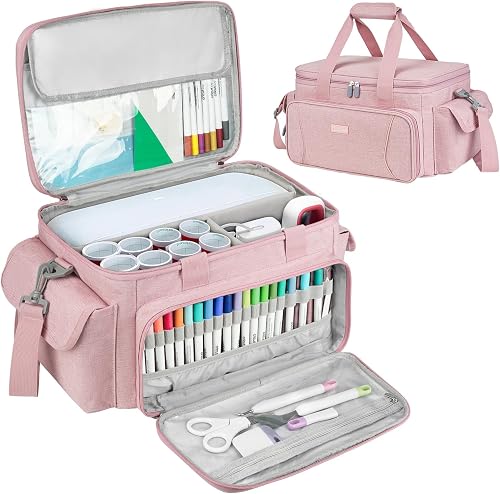
The LEFOR·Z case is best for organized transport when you carry the Cricut Joy Xtra to a class, work area or storage shelf. Its 15 x 10 x 8.2 in soft polyester shell has thick foam padding, removable dividers and a detachable shoulder strap.
LEFOR·Z Carrying Case Compatible with Cricut Joy Xtra: Best for organized transport
- 15 x 10 x 8.2 in
- Removable dividers
- 5 compartments
- Water-resistant polyester
A padded travel case for the Cricut Joy Xtra, with removable dividers and pockets for tools, mats, pens and supplies.
Pros
- Removable dividers split the main compartment into 3 parts
- Transparent pockets help organize mats and sheets
- Thick foam padding helps protect the machine
- Detachable shoulder strap and sturdy handle
Cons
- Bag only
- Pink color may not suit every workspace
- Its 15 in length still needs storage space
The main compartment divides into 3 parts, so you can separate the machine from supplies of different sizes. The transparent top pocket fits Cricut cutting card mats measuring 8.5 x 12 in, smart vinyl sheets and insert cards.
A transparent front zipper pocket and 20 elastic loops give small tools dedicated places. The case also has 2 side pockets and 1 back pocket for additional items.
The case is water-resistant, scratch-resistant and wear-resistant, according to its material description. It weighs 2.1 lb and includes the bag only, so the machine and accessories are separate.
Choose it when your main problem is storage and transport. For more options, compare Cricut Joy Xtra carrying cases.
Skip it if the Cricut Joy Xtra will stay on one desk and you don't need a dedicated case.
Product 2: Cricut Joy Xtra
The Cricut Joy Xtra is best for digital-first crafting when you want the machine and basic tools without a large supply bundle. It has a 95.94 sq in active surface area and connects with computers, tablets and smartphones.
Cricut Joy Xtra: Best for digital-first crafting

- Works with 50+ materials
- 95.94 sq in active surface area
- Print Then Cut with most inkjet printers
- 30 bonus images
The machine-focused bundle suits crafters who want the Cricut Joy Xtra with basic tools, practice materials and digital content.
Pros
- Cuts, writes, draws and foils
- Works with vinyl, iron-on HTV, cardstock and stickers
- Includes USB cable and power adapter
- Includes 30 Design Space images
Cons
- Consumable supplies are limited to practice materials
- Full library access requires the optional Cricut Access subscription
- Print Then Cut requires a compatible inkjet printer
This option includes the Cricut Joy Xtra, Fine-Point Blade, Fine Point Pen, Mini Weeder, welcome card, USB cable, power adapter and materials for a practice cut. It also includes 30 bonus images in the Design Space app.
The machine's functions cover cutting, writing, drawing and foiling. Cricut lists compatibility with vinyl, iron-on HTV, cardstock, stickers and more than 50 materials.
This bundle is a good fit if you already have craft materials or want to choose them separately. Its digital content may also appeal to someone who wants to begin with templates and images before building a larger physical supply kit.
The trade-off is that the box does not center on a vinyl starter collection. If you want transfer tape, vinyl and a mat included, the other Cricut Joy Xtra option is more convenient.
Product 3: Cricut Joy Xtra Smart Cutting Machine
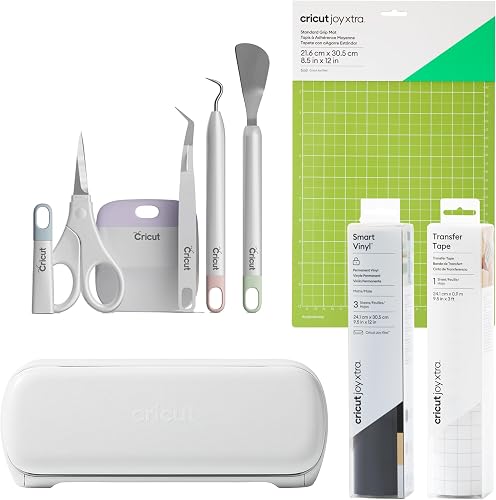
The Cricut Joy Xtra Smart Cutting Machine is best for a ready-to-start vinyl setup because its bundle includes a mat, Smart Vinyl Sampler Pack, transfer tape and a 5-piece tool set.
Cricut Joy Xtra Smart Cutting Machine: Best for a ready-to-start vinyl setup
- Smart Vinyl Sampler Pack
- 9.5 in x 20 ft transfer tape
- StandardGrip Machine Mat
- 5-piece tool set
This starter kit adds vinyl, transfer tape, a mat and tools for crafters who want supplies included with the Cricut Joy Xtra.
Pros
- Includes Smart Vinyl Sampler Pack
- Includes transfer tape for vinyl projects
- Includes a reusable cutting mat
- Includes a 5-piece tool set
Cons
- The listed active surface area is 36 square inches
- The bundle is more supply-focused than the digital-content option
- Print Then Cut still needs a compatible inkjet printer
The box contains 7 items: the machine, StandardGrip Machine Mat, Smart Vinyl Sampler Pack, a 9.5 in x 20 ft transfer tape roll and a 5-piece tool set. For standalone mat options, see Cricut Joy Xtra cutting mats.
That supply mix reduces the need to gather separate vinyl tools before starting basic decal projects.
The machine cuts, writes, draws and foils, and it works with more than 50 materials. It also supports Print Then Cut with most inkjet printers for full-color projects.
The stated active surface area is 36 square inches. Because the product data gives a different active-area figure from the digital-content bundle, check the exact machine and bundle details before ordering if working space is central to your decision.
Choose this option when included vinyl supplies matter more than bonus digital images. It is less useful if you already own a mat, transfer tape and tools.
Cricut Joy Xtra vs Joy: what changes?
The Cricut Joy Xtra is the better fit when you need more room for wider projects and support for Print Then Cut. The original Joy is a smaller-format option, so the choice depends on the size of your designs and the materials you plan to use.
Compare the machines by the projects you make most often. Small labels and short decals may not need the extra room, while sticker sheets, T-shirts and broader card designs can benefit from the Xtra format.
Our Cricut Joy Xtra vs Joy comparison gives the two machines a closer side-by-side look. Keep the size of your workspace in mind as well as the size of the finished project.
How should you choose between the Cricut bundles?
Choose the digital-content bundle if you want the machine, basic tools, practice materials, power accessories and 30 bonus Design Space images. It suits a buyer who prefers to select vinyl, cardstock and other materials separately.
Choose the vinyl starter kit if you want a mat, vinyl sampler, transfer tape and a tool set included. That option is more practical for a first vinyl project because the main transfer supplies are already grouped together.
Add the LEFOR·Z carrying case when transport or storage is part of your routine. Its dividers and pockets help keep the machine, mats, pens and small tools together, but it doesn't add cutting supplies.
For a wider bundle comparison, see the best Cricut Joy Xtra bundles. Check whether you need digital content, physical supplies or portability before comparing extras.
Everyday use, care and project limits
The Cricut Joy Xtra is easiest to use when you keep the workflow simple: choose the material, prepare the mat or material path, confirm the design size, then check the first cut before making several copies.
Keep small tools in one place and remove scraps after each project. A weeder, pen and blade are easier to find when they return to the same storage area after use.
For vinyl, weed slowly and use transfer tape when the design needs to move to another surface. For iron-on HTV, follow the material's heat instructions and check the fabric before starting a large design.
Print Then Cut needs more planning because the design begins with an inkjet print before the machine cuts around it. Leave enough room for the printed design and confirm that your printer and software workflow match the project.
The compact format helps with desk storage, but it also sets a natural ceiling on project size. If your main work involves large signs, wide wall graphics or long repeated cuts, compare a larger cutter before choosing.
Alternatives worth considering
The Cricut Joy Xtra is not the only route into home cutting. A larger Cricut model may suit people who need more tool options or a wider range of project sizes.
Read our Cricut Maker vs Cricut Joy comparison if you're deciding between a more capable Cricut platform and a smaller cutter. The right choice depends on the materials and project scale you expect to use, not just the machine's footprint.
The Silhouette Cameo 5 Alpha review is another useful comparison for buyers considering a different cutting system. Its workflow, software and material approach may suit a different type of crafter.
You can also review the best Brother ScanNCut machines if built-in scanning is part of your wish list. Compare the feature you will use most often, since extra functions only help when they match your projects.
Final verdict on Cricut Joy Xtra reviews
The Cricut Joy Xtra is a strong compact choice for everyday vinyl, sticker, card and shirt projects. Pick the digital-content bundle if you want basic machine tools and Design Space images, or choose the vinyl starter kit if included materials matter more.
Add the LEFOR·Z case when your cutter travels or needs organized storage. If you regularly make large designs, compare a larger machine first, then use the Cricut Joy Xtra vs Joy guide to confirm which compact format fits your work.
Frequently asked questions
Are Cricut Joy Xtra reviews positive?
Cricut Joy Xtra reviews generally focus on its compact design, broad material support and easy-to-learn Design Space software. The main trade-offs are the machine's smaller working area compared with larger Cricut cutters and the need to choose supplies or a bundle that matches your projects.
What can the Cricut Joy Xtra make?
The Cricut Joy Xtra cuts, writes, draws and foils. Cricut describes it for projects such as full-color stickers, custom cards, T-shirts and vinyl decals.
It works with more than 50 materials, including vinyl, iron-on HTV, cardstock and stickers.
Does Cricut Joy Xtra work with an inkjet printer?
Yes. The Cricut Joy Xtra supports Print Then Cut with most inkjet printers, which lets you create full-color stickers and similar projects.
The printer is separate from the cutting machine, so check your printer setup and the Design Space workflow before planning larger sticker projects.
Which Cricut Joy Xtra bundle should you choose?
Choose the digital-content bundle if you already have craft supplies and want the machine, tools, practice materials and 30 Design Space images. Choose the vinyl starter kit if you want vinyl, transfer tape, a mat and a 5-piece tool set included from the start.