6 Best Cricut Joy Xtra Bundles (November 2026)
The best Cricut Joy Xtra bundles include the Cricut Joy Xtra for most Joy Xtra projects, the Cricut Joy Machine & Digital Content Library for compact card and label work, and the Cricut Joy™ 2 Essential Bundle + Digital for ready-to-make starter projects.
On this page (4 sections)
The best Cricut Joy Xtra bundle for most crafters is the Cricut Joy Xtra, because it includes the machine, basic tools, practice materials and 30 bonus Design Space images. That suits a first time buyer who wants to learn without buying separate tools first.
Choose the Joy 2 Essential Bundle if you want materials for up to 35 projects. That suits a buyer who wants to start cards, stickers and iron on pieces soon after setup.
Choose Explore 5 if you need a 12 in cutting format. That wider format suits decals, apparel and cards that feel too large for a compact cutter.
The machine and included supplies matter more than the word bundle. Cutting width decides the largest design you can make in one pass.
Material range decides which projects are realistic. A 50 plus material list gives more room to try vinyl, cardstock and iron on.
Tool selection decides what you can do on day one. A fine point blade, pen and weeder cover cutting, writing and removing waste pieces.
Project supplies decide how soon you need another purchase. Practice materials help you learn, while a stated project count helps you plan cards, labels and gifts.
Compare cutting width, material range, tools and supplies before choosing. Start with the project you plan to make most often.
For stickers, check inkjet printer support. Print Then Cut lets you print a full color design first and then cut around it.
For cards, check cardstock support and pen options. A pen adds names, borders and small drawn details before cutting.
For apparel, check iron on support and whether heat transfer tools are included. Some bundles include a heat press, while others leave that purchase for later.
If you are new to this type of machine, start with our what is a vinyl cutting machine guide. It explains how digital designs become decals, cards, labels and other physical projects.
Our picks at a glance
-
1

-
2
 Best for compact card and label work
Cricut Joy Machine & Digital Content Library
9.5/10 our score
See it on Amazon -
3
 Best for ready-to-make starter projects
Cricut Joy™ 2 Essential Bundle + Digital
9.4/10 our score
See it on Amazon
- 4
 Check it
Cricut Explore® 5 Essential Bundle + Digital
Best for a wider cutting format - 5
 Check it
Cricut Joy™ 2 + Ultimate Bundle
Best for heat-transfer variety - 6
 Best for handmade cardsCheck it
Which Cricut Joy Xtra bundle is best?
The Cricut Joy Xtra is the strongest all-around choice because it combines a broad material range with basic tools and inkjet printer support. It suits crafters who want one compact machine for stickers, cards, vinyl decals and small apparel projects.
The Joy 2 bundles are better when included materials matter more. Their supplies reduce separate starter purchases of vinyl, iron on and cardstock.
Explore 5 is the wider option. Its 12 in format and 100 plus material support suit larger decals and repeated projects.
For another larger Cricut comparison, see Cricut Maker vs Maker 4. That comparison may help if you are weighing a compact Joy format against a larger machine.
Our score weighs specs, features and buyer feedback against what you are shopping for. We checked machine format, included tools, material support, digital content and project types.
Cutting width is the first filter. A 4.5 in width suits small cards and labels, while 12 in suits wider vinyl and apparel designs.
Material support is the second filter. More materials give more choice, but only if they match your planned projects.
Included tools are the third filter. A blade, pen and weeder cover basic steps, while heat transfer tools add a separate workflow.
Included supplies are the fourth filter. A bundle with materials for many projects suits a beginner who wants to start right away.
Digital content is the fifth filter. Bonus images help with first designs, while a larger library is optional and may require a subscription.
Storage and setup time should also shape your choice. A compact machine fits a shelf or cubby more easily, and practice materials plus basic tools usually lead to a faster first cut.
Care needs are similar across these machines. Keep materials flat and clean, store blades safely and use the correct mat or Smart Material workflow.
Trade offs matter here. A compact cutter is easier to store but limits design size, while a wider cutter handles more work but needs more room.
Choose based on your main project first, so you can avoid extra purchases right away.
| Product | Best for | Active surface area | Materials | Included tools | Our score |
|---|---|---|---|---|---|
| Cricut Joy Xtra | most Joy Xtra projects | 95.94 sq in | 50+ materials | Fine-Point Blade, Fine Point Pen and Mini Weeder | 9.6 |
| Cricut Joy Machine & Digital Content Library | compact card and label work | 9.5 | |||
| Cricut Joy™ 2 Essential Bundle + Digital | ready-to-make starter projects | 9.4 | |||
| Cricut Explore® 5 Essential Bundle + Digital | a wider cutting format | 100+ materials | 9.1 | ||
| Cricut Joy™ 2 + Ultimate Bundle | heat-transfer variety | 8.9 | |||
| Cricut AMZ Joy Card Bundle | handmade cards | 8.6 |
The best Cricut Joy Xtra bundles compared
Cricut Joy Xtra: Best for most Joy Xtra projects
- Works with 50+ materials
- Fine-Point Blade, pen and Mini Weeder included
- Print-Then-Cut works with most inkjet printers
- 30 bonus Design Space images
Cricut Joy Xtra gives new crafters the machine and several basic tools in one package. Its material range and inkjet printer support make it the most direct fit for stickers, cards, vinyl decals and small apparel projects.
Pros
- Includes basic tools
- Supports full-color Print-Then-Cut projects
- 30 bonus images
Cons
- Does not include a large project-material assortment
- Full library access requires optional Cricut Access
Cricut Joy Xtra is the most direct match for the keyword because it is the only product here named Joy Xtra. It includes a Fine-Point Blade, Fine Point Pen, Mini Weeder, USB cable, power adapter and practice materials, so you can begin with basic cutting, writing and weeding tasks.
The machine works with 50+ materials, including vinyl, iron-on HTV, cardstock and stickers. It also draws and foils, which gives you more project options than simple vinyl cutting alone.
Its Print-Then-Cut feature works with most inkjet printers. That matters if you want full-color stickers or printed decals instead of single-color cut shapes.
Design Space provides a free content library with 3,000+ images and 100+ fonts. Registration also adds 30 bonus images, while the larger paid Cricut Access library is optional.
Choose Joy Xtra if you want a compact machine that supports several common craft materials and includes the basic tools needed for early projects. For more setup ideas, see our Cricut Joy Xtra review.
Cricut Joy Machine & Digital Content Library: Best for compact card and label work
- Works with 50+ materials
- Matless Smart Material cuts
- 12 in x 48 in active surface area
- 30 Design Space images
The original Cricut Joy is a compact choice for cards, labels, decals and long cuts. It is useful when storage space and portability matter more than the wider format of Joy Xtra.
Pros
- Compact footprint
- Supports matless Smart Material cuts
- Includes 30 digital images
Cons
- Narrower cutting format than Joy Xtra
- The bundle is centered on the machine and digital content
The Cricut Joy Machine & Digital Content Library Bundle suits buyers who want a compact cutter for cards, labels and decals. Its 5.5 x 8.5 x 4.25 in machine size makes storage easier than a wider cutting machine.
It works with 50+ materials and supports Cricut Smart Materials for matless cutting. Matless cutting suits long designs because you do not need to place every length on a mat first.
The active surface area is 12 in x 48 in, which supports long cuts even though the machine remains compact. That length suits banners, borders and repeated cuts for labels.
This package includes 30 Design Space images, a blade and housing, a fine-point black pen, a StandardGrip mat, a welcome card and a power adapter. The StandardGrip mat suits cardstock and other materials that need a grippy surface.
It also connects to phones and laptops through wireless Bluetooth. That connection suits crafting at a desk or moving the machine between rooms.
The 30 bonus images help with first projects. You can use them as starting points and then change the size, wording or layout in Design Space.
The original Joy is not the same machine as Joy Xtra. Compare the two in our Cricut Joy Xtra vs Joy guide if you are deciding between compact storage and the wider Joy Xtra format.
Set up this bundle on a stable surface and register the machine to open the digital content. Load the blade and pen only when the app asks for each task.
Keep mats clean and store cardstock flat so cuts stay even. Remove waste pieces slowly with care around small letters and fine shapes.
Cricut Joy™ 2 Essential Bundle + Digital: Best for ready-to-make starter projects
- Works with 75+ materials
- Supplies for up to 35 projects
- Includes Smart Vinyl, Smart Iron-On and cardstock
- 25 bonus images and 1 font
Joy 2 Essential Bundle is aimed at buyers who want supplies ready for cards, stickers, labels and iron-on projects. Its 4.5 in cutting width keeps it compact while the included materials reduce the need for separate starter purchases.
Pros
- Supplies for up to 35 projects
- Works with 75+ materials
- Supports full-color stickers with an inkjet printer
Cons
- Smaller cutting width than Explore 5
- Additional tools and accessories are sold separately
Cricut Joy 2 Essential Bundle is the better choice when you want materials ready for several project types. The bundle includes Smart Vinyl, Smart Iron-On, Value Cardstock, Insert Card Sets and Printable Vinyl, with enough supplies for up to 35 projects.
Joy 2 has a 4.5 in cutting width and works with 75+ materials. It can write, draw, foil, score and cut, while its Print-Then-Cut workflow supports full-color stickers made with a home inkjet printer.
The machine weighs just over 2 lb, so it is easy to store between projects. Bluetooth connects it to a smartphone, tablet or computer through Design Space.
The included materials make this package more complete than a machine-and-digital-content bundle. The trade-off is that its cutting width remains smaller than Explore 5.
Read our guide to the best Cricut Joy Xtra accessories bundle before adding tools or supplies. Some projects need different pens, mats or replacement parts.
Cricut Explore® 5 Essential Bundle + Digital: Best for a wider cutting format
- 12 in cutting machine
- Works with 100+ materials
- Supplies for up to 65 projects
- Supports 6 tools
Explore 5 is the better fit when Joy Xtra's compact format feels limiting. It supports a 12 in cutting width, more materials and a larger included supply assortment for decals, apparel, stickers and cards.
Pros
- 12 in cutting performance
- Works with 100+ materials
- Supplies for up to 65 projects
Cons
- Larger format than Joy Xtra
- The bundle is not a Joy Xtra machine
Explore 5 is the best fit when you need a 12 in cutting machine rather than a compact Joy format. It works with 100+ materials and supports decals, apparel, stickers, cards and projects made in multiples.
The Essential Bundle includes Smart Vinyl, Smart Iron-On, Value Cardstock, Insert Card Sets and Printable Vinyl. The materials are intended to cover up to 65 projects, giving this package the largest stated project supply count in the group.
Explore 5 also supports 6 tools, including a Deep Cutting Tool sold separately. It writes, draws, foils, scores and cuts, and its snap-in pen holder simplifies pen changes.
This is not a Cricut Joy Xtra bundle, so choose it only if the wider format and broader material support fit your workspace. It needs more storage planning than the ultra-compact Joy models.
For material safety and preparation, our guide to 10 Safe Woods for Laser Cutting: Essential Guide covers a different machine category. Do not treat laser materials as automatically suitable for a Cricut cutter.
Cricut Joy™ 2 + Ultimate Bundle: Best for heat-transfer variety
- Works with 75+ materials
- Supplies for up to 75 projects
- Includes Cricut EasyPress Mini LT
- 4.5 in cutting width
Joy 2 Ultimate Bundle adds a Cricut EasyPress Mini LT to the compact cutter and materials. It makes more sense for buyers who want to explore iron-on work along with cards, labels, stickers and decals.
Pros
- Supplies for up to 75 projects
- Includes EasyPress Mini LT
- Supports 75+ materials
Cons
- Not a Joy Xtra machine
- The smaller cutting width limits larger designs
Joy 2 Ultimate Bundle is for buyers who want a compact cutter plus supplies for heat-transfer projects. It includes Smart Vinyl, Smart Iron-On, Value Cardstock, Insert Card Sets, Printable Vinyl and a Cricut EasyPress Mini LT.
The package includes enough supplies for up to 75 projects. Joy 2 still has a 4.5 in cutting width and works with 75+ materials, so it remains suited to small cards, labels, decals and stickers.
Its inkjet printer support allows full-color projects through Print-Then-Cut. Bluetooth connects the machine to a mobile phone, tablet or computer running Design Space.
The EasyPress Mini LT changes the value of this bundle for anyone planning iron-on work. If your main goal is vinyl decals or cards, the Essential Bundle may be a simpler match.
Use our guide to the best Cricut Joy Xtra vinyl when choosing materials for compatible projects. Check the machine and material instructions before cutting or pressing.
Cricut AMZ Joy Card Bundle: Best for handmade cards
- Cricut Joy Smart Cutting Machine
- 8-card sampler with envelopes
- 10-count Sparkle Gel Pen Set
- 3-Piece Joy Tool Kit
The AMZ Joy Card Bundle focuses on card making rather than a broad material mix. The card sampler, envelopes, glitter gel pens and tool kit give a card-focused beginner a clear place to start.
Pros
- Includes cards, backers and envelopes
- 10 glitter gel pen colors
- Includes a 3-piece tool kit
Cons
- Uses the original Joy machine
- Card-focused contents are less useful for broad vinyl work
The AMZ Joy Card Bundle is the clearest choice for handmade cards. It includes a Cricut Joy Smart Cutting Machine, 8-card sampler, card mat, 10-count Sparkle Gel Pen Set and 3-Piece Joy Tool Kit.
The card sampler has 8 adhesive cards, 8 silver matte holographic backers and 8 white envelopes. The cards measure 4.25 x 5.5 in, giving you a defined project size for invitations, greetings and small gifts.
The 10 glitter gel pens add color to drawn details, while the starter tool kit helps with basic craft handling. This is a focused package rather than a broad vinyl and apparel assortment.
Choose it if cards are your main project. Pick Joy Xtra or Joy 2 instead if you want more flexibility across stickers, iron-on materials and general vinyl work.
For more writing options, see the guide to best pens for Cricut Joy Xtra. The machine, pen and material must be compatible before you begin.
How should you compare a Cricut Joy Xtra bundle?
Compare a Cricut bundle by cutting width, included materials, included tools and your main project type. A digital-content bundle can be enough for experienced crafters with supplies already at home, while a project bundle helps beginners start sooner.
Is Cricut Joy Xtra better for stickers and decals?
Cricut Joy Xtra is the strongest choice here for stickers and decals because it supports Print-Then-Cut with most inkjet printers and works with printable materials. Joy 2 also supports full-color stickers, while Explore 5 offers a wider 12 in format for larger or repeated work.
Do you need included materials?
Choose an Essential or Ultimate Bundle if you want vinyl, iron-on, cardstock and printable materials included. The Cricut Joy Xtra package includes practice materials, but it does not state a project supply count like Joy 2 Essential, Joy 2 Ultimate or Explore 5 Essential.
Which bundle is best for pens?
The AMZ Joy Card Bundle includes a 10-count Sparkle Gel Pen Set and is the clearest choice for colorful card designs. Joy Xtra includes one Fine Point Pen, while other pen options may require an accessory or separate compatible pen.
See our guide to the best Cricut Joy Xtra pen adapter before using another pen style.
What accessories should you plan for?
Your project may determine whether you need extra pens, vinyl, mats, blades or storage. Start with the best Cricut Joy Xtra cutting mat, then compare the best Cricut Joy Xtra replacement blades if you expect frequent cutting.
Joy Xtra can also raise questions about specialty tools. Check the guides to Cricut Joy Xtra embossing tools and the Cricut Joy Xtra scoring tool before planning projects that depend on those functions.
How do you set up a Cricut Joy Xtra bundle?
Set up the machine on a stable work surface, connect the power adapter and install Design Space on a compatible computer, tablet or smartphone. A stable surface helps the machine feed material evenly during cutting.
Register the machine before you start your first project. Registration links the bonus digital content to your account and confirms the machine is ready to use.
Load the included practice material and follow the app project instructions before moving to a larger design. A practice cut shows how the blade, pen and material settings work together.
Keep vinyl and cardstock flat and free from dust. Dust or curls can change how material feeds and how cleanly it cuts.
Use the correct mat or Smart Material workflow for the material. The right choice depends on the material type and the length of the design.
Remove small cut pieces with a weeding tool before applying the finished design. Slow weeding helps protect thin letters and detailed shapes.
For card projects, check the card size before you design. A design that fits the card saves material and keeps the layout balanced.
For sticker projects, print first and cut second when you use Print Then Cut. Let the printed sheet dry fully before loading it so ink does not smear.
For iron on projects, follow the material directions for cutting and pressing. Mirror the design when the material instructions require it.
Store the machine, mats and tools in a dry place after use. Clean mats as directed and keep blades covered to protect the edge.
The how to use Cricut Joy Xtra guide covers the basic workflow from design selection through cutting and material removal. It is a useful check before your first larger project.
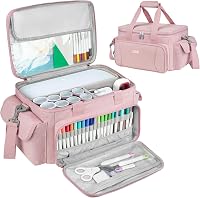
A Cricut Joy Xtra carrying case can help if you move the machine between rooms. A case also helps keep the machine, cable and small tools together for storage.
What is the best Cricut Joy Xtra bundle for you?
Choose the Cricut Joy Xtra if you want the closest match to a compact, flexible machine with basic tools, 50+ material support and inkjet printer compatibility. It suits crafters who want to make stickers, cards, decals and small apparel pieces.
Choose Joy 2 Essential when included supplies for up to 35 projects matter most. The included Smart Vinyl, Smart Iron On, cardstock, insert cards and printable vinyl help you start several project types.
Pick Joy 2 Ultimate if you want a compact cutter with supplies for up to 75 projects and an EasyPress Mini LT. The heat press makes iron on work more practical from the start.
Choose Explore 5 when a 12 in cutting format and support for 100+ materials matter more than Joy Xtra compact size. That wider format suits larger decals, apparel and projects made in multiples.
For card focused work, the AMZ Joy Card Bundle gives you cards, envelopes, glitter pens and a tool kit in one package. The 4.25 x 5.5 in cards suit greetings, invitations and small gifts.
Compare your main materials and available workspace first. A compact machine fits smaller spaces, while a wider machine needs more room for material and finished projects.
Compare your main project type next. Stickers need printable material and printer support, while apparel needs iron on and a heat press.
Compare included tools next. A pen and weeder cover basic writing and cleanup, while extra tools may be needed for specialty finishes.
Compare digital content next. Bonus images help you start, while a larger library may require a paid subscription.
Choose the bundle that reduces the accessories you need to buy next. That choice usually saves time and keeps your first projects simpler.
Check setup needs before you order. You will need a compatible device, Bluetooth, internet access for Design Space and a clean, stable work area.
Plan for care after the first project. Store materials flat, keep mats clean and replace blades when cuts become less clean.
The best choice depends on what you will make most often. Start there, then pick the bundle that supports that project with the fewest extra purchases.
Our top 3 picks at a glance
-
1
-
2
Best for compact card and label work
Cricut Joy Machine & Digital Content Library
9.5/10 our score
See it on Amazon -
3
Best for ready-to-make starter projects
Cricut Joy™ 2 Essential Bundle + Digital
9.4/10 our score
See it on Amazon