Cricut Joy Xtra vs Joy: Which Should You Choose? (November 2026)
Choose the Cricut Joy Xtra if you want more cutting width, print-then-cut and a wider range of projects. In this cricut joy xtra vs joy comparison, the Xtra is the safer pick for stickers, cards and larger vinyl work, while the Joy makes sense only when compact size is your top priority.
On this page (12 sections)
- The quick verdict on Cricut Joy Xtra vs Joy
- Side by side: features that change the choice
- Cutting width and project size
- Materials the Joy Xtra handles
- Print-then-cut and full-color stickers
- Design Space and content
- Size, storage and travel
- Bundles and what is in the box
- Care, blades and upkeep
- Who should buy the Joy Xtra
- Who should buy the Joy instead
- Final verdict: Joy Xtra vs Joy
Choose the Cricut Joy Xtra if you want more cutting width, print-then-cut and a wider range of projects. In this cricut joy xtra vs joy comparison, the Xtra is the safer pick for stickers, cards and larger vinyl work, while the Joy makes sense only when compact size is your top priority.
The Cricut Joy Xtra works with 50+ materials, including vinyl, iron-on HTV, cardstock and stickers. It also draws, writes and foils, and it works with most inkjet printers for print-then-cut designs.
That wider set of uses is the core reason to pick the Xtra. If your projects are mostly small decals, the Joy may cover them, but the Xtra gives you room to grow without changing machines.
 Best for travel and storage
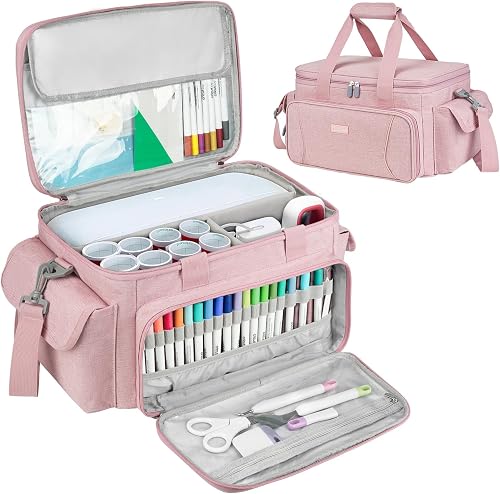
LEFOR·Z Carrying Case Compatible with Cricut Joy

The quick verdict on Cricut Joy Xtra vs Joy
Buy the Joy Xtra for wider projects and full-color stickers; buy the Joy only for small cuts and tight space. Your largest planned project should make the call.
The Joy Xtra is the machine in this comparison with the fuller feature set. Cricut says it cuts, draws, writes and foils, and its print-then-cut feature works with most inkjet printers.
The bundle for the Joy Xtra includes the machine, a fine-point blade, a fine point pen, a mini weeder, a welcome card, a USB cable, a power adapter and materials for a practice cut. It also includes a free trial subscription to Cricut Access for new subscribers and 30 bonus images in the Design Space app.
A guide to what a vinyl cutting machine is helps you check whether a cutter fits the work you want to do. Use it to match machine size to material size before you compare prices.
Side by side: features that change the choice
The Joy Xtra wins on cuts, materials and print-then-cut, while the Joy wins only on compact size. The table below keeps the focus on the Joy Xtra facts we checked.
| Point | Cricut Joy Xtra | Cricut Joy |
|---|---|---|
| Best fit | Wider vinyl, cards and stickers | Small decals and compact spaces |
| Materials | 50+ materials, including vinyl and iron-on HTV | Best for smaller material projects |
| Print-then-cut | Yes, with most inkjet printers | Not the reason to choose this machine |
| Other tools | Draws, writes and foils | Check tool support for your projects |
| Software | Design Space app | Design Space app |
| Portability | Needs more storage room | Easier to tuck away |
Scores on this page weigh specs, features and buyer feedback against what you are shopping for. The case scores 9.7 because it is sized for the Xtra and organized for travel, while the Xtra scores 9.6 for its wider project range.
Cutting width and project size
Choose the Joy Xtra if your designs need wider material or larger cards. Width decides whether a layout fits on one cut or needs trimming and joining.
The Joy Xtra is built for projects that go beyond small decals. Cricut describes it as a machine for full-color stickers, custom cards, T-shirts and vinyl decals.
That range points to a wider working area than the compact Joy.
Think about the largest blank you will use often. A wide card, a sticker sheet or a long vinyl phrase can outgrow a small cutter fast.
One wider cut also keeps text and shapes aligned without extra seams.
Material waste matters too. A wider machine can use a sheet more fully, so you trim less and buy fewer small pieces.
That saving adds up if you make cards or stickers in batches.
Materials the Joy Xtra handles
The Joy Xtra suits crafters who switch between vinyl, cardstock, stickers and heat transfer vinyl. That mix is where a versatile cutter earns its space.
Cricut says the machine works with 50+ materials. The list includes vinyl, iron-on HTV, cardstock and stickers, plus many more.
You can plan a week of projects without wondering whether the next material is supported.
The Joy is a closer call here. If you only cut small vinyl decals, its narrower scope may match your habits.
If you add cardstock and sticker projects later, the Xtra saves you from buying a second machine.
Blades and pens also shape material choice. The Xtra bundle includes a fine-point blade and a fine point pen, so cutting and writing are ready from the start.
Our guide to best pens for Cricut Joy Xtra helps you plan pen projects once the machine arrives.
Print-then-cut and full-color stickers
Print-then-cut is the clearest reason to pick the Joy Xtra over the Joy. It turns a home inkjet printer into part of your sticker workflow.
Cricut says the feature works with most inkjet printers. You print a full-color design, then the machine cuts it to shape.
That suits stickers, labels and layered designs that a plain cut cannot match.
The Joy does not offer the same draw for this workflow. If full-color stickers sit at the top of your list, that gap alone can settle the choice.
Plan for printer compatibility and material before you order. You will need sticker material that suits your printer and your projects.
Compare printable vinyl vs sticker paper before choosing a sticker material.
A practice cut with the included materials helps you learn the steps before you use your best designs.
Design Space and content
Both machines use the Design Space app, but content choices can affect your total cost. The app matters as much as the hardware.
Cricut says Design Space holds a free library with 3,000+ images and 100+ fonts. An optional Cricut Access subscription opens more, including a library the maker describes as 1,500,000+ images, 1,000+ fonts and 100,000+ projects.
The Joy Xtra bundle adds 30 bonus images. That bonus helps you start projects on day one, but it does not replace a subscription if you want the full library.
Check whether you will design your own art or use ready-made files. If you use ready-made files often, budget for the subscription from the start.
If you upload your own art, the free library may cover your needs.
Size, storage and travel
The Joy Xtra needs more shelf and table space than the Joy. Plan its home before it arrives, and plan travel if you craft away from home.
The Joy Xtra weighs 250 g, according to its specs, but the machine still needs room to feed material through. Clear space on both sides helps you load sheets and remove cuts without bending them.
The Joy makes more sense when storage is the main worry. A small shelf, a drawer or a shared craft table can favor the compact machine.
The Xtra works better when you have a table you can leave set up.
For travel, a padded bag changes the picture. The LEFOR·Z case measures 15 x 10 x 8.2 inches and weighs 2.1 lb.
It has removable dividers, a transparent top pocket for 8.5 x 12 inch mats and smart vinyl sheets, plus 20 elastic loops for tools and pens.
Bundles and what is in the box
The Joy Xtra bundle covers the first projects well, so compare bundles before you buy the machine alone. A bundle can save separate trips for tools and materials.
The bundle includes the Joy Xtra, a fine-point blade, a fine point pen, a mini weeder, a welcome card, a USB cable, a power adapter and materials for a practice cut. It also includes a free trial subscription to Cricut Access for new subscribers.
Those included items matter for a first night of crafting. You can set up, connect a device and run a practice cut without a second order.
The 30 bonus images also give you ready designs to try.
If you plan to craft at classes or with friends, our best Cricut Joy Xtra bundle guide helps you compare what each set adds. Look for tools, mats and material you will use in the first month.
Care, blades and upkeep
A cutter stays accurate when you clean it, store blades well and replace worn parts. Small habits protect your cuts and your machine.
Keep the machine and mats free of dust and loose vinyl bits. Wipe the exterior gently and store blades in a safe place when you swap tools.
A clean mat helps material grip evenly during a cut.
Blades dull with use, so watch for rough edges or missed details. Our guide to best replacement blades for Cricut Joy Xtra helps you plan spares before a deadline.
A spare blade in a case pocket beats a stalled project.
Store the machine in a padded case if you move it often. The LEFOR·Z bag uses tear-resistant polyester and thick foam padding around the sides.
That padding helps with bumps during transport, though a soft bag is not a hard crush-proof case.
The Joy Xtra carries a 1-year manufacturer warranty. Keep your order record and follow Cricut care guidance so the warranty stays valid.
The LEFOR·Z case carries a 6-month warranty from its maker.
Who should buy the Joy Xtra
Buy the Joy Xtra if you make cards, stickers and mixed-material projects. It fits crafters who want one machine for many project types.
Sticker makers gain the most from print-then-cut. Card makers gain from wider material and more layout room.
Vinyl users gain from tools that cut, draw, write and foil in one setup.
Beginners also fit this pick when they want room to learn. The Design Space app is easy to learn, according to Cricut, and the bundle includes practice materials.
Our how to use Cricut Joy Xtra guide walks through setup in plain steps.
Read Cricut Joy Xtra reviews before you order to see which projects buyers mention most. Look for patterns in card, sticker and vinyl use, then match those patterns to your own plans.
Who should buy the Joy instead
Buy the Joy if your projects stay small and your space stays tight. It is the pick for a simple, compact cutter.
Small decals, short phrases and basic vinyl cuts can fit a compact workflow. If your craft table doubles as a desk, the Joy is easier to move and store.
That ease matters when you set up and pack away each session.
Choose the Joy only when you are sure wider cuts will not tempt you. If you dream of sticker sheets, wide cards or layered designs, the Xtra is the better long-term buy.
A second machine later costs more than choosing width now.
Also weigh your printer. If you own an inkjet printer and want full-color stickers, that points back to the Xtra.
If you have no printer, plain cuts may be all you need.
Final verdict: Joy Xtra vs Joy
Pick the Joy Xtra for width, stickers and mixed materials, and pick the Joy for small cuts in a small space. That rule settles the cricut joy xtra vs joy choice for most buyers.
The Joy Xtra gives you 50+ materials, print-then-cut with most inkjet printers, and tools that cut, draw, write and foil. Its bundle adds a blade, a pen, a mini weeder, practice materials and 30 bonus images.
The Joy still has a place. It suits small decals and tight storage when wider projects are not part of your plan.
If space is your only reason to choose it, measure your shelf first, then decide.
For a wider view of machine types, our laser engraver buying guide and laser engraver guide explain when a different tool beats a vinyl cutter. Those guides help you avoid buying a cutter for engraving work.
Our score weighs specs, features and buyer feedback against what you are shopping for. Choose the machine around your largest project, then add storage and tools that match that work.
Frequently asked questions
Is the Cricut Joy Xtra better than the Cricut Joy?
The Joy Xtra is better for most buyers who want wider cuts, full-color stickers and more project choices. The Joy can still suit small decals and compact storage.
Choose by the largest project you plan to make, not by the smallest one you can cut on either machine.
What is the main difference between Joy Xtra and Joy?
The main difference is working space and project range. The Joy Xtra handles wider material and print-then-cut designs with an inkjet printer.
The Joy is the more compact machine for smaller cuts.
Compare the projects you make most before you choose.
Can the Joy Xtra make stickers?
Yes. Cricut says the Joy Xtra works with a print-then-cut feature that is compatible with most inkjet printers.
That lets you print full-color designs and then cut them to shape.
You will need compatible sticker material and a printer that works with your design setup.
What materials can the Joy Xtra cut?
Cricut says the Joy Xtra works with 50+ materials, including vinyl, iron-on HTV, cardstock and stickers. It also draws, writes and foils.
Check the material you plan to use against the machine guidance before you buy a large roll.
Should I buy a case for the Joy Xtra?
A case helps if you travel to classes, work or family events, or if you store the machine with tools and mats. The LEFOR·Z case measures 15 x 10 x 8.2 inches and has removable dividers.
It is a soft padded bag, so it suits transport and storage more than rough handling.