Cricut Maker vs Maker 3: Is the Upgrade Worth It? (November 2026)
Choose Maker 3 if faster, matless Smart Materials workflow matters most. Choose the original Maker if you already own it and value its broad tool range without needing faster production.
On this page (9 sections)
- Cricut Maker vs Maker 3: which should you buy?
- Is the Maker 3 upgrade worth it for vinyl?
- Which machine handles more materials?
- What tools make the biggest difference?
- How does the Maker platform compare with newer models?
- Which machine is easier for a beginner?
- How should you choose between Maker and Maker 3?
- Are vinyl cutters better than laser engravers for these projects?
- What is the final Cricut Maker vs Maker 3 verdict?
Choose Maker 3 if faster, matless Smart Materials work matters most. Choose the original Maker if you already own it and its broad tool range still fits your projects.
That is the practical answer to the Cricut Maker vs Maker 3 question.
The original Maker and Maker 3 belong to the same broad cutting-machine family. Both are aimed at people who want more than basic vinyl cuts, including projects with cardstock, fabric and specialty tools.
The upgrade is less about learning an entirely new type of machine and more about workflow. Maker 3 makes the strongest case when you produce longer vinyl designs, repeat projects or want less mat preparation.
If you're new to this category, start with our guide to what is a vinyl cutting machine before comparing individual Cricut models.


Cricut Maker vs Maker 3: which should you buy?
Buy Maker 3 for a faster production workflow, and buy the original Maker when its existing capabilities already cover your projects. The right choice depends on how often you cut, what materials you use and how much setup you want between designs.
The original Maker is a flexible starting point for crafters who want one machine for vinyl, paper, fabric and specialty operations. Maker 3 keeps that broad direction while improving the workflow for compatible Smart Materials and larger or repeated cuts.
That makes Maker 3 more attractive for signs, labels, wall decals and other vinyl projects where repeated mat loading can become part of the job. It is less compelling as an upgrade if you mostly make small cards, occasional decals or short one-off designs.
What does the original Cricut Maker do well?
The original Maker suits mixed-material crafters who want one machine for many project types. Its strength is the range of craft work it supports rather than one narrow production task.
The Maker platform is designed for more than adhesive vinyl. You can plan projects around cardstock, fabric and specialty operations such as drawing, scoring, foiling and engraving when the correct tool is used.
That range helps if your interests change from paper crafts to sewing projects or personalized gifts. It also means you can keep one machine in your workspace instead of buying a separate cutter for every material.
The original Maker still makes sense when your current mats, tools and project habits are already working. Replacing it only for a workflow improvement may not be worthwhile if your typical projects are short and occasional.
What does Maker 3 improve?
Maker 3 is the better fit when you want faster cutting and a more streamlined Smart Materials workflow. Those changes matter most when you make longer designs or several similar projects in one session.
Smart Materials can reduce some mat-related preparation for compatible projects. That does not remove the need to follow material guidance, measure carefully and keep enough clear space around the machine.
Maker 3 also makes more sense for people who sell small batches or make gifts for groups. A few seconds saved on one cut may become meaningful when repeated across many names, labels or signs.
If you mainly cut small pieces of vinyl for occasional cards, the difference may feel less important. For a hand-cut option, see kiss cut vinyl by hand.
In that case, material choice, weeding tools and design practice can affect your results more than the machine upgrade.
Is the Maker 3 upgrade worth it for vinyl?
The upgrade is worth considering when vinyl is your main material and you value fewer setup steps. Keep the original Maker if your vinyl projects are short, infrequent or already easy to manage.
Think about your actual workflow:
- How often do you load and unload a mat?
- Do you make designs longer than a standard mat?
- Do you repeat the same design many times?
- Does setup slow down your projects?
- Do you have enough room for longer material feeds?
If you answer yes to several questions, Maker 3 has a clearer benefit. If you mostly make small decals, labels and cards, the original Maker may continue to meet your needs.
Before choosing either machine, decide whether your projects need only adhesive vinyl or also paper, fabric and specialty tools. If you are comparing Explore models, see Cricut Explore vs Explore Air.
The broader your material mix, the less useful it is to judge the machines only by vinyl speed.
Which machine handles more materials?
Both machines belong to Cricut’s broad Maker platform, so material range is a stronger reason to choose Maker than Maker 3 over Maker. The difference is more about how you work with compatible materials.
The current Maker product data describes support for 300+ materials, including leather, wood, vinyl, iron-on HTV, cardstock and stickers. It also supports operations such as drawing, foiling, scoring, engraving, debossing and perforating with suitable tools.
That kind of range suits a craft room with changing projects. You can move from paper invitations to fabric pieces, then return to vinyl without changing to a different class of machine.
Material range does not mean every material uses the same blade, mat or settings. Follow Design Space prompts, choose the correct tool and secure each material according to the instructions for that project.
For a bundle-focused option, the best Cricut Maker bundle guide can help you compare included supplies with the machine alone.
What tools make the biggest difference?
The best accessory depends on the project, not on the machine name. Foil work needs a foil transfer tool, while fabric work needs a rotary blade and suitable mat.
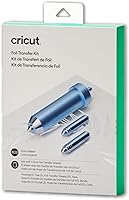
The Cricut Foil Transfer Kit includes 3 interchangeable fine, medium and bold tips, a tool housing, adhesive tape and 12 gold and silver foil transfer sheets. It uses a pressure-activated system and does not require heat.
It is compatible with Cricut Maker and Cricut Explore machines. The active surface area is about 11.5 x 11.5 in, and the included foil sheets are 4 x 6 in.
This accessory makes sense when you want decorative contrast without changing the main cutting machine. It does not replace a cutting blade, so it belongs in a project plan that already includes a suitable card or other supported surface.
The Sophia’s DESING Rotary Blade+Drive Housing is made from stainless steel and is identified as compatible with Cricut Maker and Cricut Maker 3. It is intended for materials such as fabric, lace, felt, quilt batting, silk, denim, crepe, tissue paper and mulberry paper.
Use it with a FabricGrip Mat for the described fabric work. The accessory is supplied as 1 rotary blade and drive housing, so check your setup before starting a project that needs a particular mat or tool.
This is a useful example of why the original Maker can remain valuable. A newer workflow does not matter as much if your main goal is accurate fabric cutting and your current machine already supports the required tool.
How does the Maker platform compare with newer models?
The Maker 3 upgrade is easier to justify when you want workflow gains, while newer Maker models add another reason to compare before buying. A new buyer should check the current model range instead of assuming Maker 3 is the newest option.
Compare Cricut Maker vs Explore 5 as part of that decision.
The current Cricut Maker 4 data describes support for 300+ materials, Print-Then-Cut with most inkjet printers and operations including cutting, drawing, foiling, scoring, engraving, debossing and perforating. It measures 7.1 x 22.1 x 6.2 in and includes a fine-point blade, sample materials, a fine-point pen, a LightGrip Mat, a weeder and 30 Design Space images.
The product name for this bundle is Cricut Maker 4 - Smart Cutting Machine (Seashell) | Digital Content Bundle. It has an active surface area of 270.25 sq in, uses automatic operation and works with the Design Space app and inkjet printers.
The bundle includes Smart Vinyl, matless vinyl, Smart Iron-On, matless heat transfer vinyl, cardstock, transfer tape, a fine-point blade, a fine-point pen, a LightGrip Mat and a weeder. Some Design Space content is available through an optional Cricut Access subscription.
For a newer bundle with a different focus, the Cricut Maker 5 Essential Bundle includes supplies for up to 65 projects, works with 300+ materials and supports 13 tools. It keeps 12 in (30.5 cm) cutting performance and is described as 30% more compact than previous models.
This slate blue bundle includes a Premium Fine Point Cutting Tool, Scoring Tool, Engraving Tool, materials, Printable Vinyl, Insert Card Sets and other Cricut accessories. It also includes 25 premium-quality images and 1 font as digital content.
Some tools, materials and accessories are sold separately, and the digital content is available in Design Space after registration. Those details matter when you compare a machine-only purchase with a bundle.
Our Cricut Maker vs Maker 4 comparison is the next useful read if you're deciding between Maker 3 and the current Maker range.
Which machine is easier for a beginner?
The original Maker is easier to recommend when you want a broad learning path, while Maker 3 is easier to justify when your first projects are mostly vinyl. Neither machine removes the need to learn Design Space, material settings and tool changes.
Start with one material and one project type. Adhesive vinyl, cardstock and simple labels give you a controlled way to learn loading, cutting and weeding before adding fabric or specialty tools.
The Maker 3 workflow can feel simpler for compatible Smart Materials because it may reduce mat preparation. Still, you need to measure the material path, leave enough room for the feed and follow the on-screen prompts.
If you choose Maker 3, follow our guide on how to use Cricut Maker 3. If you choose a newer model, our guide on how to use Cricut Maker 4 covers the same learning path for that machine.
How should you choose between Maker and Maker 3?
Choose by project pattern rather than by the newer model number. The upgrade is most useful when it fixes a repeated problem in your current workflow.
Choose the original Maker when:
- You already own one and it cuts your materials well.
- You make small or occasional vinyl projects.
- You want broad craft capability without replacing a working machine.
- Your existing mats and tools are part of an established setup.
- You spend more time designing than loading materials.
Choose Maker 3 when:
- You make longer vinyl designs.
- You produce repeated decals, labels or signs.
- You want a more streamlined Smart Materials workflow.
- Faster production matters to your craft business or gift schedule.
- You are buying your first Maker and want the newer workflow.
The best choice can also depend on what you would do with the money saved by keeping the original Maker. A foil kit, rotary blade, materials or better storage may improve your projects more than a machine change.
Are vinyl cutters better than laser engravers for these projects?
A vinyl cutter is usually the simpler choice for adhesive vinyl, iron-on designs and paper crafts. A laser engraver becomes more relevant when engraving or cutting supported rigid materials is central to your plans.
The Cricut Maker family is built around a broad craft workflow that includes cutting, drawing, foiling, scoring and other tool-based operations. It is a natural fit for decals, cards, apparel designs and fabric projects.
Laser machines use a different process and require different safety planning, materials and ventilation decisions. They can be useful for projects that need engraving, but they are not a direct replacement for a vinyl cutter.
Read Are Laser Engravers Worth It? and Is Laser Engraving Worth It? before switching categories.
For a smaller Cricut option, compare Cricut Maker vs Cricut Joy if your projects are mostly compact labels, cards or small decals.
What is the final Cricut Maker vs Maker 3 verdict?
Keep the original Maker if it already handles your materials and your project volume is modest. Choose Maker 3 if faster, more streamlined vinyl production will save time every week.
The original Maker remains the better value for an owner whose tools and workflow already fit. Maker 3 is the better upgrade when mat handling, repeated cuts or longer vinyl designs are the main friction points.
If you are buying new, compare Maker 3 with the current Maker 4 and Maker 5 bundles as well. Choose the model that matches your material mix, workspace and need for included supplies, not simply the newest name.
Frequently asked questions
Is the Cricut Maker 3 better than the original Maker?
The Cricut Maker 3 is better for faster workflows and Smart Materials projects, while the original Maker remains a strong choice for broad tool use. If your current Maker handles your materials and project size well, the upgrade is mainly about workflow speed and convenience rather than a completely different craft system.
What is the main difference between Cricut Maker and Maker 3?
The main difference is workflow. The original Cricut Maker established the broad Maker tool system, while Maker 3 adds workflow improvements centered on faster cutting and Smart Materials use.
Your upgrade makes more sense when those improvements reduce repeated setup in the projects you make.
Can Maker 3 use the same tools as Cricut Maker?
Many Maker tools are designed around the same tool family, but check compatibility for each accessory before ordering. The Sophia’s DESING Rotary Blade+Drive Housing is identified for Cricut Maker and Cricut Maker 3, while the Cricut Foil Transfer Kit is identified for Cricut Maker and Cricut Explore machines.
Should I buy Cricut Maker or Maker 3 for vinyl?
Choose Maker 3 if vinyl work is your main use and you want a faster Smart Materials workflow. Choose the original Maker if you already own one, use mats comfortably and also want its wider craft capability without replacing a machine that still fits your projects.
Is Cricut Maker 3 worth upgrading to?
Maker 3 is worth upgrading to when faster production, Smart Materials workflow or reduced mat handling will save you meaningful time. Keep the original Maker when it already handles your materials, tools and project volume.
Put the upgrade budget toward materials or accessories if your current process is not slowing you down.