Cricut Maker vs Explore 5: Which Fits Your Crafting Needs? (November 2026)
Pick the Cricut Maker for wider material and tool flexibility, and pick the Explore 5 for a compact, beginner-friendly bundle. In this cricut maker vs explore 5 comparison, the Maker works with 300+ materials while the Explore 5 cuts 100+ materials, and both bundles include a 9x9 press.
On this page (11 sections)
- Quick verdict: Cricut Maker vs Explore 5
- Side by side: features that decide the choice
- Material range: 300+ vs 100+ materials
- Tool flexibility and what the Maker adds
- Bundle contents and heat pressing
- Size, setup and daily use
- Who should buy the Cricut Maker?
- Who should buy the Explore 5?
- Setup, care and honest trade-offs
- Verdict: which fits your crafting needs?
- Cricut Maker vs Explore 5 FAQ
Pick the Cricut Maker for 300+ materials and extra tool functions, and pick the Explore 5 for a compact bundle built around 100+ everyday materials. The cricut maker vs explore 5 choice comes down to how far you want to go beyond vinyl, HTV and cardstock.
Our score weighs specs, features and buyer feedback against what you're shopping for. The Maker scores 9.2 for its flexibility, and the Explore 5 scores 9.1 for its compact, complete bundle.
Both machines use Design Space, and both bundles include a heat press. That shared setup makes the comparison easier to judge on materials, tools and size.

 Best for compact crafting
Cricut Explore 5 Essential Bundle with Multicolor
Quick verdict: Cricut Maker vs Explore 5
The Maker wins on range, and the Explore 5 wins on simplicity and size. This cricut maker vs explore 5 matchup has a clear split once you list what each machine actually does.
The Cricut Maker 4 works with 300+ materials, including leather, wood, vinyl, HTV, cardstock and stickers. Cricut says it also draws, foils, scores, engraves, debosses and perforates.
The Cricut Explore 5 cuts 100+ materials, including vinyl, HTV and cardstock. It is described as 30% more compact than previous models, which helps in a smaller craft room.
Both list an active surface area of 144 square inches. That shared figure means the cutting area is similar, even though the cabinets and bundles differ.
If you want the widest future options, choose the Maker. If you want a smaller machine for common projects, choose the Explore 5.
Our guide to what is a vinyl cutting machine explains where these smart cutters fit among vinyl cutters.
Side by side: features that decide the choice
The Maker is the flexibility pick, and the Explore 5 is the focused pick. The table below keeps the comparison to facts that affect daily use.
| Feature | Cricut Maker | Cricut Explore 5 |
|---|---|---|
| Materials | 300+ materials | 100+ materials |
| Extra functions | Draws, foils, scores, engraves, debosses, perforates | Cutting focused |
| Bundle press | EasyPress heat press included | EasyPress SE 9x9 included |
| Size note | Seashell finish, model 8002748 | 16 x 24 x 14 in, model 8003183 |
| Connection | Design Space app | Bluetooth and Design Space |
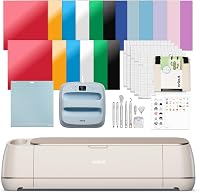
The Maker bundle includes a fine-point blade, light grip mat, 2 fine-point pens, tools, practice materials, a pressing mat, tote bag blank, Smart Iron-On, Smart Vinyl, cardstock and transfer tape.
The Explore 5 bundle includes 6 Smart Vinyl sheets, 6 Smart Iron-On sheets, cardstock, insert card sets, printable vinyl, Cricut pens and access to 400+ projects and how-to content in Design Space.
Check our best vinyl cutter Cricut guide if you want to see how these models compare with other Cricut options.
Material range: 300+ vs 100+ materials
Pick the Maker for leather, wood and specialty media, and pick the Explore 5 for vinyl, HTV and cardstock. Material range is the biggest difference in this comparison.
The Maker works with 300+ materials, including leather, wood, vinyl, iron-on HTV, cardstock and stickers. That range supports projects such as banners, metal engraving and leather debossing.
The Explore 5 cuts 100+ materials, including adhesive vinyl, HTV, cardstock, printable materials and paper. That range covers decals, labels, stickers, cards and home decor.
A larger range does not mean you will use every material. It does mean you have room to grow without changing machines later.
If your plan is mostly shirts, tote bags, stickers and cards, 100+ materials may be more than enough. If you want to test balsa, leather or engraving, the Maker gives you that path.
Think about your first 10 projects, not an ideal list. Write them down, then match them to the material list for each machine.
Tool flexibility and what the Maker adds
The Maker adds tool functions that the Explore 5 does not list. That gap matters if you want more than cutting.
Cricut says the Maker 4 cuts, draws, foils, scores, engraves, debosses and perforates. Those functions open projects such as foil details, scored cards and engraved accents.
The Maker is also compatible with most inkjet printers for Print-Then-Cut. That feature supports full-color stickers and printed designs that the cutter then cuts to shape.
The Explore 5 is described around precise cutting of 100+ materials. It does not list the same set of extra tool functions in its bundle details here.
More tools can mean more setup steps for each project. You will need the right tool, the right setting and the right material for the result you want.
For design-heavy crafters, that flexibility is a benefit. For simple vinyl decals, a focused cutter can feel faster and more direct.
Our Cricut Maker vs Explore Air 2 comparison gives more context on older Explore models.
Bundle contents and heat pressing
Both bundles include a press, but the included materials shape what you can make on day one. Compare the sheets and tools, not just the machine name.
The Maker bundle includes Smart Vinyl, Smart Iron-On, cardstock, transfer tape, a tote bag blank and materials for a practice cut. It also includes 30 digital images and tools such as a weeder, scraper, spatula and scoring stylus.
The Explore 5 bundle includes Smart Vinyl, Smart Iron-On, value cardstock, insert card sets and printable vinyl. It includes 6 Smart Vinyl sheets at 12 x 36 in and 6 Smart Heat Transfer Vinyl sheets at 12 x 13 in.
The Explore 5 EasyPress SE 9x9 has a ceramic-coated heat plate and reaches up to 400°F (205°C). Cricut describes edge-to-edge dry heat and an easy-to-hold handle for even pressure.
The Maker bundle description mentions an EasyPress 2 (SE) 9x9 in one section and EasyPress 3 in the heat press section. Check the exact press included before you order.
Both bundles suit shirts, tote bags and apparel. The Explore 5 bundle leans into apparel with its multicolor sampler and card supplies.
For a broader first project list, the Maker bundle includes pens, transfer tape and a tote blank. For cards and stickers, the Explore 5 bundle includes insert cards and printable vinyl.
Size, setup and daily use
The Explore 5 is the smaller, simpler machine for a tight craft space. Size and setup can matter as much as material count.
The Explore 5 measures 16 x 24 x 14 in and is described as 30% more compact than previous models. That smaller cabinet helps on a desk, table or craft cart.
The Maker is listed in Seashell, model 8002748. Its bundle includes an EasyPress, pressing mat and tote bag, so storage space for the full kit matters.
Both machines connect through Design Space. The Explore 5 uses Bluetooth for wireless crafting from a computer, tablet or phone.
Design Space has a free content library with 3,000+ images and 100+ fonts. The Explore 5 bundle also notes access to 400+ projects and how-to content.
The Maker description says it cuts up to 2X faster than the previous model. Speed claims come from Cricut, so treat them as maker claims rather than guaranteed times for your projects.
New users should plan a practice cut first. Both bundles include materials for that step, which helps you learn mat loading and settings with less waste.
A Cricut Maker vs Explore breakdown can help if you are also weighing earlier Explore models.
Who should buy the Cricut Maker?
Buy the Maker if you want the most material and tool options in one machine. It suits crafters who plan to move beyond basic vinyl work.
Choose the Maker for leather, wood, engraving, debossing and foiling. Those projects need the extra tool range that the Maker lists.
Choose it for Print-Then-Cut stickers if you already have a compatible inkjet printer. The cutter then follows your printed design with precise cuts.
Choose it for small business growth. A wider material range can support banners, personalized gifts, apparel and home decor from one machine.
Skip the Maker if you only make decals and simple HTV shirts. The extra tools and materials may add cost and complexity you will not use.
Skip it if your craft space is very small. The full bundle includes a press, mat, tote blank and material sheets, so storage needs planning.
Our Cricut Maker vs Joy comparison helps if you want a smaller Cricut for simple cuts.
Who should buy the Explore 5?
Buy the Explore 5 if you want a compact machine for everyday crafting. It suits beginners, teachers and small sellers focused on common projects.
Choose the Explore 5 for stickers, decals, labels, cards, shirts and tote bags. Those projects sit well within its 100+ material range.
Choose it for HTV apparel. The EasyPress 9x9, Smart Iron-On and Smart Vinyl help you make T-shirts, sweatshirts, baby bodysuits and team apparel.
Choose it for classrooms and event decor. Guided setup and Bluetooth help new users start projects with less troubleshooting.
Skip the Explore 5 if you want engraving, debossing or leather work as a core activity. The Maker lists those functions, and the Explore 5 does not.
Skip it if you already own a press and only need a cutter. This bundle is built as a complete kit, so you may pay for items you already have.
Setup, care and honest trade-offs
Both machines need clean mats, correct settings and steady space for the press. General care matters more than brand loyalty here.
Start with a practice cut using the included materials. That step teaches mat loading, blade choice and material settings before you use your best sheets.
Keep mats clean and store them flat. A dirty or curled mat can shift material and affect cut quality.
Use the right heat press settings for HTV. The Explore 5 press reaches up to 400°F (205°C), but you should follow the material maker’s temperature and time guidance for each sheet.
Store blade and tool accessories where they will not roll or dull. Keep pens capped and transfer tape flat to reduce waste.
The Maker trades simplicity for range. You get more options, but each extra tool function adds learning time.
The Explore 5 trades range for focus. You get a smaller, simpler setup, but you may outgrow it if your projects expand into specialty materials.
Verdict: which fits your crafting needs?
Pick the Maker for range and the Explore 5 for compact, everyday crafting. Your project list should make the final call in this cricut maker vs explore 5 decision.
Pick the Maker if you want leather, wood, engraving, foiling, debossing or Print-Then-Cut flexibility. Its 300+ material range and extra tool functions support that path.
Pick the Explore 5 if you want vinyl, HTV, cardstock, stickers and apparel in a smaller bundle. Its 100+ material range and included press cover those projects well.
If you are torn, list your next 10 projects. Count how many need specialty materials or tool functions, then choose the machine that covers that list.
For beginners who want a complete kit, the Explore 5 bundle is the easier starting point. For crafters who want one machine with the widest future range, the Maker is the safer long-term pick.
Start with the machine that matches your first projects, then add tools or materials as your skills grow.
Cricut Maker vs Explore 5 FAQ
These answers focus on the buying decision, not on brand claims. Use them to narrow your choice before you compare bundles.
The Maker is better for specialty materials and tool functions. The Explore 5 is better for compact, beginner-friendly crafting with common materials.
Both cut vinyl, HTV and cardstock. The difference is the Maker’s wider 300+ material range and extra functions.
The Explore 5 is listed at 16 x 24 x 14 in. The Maker bundle also needs storage for its press, mat and materials.
Frequently asked questions
Which is better in a Cricut Maker vs Explore 5 comparison?
The Maker is better for material and tool flexibility, with 300+ materials and functions beyond cutting. The Explore 5 is better for compact, beginner-friendly crafting with 100+ materials.
Choose by the materials you plan to use most often, not by bundle size alone.
Can both machines cut vinyl and HTV?
Yes. Both bundles include Smart Vinyl and Smart Iron-On, and both machines cut vinyl, HTV and cardstock.
The Maker adds many more materials, while the Explore 5 focuses on common projects like decals, stickers, shirts and cards.
Do both bundles include a heat press?
Yes. The Maker bundle includes an EasyPress heat press, and the Explore 5 bundle includes an EasyPress SE 9x9.
The Explore 5 press has a ceramic-coated plate that reaches up to 400°F (205°C).
Check the exact press included before you order.
Which machine suits a beginner?
The Explore 5 suits most beginners because it is more compact a nd setup is described as beginner-friendly in Design Space. The Maker suits beginners who already know they want leather, wood or engraving.
Guided setup helps both, but the Maker has more options to learn.