Cricut Maker vs Cricut Joy: Which Should You Choose? (November 2026)
Choose Cricut Maker for broader materials and specialized tools, or Cricut Joy for compact everyday crafts. Your project size, workspace and need for portability should guide the choice.
On this page (8 sections)
- Cricut Maker vs Cricut Joy: which fits your projects?
- How do Cricut Maker and Cricut Joy compare in size?
- Which Cricut is better for larger projects?
- Which machine is easier to start with?
- Is the Cricut Maker bundle worth choosing?
- Do you need a carrying case for Cricut Joy?
- Which Cricut works better with an inkjet printer?
- How should you decide between Cricut Maker and Cricut Joy?
Choose Cricut Maker for wider material support and specialty tools, or Cricut Joy for compact everyday crafting. The right choice depends on your project size, workspace and need for portability.
Cricut Maker works with 300+ materials, including leather, wood, vinyl, iron-on HTV, cardstock and stickers. Cricut Joy works with 50+ materials and suits portable projects with vinyl, cardstock and iron-on.
That difference in material range shapes almost every other part of the decision. A maker who moves between fabric, leather, wood and paper needs the broader support of Maker.
A crafter who mostly makes quick labels, cards and decals may never need that extra range. Think about the projects you make most often, not the ones you might try someday.
Both machines connect to Design Space for app-based crafting, so the design side feels familiar either way. You pick a project, send it to the machine, and let it cut, draw or write as planned.
Cricut Joy connects through Bluetooth to mobile phones and laptops, which suits people who craft away from a desk. Cricut Maker also works with Design Space and most inkjet printers for Print-Then-Cut projects.
For daily use, Maker suits a permanent craft area where setup can stay in place. You can leave out a mat, materials and tools, then start a new project without packing anything away.
Joy suits shelves, cubbies and shared tables because its small body is easy to set out and put away again. That ease matters if you craft in short sessions or move between rooms.
If leather, wood and specialty techniques are central, Maker is the safer match. If your list stays with cards, labels, vinyl decals and iron-on designs, Joy covers those needs in a much smaller footprint.
Neither machine removes the need to learn settings for each material. A small test cut helps you check pressure, alignment and finish before you start a larger design.
Maker gives you more room to grow into new materials and techniques over time. Joy gives you a compact way to make useful projects without a large craft space.
Set up either machine on a stable, clear surface and keep the feeding area free of clutter. A tidy workspace makes loading easier and helps you keep track of cut pieces.
Care is mostly a matter of keeping mats clean, storing blades safely and wiping the machine gently with a dry cloth. Using the right mat for the material also helps protect the surface and cut quality.
Honest trade-offs remain on both sides. Maker takes up more space, while Joy offers fewer materials and tools for specialized work.
Choose based on the space you have, the materials you use and how often you will move the machine. That practical view leads to a better match than chasing every listed feature.

 Best for compact everyday crafts
Cricut Joy Machine & Digital Content Library
Cricut Maker vs Cricut Joy: which fits your projects?
Cricut Maker suits varied and specialized projects, while Cricut Joy suits quick everyday crafts. Start with the materials and techniques you expect to use most often.
The Cricut Maker can cut, draw, foil, score, engrave, deboss and perforate. Its material range includes thicker options such as wood and leather, so it gives you more room to expand into different craft types.
Cricut Joy focuses on practical projects such as custom cards, labels, vinyl decals and iron-on designs. Compare heat transfer paper vs vinyl when choosing a decoration method.
It can draw shapes and write in different styles, which makes it useful for small batches and personalized gifts.
If you are still learning what a cutter can do, read our guide to what a vinyl cutting machine is. It explains the basic cutting process, materials and project types before you choose a machine.
Choose Cricut Maker for specialized tools
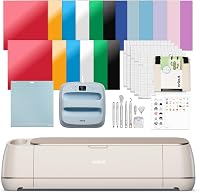
The Cricut Maker is the stronger choice when one machine needs to handle many materials and techniques. The Maker 4 bundle includes a Fine-Point Blade, Fine Point Pen, Light Grip Mat, Weeder, materials sampler and 30 Design Space images.
Its 270.25 sq in active surface area gives you more working room than the compact Joy format. The machine also supports Print-Then-Cut with most inkjet printers, which can help with full-color stickers and similar projects.
Cricut Maker is a better fit for you if you plan to work with leather, wood, fabric, cardstock, stickers and iron-on HTV. It also makes more sense when you expect to add specialty tools for engraving, debossing, foiling or scoring.
Choose Cricut Joy for simple portable projects
Cricut Joy is the better choice when storage space and portability matter more than broad tool support. It measures 5.5 x 8.5 x 4.25 in and weighs 3.9 lb, so it is easier to move between a shelf, table and craft area.
The machine works with 50+ materials and supports Smart Materials for matless cutting. It can cut individual shapes up to 4 ft long, while repeated cuts can extend up to 20 ft.
Cricut Joy also includes a StandardGrip Mat, fine-point black pen, power adapter, blade and housing, 50 online ready-to-make projects and a digital library of 30 images. The machine connects to Design Space on iOS, Android, Windows and Mac devices.
How do Cricut Maker and Cricut Joy compare in size?
Cricut Joy takes less desk and storage space, while Cricut Maker gives you a larger active work area. Measure your craft table, storage shelf and project materials before choosing.
Cricut Maker measures 7.1 x 22.1 x 6.2 in. Cricut Joy measures 5.5 x 8.5 x 4.25 in, making it much easier to store in a small cubby or carry to another room.
The smaller body does not mean Cricut Joy can only make tiny cuts. Smart Materials support long matless cuts, but the machine still has a narrower role than Maker when your projects need specialty tools or a broad material range.
Leave enough room around either machine for loading materials, using a mat and handling finished projects. A machine that fits on a shelf may still need more space when you are working.
Which Cricut is better for larger projects?
Cricut Maker is better for larger and more varied projects, while Cricut Joy is useful for long, narrow designs. Think about the shape of your projects, not only the machine's footprint.
Maker works with a 270.25 sq in active surface area and can handle projects such as banners, apparel, full-color stickers, cards and fabric appliques. Its broader tool support also helps when the project needs scoring, engraving, debossing or foiling.
Joy supports individual shapes up to 4 ft long and repeated cuts up to 20 ft with Smart Materials. That makes it useful for long labels, banners and repeated vinyl designs, even though the machine itself is compact.
Choose Maker when project variety matters most. Choose Joy when your projects are mostly labels, cards, decals, iron-on designs and other cuts that do not need Maker's specialty actions.
For another comparison within the Cricut range, see our guide to Cricut Maker vs Explore. If you are comparing larger machines, our Cricut Maker vs Venture guide covers a different size and capability decision.
Which machine is easier to start with?
Cricut Joy is easier to place and carry, while Cricut Maker gives beginners more ways to grow. The simpler choice depends on whether you want fewer decisions now or broader options later.
Joy is designed for app-based crafting and can help you move from a design to a finished card, label or decal without setting up a large machine. Its compact format suits occasional crafters and people who do not have a permanent craft table.
Maker uses the same Design Space approach but offers more possible materials and techniques. That flexibility is useful if you already know you want to make layered apparel, leather projects, wood designs or engraved materials.
Neither machine removes the need to learn material settings and project preparation. Start with a small design, follow the material guidance and keep the cutting area clear while the machine works.
Is the Cricut Maker bundle worth choosing?
The Maker 4 bundle is the better fit when you want a broad machine and a small starter set, while the Maker 5 Essential Bundle is better when included supplies matter. Compare the bundle contents with the projects you plan to make.
The Cricut Maker 4 bundle includes a Fine-Point Blade, Materials Sampler, Fine Point Pen, Light Grip Mat, Weeder and 30 bonus images in Design Space. The sampler includes Smart Vinyl, Matless Vinyl, Smart Iron-On, Matless Heat Transfer Vinyl, Cardstock and Transfer Tape.
The Cricut Maker 5 Essential Bundle includes supplies for up to 65 projects. Compare Cricut Maker vs Explore 5 if you are deciding between those machines.
It includes a Premium Fine Point Cutting Tool, Scoring Tool, Engraving Tool, Printable Vinyl, Insert Card Sets and other Cricut accessories, plus 25 images and 1 font.
The Maker 5 works with 13 tools and supports materials up to 3 mm, including leather and foam core board. It also has a 30% more compact design than previous models while keeping 12 in cutting performance.
Do you need a carrying case for Cricut Joy?
A carrying case helps if you regularly move Cricut Joy between storage and your work area. It is less useful if the machine stays on one craft table.
The VIGEGARI case is designed for Cricut Joy and has a removable divider, front zip pocket and top pocket. Its padded nylon polyester construction is intended to help protect the machine and tools from dust, scratches and everyday wear.
The case measures 13.5 x 5.5 x 10 in and weighs 0.42 kg. It has a zipper, web handle and removable straps, so it suits home storage, travel and craft events.
Check the dimensions of your machine and accessories before packing. The case is designed around Joy-sized equipment, not the larger Cricut Maker format.
Which Cricut works better with an inkjet printer?
Cricut Maker is the clearer choice for Print-Then-Cut because it supports most inkjet printers. That matters for full-color stickers and printed designs that need cutting afterward.
Design Space connects to Cricut cutting machines, and Maker 4 supports Print-Then-Cut with most inkjet printers. You still need to prepare the printed material and follow the software registration and cutting steps.
Print-Then-Cut suits projects where color comes from your printer and shape comes from the cutter. You print the design first, then let the machine follow the printed marks to cut around it.
That workflow works well for stickers, labels and other items where a flat printed image needs a clean outline. It is less useful for plain vinyl decals, where the material itself provides the color.
Start by printing a test page and checking that the ink is dry before loading the sheet. Smudged ink or a curled sheet can affect alignment and waste material.
Place the printed sheet on the correct mat and load it straight into the machine. Small angles at loading can throw off the sensor marks and shift the cut.
Follow the prompts in Design Space for registration, then check the first cuts before running a full batch. A quick check can save a whole sheet if the settings are off.
For sticker material choices, compare printable vinyl vs sticker paper. The right sheet affects ink coverage, durability and how cleanly the cut separates.
Cricut Joy is more focused on cut, draw and write projects using materials such as cardstock, vinyl and iron-on. Choose it for those projects unless printed color designs are a central part of your plan.
That focus is a strength for everyday personalization. Joy handles names, simple shapes and short phrases without the extra steps that printed designs require.
If you mainly make one-color decals or iron-on text, you may not need printer compatibility at all. In that case, Maker printer support adds capability you will rarely use.
Consider ink costs and paper or vinyl stock as part of the setup, not as an afterthought. Print-Then-Cut projects use both a printer and a cutter, so keep spare sheets for tests.
Store printed sheets flat and away from dust until you are ready to cut them. That helps the mat grip evenly and keeps the surface clean for accurate feeding.
Clean the mat regularly and replace it when it loses grip. Weak grip can let a sheet shift during cutting and spoil a design that printed perfectly.
Maker is the better pick if full-color stickers and printed labels are a regular part of your crafting. Joy remains a solid pick for simpler cut, draw and write work.
Think about your usual projects before paying for extra stock. The machine that matches your regular workflow will save time, ink and wasted sheets.
How should you decide between Cricut Maker and Cricut Joy?
Pick Cricut Maker if you want 300+ materials, larger working space and specialty techniques. Pick Cricut Joy if you want a compact machine for everyday cards, labels, decals and iron-on crafts.
Choose Cricut Maker when:
- You expect to use leather, wood, fabric, vinyl and cardstock.
- You want engraving, debossing, foiling, scoring or perforating.
- You need Print-Then-Cut with most inkjet printers.
- You want one machine that can support more project types.
Choose Cricut Joy when:
- You have limited storage or desk space.
- You want to carry the machine between rooms or locations.
- Your main projects are cards, labels, decals and iron-on designs.
- You like the option of long matless cuts with Smart Materials.
Our guide to the best Cricut vinyl cutters can help if vinyl work is your main goal. For a larger comparison, see Cricut Maker vs Cricut Explore Air 2.
If you want to compare a different type of craft machine, read How to Choose a Laser Engraver: A Complete Buying Guide or How to Choose a Laser Engraver?. For Joy accessories, see our guide to the best Cricut Joy Xtra bundle.
The best choice is the one that matches your real projects. Maker gives you more material and tool options, while Joy keeps everyday crafting compact and easy to move.
Frequently asked questions
Is Cricut Maker better than Cricut Joy?
Cricut Maker is better for projects that use a wide material range or specialty actions such as engraving, debossing, foiling and scoring. Cricut Joy is better for compact everyday crafts, including cards, labels, vinyl decals and iron-on projects.
What is the main difference between Cricut Maker and Cricut Joy?
The main difference is capability and size. Cricut Maker works with 300+ materials and supports several specialty tools, while Cricut Joy works with 50+ materials in a much smaller body designed for portable crafting.
Can Cricut Joy make long cuts?
Yes. Cricut Joy works with Smart Materials for matless cutting and can make individual shapes up to 4 ft long, with repeated cuts extending up to 20 ft.
It also supports a 12 x 48 in active surface area.
Which Cricut is better for beginners?
Cricut Joy is the simpler starting point if you mainly want cards, labels and small vinyl projects. Cricut Maker is the better first machine if you expect to use leather, wood, fabric, engraving, debossing or other specialty craft methods.