Epson SureColor F170 Sublimation Printer Review: Worth It? (November 2026)
The Epson SureColor F170 suits home crafters and small businesses that want a dedicated sublimation printer with Epson ink and a covered 150-sheet tray. It prints only, uses a USB connection, and doesn't support mobile devices.
On this page (7 sections)
The Epson SureColor F170 is a dedicated desktop sublimation printer for home crafters and small businesses. It includes genuine Epson sublimation ink, a covered 150-sheet tray and starter supplies, but it prints only and doesn't support mobile devices.
This bundle makes sense if you want a compact printer for projects such as mugs, mousepads, awards and apparel. For mug projects, see sublimation shrink wrap.
For general documents, scanning or phone printing, an all-in-one or photo printer may fit better.
What does the Epson F170 review show?
The F170 stands out as a purpose-built sublimation printer, with Epson ink, a closed paper tray and support for media up to 8.5 inches wide. For broader selection advice, see desktop sublimation printers.
The bundle also includes paper in two sizes and a roll of thermal tape.
Johnson Plastics Plus Epson SureColor F170 Dye-Sublimation Printer.: Best for a dedicated sublimation setup

- Genuine Epson sublimation ink
- 150-sheet auto-feed tray
- Prints up to 8.5 in wide
- Mac and Windows software
A compact, print-only sublimation printer with Epson ink, a closed paper tray and starter supplies. It suits a home craft space or small business that wants a dedicated printer.
Pros
- Genuine Epson sublimation ink included
- Closed 150-sheet auto-feed tray
- Mac and Windows software
- Starter paper and thermal tape included
Cons
- Mobile device connection isn't supported
- Prints only, with no scanning or copying
Its stated dimensions are 13.7 in deep, 14.8 in wide and 7.4 in high. That footprint can work on a dedicated craft table, though you should also leave room to load paper and handle transfer materials.
The F170 is a print-only device. It connects by USB, and mobile device connections aren't supported, so plan to prepare and print designs from a Mac or Windows computer.
Who should choose a dedicated F170?
Choose the F170 if your projects need sublimation transfers and you want a printer built around that process. A dedicated printer and genuine sublimation ink can simplify the setup compared with repurposing a standard inkjet.
It can suit makers who regularly personalize small batches of soft or rigid materials. For apparel, compare sublimation printers for T-shirts.
Epson describes the printer as optimized for those material types, but you still need blanks intended for sublimation and a compatible heat-transfer process.
For the limits of using sublimation on dark fabric, see how to sublimate on black shirts.
It may be a poor fit if you only need occasional paper documents or family photos. An everyday inkjet or photo printer handles those jobs with functions or media options the F170 doesn't offer.
If you are comparing dedicated models, start with our sublimation printer machine guide to see how printer type, size and workflow affect the choice. Readers considering a converted tank printer can also review what to know before using an Epson ET-15000 for sublimation.
What comes with this F170 bundle?
The bundle includes the printer, a full set of Epson sublimation ink, a user guide and power cable. It also includes a sublimation starter kit, 8.5 x 11 in and 8.5 x 14 in paper, and brown thermal tape.
That gives a new owner several basic supplies for getting started. Check that the included paper size and starter blanks match the projects you plan to make, and budget for additional supplies as your work grows.
You can compare JOYCLUB sublimation blanks when choosing project materials.
The printer uses ink bottles with auto-stop technology for refills. Epson says its dye-sublimation ink is certified under ECO PASSPORT by OEKO-TEX for textile use, including apparel and other projects.
If you want to compare what sellers bundle with the printer, our best Epson F170 sublimation printer bundles guide covers bundle choices. Paper matters too, so see our picks for sublimation paper for the Epson F170.
How do the tray and print size affect your workflow?
The F170's 150-sheet auto-feed tray is enclosed to help protect paper from dust. Keeping paper stored in the tray can reduce the amount of prep between print sessions.
Its maximum media width is 8.5 in. That is suitable for many small craft designs, but you should measure the printable area required for a particular blank before making a design or ordering materials.
The included paper comes in letter and 8.5 x 14 in sizes. Make sure your design dimensions, paper orientation and blank all fit together before printing a batch.
Epson's PrecisionCore printhead uses Precision Droplet Control, which the company associates with image clarity. That feature is relevant when your work has fine shapes or text, though your transfer result also depends on the design, paper, blank and heat process.
What are the F170's main limitations?
The biggest limits are no mobile printing, no scanning or copying, and an 8.5 in maximum media width. Those points matter if you want a shared household printer or make designs wider than the supported media.
The USB connection suits a fixed workstation. If you expect to print from a phone or tablet, choose a model with those connections instead.
The F170 is a dedicated sublimation printer, so it is less flexible for ordinary home printing than a general-purpose inkjet. Its role is clearest when sublimation is a regular part of your craft or business workflow.
Don't assume that every Epson ink-tank printer can use the same ink or process. For a specific model, see Epson ET-8550 sublimation guidance.
Our guide to sublimation ink for Epson EcoTank printers explains why ink and printer compatibility deserve a separate check.
How does the F170 compare with other printer types?
The F170 is the best match of these three for dedicated sublimation transfers. The Liene M100 is for 4 x 6 in photos, while the Epson EcoTank ET-2803 is an everyday inkjet with print, scan and copy functions.
Liene M100 4x6'' Photo Printer: Best for phone photo prints

- 4 x 6 in photo printing
- Built-in Wi-Fi hotspot
- Prints from phones and computers
A compact photo printer for 4 x 6 in snapshots from a phone or computer. It uses photo paper and cartridges, so it isn't a substitute for the F170's craft-transfer workflow.
Pros
- Phone and computer printing
- Built-in hotspot works without a home Wi-Fi network
- 100 sheets of photo paper and 3 cartridges included
Cons
- Limited to 4 x 6 in photo prints
- Uses proprietary cartridges
The Liene M100 uses thermal dye-sublimation to make small photo prints from phones, computers or its built-in hotspot. It comes with photo paper and cartridges, but its 4 x 6 in format doesn't replace the F170's wider craft-transfer media.
Epson EcoTank ET-2803 Wireless Color All-in-One Supertank: Best for everyday home documents
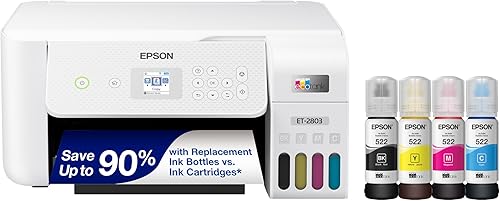
- Print, scan and copy
- Refillable ink tanks
- Wireless printing
A home inkjet for everyday documents, scanning and copying. It offers more general office functions than the F170, but its standard ink system is not the dedicated sublimation setup described here.
Pros
- Print, scan and copy functions
- Wireless and mobile printing options
- Refillable ink tanks
Cons
- An inkjet rather than a dedicated sublimation printer
- Not designed as an F170 transfer-workflow replacement
The ET-2803 has refillable ink tanks and supports wireless printing, scanning and copying. Its standard inkjet role differs from a printer designed for sublimation, so choose it for home documents rather than treating it as an F170 alternative for transfers.
If you are comparing ink choices across Epson printers, our guides to sublimation ink for Epson ET-8550 and sublimation ink for an HP inkjet printer cover different printer setups.
Is the Epson F170 worth choosing for your projects?
The F170 is a sensible pick when you want a compact, dedicated sublimation printer with Epson ink and starter supplies. Its covered tray and computer-based workflow suit a small craft space where sublimation is a planned, repeat task.
Pick the F170 for sublimation transfers, the Liene M100 for phone-friendly 4 x 6 in photo prints, or the ET-2803 for everyday printing and scanning. For F170 upkeep, see how to replace its maintenance box.
If your main question is whether this dedicated Epson setup fits your budget and workflow, compare the bundle contents and paper needs before choosing a seller.
Frequently asked questions
Is the Epson SureColor F170 good for beginners?
The F170 can suit a beginner who wants a dedicated sublimation printer and is ready to follow setup instructions for the printer, ink and transfer materials. Its bundle includes Epson ink, paper and thermal tape, while the covered 150-sheet tray helps keep paper enclosed between jobs.
It prints from Mac or Windows, not mobile devices.
Can you print from a phone with the Epson F170?
No, mobile device connections aren't supported with the F170. The printer uses USB and includes Mac and Windows print software, so plan to send designs from a compatible computer.
If phone photo printing is your main need, a small photo printer such as the Liene M100 is a different kind of device.
What size paper can the Epson F170 use?
The F170 supports media up to 8.5 inches wide, and this bundle includes 8.5 x 11 inch and 8.5 x 14 inch sublimation paper. Check the dimensions and transfer instructions for your blank before designing, since the printer's maximum width may not match the usable area of every mug, shirt or other item.
Does the Epson F170 include sublimation ink?
Yes. This bundle includes a full set of genuine Epson sublimation ink in black, cyan, magenta and yellow, along with auto-stop bottles for refilling.
Epson recommends genuine ink for print quality and performance.
Read more about the Epson F170 ink before buying replacement bottles.


