6 Best Sublimation Ink for Epson EcoTank Printers (November 2026)
The best sublimation ink for Epson EcoTank printers include the Hiipoo Sublimation Ink Refilled Bottles Work for tidy refills, the Hiipoo Sublimation Ink Refilled Bottles Compatible for model variety, and the Welacer Sublimation Ink 440ML Auto Refill for frequent printing.
On this page (9 sections)
- How we chose sublimation ink for Epson EcoTank
- Compare these Epson sublimation ink options
- Which sublimation ink fits your Epson printer?
- How do you check Epson EcoTank ink compatibility?
- Does Epson sublimation ink need an ICC profile?
- How should you set up and refill a sublimation EcoTank?
- What else affects sublimation color?
- What mistakes should you avoid with EcoTank sublimation ink?
- Which Epson EcoTank sublimation ink should you choose?
The best sublimation ink for Epson EcoTank printers depends on your exact model, the ink already in the tanks and whether you need a full CMYK set. Hiipoo's four-color refill bottles are a practical first choice for a compatible printer because the bottle design stops filling automatically.
Sublimation ink is a different ink system from standard inkjet ink. Before choosing a set, match your full printer model, decide whether the current ink system is suitable for conversion, and plan how you'll handle color settings and transfer materials.
For a printer buying guide, see desktop sublimation printers.
If you are still choosing a printer, start with our sublimation printer machine guide. For other sets beyond these EcoTank-focused options, compare the best sublimation ink set guide.
Our picks at a glance
-
1
 Best for tidy refills
Hiipoo Sublimation Ink Refilled Bottles Work
9.7/10 our score
See it on Amazon -
2
 Best for model variety
Hiipoo Sublimation Ink Refilled Bottles Compatible
9.7/10 our score
See it on Amazon -
3
 Best for frequent printing
Welacer Sublimation Ink 440ML Auto Refill
9.5/10 our score
See it on Amazon
- 4
 Check it
MERRYWORK Sublimation Ink Refill Bottles Auto Refill
Best for equal refills - 5
 Check it
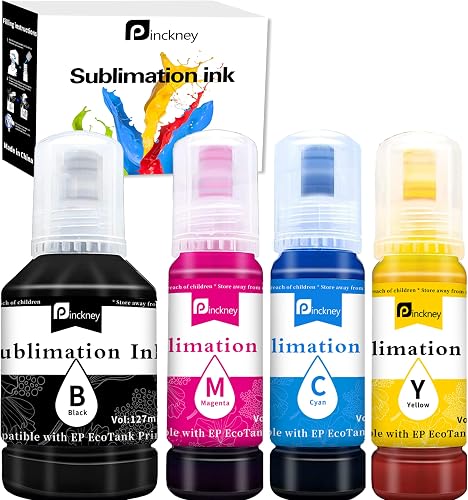
Pinckney Sublimation Ink Refill for EcoTank Printer
Best for black-heavy designs - 6
 Check it
Ankink Black Sublimation Ink for ET-2800 ET-2803
Best for black ink top-ups
How we chose sublimation ink for Epson EcoTank
We compared each set's stated printer compatibility, colors, bottle sizes, refill method and color-profile information. Those details matter because a set needs to match the printer and give you the colors your projects require.
Full-color sets rank above the single-color option for this search. A black refill can solve a specific top-up need, but it cannot support a complete CMYK workflow by itself.
Compatibility is a practical first filter. One set names the ET-8550, while another may emphasize the ET-2800 or ET-15000, so don't treat “EcoTank compatible” as a universal fit.
The bottle mix is the next useful comparison. Equal bottles suit buyers who want the same amount of each color, while sets with more black may make sense for designs that use black heavily.
Compare these Epson sublimation ink options
The two Hiipoo four-color sets lead this group, with different bottle details and compatibility lists. Use the table to narrow the choice, then confirm your printer's complete model number before filling.
| Product | Best for | Colors | Refill | Profile | Our score |
|---|---|---|---|---|---|
| Hiipoo Sublimation Ink Refilled Bottles Work | tidy refills | Black, cyan, magenta and yellow | Bottle fits ink inlet and stops automatically | ICC-free printing | 9.7 |
| Hiipoo Sublimation Ink Refilled Bottles Compatible | model variety | Black, cyan, magenta and yellow | 9.7 | ||
| Welacer Sublimation Ink 440ML Auto Refill | frequent printing | Black, cyan, magenta and yellow | Auto-stop bottle design | 9.5 | |
| MERRYWORK Sublimation Ink Refill Bottles Auto Refill | equal refills | Four 70 ml bottles | Auto-stop bottle design | 9.3 | |
| Pinckney Sublimation Ink Refill for EcoTank Printer | black-heavy designs | Auto-fill nozzle | 9.0 | ||
| Ankink Black Sublimation Ink for ET-2800 ET-2803 | black ink top-ups | Auto-fill and auto-stop | 8.4 |
Which sublimation ink fits your Epson printer?
Choose a full CMYK set if you plan to print color designs, and choose a single-color bottle only when the other colors are already covered by a compatible sublimation setup. These picks differ most in model coverage, bottle sizes and refill design.
Hiipoo Sublimation Ink Refilled Bottles Work: Best for tidy refills
- Four colors
- Auto-stop bottle fit
- ICC-free printing
- Compatible with ET-2800 and many other models
The bottle mouth fits the ink inlet and stops filling automatically, so you don't need a syringe. Check the model list against your printer before choosing it.
Pros
- Auto-stop refill design
- Broad EcoTank compatibility list
- ICC-free printing
Cons
- Compatibility varies by model
- Color management still depends on your printer and transfer setup
Hiipoo Sublimation Ink Refilled Bottles Work: Best for tidy refills
Hiipoo's refill bottles fit an ink inlet and stop filling automatically, so you don't need a syringe. The set includes black, cyan, magenta and yellow ink, and Hiipoo describes it as suitable for ICC-free printing.
Its compatibility list includes the ET-2800, ET-2803, ET-2850, ET-15000 and other EcoTank models. Match your exact model because printer families can include versions that are not named by every ink brand.
Choose this set if you want a straightforward bottle refill and your model appears in its compatibility range. Skip it if you need a color profile supplied for a tightly controlled workflow, since profile details are not provided here.
For help with the filling process, read how to refill sublimation ink cartridges. EcoTank tanks use bottles, but careful alignment and a clean refill area still matter.
Hiipoo Sublimation Ink Refilled Bottles Compatible: Best for model variety
- Four-color set
- Compatible with ET-2800 and ET-8550
- Water-based dye sublimation ink
- 127 ml black and 70 ml of each other color
This four-color set names a wide range of EcoTank and WorkForce models, including the ET-8550. Match the model number and confirm the printer is set up for sublimation ink.
Pros
- Broad model coverage
- Four colors included
- Black bottle is larger than the other colors
Cons
- Model support should be checked against the exact printer
- The set's color profile is not specified
Hiipoo Sublimation Ink Refilled Bottles Compatible: Best for model variety
This Hiipoo set names a wide range of EcoTank models, from the ET-2400 and ET-2800 to the ET-8550. For model-specific options, see sublimation ink for Epson ET-8550.
It contains 127 ml of black ink and 70 ml each of cyan, magenta and yellow.
That broader model range makes it a useful option when you own a less common EcoTank in the compatibility list. The larger black bottle also suits a workflow that uses more black than the other colors.
Choose it if your model is named and you want a larger black refill. Skip it if you want equal quantities across all four colors or need a set with a specified color profile; neither matches this set's details.
Hiipoo describes the ink as water-based dye sublimation ink. Check the exact printer and current ink system before filling, especially if the printer has previously held standard ink.
Welacer Sublimation Ink 440ML Auto Refill: Best for frequent printing
- 440 ml total
- Four colors
- Auto-stop refill bottles
- ICC-free printing
The 440 ml set includes black, cyan, magenta and yellow ink, with bottles designed to stop filling when the tank is full. Its compatibility list covers many EcoTank models.
Pros
- Largest stated set volume here
- Auto-stop refill design
- ICC-free printing
Cons
- Exact compatibility still needs checking
- No color profile details are specified
Welacer Sublimation Ink 440ML Auto Refill: Best for frequent printing
Welacer's four-color set has a stated total volume of 440 ml: 140 ml black and 100 ml each of cyan, magenta and yellow. Its bottles use an automatic refill stop, and Welacer describes the ink as ICC-free.
The larger total volume is a fit for frequent projects or keeping refills on hand. Its compatibility list includes many EcoTank models, such as the ET-2400, ET-2800, ET-4800 and ET-8550, along with selected WorkForce models.
Choose Welacer if your printer is named and you want more ink in one set. Skip it if you print infrequently and would rather start with a smaller quantity, or if your workflow depends on a specific ICC profile that this set does not specify.
Keep your printer and paper settings consistent when judging color. “ICC-free” does not mean every printer, driver and paper combination will produce identical output without setup.
MERRYWORK Sublimation Ink Refill Bottles Auto Refill: Best for equal refills
- Four 70 ml colors
- Auto-stop refill
- Compatible with ET-15000 and many other models
- Water-based ink
The four 70 ml bottles provide equal amounts of black, cyan, magenta and yellow. Its compatibility list includes several EcoTank families and some WorkForce models.
Pros
- Equal 70 ml bottles
- Auto-stop refill design
- Broad EcoTank model list
Cons
- Check the exact model before filling
- No color profile details are specified
MERRYWORK Sublimation Ink Refill Bottles Auto Refill: Best for equal refills
MERRYWORK's set has four 70 ml bottles, one each for black, cyan, magenta and yellow. Its compatibility information names the ET-2400, ET-2800, ET-2803, ET-4800, ET-15000 and many other EcoTank models.
Equal quantities suit buyers who want a balanced set rather than extra black. MERRYWORK also describes an automatic stop when the tank is full, which removes the need to estimate the fill level by squeezing a bottle.
Choose it if your model is on the list and equal bottle amounts fit your refill habits. Skip it if you routinely use more black or need a stated ICC profile, which this set does not specify.
MERRYWORK describes the ink as water-based and suitable for polyester fabrics with less than 30% cotton. Check your blank's requirements before printing a project.
Pinckney Sublimation Ink Refill for EcoTank Printer: Best for black-heavy designs
- Black 127 ml; other colors 85 ml each
- Auto-fill nozzle
- Compatible with ET-2800 and ET-8550
Pinckney provides a larger black bottle than its three color bottles and an auto-fill nozzle. Its EcoTank range includes the ET-8550 and several common models.
Pros
- Larger black bottle
- Auto-fill nozzle
- Broad EcoTank model coverage
Cons
- Check the exact model before use
- No color profile details are specified
Pinckney Sublimation Ink Refill for EcoTank Printer: Best for black-heavy designs
Pinckney includes 127 ml of black ink and 85 ml each of cyan, magenta and yellow. Its auto-fill nozzle is designed to fit an EcoTank ink inlet, and its compatibility list includes the ET-2800, ET-4800 and ET-8550.
The larger black bottle suits designs that use more black than the other colors. Its compatibility range also names several common EcoTank models, so it can be a reasonable match when the exact model is confirmed.
Choose Pinckney if you want a full-color set with extra black and your printer is listed. Skip it if you need equal quantities or a stated color profile.
Before refilling, compare the ink you use most often with the bottle mix. If cyan, magenta or yellow runs out first in your workflow, the extra black will not help you avoid those color-specific refills.
Ankink Black Sublimation Ink for ET-2800 ET-2803: Best for black ink top-ups
- Black sublimation ink
- Auto-fill and auto-stop
- Compatible with ET-2800 and ET-2803
This is a black-only refill for buyers who need to replace that color without buying a full CMYK set. Confirm that the printer and existing ink setup match.
Pros
- Single-color option
- Auto-fill and auto-stop design
- Broad model list
Cons
- Does not include cyan, magenta or yellow
- Confirm compatibility before filling
Ankink Black Sublimation Ink for ET-2800 ET-2803: Best for black ink top-ups
Ankink's option is black sublimation ink with auto-fill and auto-stop bottles. Its compatible printer list includes the ET-2800, ET-2803, ET-2850, ET-15000 and other EcoTank models, plus selected WorkForce models.
This bottle is for a narrow need: replacing black while the other colors are already covered by a compatible sublimation setup. It is not a complete color set, so it won't suit someone setting up full-color printing from scratch.
Choose Ankink when you need black only and have checked that the printer and other ink match. Skip it if any other color is low or if you're converting a printer that still contains another ink type.
Ankink's product details identify this as a single-color option. Don't mix it into a system casually; follow the printer and ink instructions for the full setup.
How do you check Epson EcoTank ink compatibility?
Match the full model number on your printer with the ink brand's compatibility list before filling a tank. The EcoTank name alone is not enough to confirm a match.
Write down the model, including its letters and digits, then compare it with the exact set you plan to use. These products name different combinations of ET-2400, ET-2800, ET-4800, ET-15000 and ET-8550 models, among others.
Also check the printer's ink history. If the tanks or lines contain standard ink, don't assume that adding sublimation ink will convert the system cleanly; follow the printer and ink instructions before proceeding.
Consider the whole printer setup, not just the refill bottle. If shirts are your main project, compare sublimation printers for t-shirts.
Confirm how the printer is configured, which paper you plan to use and whether the ink brand provides setup guidance for that combination.
For the transfer workflow, see using sublimation paper with Cricut.
For a cartridge setup, our guide to sublimation ink cartridges for Epson explains the difference between cartridge and tank options. If you are considering another printer brand, read about sublimation ink for an HP inkjet printer before planning a conversion.
Does Epson sublimation ink need an ICC profile?
An ICC profile can help coordinate color output across your printer, ink and paper, but the right setup depends on that exact combination. Some inks here are described as ICC-free, while others have no profile details specified.
Treat “ICC-free” as a description of the ink, not a promise that every computer and paper combination will give the same colors without adjustment. Follow the ink brand's setup instructions, choose suitable paper settings and make a small transfer before committing to a larger batch.
Keep color adjustments controlled. If your design software, printer driver and another utility all apply corrections, the combined changes can shift the output and make the cause harder to find.
If your ink brand provides a color profile for your setup, use its instructions as your starting point. Avoid changing multiple settings at once, since you'll have a harder time identifying which change affected the print.
How should you set up and refill a sublimation EcoTank?
A careful setup starts with the printer model and ink system, then moves to the bottle and color workflow. Read the ink instructions before you open a bottle, and keep the four colors organized by their matching tank.
Set the printer on a stable, protected work surface and keep the bottle upright until you're ready to fill. If the bottle uses an auto-stop design, align it with the correct inlet and let the mechanism work; don't force or squeeze it.
Use the refill method described for that ink. A bottle designed to fit the tank inlet is meant to simplify filling, but a poor fit or wrong tank can still cause a spill or put a color in the wrong place.
After filling, close the caps and follow the printer and ink instructions for any setup or print checks. Keep the first output small so you can review color and alignment before using a larger sheet or blank.
Store the bottles closed and follow their care instructions. Keeping colors labeled and separate reduces the chance of confusing a refill later.
What else affects sublimation color?
Ink is only one part of a sublimation transfer. Paper, printer settings, transfer material and heat-press instructions all affect the result, so keep those factors consistent when you compare colors.
Use sublimation paper made for transfer work when printing a design for heat transfer. Regular paper can help check layout, but it does not serve the same role; our guide explains whether you can use sublimation ink on paper.
Sublimation is generally used on suitable polyester materials or coated blanks. Hiipoo notes that its ink is for fabrics containing less than 30% cotton, and MERRYWORK gives a similar note for polyester fabrics.
Check the requirements for your blank before making a transfer. A suitable ink set cannot make an unsuitable fabric or surface behave like a sublimation-ready material.
What mistakes should you avoid with EcoTank sublimation ink?
The most common avoidable mistake is filling a printer before confirming the exact model and current ink system. Check both first, and don't rely on a brand's general EcoTank wording.
Another mistake is buying a black-only bottle for a full-color workflow. Ankink's option only covers black, so choose a CMYK set if you need cyan, magenta and yellow too.
Don't assume that ICC-free means no color setup is needed. The printer driver, paper selection and transfer material still affect output, so change one setting at a time and keep notes when adjusting.
Finally, don't judge color from a plain-paper print alone. Use transfer materials suited to sublimation and follow their instructions before deciding whether the color settings need changes.
Which Epson EcoTank sublimation ink should you choose?
Choose Hiipoo Sublimation Ink Refilled Bottles Work if you want auto-stop refilling and your exact printer model is named. Pick the other Hiipoo set if its wider model range or larger black bottle fits your needs, or choose Welacer for its 440 ml total set.
MERRYWORK suits buyers who want equal bottle amounts, while Pinckney gives you more black than the other colors. Pick Ankink only for a black refill when the rest of your sublimation setup is already covered.
For the best sublimation ink for Epson EcoTank, let model compatibility decide first, then choose bottle size and color mix. Before ordering, compare the best sublimation ink set options if you want to consider sets beyond these EcoTank-focused picks.
Our top 3 picks at a glance
-
1
Best for tidy refills
Hiipoo Sublimation Ink Refilled Bottles Work
9.7/10 our score
See it on Amazon -
2
Best for model variety
Hiipoo Sublimation Ink Refilled Bottles Compatible
9.7/10 our score
See it on Amazon -
3
Best for frequent printing
Welacer Sublimation Ink 440ML Auto Refill
9.5/10 our score
See it on Amazon
Frequently asked questions
Can you put sublimation ink in an Epson EcoTank?
Some EcoTank models are used for sublimation after conversion, but compatibility depends on the printer and ink. Check the ink brand's exact model list and confirm whether your printer has already held another type of ink before filling.
For setup basics, read our sublimation printer machine guide.
Does sublimation ink need an ICC profile?
Some ink brands describe their ink as ICC-free, but color output still depends on the printer driver, paper and transfer settings. If a brand provides a profile for your setup, use its instructions and avoid applying multiple color corrections at once.
Our best sublimation ink set guide compares other set choices.
Can you print sublimation ink on regular paper?
You can print a design onto ordinary paper, but regular paper is not made to hold and release sublimation dye like transfer paper. A test print can check layout, while transfer results call for suitable sublimation paper.
See whether you can use sublimation ink on paper for the difference.
Do EcoTank printers use sublimation ink cartridges?
EcoTank printers use refillable tanks, so many conversion inks come in bottles that fit the tank inlet rather than cartridges. Follow the ink maker's instructions for your model and avoid mixing ink types in the same system.
For cartridge-style setups, see sublimation ink cartridges for Epson.


