How to Sublimate on Black Shirts
Standard sublimation won't show well on a black shirt. Use a transfer material made for dark fabric, or choose a light polyester shirt for a true sublimation transfer.
On this page (6 sections)
- Can you sublimate directly onto a black shirt?
- What are your options for decorating a black shirt?
- How do you use a dark-fabric transfer on a black shirt?
- What should you check before buying a dark-fabric transfer?
- What common mistakes can spoil a black-shirt transfer?
- Should you choose sublimation or dark-fabric transfer paper?
Standard sublimation doesn't show well on a black shirt because sublimation ink is transparent and there is no white ink layer to cover the dark fabric. For a true sublimation result, use a light-colored polyester shirt; for a black shirt, use transfer material made for dark fabric and follow its instructions.
For child sizes, compare sublimation shirts for kids.
The difference matters when you choose both the paper and the shirt. Standard sublimation paper is intended for compatible light-colored polyester, while dark-fabric transfer paper is a separate approach that may use different ink and pressing steps.
Paper gift bags are another special substrate; see sublimation on paper gift bags for the material considerations.
Can you sublimate directly onto a black shirt?
No, standard sublimation is not a reliable way to put visible color directly on black fabric. Its transparent dyes bond with polyester, but the dark shirt remains visible through the design.
A white design won't print white from a standard sublimation printer. Pale colors can also disappear, and darker colors may look dull against black.
If you need a true sublimation transfer, pick a light polyester blank. Check the shirt's fiber content and color before buying; our guide to sublimation shirts blanks explains what to look for.
Why doesn't sublimation paper for black shirts work like regular paper?
Paper made for dark fabric is not the same as standard sublimation paper. It may be an inkjet-printable iron-on transfer with an opaque layer that helps the design show against a dark shirt.
Read the paper's directions for the printer type, ink, print side, whether to mirror the image, cutting, and press method. Don't assume that paper labeled for dark fabric works with sublimation ink.
Avery Heat Transfer Paper is made for inkjet printing on dark-colored cotton and cotton/poly fabrics. It is an option for a dark-shirt transfer, but it's not standard sublimation paper.
What are your options for decorating a black shirt?
Choose between using a dark-fabric transfer on the black shirt and using standard sublimation on a light polyester shirt. The right choice depends on whether keeping the shirt black matters more than using a sublimation workflow.
Option 1: Use a transfer made for dark fabric
Choose a transfer paper that names dark fabrics as compatible, then follow its own instructions from printing through pressing. Some dark-fabric transfers are designed for inkjet printers and cotton or cotton/poly fabrics, so check that the product matches your equipment and shirt.
Trim close to the design if the transfer method calls for it, since unprinted areas may leave a visible film or edge. Test the process on a spare shirt or fabric piece before making a finished garment.
Option 2: Use standard sublimation on a light shirt
For standard sublimation, use the compatible light polyester fabric specified by the paper and ink maker. A-SUB Sublimation Paper is described for white or light-colored high-quality polyester, and its instructions say to use sublimation ink with a compatible sublimation printer.
A black polyester shirt does not solve the color problem. Choose a white or light shirt instead, and plan the design around its base color.
Option 3: Change the design or garment color
If the garment can be a different shade, a light blank gives standard sublimation a suitable background. For other dark shades, this guide to sublimation shirt red covers color limits on red and purple shirts.
You can also simplify the artwork to suit the transfer material. Our sublimation shirts design guide covers preparing artwork for shirts.
How do you use a dark-fabric transfer on a black shirt?
Follow the transfer paper's instructions in order, because dark-fabric materials can differ from standard sublimation. Use the printer and ink type the paper specifies, and confirm whether the image needs mirroring before you print.
- Check that the transfer paper is made for your printer, ink, and shirt fabric.
- Prepare the design at the correct size and orientation for that paper.
- Print on the side and with the settings named in its instructions.
- Cut around the design if the process calls for trimming.
- Set up the press or iron as directed, including temperature, time, and pressure.
- Let the transfer cool or peel it as instructed.
Don't use a temperature or press time from another brand's paper. The right settings depend on the transfer material, and a mismatch can harm the design or shirt.
A heat press can provide set time and temperature controls for transfers. Compare a sublimation oven vs heat press when choosing transfer equipment.
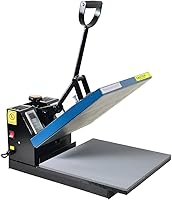
The Fancierstudio Digital Heat Press has electronic time and heat control with adjustable pressure; use the transfer paper's directions to set it.
What should you check before buying a dark-fabric transfer?
Check the printer, ink, fabric, and press directions together before choosing paper. A paper made for one combination may not work with another.
- Printer and ink: Confirm whether the transfer accepts inkjet ink, sublimation ink, or another specific type.
- Fabric: Check whether it is made for cotton, polyester, or a blend, and whether black garments are supported.
- Image handling: Look for instructions on mirroring, trimming, and the printable side.
- Pressing: Follow its stated heat, time, pressure, and peel steps.
- Finish: Consider how much of the transfer sheet remains around the design and how that will look on the shirt.
If you want to use a sublimation printer machine, match the paper to sublimation ink and light polyester blanks. For ink options, see best sublimation ink for Epson EcoTank.
What common mistakes can spoil a black-shirt transfer?
The main mistake is treating dark-fabric transfer paper as interchangeable with sublimation paper. The materials can require different printers, inks, and steps.
Other avoidable errors include printing on the wrong side, skipping an image mirror when required, choosing a shirt fabric the paper doesn't support, and using press settings copied from another transfer. Read the instructions for the exact paper before starting.
Keep the work area clean and remove lint from the shirt as directed by the transfer maker. A stray fiber or crease can show in the finished transfer.
Should you choose sublimation or dark-fabric transfer paper?
For a black shirt, choose a dark-fabric transfer if the garment must remain black. Choose standard sublimation if you can switch to a compatible light polyester blank.
Avery Heat Transfer Paper fits the dark-shirt route when its inkjet and fabric requirements match your setup. A-SUB Sublimation Paper fits the light-polyester route when paired with sublimation ink and a compatible printer.
If you're deciding between a black garment and standard sublimation, the simplest rule is to keep the black shirt and change transfer methods, or keep sublimation and change to a light shirt. For cotton blanks, read how to sublimation on cotton shirts to understand how that process differs.
Frequently asked questions
Can you sublimate directly onto a black shirt?
Standard sublimation ink does not show well on black fabric because it has no white ink to cover the dark background. For a true sublimation transfer, use a compatible light polyester shirt.
To decorate a black shirt, choose a transfer material specifically made for dark fabrics and follow its instructions.
What sublimation paper works on black shirts?
Ordinary sublimation paper is made to transfer sublimation ink onto compatible light-colored polyester, not to cover black fabric. Dark-fabric transfer paper is a different material and may require a specific printer ink and process.
Check the paper's fabric and printer compatibility before printing.
Can I use sublimation paper for dark fabric?
Only if the material is designed for dark fabric and matches your printer and ink. Some dark-fabric papers are printable heat transfers rather than sublimation paper, and their steps can differ.
Read the package instructions for printing, mirroring, cutting, and pressing before you start.
Does sublimation work on black polyester?
Black polyester still blocks the usual sublimation colors because the process does not add a white layer. Choose a light-colored polyester blank for standard sublimation, or use a separate dark-fabric transfer method if the shirt must stay black.