9 Best Enclosed Laser Engravers (November 2026)
The best enclosed laser engravers include the xTool S1 40W Laser Cutter and Laser for large workpieces, the BlazeX M3 10W Laser Engraver Machine for camera guided setup, and the xTool M2 10W Laser Engraver for home craft studios.
On this page (5 sections)
The best enclosed laser engraver depends on the size of your work and whether you need a complete machine or just a cover. If you want one platform for printing and engraving, compare 3D printer and laser engraver combos.
The xTool S1 has a large work area and 40W laser, while the Creality Enclosure 2.0 is a cover for a compatible engraver you already own.
An enclosed housing can help contain direct laser exposure, debris and smoke, but you still need to supervise jobs and plan ventilation. For a wider look at compact machines, see our Best Desktop Laser Engraver guide.
Our picks at a glance
-
1

-
2

-
3

- 4
 Check it
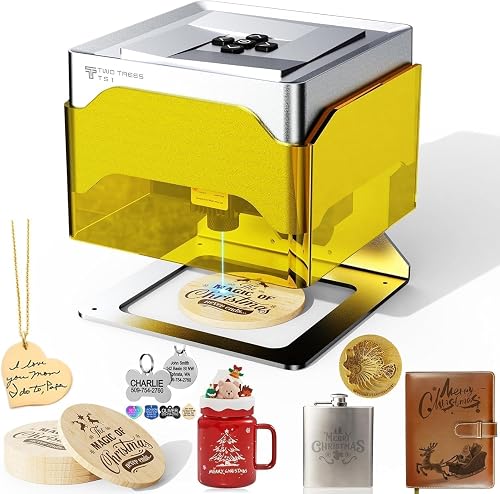
Twotrees TS1 Mini 3W Laser Engraver
Best for miniature gifts - 5
 Check it
Creality Falcon A1 10W Laser Engraver
Best for ready assembled layouts - 6
 Check it
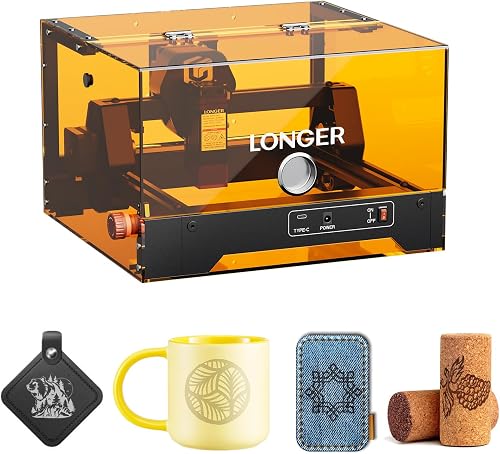
LONGER RAY5 miniS 3.5W Enclosed Laser Engraver
Best for flexible controls - 7
 Check it
Woxcker Laser Engraver 5.5W Enclosed 300×300mm Engraving
Best for roomy 5.5W projects - 8
 Check it
Woxcker Laser Engraver 10W for DIY Maker
Best for DIY batch layouts - 9
 Check it
Creality Laser Engraver Enclosure 2.0
Best for existing open frames
How we chose the best enclosed laser engravers
We compared enclosure designs, work areas, laser power, positioning tools, controls and setup details. The scores reflect how each option's stated features fit common needs, from small keepsakes to larger work.
A fully enclosed machine has its laser and work area inside its own housing. A separate enclosure, such as the Creality cover, surrounds a compatible open-frame engraver but does not include a laser machine.
Plan for smoke removal before you buy. Some machines include a fan, while the LONGER RAY5 miniS exhaust pipe and flange are sold separately.
Which enclosed laser engraver fits your projects?
The main choices here are complete enclosed engravers and one standalone cover. For more enclosed machine options, see Monport laser engravers.
Compare the work area, laser output and loading access with the materials and objects you expect to use.
To compare laser types and the materials they suit, see fiber vs CO2 lasers. For metal marking, compare 50W fiber laser engravers.
| Product | Best for | Laser power | Bed size | Safety features | Our score |
|---|---|---|---|---|---|
| xTool S1 40W Laser Cutter and Laser | large workpieces | 40W | 23.93 x 15.16 in | Lid-open stop, emergency stop, flame sensors | 9.5 |
| BlazeX M3 10W Laser Engraver Machine | camera guided setup | 10W | 9.4 | ||
| xTool M2 10W Laser Engraver | home craft studios | 10W | 9.3 | ||
| Twotrees TS1 Mini 3W Laser Engraver | miniature gifts | 3W adjustable | 8.9 | ||
| Creality Falcon A1 10W Laser Engraver | ready assembled layouts | 10W diode | 8.8 | ||
| LONGER RAY5 miniS 3.5W Enclosed Laser Engraver | flexible controls | 3.5W | 8.4 | ||
| Woxcker Laser Engraver 5.5W Enclosed 300×300mm Engraving | roomy 5.5W projects | 5.5W | Lid stop, flame sensor, emergency stop, tilt stop | 8.2 | |
| Woxcker Laser Engraver 10W for DIY Maker | DIY batch layouts | 10W | Lid stop, flame detection, emergency stop, tilt stop | 7.9 | |
| Creality Laser Engraver Enclosure 2.0 | existing open frames | 9.7 |
The best enclosed laser engravers for different projects
The xTool S1 leads for larger projects, while the other machines serve camera-guided, home craft, compact and mid-size work. For another brand's lineup, compare Ortur laser engravers.
The Creality cover appears last because it is an accessory, not a laser engraver.
xTool S1 40W Laser Cutter and Laser: Best for large workpieces
- 40W laser
- 23.93 x 15.16 in bed
- Up to 600 mm/s
- Enclosed design
A large-format enclosed machine with a 40W laser and a rotary bundle. It has auto-focus, pin-point positioning and passthrough support for projects up to 118 in long.
Pros
- Large stated bed area
- Auto-focus and passthrough features
- Multiple safety features
Cons
- Heavy at 86.8 lb
- Requires significant workspace
The xTool S1 40W is the strongest fit for larger projects and higher laser power. Its 23.93 x 15.16 in bed leaves more room for signs, layouts and larger pieces than the compact machines here.
For production-oriented needs, see industrial laser engraving machines.
The rotary bundle is suited to curved surfaces. xTool also describes auto-focus, pin-point positioning and passthrough support for projects up to 118 in long.
The machine weighs 86.8 lb, so plan a stable work surface and enough room around it before delivery. Its lid-open stop, emergency stop and five flame sensors add safeguards, but do not replace supervision or a ventilation plan.
Choose the S1 if you need a large work area and stronger cutting capacity. For a different balance of power and footprint, compare Best Enclosed 20W Laser Engravers.
BlazeX M3 10W Laser Engraver Machine: Best for camera guided setup
- 10W laser
- Smart camera
- Protective enclosure
- Honeycomb bed included
A 10W enclosed engraver bundled with a camera, honeycomb bed and starter materials. The camera previews design placement on the material.
Pros
- Camera previews placement
- Honeycomb bed included
- Works with LightBurn and CutLabX
Cons
- Confirm the machine footprint and included items before choosing
- Check how the exhaust setup suits your workspace
The BlazeX M3 combines a 10W laser with camera placement and a starter bundle. Its camera previews the design on the material, and the bundle includes a honeycomb bed, tool kit and 13 engraving materials.
It works with LightBurn and CutLabX, and its safety features include lid-open and tilt-stop sensors. A built-in fan exhausts smoke and odors, so decide where that air will go before you set up.
Choose the M3 if you want camera guidance and useful starter pieces in one package. Skip it if you need a clearly documented machine footprint before purchase, or if you want a larger work area than its product information establishes.
xTool M2 10W Laser Engraver: Best for home craft studios
- 10W diode laser
- Built-in dual cameras
- Class 1 enclosed design
- Optional inkjet and rotary add-ons
A home-crafting machine with dual cameras and a 10W diode laser. The inkjet module and RA3 Lite rotary are separate add-ons.
Pros
- Dual-camera workspace preview
- Enclosed design
- Templates in xTool Studio
Cons
- Inkjet module and rotary sold separately
- 36.2 lb machine needs a stable spot
The xTool M2 is a home craft machine with dual cameras and a fully enclosed 10W diode laser. The cameras preview the workspace to help you position materials, and xTool Studio includes templates for common craft projects.
The standard machine does not include the CMYK inkjet module or RA3 Lite rotary. Those are separate add-ons, so choose another setup if color printing or rotary work is central to your plans.
At 36.2 lb, the M2 needs a firm, dedicated spot. Consider it for home decor, gifts and craft work with camera-assisted placement; our Best Laser Engraver for Home Use guide compares other home-focused choices.
Creality Falcon A1 10W Laser Engraver: Best for ready assembled layouts
- 10W diode laser
- 15 x 12 in work area
- Built-in camera
- Fully enclosed design
A pre-assembled enclosed option with a built-in camera and a 15 x 12 in work area. It supports Falcon Design Space, LightBurn and LaserGRBL.
Pros
- Camera helps position designs
- Dual doors and side openings
- Lid-opening pause and emergency stop
Cons
- Avoid highly reflective materials
- Honeycomb panel size compatibility is specific
The Creality Falcon A1 suits buyers who want a pre-assembled camera-guided machine with room for mid-size projects. Its built-in camera helps position artwork, and its dual doors and side openings make material loading easier.
The work area measures 15 x 12 in, with a rated engraving speed up to 600 mm/s. Creality describes a lid-opening pause and emergency stop.
The A1 works only with 18.11 x 13.62 in honeycomb panels, and it should not be used on highly reflective materials such as mirror-finished metal or mirrored acrylic.
Choose it if you want more room than a mini engraver and an easier way to place designs. Skip it if reflective materials are part of your regular work or if your existing honeycomb panel has different dimensions.
Twotrees TS1 Mini 3W Laser Engraver: Best for miniature gifts
- 3W adjustable laser
- 80 x 80 mm work area
- Fully enclosed acrylic cover
- Bluetooth phone control
A compact enclosed engraver for small, detailed projects such as keychains and bookmarks. Its work area is far smaller than the larger machines here.
Pros
- Small footprint
- Phone app control
- No complex assembly
Cons
- 80 x 80 mm work area limits project size
- 3W output suits fine detail and light cutting
The Twotrees TS1 Mini is a compact choice for tiny crafts and fine details. Its small work area suits items such as keychains, bookmarks and leather patches, while the acrylic cover contains light and debris.
You can control it through the MKSLaser phone app over Bluetooth or connect it to a computer by USB. The 3W adjustable laser is aimed at detailed engraving and light cutting on thin materials, so this is not a substitute for a larger, higher-power machine.
Choose it when portability, phone control and a small desk footprint matter more than capacity. If price is your main constraint, compare laser engravers under 200 dollars.
Measure the objects you plan to engrave, including their height inside the cover, before you buy.
LONGER RAY5 miniS 3.5W Enclosed Laser Engraver: Best for flexible controls
- 3.5W laser
- Pre-assembled design
- Door detection
- USB, Wi-Fi or app control
A pre-assembled enclosed machine with a built-in exhaust fan and several control options. The exhaust pipe and flange are sold separately.
Pros
- Door detection pauses the laser
- Supports LightBurn and other named software
- Pre-assembled design
Cons
- 3.5W output suits smaller tasks
- Exhaust pipe and flange are not included
The LONGER RAY5 miniS is a pre-assembled pick for smaller projects and flexible controls. It has a built-in exhaust fan and door detection that pauses the laser when opened.
It supports USB, Wi-Fi, app and offline control, along with LightBurn, LaserGRBL and LONGER LaserBurn. Its exhaust pipe and flange are separate purchases, so include a route for fumes in your setup plan.
Choose it if you prefer a small machine with several ways to send a job and don't want a complex first assembly. For setup and operation, see using a Longer laser engraver.
Skip it if your typical projects need a large bed or if you want the exhaust connection included.
Woxcker Laser Engraver 5.5W Enclosed 300×300mm Engraving: Best for roomy 5.5W projects
- 5.5W output
- 300 x 300 mm area
- Enclosed design
- Wi-Fi, USB, app or TF card
A 5.5W enclosed engraver with a 300 x 300 mm area and several safety features. Its connection options include offline TF-card control.
Pros
- Large stated area for its power class
- Several stop and sensor features
- Modular assembly
Cons
- Check material compatibility and ventilation needs
- Height is not specified
The Woxcker 5.5W engraver is a mid-power option for buyers who want a broad work area. Its 300 x 300 mm area gives more room for layouts than the mini machines, and it offers Wi-Fi, USB, app and TF-card control.
Its safety features include a lid-open stop, flame sensor, emergency stop, safety lock and tilt stop. The five-part modular design breaks setup into sections, and the machine supports LightBurn and LaserGRBL.
Choose it if your designs need more room but you don't need the 10W Woxcker's additional output. Skip it if you need a stated internal height or want a machine with ventilation details that match your specific room without extra planning.
Woxcker Laser Engraver 10W for DIY Maker: Best for DIY batch layouts
- 10W output
- 300 x 300 mm area
- 360° enclosure
- Wi-Fi, USB, app or TF card
A 10W enclosed engraver with a 300 x 300 mm area and several control methods. Its five-part modular assembly is designed to simplify setup.
Pros
- Large stated work area
- Multiple control options
- Compatible with optional air assist and rotary roller
Cons
- Requires modular assembly
- Plan ventilation for your workspace
The Woxcker 10W is a larger-area option for DIY layouts and small batches. Its 300 x 300 mm area can fit a bigger design or several smaller pieces, and it supports optional air assist and a rotary roller.
It offers Wi-Fi, USB, app and TF-card control. The five-part modular assembly is designed to simplify setup, though you still need to assemble it and plan where fumes will go.
Choose this model if you need a roomy work area and more output than the 5.5W Woxcker. Skip it if you want a pre-assembled machine or need an integrated exhaust system rather than planning ventilation separately.
Creality Laser Engraver Enclosure 2.0: Best for existing open frames
- Universal cover for most engravers
- 720 x 720 x 400 mm
- Foldable design
- 4000 RPM fan
A spacious foldable cover for buyers who already own a compatible open-frame engraver. It adds viewing windows and a fan, but does not include an engraver.
Pros
- Fits many engraver models
- Foldable for storage
- Viewing windows
Cons
- This is a cover, not an engraver
- Check fit and exhaust routing for your setup
The Creality Laser Engraver Enclosure 2.0 is a cover for buyers who already own a compatible open-frame machine. Its 720 x 720 x 400 mm space is designed to fit many engravers, including Creality Falcon models.
Two viewing windows use blue light-blocking PVC, and the cover folds for storage. Its 4000 RPM fan is designed to draw smoke, particles and odors out, so check the exhaust route and where the air will discharge.
Treat this as an accessory, not as an enclosed laser engraver. Measure your machine, including cables and any raised components, before buying; choose a complete enclosed machine if you don't already have a compatible engraver.
How to choose an enclosed laser engraver
Choose an enclosed laser engraver by matching the work area, laser power, material handling and fume plan to your regular projects. If you specifically need CO2, compare desktop CO2 laser engravers.
A large bed adds room, but it also takes more space and does not replace the need to confirm that a material suits the laser.
What work area do enclosed laser engravers need?
Pick a work area that fits your largest regular project with enough room to place and load the material. Measure both the object and its design, then check the machine opening and internal clearance.
An 80 x 80 mm bed is suited to small keepsakes, not signs or batches. A 300 x 300 mm area accommodates larger layouts, while the S1’s bed and passthrough support target longer or larger work.
Think about how often you will repeat the same design, too. Several small tags can be laid out together on a larger bed, but a large machine is wasted space if all your work fits in a compact area.
How much laser power should you choose?
Choose power according to the material and task rather than treating wattage as a universal measure of quality. These picks span from the 3W Twotrees to the 40W xTool S1, with several 10W choices for general craft work.
Higher output can make cutting-capable work more practical, but material type, thickness, focus and settings also matter. Check the machine’s guidance for each material and leave time for safe setup and material-specific adjustments.
If you are choosing between power classes, our guide to how much power a laser engraver uses explains what to consider around operation and electrical use. For broad project planning, compare what a 20W laser can cut.
What should you check about enclosure safety and fumes?
Look for safeguards such as a lid-open stop, emergency stop or flame detection, then follow the operating instructions for the exact machine. An enclosure can reduce direct exposure and contain debris, but it does not make a job safe to leave unattended.
Smoke and odors need an exit route. Confirm whether a fan is built in, whether a pipe or flange is included, and where exhaust air can go; a fan without a suitable route does not solve the ventilation problem.
Also check material safety before starting a job. Do not assume that every plastic, coating or household material is safe to engrave just because a machine can mark many surfaces.
Is a complete enclosed machine better than a separate cover?
A complete enclosed machine is usually the simpler choice if you are buying your first laser engraver. A separate cover makes more sense if you already own an open-frame machine and can verify its fit and exhaust needs.
The Creality cover is designed for many engravers, but compatibility still depends on the whole setup. Measure the machine and leave room for cables, airflow and access to controls before choosing it.
A cover also does not upgrade the laser or change its work area. If you need a larger bed, more power or built-in positioning features, choose a complete machine with those capabilities.
What setup steps help prevent avoidable problems?
Start with a level, stable surface and enough space to reach the lid, controls and ventilation connection. For heavy machines such as the xTool S1, plan the location before moving it into your work area.
Next, follow the machine’s assembly and software instructions, connect the ventilation route, and confirm that the lid and stop functions work as intended. Use a small sample project on a material you know is compatible before committing a valuable workpiece.
Keep the first design simple. Check the material’s position, focus and job boundaries before starting, and stay nearby while the laser runs.
How should you care for an enclosed engraver?
Keep the work area clear and remove loose debris after jobs, following the machine’s cleaning instructions. Dust or residue around moving parts and the laser path can interfere with consistent work, so make regular inspection part of your routine.
Check the enclosure, lid sensor, emergency stop and exhaust connection before use. If smoke is escaping or the fan is not moving air as expected, stop and fix the ventilation setup before continuing.
Use only materials that the machine manufacturer identifies as suitable. Avoid reflective surfaces on the Falcon A1, and consult material-specific guidance rather than reusing settings across different materials.
What common buying and setup mistakes should you avoid?
The most common mistake is buying for a headline wattage instead of the work you actually do. A 3W mini can suit small engravings, but it will frustrate anyone who needs larger layouts or regular cutting.
Another mistake is treating an enclosure as a complete fume solution. Confirm the fan, duct parts and exhaust destination before the first job, and don't assume a closed lid makes smoke harmless.
Finally, check what comes in the box and what needs an add-on. The xTool M2's inkjet module and rotary are separate, the LONGER exhaust pipe and flange are separate, and the Creality cover does not include an engraver.
Which enclosed laser engraver should you choose?
Choose the xTool S1 if you need a large bed and 40W output, or the xTool M2 if camera guidance and home craft features matter most. Pick the Falcon A1 for a pre-assembled mid-size machine, the Twotrees for tiny projects, and the Creality cover only if you already own a compatible open-frame engraver.
Before ordering, measure your workpieces and available space, then confirm the ventilation route and included accessories. For a broader machine comparison, see our Best Diode Laser Engraver guide.
Our top 3 picks at a glance
-
1
-
2
-
3
Frequently asked questions
What is the best enclosed laser engraver for home use?
The xTool M2 suits home crafting if you want a 10W diode laser, dual cameras and a fully enclosed design. Choose the xTool S1 if you need a larger bed or more laser power.
Match the machine to your projects and available room, and plan a safe way to handle smoke and fumes.
Is an enclosed diode laser engraver safer?
An enclosure can help contain laser light and debris, and some models add lid stops or other safeguards. These features don't remove the need to follow the machine's safety instructions, manage fumes and supervise operation.
Check the safety features and certification for the exact model.
Can I enclose an open-frame laser engraver?
Yes, a separate cover such as the Creality Laser Engraver Enclosure 2.0 is designed to fit many open-frame machines. Measure your engraver, allow room for cables and ventilation, and confirm that the cover fits before setup.
A cover does not replace the engraver's safety guidance.
How much power do I need in an enclosed laser engraver?
Choose power based on the materials, thickness and pace you need. The 3W Twotrees TS1 Mini is aimed at small detailed work, while 10W and 40W options here serve broader project needs.
Power alone doesn't predict results across materials, so check the machine's guidance for each material.