5 Best Creality Laser Engraver Enclosure (November 2026)
The best Creality laser engraver enclosures include the Cregrant3D Creality Laser Engraver Enclosure for broad machine compatibility, the Creality Laser Engraver Enclosure 2.0 for high-speed ventilation, and the Creality Laser Engraver Enclosure for foldable smoke control.
On this page (5 sections)
The best Creality laser engraver enclosure for most owners is the Cregrant3D Creality Laser Engraver Enclosure, with a 700 x 720 x 400 mm size, exhaust fan, pipe and blue-light-filtering viewing window. Choose a 720 x 720 x 400 mm model when your machine, rotary roller or workspace needs more width.
That choice suits owners who work indoors and want smoke, odors and noise kept away from the room while a job is running. It also suits shared craft spaces where dust and fumes would otherwise settle on nearby surfaces.
A good enclosure should fit the complete working setup, not only the laser module. If you plan to build one, see DIY laser engraver enclosure.
That means the frame, the machine rails, the rotary roller and the space needed for cables all need to sit comfortably inside the cover.
If you need a replacement, compare laser engraver heads. A replacement head may change the height or the cable route, so it is worth checking the full setup before you order a cover.
A laser engraver grid mat can also help organize the work surface inside that setup. It can make placement easier when you are aligning small items or repeated jobs.
Measure the machine, rotary roller, cable bends and available table space before choosing between the 700 mm and 720 mm widths. A small difference in width can matter on a crowded bench, especially if the enclosure needs to sit beside other tools.
Think about height as well as width. The 400 mm height listed for these models needs to clear the machine, any rotary setup and the room you need to reach controls or adjust the work.
This guide focuses on the main differences among these Creality-compatible covers: working size, smoke ventilation, viewing design, foldable storage and visibility during a job. Those are the points that change how the enclosure feels in daily use.
For the basic safety question, read Do You Need an Enclosure for a Laser Engraver?. It helps to understand what an enclosure can do before you compare fan speeds, windows or frame materials.
Set up the enclosure on a clear surface and route the exhaust pipe before the first job. Use laser focus gauge instructions before starting the engraving.
That early check makes it easier to spot a tight bend, a blocked outlet or a cable that runs too close to the frame.
Care between jobs is simple but useful. Wipe the viewing window, check the fabric and pipes for damage, and fold the cover only when it is dry and clear of debris.
Our picks at a glance
-
1
 Best for broad machine compatibility
Cregrant3D Creality Laser Engraver Enclosure
9.7/10 our score
See it on Amazon -
2
 Best for high-speed ventilation
Creality Laser Engraver Enclosure 2.0
9.7/10 our score
See it on Amazon -
3

- 4
 Check it
Cregrant3D Skouphy Updated Integrated Laser Engraver Enclosure
Best for built-in lighting - 5
 Check it
Creality Laser Engraver Enclosure 2.0 with Vent
Best for the classic Creality setup
The best Creality laser engraver enclosures for different setups
The top two picks tie at 9.7 because they offer large working areas and strong ventilation features. The Cregrant3D model favors broad compatibility and rotary-roller space, while the Creality 2.0 favors a 720 mm square footprint and a 4000 RPM fan.
Our score weighs specs, features and buyer feedback against what you're shopping for. We compared the stated dimensions, ventilation systems, viewing windows, materials and storage features.
| Product | Best for | Size | Ventilation | Viewing | Our score |
|---|---|---|---|---|---|
| Cregrant3D Creality Laser Engraver Enclosure | broad machine compatibility | 700 x 720 x 400 mm | Exhaust fan and pipe | Transparent blue-light-filtering window | 9.7 |
| Creality Laser Engraver Enclosure 2.0 | high-speed ventilation | 720 x 720 x 400 mm | 4000 RPM fan | 9.7 | |
| Creality Laser Engraver Enclosure | foldable smoke control | 700 x 720 x 400 mm | Exhaust fan and pipe | 9.4 | |
| Cregrant3D Skouphy Updated Integrated Laser Engraver Enclosure | built-in lighting | 720 x 720 x 400 mm | 4500 RPM fan | 9.2 | |
| Creality Laser Engraver Enclosure 2.0 with Vent | the classic Creality setup | 720 x 720 x 400 mm | 4000 RPM fan with pipe | 9.1 |
Cregrant3D Creality Laser Engraver Enclosure: Best for broad machine compatibility
- 700 x 720 x 400 mm size
- Exhaust fan and pipe
- Transparent blue-light-filtering window
- Fireproof and dustproof cover
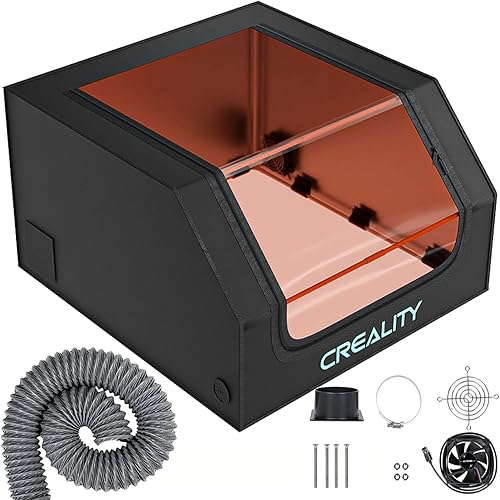
The 700 x 720 x 400 mm cover gives many Creality owners room for a laser engraver and a rotary roller. Its enclosed design, viewing window, exhaust fan and pipe cover the main needs of an indoor setup.
Pros
- Room for a rotary roller
- Smoke and dust ventilation
- Large viewing window
Cons
- Installation needs careful pipe placement
- Check machine dimensions before ordering
The Cregrant3D Creality Laser Engraver Enclosure is the best overall choice for owners who want a roomy cover around a desktop machine. Its 700 x 720 x 400 mm size gives you working space for many popular laser engravers and enough height for a rotary roller.
The enclosure has a transparent viewing design that filters blue light, so you can watch the engraving area without opening the cover. That matters when you need to check alignment or progress during a job.
Its enclosed design helps isolate smoke, odors and noise while the built-in exhaust fan and pipe move smoke and dust away from the work area. For a separate system, see DIY laser fume extraction.
The cover is also described as fireproof and dustproof.
Installation needs care around the two-way and three-way pipe connections. Press the pipe tightly against the connecting rods without putting excessive pressure on the cover body.
Choose this model when you want a balanced combination of size, viewing access and ventilation. Check your machine's full footprint before ordering, especially if you plan to use a rotary roller.
Creality Laser Engraver Enclosure 2.0: Best for high-speed ventilation
- 720 x 720 x 400 mm size
- 4000 RPM ventilation fan
- Dual-window design
- Foldable flame-retardant cover
This Creality Falcon enclosure gives you a 720 x 720 x 400 mm space, a 4000 RPM fan and a foldable frame. It suits owners who want extra width and a strong focus on smoke, particle and odor extraction.
Pros
- Largest footprint in this group
- 4000 RPM ventilation fan
- Foldable for storage
Cons
- Confirm clearance for your machine and cables
- The larger footprint needs more floor space
The Creality Laser Engraver Enclosure 2.0 is best for owners who want a wider square workspace and a high-speed ventilation fan. Its 720 x 720 x 400 mm size gives it the largest stated footprint in this group.
A 4000 RPM ventilation fan helps extract smoke, particles and odors during engraving. The closed design also helps isolate operating noise, which can make the work area more comfortable.
The dual-window design uses blue-light-blocking PVC material for viewing the engraving process. You can observe the machine while keeping the cover closed.
The frame uses high-strength steel pipes, while the cover uses flame-retardant fabric. The foldable assembly design helps when you need to store the enclosure after a project.
Pick it if you have enough table or floor space for a 720 mm square enclosure. Measure around the complete machine, then check how the ventilation pipe will reach its intended outlet.
Creality Laser Engraver Enclosure: Best for foldable smoke control
- 700 x 720 x 400 mm size
- Exhaust fan and pipe
- Flame-retardant material
- Foldable design
This Creality cover combines a 700 x 720 x 400 mm interior with a vent, pipe and foldable frame. It is a practical match for owners who need smoke control but must store the enclosure between projects.
Pros
- Foldable for storage
- Light-filtered viewing window
- Room for a rotary roller
Cons
- Measure your machine before setup
- The vent still needs a suitable exhaust path
The Creality Laser Engraver Enclosure is a strong choice for foldable smoke control around Creality, xTool and other laser engravers. It uses a 700 x 720 x 400 mm interior, so it offers nearly the same working size as the top Cregrant3D pick.
Its flame-retardant material is described as able to withstand temperatures up to 1000°C. The enclosure also helps isolate smoke, odors, noise, water and dust during operation.
The transparent viewing window filters blue light and lets you observe the engraving process without lifting the cover. An exhaust fan and pipe help expel smoke and dust from inside the enclosure.
The foldable design is useful if your engraving area also serves another purpose. It is also described as lightweight and easy to carry, which helps when you need to move it between storage and the work table.
Choose this model if storage matters as much as ventilation. The fan still needs a clear exhaust route, so plan that route before assembling the cover.
Cregrant3D Skouphy Updated Integrated Laser Engraver Enclosure: Best for built-in lighting
- 720 x 720 x 400 mm size
- 5-watt LED light strip
- 4500 RPM ventilation fan
- Integrated bottom cover
The updated Skouphy enclosure adds a 5-watt LED light strip, integrated bottom cover and 4500 RPM ventilation fan to a 720 x 720 x 400 mm tent. It suits owners who want better visibility during engraving.
Pros
- Fastest stated fan speed here
- Built-in LED lighting
- Integrated bottom cover
Cons
- Confirm the screw-in installation area
- Check that the 720 mm width fits your workspace
The Cregrant3D Skouphy Updated Integrated Laser Engraver Enclosure is best for owners who want built-in light during engraving. It measures 720 x 720 x 400 mm and includes a 5-watt LED light strip for clearer visibility inside the cover.
The integrated bottom cover reduces gaps where smoke may escape from below. Its ventilation system uses a 4500 RPM fan to extract smoke, particles and odors during work.
The thickened PVC visual window filters blue light from the engraving area. This gives you a way to monitor progress while the cover remains closed.
The enclosure uses aluminum mold Oxford cloth and fiber support rods. Those materials are described as reducing weight while improving support strength, and the frame is designed for installation and carrying.
Choose it when lighting is a daily need, such as a dim workbench or detailed engraving setup. Confirm the 720 mm width and the screw-in installation area before setting it up.
Creality Laser Engraver Enclosure 2.0 with Vent: Best for the classic Creality setup
- 720 x 720 x 400 mm size
- 4000 RPM ventilation fan
- Blue-light-filtering viewing window
- Foldable flame-retardant cover
This Creality Enclosure 2.0 has the same 720 x 720 x 400 mm size as the larger picks, plus a 4000 RPM fan, pipe and filtered viewing window. It fits buyers who want a straightforward enclosure with a square footprint.
Pros
- Large working area
- Foldable design
- Room for a rotary roller
Cons
- Confirm the exhaust route first
- Needs workspace for its 720 mm width
The Creality Laser Engraver Enclosure 2.0 with Vent is the best straightforward choice for a classic Creality setup with a large square cover. Its 720 x 720 x 400 mm size leaves room for many desktop engravers and a rotary roller.
The enclosure uses a light-filtered viewing window that helps you observe the work area while filtering blue light. Its flame-retardant material is described as able to withstand temperatures up to 1000°C.
A 4000 RPM fan and pipe help exhaust smoke and dust. The closed cover also helps isolate noise, smoke and odors generated during engraving or cutting.
The frame requires only a few installation steps and the enclosure folds for storage. The design is also described as lightweight and easy to carry, which suits a shared craft room.
Pick it if you want the core features of the Creality 2.0 design without built-in lighting. Read How Does a Laser Engraver Work? to understand why ventilation and a closed viewing area matter.
How to choose a Creality laser engraver enclosure by size
The right size is the smallest enclosure that safely fits your full working setup with room for cables and ventilation. The products here use either a 700 x 720 x 400 mm or 720 x 720 x 400 mm footprint.
Measure these areas before choosing:
- The assembled laser engraver
- Any rotary roller or other attachment
- Cable bends and power connections
- The height needed to open or adjust the machine
- The table or floor area available for the cover
- The route from the exhaust port to its outlet
A 20 mm difference in width may matter on a crowded bench. The 720 mm models offer more width, but they also need more open space around the enclosure.
For a larger machine or a setup with extra accessories, compare this guide with Best Large Laser Engraver Enclosures. A fiber laser has different enclosure needs, so see How to Choose a Fiber Laser Engraver Enclosure before using a diode-laser cover for that type of machine.
Which ventilation features matter most?
The most useful ventilation setup is a fan and pipe that match your workspace and have a clear route for exhausting smoke. A higher stated fan speed may be useful, but it does not replace careful placement and a suitable outlet.
That route matters most in a small room. When the pipe is short and direct, the fan has an easier path for moving smoke, particles and odors out of the enclosure.
The updated Skouphy enclosure lists a 4500 RPM fan, while the Creality 2.0 models list 4000 RPM fans. The other picks also include exhaust systems, but their data does not state a fan speed.
Use those figures as a guide to the stated performance, not as a promise about every material or job. Different materials create different amounts of smoke, so the exhaust path still needs to suit the work you plan to do.
Keep the pipe route as short and direct as your workspace allows. A long or sharply bent route can make the setup harder to manage and may leave smoke inside the cover for longer.
Avoid crushing the pipe or pressing hard against the cover frame, since the first Cregrant3D model specifically calls for careful pressure during installation. Press the pipe connections firmly against the connecting rods, but do not force the cover body out of shape.
Plan where the pipe will end before you assemble the frame. The outlet should be placed so smoke is moved away from the work area and not sent back toward the room.
Check the fan and pipe before each session. A blocked pipe, a loose connection or a kink in the hose can reduce airflow and let smoke build up inside the enclosure.
An enclosure helps contain smoke, particles and odors, but it should not be treated as the only safety measure. Use the machine according to its instructions, keep the work area clear and choose materials suitable for laser engraving.
The closed cover also helps isolate noise during operation. That can make a longer job more comfortable, but it does not remove the need to stay aware of the machine while it runs.
For indoor use, ventilation works best when the cover stays closed during the job. Opening the cover early can release smoke that the fan was still working to clear.
Store the pipe and fan parts with the frame so they are ready for the next setup. Keeping them together reduces the chance of a missing connector or a damaged hose.
Are viewing windows and built-in lights useful?
A viewing window lets you check progress without opening the enclosure, while built-in lighting helps you see the work area in a darker room. The products here use transparent or dual-window designs that filter blue light.
That matters during longer jobs, when opening the cover to check alignment can let smoke escape. A filtered window gives you a way to watch the work while the enclosure stays closed.
The Skouphy updated model adds a 5-watt LED light strip, making it the clearest choice for owners who want illumination built into the enclosure. The other models focus on filtered viewing windows rather than stated interior lighting.
Built-in light is most useful on a dim bench or in a room with poor overhead light. It can help you see small details, check placement and spot problems before a job moves too far.
A dual-window design can also help when you need to view the machine from different angles. That may suit owners who work standing at a table rather than sitting directly in front of the enclosure.
Keep the window clean and check it for damage before use. Dust, residue or scratches can make the view harder to read and may affect how well the filtered material works.
Wipe the window with a soft, clean cloth as directed for the product. Avoid harsh rubbing, since that can scratch the surface and make future checks less clear.
If the window becomes cloudy, torn or damaged, stop using the enclosure until it can be safely replaced or repaired. A damaged window may not provide the eye protection described for the cover.
Check the fabric around the window as well. Loose seams or stretched edges can create gaps where smoke or light may escape during a job.
For setup and operation basics, read How to Use a Laser Engraver?. The guide can help you think through machine placement, material handling and the checks to make before starting a job.
Use the window as part of those checks, not as a replacement for them. Look for smoke building up, material shifting or the rotary roller moving out of place before you pause the job.
Lighting and viewing features are about comfort as much as safety. They make it easier to monitor a job well, which helps you respond sooner if something needs attention.
Which Creality enclosure should you choose?
Pick the Cregrant3D Creality Laser Engraver Enclosure if you want the best balance of size, ventilation, viewing access and rotary-roller room. Choose the Creality Laser Engraver Enclosure 2.0 if you prefer a 720 mm square footprint and a stated 4000 RPM fan.
That first choice suits owners who want broad compatibility with popular desktop machines. The 700 x 720 x 400 mm size leaves room for a rotary roller, while the exhaust fan and pipe help move smoke and dust out of the work area.
The 2.0 model suits owners who want the extra width of a 720 mm square cover. Its dual-window design, foldable frame and flame-retardant fabric make it a practical option for a dedicated indoor setup.
Choose the Creality Laser Engraver Enclosure if foldable storage is a priority. Its 700 x 720 x 400 mm interior, exhaust fan and pipe give you smoke control without keeping a rigid box on the bench all the time.
Pick the Skouphy Updated Integrated Enclosure if a 5-watt LED light and 4500 RPM fan are more useful than a simpler setup. The integrated bottom cover and thickened PVC window also suit owners who want clearer visibility during a job.
The Creality Laser Engraver Enclosure 2.0 with Vent is a sensible fit for owners who want a large foldable cover with a filtered viewing window and ventilation. It suits a classic Creality setup where the main needs are size, smoke control and easy storage.
In every case, measure your complete Creality setup and plan the exhaust route before you order. Check the machine, rotary roller, cable bends and the space needed for the pipe to reach its outlet.
Also check the table or floor space for the full enclosure. A 720 mm model needs more open area than a 700 mm model, and the frame needs room to stand without crowding other tools.
Clean the viewing window, inspect the fabric and pipes, and confirm the fan connection before storage. Folding the cover only when it is dry helps keep it ready for the next project.
Our top 3 picks at a glance
-
1
Best for broad machine compatibility
Cregrant3D Creality Laser Engraver Enclosure
9.7/10 our score
See it on Amazon -
2
Best for high-speed ventilation
Creality Laser Engraver Enclosure 2.0
9.7/10 our score
See it on Amazon -
3
Frequently asked questions
What is the best Creality laser engraver enclosure?
The Cregrant3D Creality Laser Engraver Enclosure is the best overall match here because it combines a 700 x 720 x 400 mm size with an exhaust fan, pipe and large blue-light-filtering viewing window. Choose a 720 x 720 x 400 mm model if your machine or rotary roller needs more width.
Will a Creality laser engraver enclosure fit a Falcon machine?
Many of these enclosures are sized for large desktop diode laser setups, but fit depends on your machine's length, width, height and cable path. Measure the assembled engraver and any rotary roller, then compare those measurements with the enclosure's 700 or 720 mm width and 400 mm height.
Does a laser engraver enclosure remove smoke?
An enclosure can contain smoke and route it through a fan and pipe, but it still needs a sensible exhaust path. The picks here include ventilation systems, while the 2.0 models list fans rated at 4000 RPM and the updated Skouphy model lists a 4500 RPM fan.
Can you store a Creality enclosure after use?
Yes, the Creality Enclosure 2.0, Creality enclosure with vent and Creality enclosure with smoke isolation all list foldable designs. Fold the cover only after the work area is clear and the enclosure is dry, then store the frame where it will not be crushed.