6 Best Large Laser Engraver Enclosures (November 2026)
The best large laser engraver enclosures include the Cregrant3D Creality Laser Engraver Enclosure for broad machine compatibility, the Creality Laser Engraver Enclosure 2.0 for dual-window viewing, and the Skouphy Creality Laser Engraver Enclosure 2.0 for rotary-roller clearance.
On this page (4 sections)
The best large laser engraver enclosure for most makers is the Cregrant3D Creality Laser Engraver Enclosure, because its 700 x 720 x 400 mm space leaves room for many machines and a rotary roller.
If you need the largest footprint in this group, choose a 720 x 720 x 400 mm model.
Large enclosures matter when a standard cover leaves little room around the frame or workpiece. If a standard cover does not fit, building a laser engraver enclosure lets you plan around your machine.
A tight fit can make daily use awkward, even if the laser itself slides in.
You may need space for cables, the exhaust pipe and any accessories you use with the machine.
The extra height can also help when you add a rotary roller, while an exhaust fan and pipe help move smoke and dust away from the work area.
That headroom is useful for taller setups, but it is not a guarantee for every machine.
You should still measure your full setup, including the workpiece and the exhaust path, before you order.
For many home workshops, the main benefit is simpler day to day use rather than raw size alone.
You can watch the work through the viewing window, keep smoke and odors more contained, and avoid crowding the machine on every side.
Smaller covers can work well for compact lasers, yet they often leave less room once a roller or larger blank is added.
This group focuses on large covers because that extra clearance suits wider frames and more demanding projects.
If you're still deciding whether an enclosure fits your setup, read Do You Need an Enclosure for a Laser Engraver?.
For fiber systems, the design questions differ, so compare the advice in our guide to a fiber laser engraver enclosure.
Use those guides to check whether your needs are about fit, smoke control or safety before you pick a size.
Our picks at a glance
-
1
 Best for broad machine compatibility
Cregrant3D Creality Laser Engraver Enclosure
9.7/10 our score
See it on Amazon -
2
 Best for dual-window viewing
Creality Laser Engraver Enclosure 2.0
9.7/10 our score
See it on Amazon -
3
 Best for rotary-roller clearance
Skouphy Creality Laser Engraver Enclosure 2.0
9.5/10 our score
See it on Amazon
- 4
 Check it
Creality Laser Engraver Enclosure
Best for foldable storage - 5
 Check it
Skouphy Laser Engraver Integrated Enclosure with LED
Best for a sealed bottom and LED light - 6
 Check it
Creality Laser Engraver Enclosure 2.0 with Vent
Best for a lighter foldable cover
The best large laser engraver enclosures for different setups
The best large laser engraver enclosure depends on the clearance, ventilation and storage features your workspace needs. The first two picks tie at 9.7 because both offer large dimensions and useful smoke-control features.
Our score weighs specs, features and buyer feedback against what you're shopping for.
Cregrant3D Creality Laser Engraver Enclosure: Best for broad machine compatibility
- 700 x 720 x 400 mm space
- Exhaust fan and pipe
- Room for a rotary roller
- Blue-light-filtering viewing window
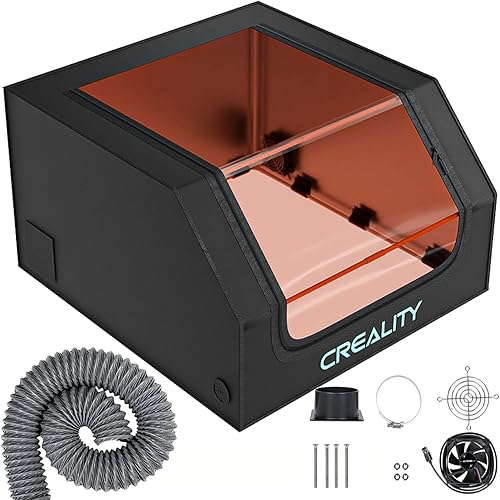
The large 700 x 720 x 400 mm cover suits many laser engravers and leaves enough height for a rotary roller. Its enclosed design helps isolate smoke, odors, noise and dust while the exhaust system moves smoke and dust out.
Pros
- Large working space
- Rotary roller clearance
- Exhaust fan and pipe
- Large viewing window
Cons
- Requires careful pipe installation
- Slightly less width and depth than the 720 mm models
The Cregrant3D Creality Laser Engraver Enclosure is the strongest general pick for a large diode laser setup. Its 700 x 720 x 400 mm space gives a broad working area, and the higher profile can accommodate a rotary roller.
The enclosed design helps isolate smoke, odors, noise, fire and dust during engraving or cutting. A built-in smoke ventilation system with an exhaust fan and pipe helps expel smoke and dust from inside the cover.
A transparent viewing window filters blue light and gives you a way to observe the engraving progress without opening the enclosure. That combination suits makers who want clearance and direct visibility in the same cover.
The cover is described as compatible with most laser engravers, including xTool D1, D1 Pro, Creality CR-Laser Falcon, Ortur, Sculpfun and Atomstack laser engravers. Measure your full setup before ordering, especially if the rotary roller or exhaust connection changes the footprint.
Choose this one for broad machine compatibility and a large viewing area. During installation, press the 2-way or 3-way pipe tightly against the connecting rods with care, as the cover instructions call for that step.
Creality Laser Engraver Enclosure 2.0: Best for dual-window viewing
- 720 x 720 x 400 mm space
- 4000 RPM ventilation fan
- Dual-window design
- Foldable assembly
This enclosure gives larger machines 720 x 720 x 400 mm of stated space. Its dual windows, 4000 RPM fan and foldable assembly suit makers who want clear viewing, smoke extraction and easier storage.
Pros
- Largest stated footprint in this group
- 4000 RPM fan
- Dual viewing windows
- Foldable design
Cons
- The product dimensions field is not useful for room planning
- Confirm the exact fit of your machine before ordering
The Creality Laser Engraver Enclosure 2.0 is a close match for the top pick, with 720 x 720 x 400 mm of space and a 4000 RPM high-efficiency ventilation fan. Its extra width and depth can help when a 700 mm cover feels tight.
The dual-window design supports observation from more than one viewing area, while blue-light-blocking PVC is used for eye protection. The closed design also targets noise, fumes and odors during operation.
Its flame-retardant fabric and high-strength steel pipes provide the stated enclosure structure. The foldable assembly is useful when the laser setup shares a workbench or needs to be stored between projects.
The enclosure is described as compatible with Creality Falcon machines and 95% of laser engraving machines. That broad compatibility statement still needs to be checked against your exact frame, workpiece and cable layout.
Pick this model when 720 mm width and depth, a 4000 RPM fan and dual windows matter most. For Creality-specific comparisons, see the best enclosures for Creality laser engravers.
Skouphy Creality Laser Engraver Enclosure 2.0: Best for rotary-roller clearance
- 720 x 720 x 400 mm space
- 4000 RPM ventilation fan
- Dual-view window
- High-strength steel pipe frame
The 400 mm height and 720 mm width and depth give larger setups room to work, including setups using a rotary roller. A 4000 RPM fan, flame-retardant fabric and dual-view window focus on smoke movement and observation.
Pros
- Large square footprint
- Rotary-roller clearance
- 4000 RPM fan
- Dual-view window
Cons
- It is one item, so a second cover is not included
- Industrial styling may not suit every workspace
The Skouphy Creality Laser Engraver Enclosure 2.0 suits makers who want the same 720 x 720 x 400 mm footprint with a high-strength steel pipe structure. The 400 mm height leaves room for setups that use a rotary roller.
Its 4000 RPM ventilation fan is designed to extract smoke, particles and odors. The flame-retardant fabric is described as waterproof and fireproof, while the closed design also isolates noise, fire, smoke and odors.
The dual-view window uses anti-blue-light PVC, so you can watch the engraving process through a larger viewing arrangement. The frame and fabric combination gives the enclosure a stable structure without changing the basic foldable tent format.
This is a practical choice for xTool D1, D1 Pro, Creality CR-Laser Falcon, Ortur, Sculpfun and Atomstack setups mentioned in the product information. Confirm the exact machine dimensions before choosing it for a large workpiece.
Choose it for rotary-roller clearance and a 4000 RPM fan. It is especially close to the Creality 2.0 option, so compare the viewing design and the brand you prefer.
Creality Laser Engraver Enclosure: Best for foldable storage
- 700 x 720 x 400 mm space
- Exhaust fan and pipe
- Blue-light-filtered viewing window
- Foldable design
This Creality cover balances large clearance with foldable storage. Its flame-retardant material, exhaust fan, pipe and blue-light-filtered window address the main needs of a large laser enclosure.
Pros
- Foldable for storage
- Exhaust fan and pipe
- Large viewing window
- 700 x 720 x 400 mm space
Cons
- Smaller footprint than the 720 x 720 mm options
- The stated height still needs to be compared with your machine and accessories
The Creality Laser Engraver Enclosure works well when you need large clearance but also want a cover that folds away. Its 700 x 720 x 400 mm space is slightly smaller in width and depth than the 720 x 720 mm options.
The flame-retardant material is described as able to withstand temperatures up to 1000°C. The enclosure also helps isolate smoke, odors, noise, water and dust during work.
An exhaust fan and pipe form the built-in smoke ventilation system. A large transparent viewing window filters blue light, giving you a clear way to watch the engraving process.
The cover is described as compatible with Creality, xTool and other laser engravers. It can be installed without other tools and folded for storage, which helps when your workspace has to serve more than one purpose.
Pick this model when foldable storage matters as much as clearance. Choose one of the 720 mm options instead if your machine or workpiece needs every extra millimeter of width and depth.
Skouphy Laser Engraver Integrated Enclosure with LED: Best for a sealed bottom and LED light
- 720 x 720 x 400 mm space
- Integrated bottom
- LED light strip
- 4000 RPM exhaust fan
The integrated bottom is designed to keep smoke from escaping below and collect dust and debris. An LED light strip, 4000 RPM fan, thickened PVC window and metal support rods add useful details for a large enclosed workspace.
Pros
- Integrated bottom
- LED light strip
- 4000 RPM fan
- Three-layer composite exhaust pipe
Cons
- Screw-in installation type
- The integrated bottom may make access and repositioning different from open-bottom designs
The Skouphy Laser Engraver Integrated Enclosure with LED is the best fit when you want an integrated bottom and built-in light. Its 720 x 720 x 400 mm space gives it the same large footprint as the biggest covers here.
The integrated bottom is designed to prevent smoke from escaping below and to collect dust and debris during engraving. That construction differs from a cover that leaves the base more open, so consider how you access and reposition your machine.
A 4000 RPM exhaust fan moves smoke, while the three-layer composite exhaust pipe is designed to reduce smoke and dust adhesion inside the pipe. The LED light strip adds brightness for observing the carving process.
The cover uses aluminum, Oxford cloth and iron, with upgraded metal support rods for a more stable frame. Its thickened PVC viewing window filters blue light, and the foldable assembly saves space when stored.
Choose this one for bottom coverage, LED lighting and a large square footprint. The screw-in installation type makes careful setup planning worthwhile before you place the machine inside.
Creality Laser Engraver Enclosure 2.0 with Vent: Best for a lighter foldable cover
- 720 x 720 x 400 mm space
- Fan and pipe
- Blue-light-filtering viewing window
- Foldable storage
This 720 x 720 x 400 mm enclosure gives large machines generous stated clearance while weighing 3.7 lb. The foldable cover, fan, pipe and blue-light-filtering window make it suited to makers who move or store their setup.
Pros
- 3.7 lb stated weight
- Foldable storage
- Large viewing window
- Fan and pipe included in the design
Cons
- Lower score than the other 720 mm options
- Confirm the fit around your machine and workpiece before ordering
The Creality Laser Engraver Enclosure 2.0 with Vent is a lighter option for makers who need large clearance and foldable storage. It has 720 x 720 x 400 mm of space and a stated weight of 3.7 lb.
The built-in ventilation system uses a fan and pipe to expel smoke and dust during engraving or cutting. Its transparent viewing design filters blue light, so you can observe progress without opening the cover.
The enclosure is described as compatible with Creality Falcon machines and 95% of laser engraving machines. It also targets noise from the laser engraver's cooling fans through its protective cover design.
A few installation steps are needed, and the cover can be folded for storage. That makes it useful for a portable or shared workspace where a permanent enclosure would take up too much room.
Choose this model when a lightweight foldable cover is more important than the higher scores of the other 720 mm picks. Compare the full setup dimensions before ordering, including the machine, workpiece and exhaust path.
How to choose a large laser engraver enclosure
Choose by the complete working footprint, not just the laser frame's outside dimensions. A large laser engraver enclosure must also leave room for a rotary roller, cables, the workpiece and the exhaust connection.
A grid mat for a laser engraver can also be part of the work-area setup.
Which enclosure has the most useful clearance?
The 720 x 720 x 400 mm models provide the largest stated width and depth in this group. That includes the Creality Laser Engraver Enclosure 2.0, the Skouphy Creality Laser Engraver Enclosure 2.0, the Skouphy integrated enclosure and the Creality 2.0 with Vent.
The 700 x 720 x 400 mm covers are only narrower in one measurement. They can still fit many larger diode laser setups, especially when your machine does not need the extra 20 mm of width.
Measure the machine with every accessory installed. A rotary roller can change the height and usable floor area, so do not measure only the laser head or base frame.
How much ventilation do you need?
An exhaust fan and pipe are central features for smoke and dust control. The Creality 2.0 and both Skouphy models in the 720 mm group specify 4000 RPM fans, while the other models describe a built-in fan or smoke ventilation system without giving a speed.
The enclosure can help contain smoke and odors, but the complete ventilation path still matters. Plan where the pipe will go before you assemble the cover, and keep the connection secure during installation.
If you need ventilation hardware, compare laser engraver vent kits.
A sealed or integrated bottom changes how smoke and dust are contained. The Skouphy integrated model is the clearest choice for that design because its bottom is described as completely sealed.
Do viewing windows matter?
A large viewing window lets you observe the engraving without opening the enclosure. Several picks also describe blue-light filtering, including the Cregrant3D, Creality and Skouphy models.
Dual windows may make observation easier around a large setup. The Creality 2.0 and Skouphy Creality 2.0 use dual-window designs, while the other picks describe a large or transparent viewing area.
Viewing access does not replace safe operating practices. Follow the laser engraver and enclosure instructions, and keep the cover positioned as intended while the machine is working.
Which features help in a small workspace?
Foldable construction helps when the enclosure must be stored between projects. The Creality Laser Engraver Enclosure, Creality Laser Engraver Enclosure 2.0, Skouphy Creality Laser Engraver Enclosure 2.0 and Creality Laser Engraver Enclosure 2.0 with Vent describe foldable designs.
The integrated-bottom Skouphy model also uses a foldable assembly, while adding an LED light strip and metal support rods. Its bottom may suit a fixed work area better than a setup that needs frequent repositioning.
Before buying, measure the storage location as well as the workbench. A cover that fits around the machine may still be awkward to fold or store if the nearby space is narrow.
Large laser engraver enclosure setup and care
Set up the enclosure on a stable surface with enough room to connect the exhaust pipe without pressing hard against the cover.
Check the frame, windows, fan and pipe before placing the laser inside.
A careful dry layout helps you spot a bent pipe, a loose joint or a window that is already scratched or cloudy.
Route the exhaust path first on paper or with a spare length of material, so you know where the pipe will turn.
It helps to leave a little slack, since a pipe pulled tight can press on the cover and make the fit worse.
Place the laser inside only after the frame feels square and the fabric sits without deep folds around the viewing area.
Keep the viewing area clear so you can monitor progress.
Wipe marks, dust and smoke residue can make a window hard to see through after a few jobs.
Clean it with a soft cloth and a product suitable for the window material, following the care guidance for your model.
Dust can collect around the machine and inside the enclosure, so remove residue according to the enclosure and laser engraver instructions.
Pay special attention to corners, seams and the area near the exhaust connection, where loose material often settles.
Empty the space regularly rather than letting layers build up over many sessions.
Check the fan and pipe from time to time to make sure they remain clear and firmly connected.
If your setup is folded away between projects, store the cover in a dry place and avoid sharp creases where you can.
Before the next use, unfold it fully and check that the frame, windows and ventilation parts are undamaged.
Do not assume that a larger enclosure fits every large-format machine.
Our guides to the Best Laser Engraver For Large Projects and Best Large Format Laser Engraver can help you match the enclosure to the machine and workpiece.
Those guides are also useful when a rotary roller, taller gantry or wider blank changes the space you need.
Which large laser engraver enclosure should you choose?
Choose the Cregrant3D Creality Laser Engraver Enclosure if you want the best balance of broad compatibility, rotary-roller clearance, viewing space and ventilation.
Choose the Creality Laser Engraver Enclosure 2.0 if you want 720 x 720 x 400 mm clearance, dual windows and a 4000 RPM fan.
Those two choices cover most needs, but the rest of the group suits different priorities.
Pick the Skouphy Creality model for similar clearance with a high-strength steel pipe frame.
It suits makers who want the 720 mm footprint and value a firm frame around the fabric cover.
Choose the Creality cover with vent for foldable storage, the integrated Skouphy model for a sealed bottom and LED light, or the lighter Creality 2.0 with Vent for easier movement.
The vent model fits a shared bench because it can be folded when the laser is not in use.
The integrated Skouphy model suits a fixed work area where a sealed bottom and better lighting help with dust control and observation.
The lighter Creality 2.0 with Vent is worth a look if you move the setup often or store it between jobs.
That lighter weight may make folding and repositioning easier, though you should still check the fit with your machine installed.
The right best large laser engraver enclosure is the one that fits the complete machine and workpiece with space left for safe ventilation.
Measure first, then compare the fan, viewing window, bottom design and storage needs.
Start with width and depth, then check height with any rotary roller or accessory fitted.
After that, think about how you work day to day.
If you watch the laser closely, a larger or dual viewing area may matter more than a small gain in footprint.
If smoke is your main concern, give more weight to the fan, pipe and bottom design.
If your bench is shared, foldable storage and lighter weight should move up your list.
Once those points are clear, the choice becomes much simpler and you can pick the model that matches the way you actually use the machine.
Our top 3 picks at a glance
-
1
Best for broad machine compatibility
Cregrant3D Creality Laser Engraver Enclosure
9.7/10 our score
See it on Amazon -
2
Best for dual-window viewing
Creality Laser Engraver Enclosure 2.0
9.7/10 our score
See it on Amazon -
3
Best for rotary-roller clearance
Skouphy Creality Laser Engraver Enclosure 2.0
9.5/10 our score
See it on Amazon
Frequently asked questions
What size should a large laser engraver enclosure be?
A large laser engraver enclosure should leave room for the machine, cables, ventilation connection and the workpiece you plan to use. The picks here range from 700 x 720 x 400 mm to 720 x 720 x 400 mm.
Measure the machine with its rotary roller or other accessories installed, then compare those measurements with the enclosure's usable interior.
Is a 720 x 720 x 400 mm enclosure large enough?
A 720 x 720 x 400 mm enclosure can suit many larger diode laser setups, including some setups with a rotary roller. It is not automatically large enough for every frame or workpiece.
Check the machine footprint, accessory height and the space needed for the exhaust connection before choosing one.
Do large laser engraver enclosures remove smoke?
These enclosures use exhaust fans and pipes to move smoke and dust out of the enclosed area. The Creality Laser Engraver Enclosure 2.0 and Skouphy Creality Laser Engraver Enclosure 2.0 specify 4000 RPM fans.
Use the ventilation system as designed and follow the machine and enclosure instructions for safe operation.
What should you check before buying a large laser enclosure?
Check the enclosure's width, depth and height against the complete setup, including a rotary roller, cables and the exhaust connection. Also compare the viewing window, fan, pipe, foldable design and bottom construction.
For more context, read our guide to choosing a laser engraver enclosure.