8 Best Vent Kits for Laser Engravers (November 2026)
The best laser engraver vent kits include the UniTak3D Smoke Exhaust Kit with Efficient Ventilation for complete enclosure exhaust, the Flamorrow Window Vent Kit with Outdoor Vent for sliding window exhaust, and the Daisypower Dryer Vent Window Kit for standard 4-inch ducts.
On this page (6 sections)
The best laser engraver vent kit for most enclosure setups is the UniTak3D Smoke Exhaust Kit, because it combines an 8025 4500RPM fan with an exhaust pipe.
A good vent system has three parts: a fan that moves air, a duct that matches the fan outlet, and a final outlet that sends exhaust away from the work area.
If one part does not match the others, smoke can leak back into the room even when the fan is running.
The right combination depends on your enclosure opening, duct size and window position.
Some buyers already own a fan and only need a window panel, while others need a complete fan and pipe set.
Flamorrow suits a sliding-window outlet for a 3-inch or 4-inch hose. Daisypower suits a standard 4-inch duct, while HOCENWAY offers adjustable airflow and filtration.
For a new setup, measure the enclosure opening and check the duct diameter you can fit.
Confirm where the exhaust will leave the room, because a fan kit alone does not solve the final outlet.
UniTak3D suits buyers who want smoke, dust and odor extraction without adding a separate fan.
Its pipe material is described as flame-retardant, which is relevant near equipment that produces heat.
This kit does not replace a window outlet or a filter system, so plan a safe place for the duct to end.
If you need the fan rather than outlet hardware, compare our Best Fume Extractor For Laser Engraving guide.
For a broader setup plan, see How to Vent a Laser Engraver?.
Use the fan guide to move air from the enclosure. Use the venting guide to plan the full path to the window or other outlet.
Our picks at a glance
-
1
 Best for complete enclosure exhaust
UniTak3D Smoke Exhaust Kit with Efficient Ventilation
9.7/10 our score
See it on Amazon -
2
 Best for sliding window exhaust
Flamorrow Window Vent Kit with Outdoor Vent
9.6/10 our score
See it on Amazon -
3

- 4
 Check it
HOCENWAY Upgrade 3-Layers Filter System Smoke Exhaust
Best for filtered enclosure airflow - 5
 Check it
Cregrant3D Skouphy Updated Integrated Laser Engraver Enclosure
Best for an integrated enclosure - 6
 Check it
HOCENWAY Upgrade Speed Control 3 Inch Inline
Best for adjustable 3-inch airflow - 7
 Check it
YOOPAI Fan Fume Extraction Kit for 3D
Best for compact USB control - 8
 Check it
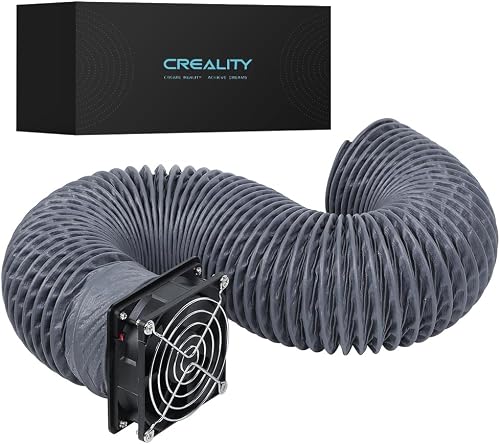
Creality Official Fume Extraction Kit
Best for Creality enclosure interfaces
How we chose the best laser engraver vent kit options
The best laser engraver vent kit should match the path from your enclosure to the final outlet.
A kit that looks strong on paper will not help if its duct size or mounting method does not fit your enclosure.
We compared fan speed, duct diameter, airflow, window adjustment, filtration and installation requirements.
Those details decide how the kit connects, how much air it can move and where exhaust can go.
We also considered the type of buyer each product suits.
A fan-and-pipe kit suits a new enclosure, while a window panel suits a setup where the fan and duct are already installed.
Some buyers need filtration inside the enclosure, and others need a stronger inline fan or a full enclosure with lighting. For an xTool AP2 purifier, see xTool AP2 filter replacement steps.
That is why this roundup mixes fan kits, window panels, a filtered system, an inline fan and one integrated enclosure.
Each option solves a different part of the exhaust problem, so the best pick depends on what you already own.
Price was not the deciding factor. We focused on specs, features and buyer feedback for the shopping task.
Our score weighs specs, features and buyer feedback, ordered from highest to lowest across Handyloom.
A high score means the product covers its intended job well, based on the information available for that job.
We flag trade-offs where they matter in daily use, such as a cut opening, printed adapter or separate window outlet.
Read the pros and cons as part of the score, not as fine print.
| Product | Best for | Fan | Use | Weight | Our score |
|---|---|---|---|---|---|
| UniTak3D Smoke Exhaust Kit with Efficient Ventilation | complete enclosure exhaust | 8025, 4500RPM | Laser engraver and 3D printer enclosures | 1.39 lb | 9.7 |
| Flamorrow Window Vent Kit with Outdoor Vent | sliding window exhaust | 9.6 | |||
| Daisypower Dryer Vent Window Kit | standard 4-inch ducts | 9.4 | |||
| HOCENWAY Upgrade 3-Layers Filter System Smoke Exhaust | filtered enclosure airflow | 9.2 | |||
| Cregrant3D Skouphy Updated Integrated Laser Engraver Enclosure | an integrated enclosure | 9.2 | |||
| HOCENWAY Upgrade Speed Control 3 Inch Inline | adjustable 3-inch airflow | 8.9 | |||
| YOOPAI Fan Fume Extraction Kit for 3D | compact USB control | 8.7 | |||
| Creality Official Fume Extraction Kit | Creality enclosure interfaces | 8.2 |
Best laser engraver vent kits for enclosure exhaust
The top picks cover different installation jobs. UniTak3D is the most complete standalone exhaust kit, while Flamorrow and Daisypower focus on the window side of the system.
UniTak3D Smoke Exhaust Kit with Efficient Ventilation: Best for complete enclosure exhaust
- 4500RPM 8025 fan
- Flame-retardant exhaust pipe
- Low-noise operation
- Fits laser engraver and 3D printer enclosures
The UniTak3D combines an 8025 fan and pipe in one exhaust kit. It suits an enclosure that needs smoke, dust and odor extraction without adding a separate fan.
Pros
- Complete fan and pipe setup
- Flame-retardant pipe material
- Compatible with laser engraver enclosures
Cons
- Does not replace a window outlet or filter system
- Measure the enclosure opening before installation
UniTak3D is the strongest all-around pick when you need a fan and pipe together. Its 8025 fan runs at 4500RPM, and the kit is designed for laser engraver and 3D printer enclosure use.
The exhaust pipe uses flame-retardant material, which matters when the duct passes close to equipment that may produce heat.
UniTak3D describes the fan as low-noise for homes, offices and studios.
The fan removes smoke and dust while helping cool equipment during longer operation.
Stable airflow can help limit heat buildup when a machine runs for an extended period.
Its compatibility with Bambu Lab A1 and A1 Mini enclosure covers may help if your setup uses one of those covers.
Check your enclosure opening size before installation, because a close fit makes sealing easier.
Set-up is described as simple, with no need for complex tools or professional skills.
Follow the instructions for your enclosure, then secure the pipe so it does not sag or pull loose.
Low-noise operation matters in a shared room, as a quiet fan makes it easier to keep exhaust running during a job.
This is an exhaust kit, not a complete venting system.
It does not provide a window panel or filter system, so plan the final outlet and any extra filtration separately.
Choose this kit for a simple fan-and-pipe starting point when you already know where the duct will go.
Flamorrow Window Vent Kit with Outdoor Vent: Best for sliding window exhaust
- Fits 3 in and 4 in hoses
- Adjusts from 16.5 to 47 in
- Louvered outdoor vent cover
- Includes 4-to-3 in adapter and sealing materials
Flamorrow is the strongest choice when your laser enclosure already has a fan and you need to route exhaust through a sliding window. Its adjustable panels cover a broad window range.
Pros
- Supports 3 in and 4 in ducts
- Adjustable horizontal or vertical panels
- Includes foam and aluminum sealing tape
Cons
- Requires a compatible exhaust fan and hose
- Measure the window before buying
Flamorrow is the best match for a sliding window outlet because its panels adjust from 16.5 to 47 inches.
The kit works with both 3-inch and 4-inch hoses, making it easier to match common enclosure and fan sizes.
Its outdoor vent cover uses louvers to help limit wind, rain, snow, dust and leaves entering the duct.
The louvers open and close as air flows through the vent, which helps when the outlet sits exposed to the weather.
The kit also includes a 4-to-3-inch adapter, aluminum tape, a clamp and self-adhesive foam sealing tape.
Those parts help seal the gap between the duct and the window panel and keep the hose from falling away.
Measure the window in its actual horizontal or vertical sliding position before choosing it.
A small error in opening width can leave a gap that lets in cold air or lets exhaust escape.
The panel solves the outlet and sealing problem, but you still need a fan and a compatible exhaust hose.
That makes it a good choice for buyers who already have a working fan setup.
In daily use, check the louvered cover after windy weather.
Keeping the louvers clear helps the duct exhaust properly and limits debris entering from outside.
Choose Flamorrow when your work area is near a window and you want more duct-size flexibility.
It is less useful if you need the fan itself, because this kit focuses on the outlet side.
Daisypower Dryer Vent Window Kit: Best for standard 4-inch ducts
- 4 in round exhaust outlet
- Adjusts from 16 to 47 in
- Louvered cover with screen
- Fits devices with a standard 4 in duct outlet
Daisypower fits a setup built around a standard 4-inch duct. The sliding panels suit many horizontal or vertical windows, while the outdoor cover helps keep weather and debris out.
Pros
- Wide 16 to 47 in window range
- Screened louvered outdoor cover
- Useful for laser engravers and exhaust blowers
Cons
- Less flexible than a kit that supports both 3 in and 4 in hoses
- Does not include the exhaust fan
Daisypower suits a setup built around a standard 4-inch duct outlet. Its sliding panels adjust from 16 to 47 inches, so it covers a similar window range to Flamorrow while keeping the connection focused on 4-inch exhaust.
The outdoor cover has louvers and a screen. That design helps keep wind, rain, snow, birds and rodents from entering the outlet while allowing air to flow through.
This window kit can serve laser engravers, exhaust blowers and other devices with standard 4-inch duct outlets. It can also suit dryers and portable air conditioner window seals where the same duct size is used.
Check that your fan, hose and enclosure all use the same size before buying. A mismatch at any connection can make sealing harder and reduce how well the system exhausts.
Set-up involves fitting the sliding panels to the window and sealing gaps with the included materials. Aluminum tape helps insulate the gap between the hose and vent cover, while the clamp helps prevent the hose from falling.
Self-adhesive foam sealing strip adds another layer of insulation around the window setup. Taking time to seal each gap helps keep the exhaust path directed where it should go.
Pick Daisypower when your existing system already uses 4-inch ducting. Choose Flamorrow instead if you need one window kit to support either 3-inch or 4-inch hose connections.
HOCENWAY Upgrade 3-Layers Filter System Smoke Exhaust: Best for filtered enclosure airflow
- 5000RPM fan
- 3-layer filter system
- Speed control power adapter
- 70 x 70 x 20 mm DC brushless fan
HOCENWAY adds adjustable airflow and three-layer filtration to an enclosure. It suits users who need an internal filter system and can make a suitable opening or print the required adapter.
Pros
- Three-layer filtration
- Adjustable fan speed
- Works with most enclosure tents
Cons
- May require cutting an enclosure opening
- Requires a printed plastic adapter to replace the steel fan bracket
HOCENWAY is the best choice here for a filtered enclosure system with adjustable airflow. Its 70 x 70 x 20 mm DC brushless fan reaches 5000RPM maximum and uses a speed-control power adapter with 3 to 12V output at 2A.
The three-layer filter system is intended to absorb larger dust particles and harmful gases. That makes it different from an exhaust-only fan, although it still needs a suitable enclosure opening and a sensible final exhaust plan.
The speed control feature lets you adjust airflow to match the job. Lower airflow may suit lighter work, while higher airflow can help when more smoke needs to be moved from the enclosure.
The product may work with most enclosure tents, but some users need to cut an opening. It also requires a printed plastic adapter to replace the steel fan bracket, so account for that extra setup step.
That printed adapter is an important planning point before ordering. You need access to a printer and the adapter file, and you should confirm the fit before relying on the system for a long job.
In daily use, the filter layers need attention over time. Check the condition of the filter as part of routine care, because a clogged filter can make airflow less effective.
Choose HOCENWAY if adjustable airflow and internal filtration matter most. It is not the quickest choice for a plug-and-route installation because the enclosure opening and printed adapter may need preparation.
Cregrant3D Skouphy Updated Integrated Laser Engraver Enclosure: Best for an integrated enclosure
- 720 x 720 x 400 mm enclosure
- 4500RPM ventilation fan
- 5-watt LED light strip
- Thickened PVC visual window
Cregrant3D is an enclosure and ventilation setup in one product. Its large size and integrated 4500RPM fan suit laser users who need a covered work area with built-in lighting.
Pros
- Integrated enclosure and fan
- Large visual window
- Fits many listed laser engraver models
Cons
- Takes more space than a standalone vent kit
- Check your machine dimensions before buying
Cregrant3D is an enclosure with an integrated ventilation kit rather than a small add-on fan. Its 720 x 720 x 400 mm size gives room for many laser engravers, and the higher enclosure size can accommodate a rotary roller.
The built-in 4500RPM fan is designed to extract smoke, particles and odors. That integrated design means the enclosure, fan and viewing window work as one setup rather than as separate parts.
A 5-watt LED light strip improves visibility during engraving. Good lighting makes it easier to watch the work area, especially when the PVC window is in place.
The thickened PVC visual window helps filter blue light from carved light sources. It also gives you a large area for observation without reaching inside the enclosure during a job.
The enclosure uses aluminum and fiber materials, with an integrated bottom cover intended to reduce smoke escape. The support rods are described as lightweight fiber material, which helps with setup and carrying.
The product is listed as suitable for models including xTool D1, D1 Pro, Creality CR-Laser Falcon, Ortur, Sculpfun and Atomstack laser engravers. Check your own machine and any rotary setup against the enclosure dimensions before buying.
Choose it when you need the enclosure, lighting and ventilation together. Measure your machine and any rotary setup first because this enclosure takes more space than a standalone duct fan.
HOCENWAY Upgrade Speed Control 3 Inch Inline: Best for adjustable 3-inch airflow
- 3-inch vent size
- 200 m³/h airflow
- Adjustable speed switch
- 30dB noise level
This HOCENWAY inline fan suits a 3-inch duct run where adjustable airflow matters. Its included 1.5 m pipe simplifies a short installation between an enclosure and outlet.
Pros
- Adjustable speed switch
- 200 m³/h stated airflow
- Included 1.5 m pipe
Cons
- Only fits a 3-inch vent size
- Larger and heavier than compact enclosure fans
HOCENWAY's 3-inch inline fan fits buyers who need a stronger duct fan with speed control. It uses a 75 mm, or 3-inch, vent, provides stated airflow of 200 m³/h and includes a 1.5 m pipe.
The fan has a 25W power rating, a 2600 R/min speed and a stated noise level of about 30dB. Its adjustable speed switch lets you change airflow rather than running at one fixed setting.
That control is useful when jobs produce different amounts of smoke. You can match the airflow to the work instead of using full speed for every session.
The metal detachable clamps support installation and access for cleaning the fan blades. The fan weighs 1.2 kg, so plan a secure position instead of leaving it suspended from a flexible hose.
The included 1.5 m pipe simplifies a short installation between an enclosure and outlet. A shorter, direct run is generally easier to manage than a long hose with several bends.
In daily use, keep the fan blades clean as part of routine care. Dust and residue can build up over time, and the detachable design makes cleaning more straightforward.
Choose it for a 3-inch duct path where adjustable airflow is more important than a small enclosure fan. For a quieter compact setup, compare our Best Exhaust Fan For Laser Engraving guide.
YOOPAI Fan Fume Extraction Kit for 3D: Best for compact USB control
- 4000RPM exhaust fan
- USB power switch
- 70 mm hose diameter
- Hose extends up to 2 m
YOOPAI is a compact choice for an enclosure with a 70 mm opening and a nearby USB power source. Its retractable hose helps when the outlet is not directly beside the machine.
Pros
- One-button USB control
- Retractable hose
- Low-noise exhaust fan
Cons
- May require opening an enclosure without a side opening
- Hose diameter is smaller than a standard 4-inch duct
YOOPAI suits a compact enclosure with a 70 mm hose diameter and a nearby USB power source. Its 4000RPM fan uses a USB power switch, so you can turn it on or off with one button.
The retractable hose extends up to 2 m. That extra length helps when the outlet is not directly beside the enclosure, while the telescoping design can save space when the hose is shortened.
YOOPAI is intended to exhaust odors, smoke and dust from a 3D printer enclosure. It can also suit a laser cover where the same 70 mm connection is available.
If your laser cover has no side opening, the product requires you to create one according to the kit's size. Measure the kit before cutting, and check that the opening will not weaken the cover or block airflow.
Set-up involves aligning the part with the cover and fixing it with screws. Keep the hose route as direct as possible, because extra bends and length can make exhaust less effective.
In daily use, the one-button control keeps operation simple. You can switch the fan on at the start of a job and off when the enclosure clears.
Choose this kit when simple USB control and a flexible hose matter. Check the 70 mm connection carefully because it is smaller than a standard 4-inch duct.
Creality Official Fume Extraction Kit: Best for Creality enclosure interfaces
- 4000RPM ventilation fan
- USB power connector
- Hose extends up to 2 m
- Compatible with Ender Plus enclosure fan interface
Creality's kit fits users who already have an Ender Plus enclosure with a fan interface or a compatible laser enclosure. The USB switch and extendable hose keep operation simple.
Pros
- Official Creality accessory
- USB power control
- Compatible with a listed Ender Plus interface
Cons
- May require cutting an opening on other enclosures
- 70 mm hose limits duct matching
Creality's official kit is the best fit for a compatible Creality enclosure interface. It uses a 4000RPM ventilation fan, a USB power connector and a hose that extends up to 2 m.
The kit is compatible with the Ender Plus 3D Printer Enclosure with a fan interface and with laser engraver enclosures. Its hose diameter is 70 mm, so matching the opening is essential before installation.
Creality describes the kit as a way to extract smoke, particles and odors from an enclosure. The fan is designed to move air from inside the cover and send it through the hose.
The one-button USB control keeps daily operation simple. You do not need a separate controller, which helps when the kit is used in a compact workspace.
The extendable hose helps with longer routing when the outlet is farther from the enclosure. A retractable design also helps save space when the full length is not needed.
If your enclosure does not have a fan interface, you may need to open it yourself. That extra work can be avoided by choosing a kit made for your exact enclosure or duct size.
Choose it when your enclosure already has the compatible interface. If it does not, a purpose-built opening or a different duct size may be easier.
How to match the duct, fan and window outlet
Match the smallest connection in the system before you buy.
A 4-inch window outlet does not make a 70 mm fan compatible, and a 3-inch fan needs an adapter or outlet designed for that size.
Flamorrow offers the broadest window-side flexibility because it supports 3-inch and 4-inch hoses.
Daisypower is simpler when every part of your system uses a standard 4-inch duct.
For 70 mm systems, YOOPAI and Creality are the closest matches in this group.
HOCENWAY's inline model uses a 75 mm, or 3-inch, vent, so it belongs with a 3-inch duct path.
HOCENWAY's filter system uses a 70 x 70 x 20 mm fan, which is a different mounting job from a duct fan.
That kit needs an enclosure opening and a printed adapter, so it is not a simple window outlet.
Keep the duct run as direct as your room allows.
Long or sharply bent flexible hose can make routing harder, and a loose connection can send exhaust back into the work area.
Seal each joint where the hose meets the fan, the enclosure and the window panel.
Tape, clamps and foam strips are not just extras, because gaps can undo the work of a strong fan.
Place the final outlet where exhaust can leave without blowing back toward doors or open windows.
Weather covers and louvers help protect the outlet, but placement still matters.
Measure the enclosure opening, hose diameter and window width before ordering.
Those three numbers will tell you more about compatibility than fan speed alone.
How to set up a laser engraver vent kit
Start by measuring the enclosure opening, the duct diameter and the window opening. Confirm whether the fan mounts directly to the enclosure or whether you need to cut an opening or print an adapter.
Place the fan where it can pull air from the enclosure and push it toward the final outlet. Use the supplied connection method for the chosen kit, then secure loose hose sections so they do not fall away during operation.
Seal the window panel around the duct and frame. Flamorrow includes aluminum tape and foam sealing tape, while Daisypower uses aluminum tape, a clamp and self-adhesive foam sealing strip for its window setup.
Keep the outlet away from doors, open windows used for fresh air and areas where people spend time. For a build that uses separate parts, see our guide to a diy laser engraver fume extractor.
Do you need a filter as well as an exhaust fan?
A filter can help when an enclosure needs internal particle and gas filtration, but it does not remove the need to plan the airflow path.
HOCENWAY's three-layer system is the clearest filter-focused option in this roundup.
An exhaust-only system may be simpler when you can route the duct outdoors through a suitable window outlet.
A fan and duct move smoke out of the enclosure, while a filter tries to capture particles and gases before they spread.
A filter system may suit a more contained workspace, but check the enclosure opening, adapter needs and filter replacement plan before installation.
HOCENWAY requires a printed plastic adapter and may need a cut opening in the enclosure.
That extra setup affects how quickly you can start work.
If you need a quick start, a fan-and-pipe kit paired with a window outlet may be easier to plan.
For a separate air-cleaning approach, compare our Best Smoke Purifier For Laser Engraving guide.
A purifier can help clean room air, but it works differently from a duct that sends exhaust outside.
The purifier, fan and duct should work together rather than compete for airflow inside a closed enclosure.
Think about where you spend time while the machine runs.
A filter may help where outdoor routing is hard, while outdoor exhaust may suit a workspace near a suitable window.
Filters also need checking and replacement as they load up.
A system you will maintain is more useful than a complex setup that gets ignored.
Which laser engraver vent kit should you choose?
Pick the UniTak3D if you need a complete 4500RPM fan-and-pipe kit for a laser engraver enclosure. Pick Flamorrow if your main problem is routing a 3-inch or 4-inch hose through a sliding window.
Choose Daisypower for a standard 4-inch outlet, HOCENWAY's filter system for adjustable filtered enclosure airflow, and Cregrant3D when you need a larger enclosure with lighting and integrated ventilation.
For a 3-inch duct path, HOCENWAY's inline fan offers adjustable speed and stated 200 m³/h airflow. For a compact 70 mm connection, YOOPAI and Creality provide 4000RPM fan kits with USB control.
Measure first, match every connection and plan where the exhaust will go. The best laser engraver vent kit is the one that fits the enclosure opening, moves air through a sealed path and ends at a suitable outlet.
Our top 3 picks at a glance
-
1
Best for complete enclosure exhaust
UniTak3D Smoke Exhaust Kit with Efficient Ventilation
9.7/10 our score
See it on Amazon -
2
Best for sliding window exhaust
Flamorrow Window Vent Kit with Outdoor Vent
9.6/10 our score
See it on Amazon -
3
Frequently asked questions
What is the best laser engraver vent kit?
The UniTak3D Smoke Exhaust Kit is the best laser engraver vent kit for a complete enclosure exhaust setup. It combines an 8025 4500RPM fan with an exhaust pipe and is designed for laser engraver enclosures.
Choose Flamorrow or Daisypower when your main need is a window outlet.
Do laser engraver vent kits need a window outlet?
A vent kit needs a safe place for exhaust to leave the work area. Flamorrow and Daisypower provide window outlet hardware, while fan kits such as UniTak3D, YOOPAI and Creality focus on moving air from an enclosure.
Match the duct size to the outlet before installation.
What duct size should a laser engraver vent kit use?
Choose the duct size that matches both the fan and the outlet. Flamorrow supports 3-inch and 4-inch hoses, Daisypower uses a standard 4-inch outlet, and HOCENWAY's inline fan uses a 3-inch vent.
YOOPAI and Creality use 70 mm hoses.
Can a laser engraver vent kit remove all fumes?
A vent kit can move smoke, dust and odors out of an enclosure, but it doesn't guarantee that every contaminant is removed. Use compatible materials, seal gaps, route exhaust outdoors when appropriate and follow your laser engraver and enclosure instructions.


