6 Best Laser Engraver Enclosures with Exhaust Fans (November 2026)
The best laser engraver enclosures with exhaust fans include the Cregrant3D Creality Laser Engraver Enclosure for rotary-roller setups, the Creality Laser Engraver Enclosure 2.0 for high-speed ventilation, and the Skouphy Laser Engraver Integrated Enclosure with LED for bright project viewing.
On this page (6 sections)
- The best laser engraver enclosure with exhaust fan picks
- What should you check before buying an enclosure with an exhaust fan?
- How much fan power or speed do you need?
- Are viewing windows and LED lights worth having?
- How should you set up and care for an enclosure?
- Which laser engraver enclosure with exhaust fan should you choose?
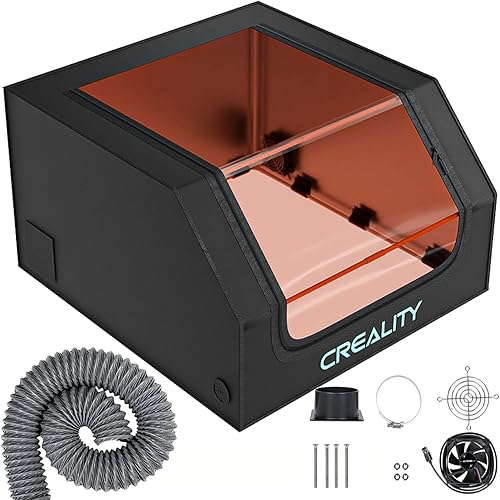
The best laser engraver enclosure with exhaust fan for most indoor workspaces is the Cregrant3D Creality Laser Engraver Enclosure. It combines a 700 x 720 x 400 mm space, an exhaust fan and pipe, a blue-light-filtering viewing window and enough height for a rotary roller.
That mix suits a broad range of diode laser owners. The height matters in daily use because a roller changes how you load cylindrical items and how you reach controls.
The viewing window also matters because you can check progress while keeping the cover closed.
Choose the Creality Laser Engraver Enclosure 2.0 if a stated 4,000 RPM fan and foldable storage matter most. Its dual windows and flame-retardant fabric give it a different feel from a basic folding tent.
The Skouphy and updated Cregrant3D models add integrated lighting, which helps when the cover blocks room light or you work in a dim corner. Their sealed bottom designs also help contain smoke and collect debris near the work area.
HOCENWAY suits mixed 3D printer and laser use. Its tall and narrow interior fits a different kind of setup, and it includes a removable filter membrane and a USB LED light.
Crafit is the better match for a permanent furniture-style station. It adds magnetic doors, storage, cable holes, a power strip and a 20-watt fan, but it needs a planned floor space.
We compared the dimensions, ventilation details, viewing features, materials and setup styles for these six enclosures. This guide focuses on workspace fit and smoke-routing features, not professional laser certification.
Before you choose, measure your machine, any rotary accessory and the space around cables and the exhaust pipe. If no ready-made cover fits, building a laser engraver enclosure lets you plan around your setup.
A cover that looks large enough on paper can feel tight once those parts are in place.
Think about how you work day to day as well. Some people fold a cover away between projects, while others want a station that stays set up.
Also consider where exhausted air will go. The pipe route should be clear and not crushed or bent sharply at the connection.
The right pick is the one that fits your machine, your room and your routine. Size, viewing and ventilation should work together rather than compete for attention.
Our picks at a glance
-
1
 Best for rotary-roller setups
Cregrant3D Creality Laser Engraver Enclosure
9.7/10 our score
See it on Amazon -
2
 Best for high-speed ventilation
Creality Laser Engraver Enclosure 2.0
9.7/10 our score
See it on Amazon -
3
 Best for bright project viewing
Skouphy Laser Engraver Integrated Enclosure with LED
9.4/10 our score
See it on Amazon
- 4
 Check it
Cregrant3D Skouphy Updated Integrated Laser Engraver Enclosure
Best for LED-lit portability - 5
 Check it
HOCENWAY 3-in-1 Multifunctional 3D Printer Enclosure Laser
Best for mixed machine use - 6
 Check it
Crafit Laser Engraver Enclosure Cabinet with Exhaust
Best for a permanent craft station
The best laser engraver enclosure with exhaust fan picks
These picks cover folding covers, integrated LED designs, a mixed-use 3D printer enclosure and a freestanding cabinet. The first two score highest because they offer broad work areas and useful ventilation details for common diode laser setups.
For fiber systems, see fiber laser enclosure guidance because enclosure needs can differ.
Our score weighs specs, features and buyer feedback against what you're shopping for. The products are arranged from highest score to lowest score.
Cregrant3D Creality Laser Engraver Enclosure: Best for rotary-roller setups
- 700 x 720 x 400 mm size
- Built-in smoke ventilation system
- Exhaust fan and pipe
- Large blue-light-filtering viewing window
The tall 700 x 720 x 400 mm enclosure gives many diode laser users room for a rotary roller. Its enclosed design, viewing window and exhaust system suit indoor workspace setup.
Pros
- Largest stated size among the tent-style picks
- Room for a rotary roller
- Includes exhaust fan and pipe
Cons
- Installation needs careful pipe placement
- No fan speed is stated
The Cregrant3D Creality Laser Engraver Enclosure is the best all-around choice when your machine needs a wide and fairly tall cover. Its 700 x 720 x 400 mm size gives you more working room than a compact cover, and the added height can accommodate a rotary roller.
The built-in smoke ventilation system helps move smoke and dust away from the engraving area through the included exhaust fan and pipe. The enclosed design also helps isolate noise, fire, smoke and odors during operation.
Its transparent viewing area filters blue light and lets you watch the engraving process without opening the cover. That matters when you need to check alignment or progress while keeping the enclosure closed.
The cover is described as compatible with many machines, including xTool D1 and D1 Pro, Creality CR-Laser Falcon, Ortur, Sculpfun and Atomstack engravers. Measure your machine and roller before ordering, because broad compatibility does not mean every setup has the same clearance.
The main trade-off is that the fan speed is not stated. During assembly, press the 2-way or 3-way pipe tightly against the connecting rods so the cover body is not placed under excessive pressure.
Choose this one for a larger folding enclosure with a rotary-roller-friendly height. For a wider comparison, see our Best Laser Engraver Enclosure guide.
Creality Laser Engraver Enclosure 2.0: Best for high-speed ventilation
- 720 x 720 x 400 mm size
- 4,000 RPM ventilation fan
- Dual-window blue-light-blocking PVC
- Foldable assembly
This Creality Falcon enclosure combines a large 720 x 720 x 400 mm space with a stated 4,000 RPM fan. The foldable design also helps when you need to store the cover between projects.
Pros
- Stated 4,000 RPM fan
- Dual viewing windows
- Foldable for storage
Cons
- Published product dimensions are not useful for room planning
- Check machine clearance before ordering
The Creality Laser Engraver Enclosure 2.0 is a strong match when you want a 720 x 720 x 400 mm cover with a stated 4,000 RPM ventilation fan. Its size suits many tabletop laser engravers, while the foldable assembly helps reduce storage demands when the machine is not running.
The dual-window design uses blue-light-blocking PVC so you can observe the job through more than one viewing area. Its closed structure is intended to help isolate noise, fumes and odors during engraving.
The flame-retardant fabric and steel pipes give the enclosure a different construction profile from lighter tent supports. Creality Falcon models are a natural match, and the enclosure is also described as fitting 95% of laser engraving machines on the market.
That percentage should not replace a tape measure. Check the machine's full working area, the position of the exhaust connection and the space needed around cables before you set up.
Choose this model if ventilation speed and compact storage matter more than built-in lighting. If your machine is from Creality, compare it with our Best Enclosures for Creality Laser Engravers guide.
Skouphy Laser Engraver Integrated Enclosure with LED: Best for bright project viewing
- 720 x 720 x 400 mm size
- Integrated LED light strip
- 4,000 RPM exhaust fan
- Sealed bottom design
The integrated bottom and LED strip make this a practical choice for users who want smoke containment and brighter visibility in one enclosure. It also uses metal support rods and a foldable assembly.
Pros
- LED light strip included
- Sealed bottom helps contain smoke and debris
- Three-layer exhaust pipe
Cons
- Black enclosure may need extra room lighting outside the tent
- Screw-in installation
The Skouphy integrated enclosure is best for users who want a 4,000 RPM exhaust fan and an LED light strip in the same cover. Its 720 x 720 x 400 mm space fits the same general machine class as the larger Creality-style tents.
The sealed bottom is a useful design choice for smoke and debris control. Instead of leaving the base open, the integrated design helps collect dust and debris inside the enclosure during engraving.
The LED strip adds brightness around the work area, and the thickened PVC viewing window filters blue light from the laser source. The exhaust pipe uses three composite layers, which are intended to make smoke and dust less likely to cling to the inside wall.
Aluminum, Oxford cloth and iron make up the stated materials. The foldable assembly saves space, while the upgraded metal support rods give the cover a firmer frame.
This is a good choice when viewing conditions matter as much as ventilation. Its black finish and screw-in installation mean you should plan the support location and make sure the pipe can reach your chosen exhaust route.
For separate ventilation hardware options, see laser engraver vent kits.
Choose it for a sealed-bottom enclosure with built-in light. For a separate fan comparison, read Best Exhaust Fan For Laser Engraving.
Cregrant3D Skouphy Updated Integrated Laser Engraver Enclosure: Best for LED-lit portability
- 720 x 720 x 400 mm size
- 5-watt LED light strip
- 4,500 RPM ventilation fan
- Integrated bottom cover
This updated integrated enclosure has the highest stated fan speed in the group and includes a 5-watt LED strip. Its fiber supports reduce weight while the integrated bottom cover helps limit smoke escape.
Pros
- Highest stated fan speed here
- 5-watt LED strip
- Fiber supports reduce weight
Cons
- The included machine fit still needs measuring
- The product name and brand names differ
The updated Cregrant3D and Skouphy enclosure is the ventilation-focused pick because it has a stated 4,500 RPM fan, the highest fan speed among these products. It also includes a 5-watt LED light strip and an integrated bottom cover.
Its 720 x 720 x 400 mm size leaves room for many common tabletop laser engravers. The large viewing window and thickened PVC help you observe the work while reducing direct exposure to blue light from the engraving area.
The integrated bottom is meant to reduce smoke escape, which can make the work area easier to keep orderly. The exhaust device is described as moving smoke, particles and odors during operation.
This enclosure uses aluminum mold Oxford cloth and fiber support rods. The fiber supports reduce weight while maintaining support strength, which may help if you fold and carry the enclosure between work areas.
The product name references Cregrant3D, while the manufacturer information references Skouphy. That naming difference is worth checking before ordering if you need a particular brand or replacement part.
Choose this model when the highest stated fan speed and built-in light are your priorities. Measure the machine, roller and pipe route before buying.
HOCENWAY 3-in-1 Multifunctional 3D Printer Enclosure Laser: Best for mixed machine use
- 535 x 635 x 750 mm outer size
- Smoke exhaust interface and pipe
- 5-watt USB LED light
- Removable brown filter membrane
HOCENWAY is the most useful fit for a small laser engraver that shares space with a resin or FDM 3D printer. Its tall, narrow shape and included filter membrane make it different from the wider laser tents.
Pros
- Works with small laser engravers and some 3D printers
- 5-watt USB LED light
- Includes 1.5 m exhaust pipe
Cons
- Narrower interior than the 720 mm-wide picks
- The printer is not included
The HOCENWAY 3-in-1 enclosure is the best fit for a small laser engraver that shares a workspace with a resin or FDM 3D printer. Its outer dimensions are 535 W x 635 L x 750 H mm, with an inner size of 500 W x 635 L x 750 H mm.
The tall shape differs from the broad 720 mm laser tents. It may suit a vertical setup, but the narrower 500 mm interior makes machine width the first measurement to check.
HOCENWAY includes a brown removable filter membrane for filtering ultraviolet rays from a laser engraving head or UV-curable printer. It also includes a 5-watt USB LED light and a 1.5 m, 75 mm smoke exhaust pipe.
The enclosure is described as suitable for small laser engravers, most resin 3D printers and some FDM printers such as Ender 3 and CR6 SE. The 3D printer and screen are not included, so plan the full setup before assembly.
This pick makes sense when one cover needs to serve more than one type of machine. It is less suitable when you need a wide enclosure for a large laser bed or rotary accessory.
Choose it for mixed machine use and a tall interior. Confirm your printer or laser's full dimensions before you order.
Crafit Laser Engraver Enclosure Cabinet with Exhaust: Best for a permanent craft station
- 24.8 x 27.1 x 12.6 in interior
- 20-watt ventilation fan
- 2 m flexible exhaust pipe
- Storage rack and 3-outlet power strip
Crafit is a freestanding cabinet rather than a folding tent. It adds a storage rack, magnetic doors, cable holes and a switch-controlled 3-outlet power strip for a more permanent workstation.
Pros
- Freestanding cabinet design
- 20-watt ventilation fan
- Storage rack and power strip
Cons
- Largest overall furniture footprint
- Not professional laser safety equipment
The Crafit Laser Engraver Enclosure Cabinet is the best choice for a permanent craft station with storage and a powered exhaust system. Its interior measures 24.8 x 27.1 x 12.6 in, and the freestanding cabinet uses a metal frame with heat-resistant wood.
The 20-watt ventilation fan and 2 m flexible exhaust pipe give this cabinet a different ventilation setup from the smaller folding covers. Its semi-transparent panels provide a broad view while filtering part of the blue light.
This cabinet adds workspace features that folding tents do not have. A foldable side panel supports a laptop or air assist kit, and the bottom storage rack has dividers for wood sheets and other engraving materials.
The switch-controlled power strip has 3 AC outlets for the engraver, fan, laptop and air assist. Magnetic doors, cable management holes, adjustable foot pads and included assembly instructions support a more organized station.
The trade-off is size. The full cabinet measures about 40.2 x 28.35 x 42.9 in and weighs 25 kg, so it needs a planned floor location.
Crafit clearly states that this product is not professional laser safety equipment or a substitute for professional gear. Choose it for furniture-style organization, not as a replacement for a complete laser safety plan.
What should you check before buying an enclosure with an exhaust fan?
The best laser engraver enclosure with exhaust fan is the one that fits the machine, leaves room for movement and gives the exhaust pipe a practical route. Start with the machine's outside dimensions, then add space for a rotary roller, cables and material loading.
A cover can be large enough for the laser but still awkward if the pipe bends sharply or the fan outlet sits against a wall. Plan where air will go before you assemble the enclosure.
For larger work areas, compare the 700 x 720 x 400 mm Cregrant3D model with the 720 x 720 x 400 mm Creality, Skouphy and updated Cregrant3D models. If your setup is narrow but tall, HOCENWAY's 500 x 635 x 750 mm interior may be a better starting point.
Our guide to the best large laser engraver enclosure covers size planning for bigger machines and accessories.
How much fan power or speed do you need?
There is no single fan speed or wattage that proves an enclosure is right for every laser setup. The products here use different measures, so compare the complete ventilation path rather than choosing by one number alone.
The Creality 2.0 and Skouphy integrated enclosure state 4,000 RPM fans. The updated Cregrant3D model states 4,500 RPM, while Crafit uses a 20-watt fan and HOCENWAY includes a smoke exhaust interface and pipe without a stated fan speed.
A fast fan still needs a clear pipe route and suitable destination for exhausted air. Keep the pipe connections secure, avoid crushing the tube and follow the laser manufacturer's material and ventilation guidance.
For a cover-first setup, choose the updated Cregrant3D model for its highest stated RPM. For a permanent station, Crafit's 20-watt fan, 2 m pipe and built-in power strip may be more useful than a tent's RPM figure.
Are viewing windows and LED lights worth having?
Yes, a viewing window helps you watch the job without opening the enclosure, while an LED light helps when the cover blocks room lighting. These features improve visibility, but they do not remove the need to follow laser safety instructions.
The Cregrant3D and Creality designs focus on blue-light-filtering viewing areas. Skouphy and the updated Cregrant3D model add integrated LED strips, while HOCENWAY includes a 5-watt USB LED light.
Crafit uses multi-sided semi-transparent panels and a light-filtering material for a wider view. Think about the position of your machine and whether you need to see one work area or the full cabinet.
The right choice depends on your room. A bright bench may not need an LED strip, while a dark corner can benefit from one that stays inside the enclosure.
How should you set up and care for an enclosure?
Set the enclosure on a stable surface, confirm the laser has room to move, and route the exhaust pipe without sharp bends or crushed sections. Before engraving, check that the viewing panels, doors, pipe connection and power connections are in their intended positions.
Keep the inside clear of loose materials that are not part of the current job. Remove dust and debris after the enclosure has cooled, and inspect the exhaust pipe for buildup or damage as part of regular care.
Folding covers need careful assembly so their support rods are not forced against the fabric or pipe connection. The Cregrant3D instructions specifically caution against excessive pressure on the cover body during installation.
Crafit's cabinet needs a permanent floor location and has adjustable foot pads for uneven floors. Its magnetic doors and wide openings make access easier, but the cabinet still needs enough clearance for cleaning and cable routing.
An enclosure helps organize a laser workspace, but it does not make every material safe to engrave. Use the laser manufacturer's material guidance and keep the machine attended according to its instructions.
Which laser engraver enclosure with exhaust fan should you choose?
Pick the Cregrant3D Creality Laser Engraver Enclosure if you want the best balance of size, viewing area, exhaust parts and rotary-roller room. Its 700 x 720 x 400 mm footprint gives many tabletop setups room to work without feeling boxed in.
That extra height is the key detail for roller users. It leaves more space for taller loads and for reaching in to load or adjust material.
Pick the Creality Laser Engraver Enclosure 2.0 if a stated 4,000 RPM fan and foldable storage are more important. The 720 x 720 x 400 mm size, dual windows and steel pipe frame suit people who fold the cover away between jobs.
Choose the Skouphy integrated enclosure for a sealed bottom and LED light. The sealed base helps with smoke and debris control, and the light makes it easier to watch the work when the room is dark.
Choose the updated Cregrant3D model for its stated 4,500 RPM fan and 5-watt light strip. Its fiber supports reduce weight, which can help if you move or fold the enclosure often.
Choose HOCENWAY when one enclosure must serve a small laser and compatible 3D printers. Its 500 x 635 x 750 mm interior is tall but narrow, so machine width should be your first check.
For a permanent craft station with storage, power access and a 20-watt fan, the Crafit cabinet is the clearest fit. It also adds a storage rack for blanks, a foldable side panel for a laptop or air assist kit and magnetic doors for easier access.
Before buying any model, measure the machine, accessories and exhaust route together. Check the full width, depth and height, then add space for cables, a rotary roller and the pipe connection.
Plan the pipe route at the same time. A fast fan will not help much if the tube is crushed, kinked or routed to a poor destination.
Also think about care and access. Folding tents need careful assembly and regular cleaning inside, while the Crafit cabinet needs enough clearance around its doors and cable holes.
Match the enclosure to your routine. A folding tent suits occasional work and limited space, while a cabinet suits a fixed bench or floor station.
In short, choose the Cregrant3D Creality enclosure for general balance, the Creality 2.0 for stated fan speed and folding storage, Skouphy or updated Cregrant3D for built-in light, HOCENWAY for mixed machines and Crafit for a permanent station.
Our top 3 picks at a glance
-
1
Best for rotary-roller setups
Cregrant3D Creality Laser Engraver Enclosure
9.7/10 our score
See it on Amazon -
2
Best for high-speed ventilation
Creality Laser Engraver Enclosure 2.0
9.7/10 our score
See it on Amazon -
3
Best for bright project viewing
Skouphy Laser Engraver Integrated Enclosure with LED
9.4/10 our score
See it on Amazon
Frequently asked questions
What is the best laser engraver enclosure with exhaust fan?
The Cregrant3D Creality Laser Engraver Enclosure is the strongest general pick because it combines a 700 x 720 x 400 mm size, an exhaust fan and pipe, a large viewing window and room for a rotary roller. Choose another model if you need a stated fan speed, integrated LED lighting or a freestanding cabinet.
Does a laser engraver enclosure remove smoke completely?
No enclosure can be assumed to remove all smoke or odor. A powered exhaust fan can help move fumes and particles through a connected pipe, but the setup still needs a suitable exhaust route, good seals and safe operating habits.
The enclosure also does not replace the safety instructions for your laser.
How do I choose an enclosure size for a laser engraver?
Measure the machine, cables and any rotary roller first, then compare those measurements with the enclosure's usable interior. Leave room to open the machine, load material and route the exhaust pipe without pressing against the cover.
The 720 x 720 x 400 mm models suit larger tabletop setups than the HOCENWAY's narrower 500 x 635 x 750 mm interior.
Is an enclosure required for a laser engraver?
An enclosure is useful for containing smoke, dust, odors and some light from a laser engraving workspace, but the right safety setup depends on the machine, material, ventilation route and local conditions. Read our guide on whether you need an enclosure for a laser engraver before choosing a cover.