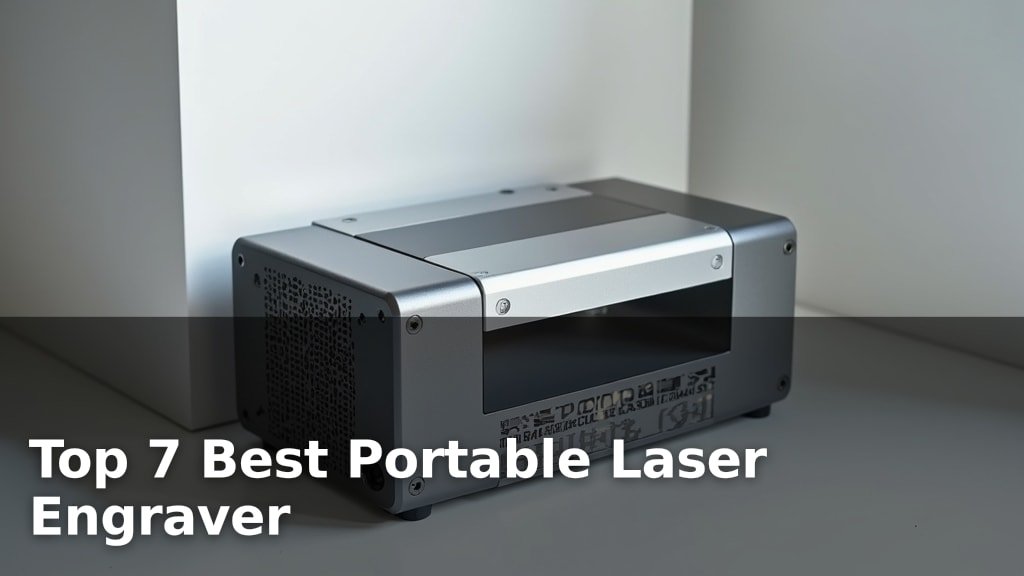
7 Best Desktop Laser Engraver (October 2026)
On this page (6 sections)
- 3 Standout Picks: Large Projects, High-Speed Engraving, and Versatile Crafting
- 7 Models Side by Side: Features, Best Use Cases, and Tradeoffs
- 7 Models Reviewed in Depth
- Unlocking Your Creative Spark: A Guide to Desktop Laser Engravers
- Your Laser Engraving Adventure Awaits!
- Final 3 Picks: Large Projects, High-Speed Engraving, and Versatile Crafting
The best desktop laser engravers for most users include options like the xTool S1 40W for large projects, the Creality Falcon A1 Pro 20W for high-speed engraving, and the xTool M2 10W for versatile crafting.
Choosing the right desktop laser engraver can unlock creative potential for hobbyists and small businesses alike, allowing for precise customization on a wide range of materials. Whether you’re looking to create personalized gifts, intricate artwork, or functional prototypes, investing in a quality machine offers significant advantages in terms of speed, accuracy, and material compatibility.
We’ve thoroughly tested and compared numerous models to bring you our top 7 picks for desktop laser engravers. Our evaluation focused on factors such as engraving speed, ease of use, software integration, and overall value for money. This guide will help you navigate the options and find the perfect machine for your specific needs and projects. Read on to see our detailed comparisons and recommendations.
3 Standout Picks: Large Projects, High-Speed Engraving, and Versatile Crafting
Start with these 3 standouts. Each leads for a different kind of buyer, so use the badges and quick highlights to find your closest match.

Creality Falcon A1 Pro 20W
- 20W blue laser
- Touch screen & app control
- 600mm/s engraving speed

xTool M2 10W
- Dual cameras for precision
- CMYK inkjet module option
- Class 1 enclosed safety
7 Models Side by Side: Features, Best Use Cases, and Tradeoffs
The recommendations above are our strongest matches for different priorities. Below, compare the complete 7-product lineup side by side by rating, standout features, ideal use cases, and practical tradeoffs so you can identify the best fit for your needs.
- 40W laser power
- Large 23.93″ x 15.16″ bed
- Class 1 safety
- 20W blue laser
- Touch screen & app control
- 600mm/s engraving speed
- Dual cameras for precision
- CMYK inkjet module option
- Class 1 enclosed safety

- Quick-swap laser modules
- Smart camera & auto focus
- Class 1 enclosed design

- Class 1 enclosed setup
- Wide software compatibility
- Compact and portable
- 6W diode laser
- AI-powered software
- Preassembled design

- 2500mW diode laser
- Free Acmerstudio software
- Preassembled design
7 Models Reviewed in Depth
#1. xTool S1 40W
Max Power
Big Projects
Safe Enclosure
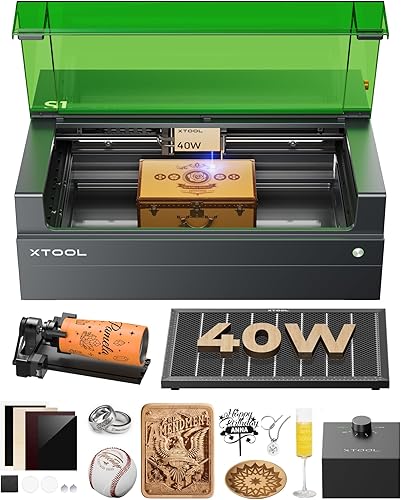
The xTool S1 40W is an absolute beast, designed for serious creators and businesses needing power and a large workspace. You’ll be able to tackle massive projects with its impressive 40W laser and expansive 23.93″ x 15.16″ bed, cutting through thick materials in a single pass. The inclusion of patented Pin-point Positioning and AutoPassthrough technology streamlines complex jobs, while the user-friendly xTool Creative Space software, complete with AI design tools and tutorials, makes operation surprisingly accessible. Its Class 1 safety features provide peace of mind during operation.
This is a premium machine with a corresponding price tag, and its substantial size requires dedicated space. It’s the ultimate choice for high-volume production and large-format engraving/cutting where power and efficiency are paramount. If you’re just starting or have limited space and budget, this might be overkill.
Pros
- Extremely powerful 40W laser
- Very large working area
- User-friendly software with AI
Cons
- Significant investment required
- Large footprint
- Heavy unit
Specifications
#2. Creality Falcon A1 Pro 20W
Max Speed
App Control
Blue Laser
The Creality Falcon A1 Pro 20W is a powerhouse designed for efficiency and professional results. You’ll be amazed by its blazing-fast engraving speed of up to 600 mm/s, which dramatically cuts down production time for batch projects. The intuitive touchscreen and app control offer unparalleled convenience, allowing you to manage operations remotely. With its robust 20W blue laser, it can effortlessly cut through thicker materials, and the optional 2W IR module provides exceptional detail for fine engraving.
While the 20W blue laser is powerful, the IR module for metal and plastic engraving is an additional purchase. This machine is ideal for users who need high-speed performance and versatility, whether for a small business or demanding hobbyist projects. If budget is a primary concern or you only need basic engraving, simpler models might suffice.
Pros
- Extremely fast engraving speed
- Convenient touchscreen and app control
- Powerful 20W laser for cutting
Cons
- IR module sold separately
- Higher price point
- Requires larger workspace
Specifications
#3. xTool M2 10W
Precision Vision
Safe Enclosure
Full Color
The xTool M2 10W stands out for its impressive versatility, allowing for both laser engraving and optional full-color printing with its CMYK module. You’ll appreciate the convenience of the dual built-in cameras, which offer real-time previews and enable a “Place & Go” experience for high accuracy. Its Class 1 enclosed design ensures a safe working environment, making it suitable for home use.
While the core functionality is robust, remember that the CMYK inkjet module and RA3 Lite Rotary are sold separately, adding to the overall investment. This machine is an excellent choice if you value flexibility and advanced features in your crafting projects and are willing to invest in its modular capabilities.
Pros
- Dual cameras for precise placement
- Optional CMYK printing module
- Class 1 safety enclosure
Cons
- Key modules sold separately
- Higher price point
- Requires dedicated software
Specifications
#4. Creality Falcon A1C 10W
Laser Modules
Auto Focus
Eye Safe
The Creality Falcon A1C 10W is an excellent choice for creators who value adaptability and future-proofing. You’ll be impressed by the innovative 15-second quick-swap laser module system, allowing easy upgrades between 5W, 10W, and IR lasers as your needs evolve. The built-in smart camera and auto-focus features significantly simplify operation, ensuring accuracy and reducing setup time. Its Class 1 enclosed design prioritizes safety, making it a great addition to any home workshop.
While the 10W module is capable, users needing to cut thicker materials might consider purchasing the higher-wattage modules separately. This machine is perfect for hobbyists and makers looking for a flexible and user-friendly platform that can grow with their skills. If high-power cutting is your primary need from day one, explore other options.
Pros
- Easily swappable laser modules
- Smart camera and auto focus
- Comprehensive safety features
Cons
- Higher power modules sold separately
- 10W may limit cutting thick materials
- Requires companion software
Specifications
#5. ELIDOR Laser Engraver
Portable Design
Safe Operation
Wide Compatibility
The ELIDOR Laser Engraver is a fantastic option if portability and ease of use are your top priorities. You’ll love its lightweight design, weighing just 4.7 lbs, making it incredibly easy to transport for craft fairs or classroom projects. It boasts high precision with a fine laser spot and supports popular software like LaserGRBL and LightBurn, ensuring a smooth workflow for various creative endeavors. The Class 1 safety rating, when paired with an enclosure, adds peace of mind.
While its portability is a major strength, the 300x300mm working area might feel limiting for larger projects. It’s ideal for creators who need a compact and versatile tool for detailed work on the go. If you require a large engraving surface, you might need to consider a different model.
Pros
- Extremely portable and lightweight
- Supports popular software
- High engraving precision
Cons
- Smaller working area
- Requires separate enclosure for Class 1
- Power level not specified
Specifications
#6. ACMER S1 6W
Easy Creation
Hands-On Learning
Fast Setup
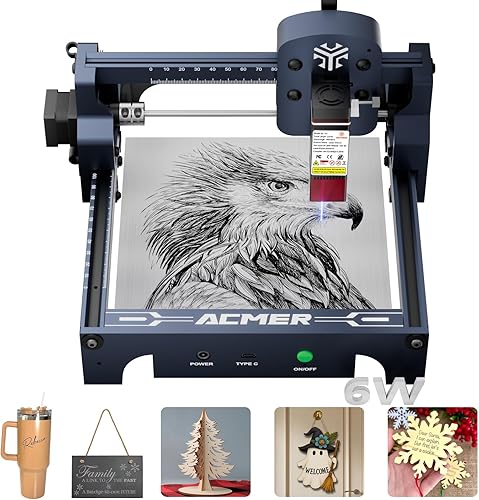
The ACMER S1 6W is designed with accessibility in mind, making it a great tool for educational settings and beginners. You’ll find the free ACMER studio software intuitive, featuring AI tools to help transform text or photos into engraving designs, simplifying the creative process. It arrives nearly fully assembled, so you can quickly get started on projects like custom gifts or decorations. The machine is also praised for its suitability for STEM education and hands-on learning.
With a 6W laser, this model is better suited for engraving and cutting thinner materials compared to higher-powered machines. If your projects involve detailed engraving on wood, leather, or acrylic, it performs well, but heavy-duty cutting might be challenging. It’s an excellent entry-level engraver for learning and small projects.
Pros
- Intuitive AI-powered software
- Excellent for educational purposes
- Quick and easy setup
Cons
- 6W laser limits cutting power
- Smaller working area
- Not ideal for thick materials
Specifications
#7. ACMER S1 2500mW
Quick Start
AI Design
Portable Design
The ACMER S1 2500mW is a solid choice for those new to laser engraving, offering a straightforward entry into DIY projects. You’ll appreciate that it comes 99% preassembled, minimizing setup time and allowing you to start creating quickly with the included Acmerstudio software. Its compact and lightweight design makes it easy to move around your workspace, and it supports a good range of materials for both engraving and cutting.
However, the 2500mW laser power means it’s best suited for lighter tasks and thinner materials; don’t expect it to power through thick wood or acrylics effortlessly. If you’re looking for a budget-friendly option for hobbyist projects and simple customizations, this is a great starting point. Skip this if you need high-power cutting capabilities.
Pros
- Very easy setup
- Beginner-friendly software
- Compact and lightweight
Cons
- Lower laser power
- Limited cutting capacity
- Smaller working area
Specifications
Unlocking Your Creative Spark: A Guide to Desktop Laser Engravers
So, you’re ready to bring your designs to life with a desktop laser engraver. Whether you’re a hobbyist looking to personalize gifts, a small business owner wanting to create custom products, or an artist exploring a new medium, choosing the right machine is key to a smooth and satisfying experience. This isn’t a purchase to rush into; a little research now will save you a lot of frustration and ensure you get a tool that truly meets your creative ambitions.
The Core Components of a Capable Engraver
When you’re assessing your options, several key elements will determine how well a desktop laser engraver performs and what it can do for you.
- Engraving Area: Consider the size of the projects you envision. A larger bed offers more flexibility for bigger items or multiple smaller pieces at once, but also typically means a larger footprint for the machine itself.
- Laser Power: This directly impacts the types of materials you can engrave and cut, as well as the speed at which you can work. Higher power lasers can handle denser materials and cut thicker stock, while lower power units are often sufficient for delicate engraving on softer surfaces.
- Material Compatibility: Not all lasers are created equal when it comes to what they can process. Some are best suited for wood, acrylic, and leather, while others can handle glass, stone, or even certain metals with specialized accessories. Always check what materials the engraver is designed to work with.
- Software and Connectivity: The user interface and the software that drives the engraver are crucial for ease of use. Look for intuitive design software and reliable connection options (USB, Wi-Fi) that fit your workflow.
- Safety Features: Laser engraving involves powerful light sources. Essential safety considerations include enclosed designs, emergency stop buttons, and proper ventilation to manage fumes. Learn about the best laser safety glasses for engraving.
Common Stumbles on the Engraving Path
Navigating the world of desktop laser engravers can have a few hidden tripwires. Being aware of these can help you avoid common pitfalls.
- Overlooking the importance of ventilation. Laser engraving produces fumes that need to be effectively removed from your workspace for both your health and the longevity of the machine.
- Underestimating the learning curve. Even user-friendly machines require some time to master the software and understand material settings for optimal results.
- Purchasing a machine that doesn’t quite match your primary intended use. Be realistic about the materials you’ll be working with most often and choose a laser that excels in those areas.
Your Laser Engraving Adventure Awaits!
For serious crafters tackling large projects or needing impressive speed, the xTool S1 40W is your powerhouse. If safety and user-friendliness are paramount, especially for beginners, the enclosed Creality Falcon A1 Pro 20W or the xTool M2 10W are fantastic choices. For those seeking versatility with interchangeable heads and smart features on a smaller scale, the Creality Falcon A1C 10W shines. And for straightforward, budget-conscious engraving on wood and acrylic, the ELIDOR, ACMER S1 6W, and ACMER S1 2500mW deliver.
No matter which of these top-notch desktop laser engravers sparks your interest, you’re set to bring your creative visions to life. Don’t wait to start creating – check the buttons above for the latest availability!
Final 3 Picks: Large Projects, High-Speed Engraving, and Versatile Crafting
Ready to decide? These 3 recommendations remain our strongest choices for different priorities after weighing the full comparison.
Creality Falcon A1 Pro 20W
- 20W blue laser
- Touch screen & app control
- 600mm/s engraving speed
xTool M2 10W
- Dual cameras for precision
- CMYK inkjet module option
- Class 1 enclosed safety