9 Best Tables for Laser Engravers (November 2026)
The best laser engraver tables include the Mroy mio Honeycomb Laser Bed 400x400mm for most desktop laser setups, the Cregrant3D Update Heat-Resistant Coating Honeycomb Laser Bed for included positioning aids, and the UniTak3D Honeycomb Laser Bed 400x400mm Working Table for a defined working area.
On this page (4 sections)
The best table for laser engraver work is the Mroy mio 400 x 400mm honeycomb bed for its stable steel and aluminum construction, measuring scale and desktop protection. It suits home DIY users and small studio setups that need a dependable surface for repeat jobs.
A honeycomb bed lifts the workpiece on an open grid instead of laying it flat on a solid top. That gap lets smoke and heat move downward, away from the material where the cut happens.
The Mroy mio bed is 400 x 400mm, which is a common middle size for desktop machines. Smaller beds can limit wide signs, while larger beds need more bench room than some setups can spare.
Steel and aluminum construction matters in daily use. The structure is described as resistant to high heat and able to dissipate heat without deforming, which helps keep material flat.
The aluminum panel underneath helps protect your own workbench from laser penetration and scorch marks. That layer does not remove the need for ventilation or fire precautions, but it adds a useful barrier for the desk.For fiber laser setups, compare fiber laser engraver enclosures.
Side measuring scales make positioning quicker when you run the same layout more than once. You can place stock, check its edges against the marks, and start with less guesswork.
Before choosing any bed, measure your machine's usable area, the table's outside size and the space needed for cables. A table that looks right on paper can still crowd the frame or block safe movement.
If you're still planning the rest of your setup, this guide to What Accessories Do You Need for a Laser Engraver? covers the other useful parts.
For a Creality-specific enclosure, compare Creality laser engraver enclosures.
Our picks at a glance
-
1
 Best for most desktop laser setups
Mroy mio Honeycomb Laser Bed 400x400mm
9.6/10 our score
See it on Amazon -
2
 Best for included positioning aids
Cregrant3D Update Heat-Resistant Coating Honeycomb Laser Bed
9.5/10 our score
See it on Amazon -
3
 Best for a defined working area
UniTak3D Honeycomb Laser Bed 400x400mm Working Table
9.4/10 our score
See it on Amazon
- 4
 Check it
BENECREAT Honeycomb Working Table
Best for compact workpieces - 5
 Check it
Creality Honeycomb Working Table Set 320x320mm Steel
Best for adjustable machine height - 6
 Check it
Longer Honeycomb Working Table
Best for diode and CO2 flexibility - 7
 Check it
Artilume Honeycomb Laser Bed 15.7x11.8in / 400x300mm
Best for rectangular work areas - 8
 Check it
Cregrant3D Update Heat-Resistant Coating Honeycomb Laser Bed
Best for extra square cutting room - 9
 Check it
Creality Honeycomb Working Table 500x500mm
Best for the largest projects
The best table for laser engraver work by setup
The best table for laser engraver work depends on your machine size, project shape and need for positioning aids. No single bed fits every frame, material or bench layout.
The 400 x 400mm Mroy mio is the strongest general pick for most desktop users. It balances a broad square surface with a size that many machines can accommodate.
Other tables focus on narrower needs. Some suit compact workpieces, some add height for special setups, and some offer extra width or length for larger projects.
Our score weighs specs, features and buyer feedback against what you're shopping for. That keeps the order practical when you compare size, material and included parts.
Use this section as a shortlist, not a final fit check. The right choice still depends on measuring the machine frame and the bench space you have.
Pay attention to whether a listed size is the outside bed or the working area. That one detail can change whether a project fits in daily use.
Mroy mio Honeycomb Laser Bed 400x400mm: Best for most desktop laser setups
- 400 x 400mm size
- Steel table with aluminum panel
- Side measuring scale
- Honeycomb holes for smoke discharge
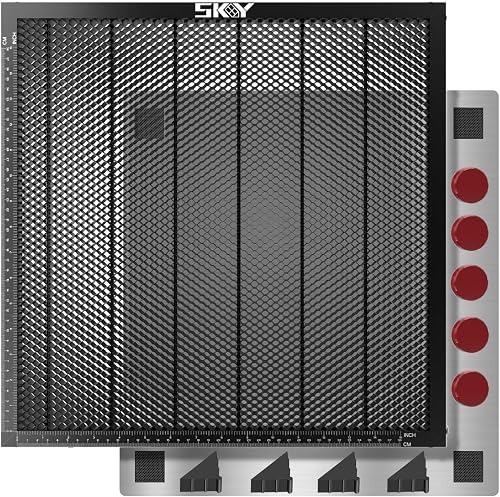
This 400 x 400mm bed suits many desktop laser machines and combines a steel working surface with an aluminum panel. Its surrounding scale marks help with material positioning.
Pros
- Large standard desktop size
- Measuring scale
- Smoke discharge design
Cons
- Single-item setup
- Confirm fit around your machine before ordering
The Mroy mio Honeycomb Laser Bed 400x400mm is the best table for laser engraver work for most desktop users. Its 400 x 400mm size gives you a broad square surface without moving up to the largest table in this group.
The table combines a steel working surface with an aluminum panel. The honeycomb holes support smoke discharge, while the panel helps protect the original workbench from laser penetration and scorch marks.
A measuring scale around the sides helps you position material and estimate the usable area before starting a project. That is useful when you repeat signs, labels or other pieces that need consistent placement.
The black finish and solid aluminum structure are suited to frequent home DIY or studio use. Mroy mio also describes the structure as heat resistant and designed for fast heat dissipation.
Choose it when you want a general-purpose 400 x 400mm bed with a scale. Check the machine frame and cable clearance because the bed's size must fit inside your full work area.
For a larger machine setup, compare large laser engraver enclosures.
Cregrant3D Update Heat-Resistant Coating Honeycomb Laser Bed: Best for included positioning aids
- 400 x 400mm honeycomb panel
- Black oxide coating
- Aluminum panel
- 5 magnets and 4 corner protectors
This 400 x 400mm Cregrant3D bed adds black oxide coating, an aluminum panel, magnets and corner protectors. It fits buyers who want positioning and protection parts in one setup.
Pros
- Black oxide coating
- Magnets for fixation
- Scale lines on both axes
Cons
- Compatibility still depends on machine size
- Product dimensions are not useful for measuring the working area
The Cregrant3D Update Heat-Resistant Coating Honeycomb Laser Bed suits buyers who want a 400 x 400mm surface with included positioning and protection parts. Its black oxide coating is designed to reduce light reflection and protect the laser module.
The package includes an aluminum panel, 4 corner protectors and 5 magnetic suction magnets. The magnets can help hold material in place during engraving, while the corner protectors cover the table's exposed corners.
Scale lines on the X and Y axes form a right-angle measuring guide. That gives you a quick way to position a rectangular piece without adding a separate ruler to the work surface.
The open honeycomb design supports airflow and smoke exhaust. For an enclosure designed to move fumes, compare laser engraver enclosures with exhaust fans.
The table weighs 4.99 lb, so plan for a stable bench that can hold the table and your machine together.
Choose this version when the magnets and corner protectors matter. For a larger square area, compare it with the 440 x 440mm Cregrant3D option below.
UniTak3D Honeycomb Laser Bed 400x400mm Working Table: Best for a defined working area
- 400 x 400mm bed
- 360 x 360mm working area
- Aluminum plate
- 4 corner protectors, 10 rivets and 10 silicone pads
UniTak3D separates the overall bed size from its 360 x 360mm working area, making project planning clearer. The package includes an aluminum plate and several small setup parts.
Pros
- Clear working-area measurement
- All-metal construction
- Broad machine compatibility stated
Cons
- Working area is smaller than the outside bed size
- More included parts to organize
The UniTak3D Honeycomb Laser Bed 400x400mm Working Table is the clearest choice when you need to separate the bed's outside size from its usable working area. The overall bed is 400 x 400mm, while the stated working area is 360 x 360mm.
Its all-metal construction uses a steel honeycomb core, with an aluminum plate below for desktop protection. The black surface is designed to reduce reflection from the laser head.
The package includes 1 honeycomb plate, 1 aluminum plate, 4 protective corners, 10 rivets and 10 silicone pads. These included parts make the setup more complete, but you should keep the small pieces together during assembly or adjustment.
The table is described for XTool D1, D1 Pro, S9, S10, S30 Pro, RAY5, CO2 machines, Creality Falcon 2 and other cutting machines.For a printer-mounted setup, see 3D printer laser engraver kits. Fit still depends on your machine's actual frame and usable area.
For an xTool D1 upgrade, compare xTool D1 laser modules.
Choose it if the 360 x 360mm working-area figure helps you plan projects. For help understanding how bed height affects focus, read What Is the Z Axis on a Laser Engraver?.A laser engraver focus gauge can help set the working distance.
BENECREAT Honeycomb Working Table: Best for compact workpieces
- 11.81 x 7.87 x 0.87 in size
- Iron honeycomb grid
- Metal frame
- Bright light from the bottom plate during cutting
The BENECREAT bed is the smallest and lightest option here, with an 11.81 x 7.87in working size. It suits compact projects where a 400 x 200mm square surface would take up too much room.
Pros
- Compact footprint
- Lightest option here
- Open honeycomb design
Cons
- Less working room than the larger beds
- Check your machine's usable area carefully
The BENECREAT Honeycomb Working Table is the best table for laser engraver users with compact machines or small workpieces. Its 11.81 x 7.87 x 0.87in size takes up much less bench space than the square 400mm beds.
The bed uses an iron honeycomb grid, a metal frame and rivets. Its open structure supports airflow during cutting, and the bottom metal plate can emit bright light when the laser cuts through the material.
At 1.47 lb, this is the lightest option in the roundup. That makes it easier to move, but the smaller surface limits the size of projects you can place on it.
BENECREAT describes the bed as suitable for various engraving and cutting machines, including CO2 laser carving machines, when the size is appropriate. Measure your machine's work area rather than choosing by brand alone.
Choose it for small signs, labels and other compact pieces. Pick a larger bed if your material often reaches beyond 300mm in length.
Creality Honeycomb Working Table Set 320x320mm Steel: Best for adjustable machine height
- 320 x 320mm honeycomb bed
- Steel sheet and aluminum base
- 12 raisers
- 4 non-slip pads
Creality combines a 320 x 320mm bed with 12 raisers that can increase engraving height by 50mm each and up to 150mm when extended. It suits setups that need more clearance or rotary-roller room.
Pros
- Raisers included
- Steel and aluminum construction
- Non-slip pads included
Cons
- Smaller bed than the 400mm options
- Extra height parts need storage
The Creality Honeycomb Working Table Set 320x320mm Steel is the best table for laser engraver setups that need extra height. The set includes a 320 x 320mm honeycomb bed plus 12 raisers that increase engraving height by 50mm each.
The raisers can be stacked for an increase of up to 150mm. That added clearance can help when a rotary roller or a taller workpiece needs more room under the machine.
For rotary workholding options, compare laser engraver rotary chucks.
The set includes 1 honeycomb bed, 1 metal base, 12 heightened columns and 4 non-slip pads. The bed uses a galvanized iron frame and aluminum alloy, while the aluminum base adds another layer of desktop protection.
The 6mm honeycomb apertures support heat dissipation and smoke exhaust. The smaller bed is a trade-off for buyers who need the included height parts.
Choose this set when clearance matters more than a 400mm or 500mm work area. For a broader upgrade plan, see our guide to laser engraver upgrades.
Longer Honeycomb Working Table: Best for diode and CO2 flexibility
- 15.7 x 15.7 x 0.86 in size
- Iron and aluminum construction
- Aluminum panel
- Honeycomb smoke evacuation
Longer's square bed gives you a familiar 400mm-class surface with an aluminum panel for desktop protection. The stated compatibility covers diode, fiber and CO2 laser engravers.
Pros
- Square working surface
- Aluminum protection panel
- Broad machine-type compatibility
Cons
- Exact product dimensions are not fully useful for fit planning
- Confirm clearance around the bed
The Longer Honeycomb Working Table is the best table for laser engraver users who work across diode, fiber and CO2 machines. Its 15.7 x 15.7 x 0.86in format provides a square surface close to 400 x 400mm.
The table combines iron and aluminum and includes an aluminum panel for desktop protection. Its honeycomb design supports smoke evacuation and helps reduce contact between hot fumes and the material.
Longer describes the table as compatible with RAY5 machines and other diode, fiber and CO2 laser engravers. Because machine frames differ, compare the table's footprint with your actual work area before placing it.
The square layout is useful for projects that need equal room in both directions. It is a better match for broad signs and panels than the compact BENECREAT bed.
Choose it for a flexible square table across several laser types. If you use a CO2 machine, compare this bed with our guide to the best accessories for CO2 laser engraver.
Artilume Honeycomb Laser Bed 15.7x11.8in / 400x300mm: Best for rectangular work areas
- 400 x 300mm working area
- Steel construction
- Built-in measuring scale
- No installation required
Artilume uses a 400 x 300mm rectangular format, which can fit machines that need more length than width. It arrives ready to use and includes measurement marks along the edges.
Pros
- Rectangular layout
- Ready to use
- Measuring scale
Cons
- Not a 400 x 400mm square
- Check the 22mm thickness against your setup
The Artilume Honeycomb Laser Bed 15.7x11.8in / 400x300mm is the best table for laser engraver users who need a rectangular work area. Its 400 x 300mm format gives more length than width, which can suit machines with an uneven frame shape.
The steel surface has fireproof and rust-resistant paint. Measurement marks run along the edges, helping you position material without adding a separate measuring guide.
This bed is 22mm thick and requires no installation. Artilume describes it as compatible with most diode, fiber and infrared laser engravers, but you should still check the machine's clearance and usable area.
The rectangular shape is the main reason to choose it. A square 400 x 400mm bed gives more side-to-side room, while this model can save bench space where width is limited.
Choose it for long, narrow projects or a rectangular machine layout. Confirm that the 22mm thickness works with your focus and Z-axis range.
Cregrant3D Update Heat-Resistant Coating Honeycomb Laser Bed: Best for extra square cutting room
- 440 x 440mm working area
- Black oxide coating
- Aluminum panel
- 5 magnets and 4 corner protectors
This Cregrant3D bed expands the square format to 440 x 440mm, giving larger machines more room than the 400mm beds. It includes the same type of black oxide coating, magnets and corner protectors as the smaller version.
Pros
- Largest square bed below 500mm
- Black oxide coating
- Aluminum panel included
Cons
- Heavier than the 400 x 400mm Cregrant3D bed
- Needs more bench space
The Cregrant3D Update Heat-Resistant Coating Honeycomb Laser Bed is the best table for laser engraver users who need more square cutting room without moving to 500mm. Its 440 x 440mm working area is larger than the 400mm options.
The bed measures 17.32 x 17.32 x 0.79in and weighs 6.07 lb. Its black oxide coating is designed to reduce reflection, while the aluminum panel helps protect the desktop.
The package includes 5 magnetic suction magnets and 4 corner protectors. Scale lines on the X and Y axes help position material, and the honeycomb openings support airflow and smoke exhaust.
The larger surface needs more bench space and a machine with enough clearance around the work area. Measure both the machine and your available bench before choosing it.
Choose it when 400 x 400mm feels limiting but 500 x 500mm would be excessive. It is also a practical option for buyers who want magnets and corner protection included.
Creality Honeycomb Working Table 500x500mm: Best for the largest projects
- 500 x 500mm maximum work area
- Aluminum honeycomb grille
- 8mm honeycomb apertures
- Aluminum protection plate
Creality's 500 x 500mm table gives the largest work area in this group. Choose it only when your machine, bench and projects all have room for its bigger footprint.
Pros
- Largest work area
- Aluminum construction
- Protection plate included
Cons
- Heaviest option here
- Needs the most bench space
The Creality Honeycomb Working Table 500x500mm is the best table for laser engraver projects that need the largest work area in this roundup. Its 500 x 500mm maximum work area gives substantially more room than the 320mm, 400mm and 440mm beds.
The table uses an aluminum honeycomb grille and metal frame. Its 8mm apertures support air circulation, heat dissipation and smoke evacuation, while the included aluminum plate helps protect the workbench.
At 8.8 lb, it is the heaviest table here. The larger footprint and weight make bench planning especially important, and the machine must have enough room to use the full work area.
Creality describes the structure as lightweight for its size and supported by multiple metal columns. The aluminum construction is intended to resist deformation during cutting.
Choose it only when your machine and projects can use the extra surface. A smaller table is easier to place if your laser has a compact frame.
How to choose a laser engraver table size
Choose a laser engraver table by the machine's usable area, not only by the table's outside dimensions. The inside area is what your material can actually use.
The UniTak3D, for example, has a 400 x 400mm bed but a stated 360 x 360mm working area. Planning from the smaller figure avoids surprises when a panel looks too wide.
Measure these points before ordering:
- The machine's inside work area.
- The table's outside length and width.
- The height added by the bed.
- Space for cables, ventilation and moving parts.
- The largest material you plan to cut.
A 320 x 320mm bed suits compact work and smaller frames. It leaves more room around the machine, but it will not hold the same panels as a 400mm bed.
A 400 x 400mm bed is a flexible middle choice for many desktop setups. It gives square room for signs and blanks without jumping to the largest footprint.
440 x 440mm and 500 x 500mm tables need more bench space. They can suit larger machines, yet they may crowd smaller desks or limit cable routing.
Height also deserves a check before you order. A thicker bed raises the material closer to the laser head, and that change can affect focus on some machines.
Shape matters as much as size. A rectangular bed can fit a long frame better than a square bed, while a square bed suits balanced projects in both directions.
If your stock is usually narrow, a smaller bed may be easier to store and centre. If you cut wide panels, measure that stock first and size the table around it.
Why honeycomb airflow and desktop protection matter
Honeycomb openings give smoke and heat a path below the material, while an aluminum panel can help protect the bench from laser damage. That airflow is one of the main reasons makers choose this style of table.
When smoke stays trapped under a sheet, it can mark the back of the workpiece. An open grid lets more of that smoke move away from the cut zone during the job.
These features support cleaner work, but they don't replace ventilation, fire precautions or machine-specific safety steps. A honeycomb bed is a work surface, not a fume extraction system.
Heat can also build up where the laser passes through thin stock. Holes in the bed give heat a route downward instead of holding it flat against the material.
Keep the table free of scraps before starting a new job. Small offcuts can shift stock, catch the beam or block the holes that airflow depends on.
Remove soot and debris after use so material sits flat and the openings remain available for airflow. A quick brush and wipe is usually enough for routine care.
Check the bed for loose parts, bent cells or residue before a long run. Good housekeeping keeps the surface level and helps each new piece start in the same position.
A measuring scale is useful when you repeat projects. It helps you place the same blank in the same spot, which saves checking time between runs.
Magnets can help hold suitable material, but choose a holding method that doesn't interfere with the laser head or the material being cut. Test the setup with the machine off before you begin.
Placement also matters for care. Keep the bed dry, store small magnets and pads where they will not be lost, and avoid stacking heavy items on the grid.
Which table should you choose?
Choose the Mroy mio 400 x 400mm if you want the best table for laser engraver work across common desktop projects. It suits buyers who want steel and aluminum construction with a measuring scale in one bed.
Pick the BENECREAT for compact work. Its smaller rectangular surface takes less bench space and is a better fit for small signs, labels and short pieces.
Pick the Creality 320mm set for added height. The included raisers can help when a rotary roller or a taller workpiece needs more clearance under the machine.
Pick the 500mm Creality when your machine can use the largest surface. It suits bigger panels, but it also needs the most bench space and careful placement.
If your machine needs a rectangular bed, choose Artilume's 400 x 300mm format. That layout can suit frames with more length than width and can save space where side room is tight.
For more square room than a 400mm bed offers, choose the 440 x 440mm Cregrant3D model and measure your bench first. The extra surface is useful only if the frame and desk can hold it.
If positioning aids matter to you, look at the included magnets, corner protectors and scale lines on each option. Those small parts can save time on repeat jobs.
If you mainly need a defined working area, the UniTak3D stated 360 x 360mm figure makes planning clearer. For mixed diode and CO2 use, check the Longer model's stated machine types against your own machine.
Measure the inside work area before you decide. That step prevents the most common regret with these tables, which is a bed that is too large, too small or too thick for the setup.
For a basic explanation of the laser process before you choose accessories, read How Does a Laser Engraver Work?.
Our top 3 picks at a glance
-
1
Best for most desktop laser setups
Mroy mio Honeycomb Laser Bed 400x400mm
9.6/10 our score
See it on Amazon -
2
Best for included positioning aids
Cregrant3D Update Heat-Resistant Coating Honeycomb Laser Bed
9.5/10 our score
See it on Amazon -
3
Best for a defined working area
UniTak3D Honeycomb Laser Bed 400x400mm Working Table
9.4/10 our score
See it on Amazon
Frequently asked questions
What is the best table for a laser engraver?
The Mroy mio 400 x 400mm honeycomb bed is the best table for a laser engraver for most desktop setups. It has a steel working table, aluminum panel, smoke-discharge holes and a measuring scale.
Confirm the bed size and machine clearance before buying.
What size table do I need for a laser engraver?
Match the table to the machine's usable work area, then leave room for the frame, cables and safe movement. A 400 x 400mm bed suits many desktop machines, while the 320 x 320mm Creality bed fits smaller setups.
Measure your machine before ordering.
Are honeycomb tables useful for laser engraving?
Yes. Honeycomb openings allow air and smoke to move below the material, while the bed supports the workpiece above the surface.
Many of these tables also include an aluminum panel to help protect the desk from laser damage.
Should a laser engraver table be metal?
Metal is a practical choice because the tables in this roundup use steel, iron, aluminum or combinations of those materials. The right table still depends on size, working area and machine clearance.
A metal surface does not replace safe laser operation or ventilation.