5 Best Accessories for CO2 Laser Engraver (November 2026)
The best CO2 laser engraver accessories include the Cloudray 400x400mm Honeycomb Laser Bed for full-size desktop work areas, the BRILLIANCE LASER INKS 50 Grams Black Metal Marking for black metal marking, and the BENECREAT Honeycomb Working Table for compact laser setups.
On this page (7 sections)
- The best accessories for CO2 laser engravers by use
- What should you buy first for a CO2 laser engraver?
- How do honeycomb beds improve CO2 laser cutting?
- Which accessories help with CO2 laser metal marking?
- How do you choose workholding accessories?
- How should you care for laser accessories?
- Which CO2 laser engraver accessories should you choose?
The best accessories for a CO2 laser engraver are a correctly sized honeycomb bed, dependable hold-down tools and materials suited to your projects. Cloudray is the best overall choice for a 400 x 400 mm desktop work area, while the other picks target metal marking, compact machines, practice materials and soft-material workholding.
CO2 machines need more than the laser itself. A work surface affects airflow and backside marks, workholding affects movement during a cut, and the right project materials make it easier to learn settings without wasting larger sheets.
For smoke management around the machine, compare laser enclosures with exhaust fans. For a larger cover, compare large laser engraver enclosures.
If you're starting from scratch, our guide to What Accessories Do You Need for a Laser Engraver? covers the wider setup. For the support underneath your machine, compare our advice on the best table for laser engraver.
Our picks at a glance
-
1
 Best for full-size desktop work areas
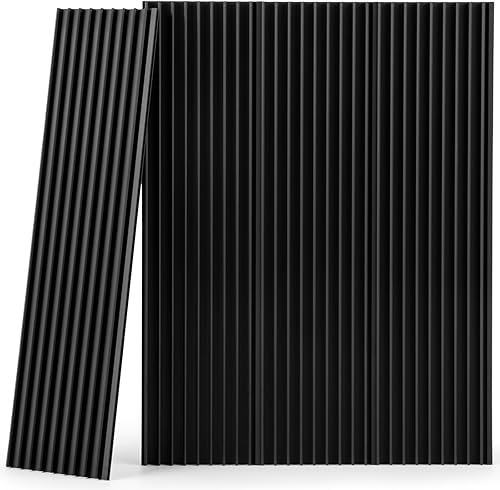
Cloudray 400x400mm Honeycomb Laser Bed
9.7/10 our score
See it on Amazon -
2
 Best for black metal marking
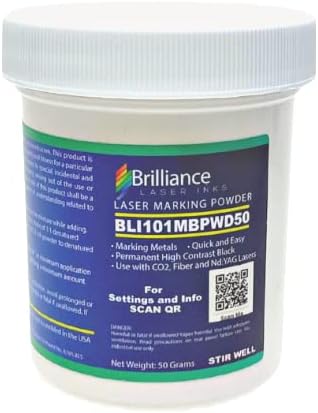
BRILLIANCE LASER INKS 50 Grams Black Metal Marking
9.5/10 our score
See it on Amazon -
3
- 4
 Best for trying varied materialsCheck it
- 5
 Check it
Blulu 50 Pcs Magnetism Honeycomb Pin
Best for holding soft materials
The best accessories for CO2 laser engravers by use
The best choice depends on the job. Cloudray gives the broadest work area here, BRILLIANCE LASER INKS targets black metal marking, and BENECREAT suits a smaller machine.
Our score weighs specs, features and buyer feedback against the needs of someone shopping for CO2 laser engraver accessories. The products are listed from highest score to lowest.
Cloudray 400x400mm Honeycomb Laser Bed: Best for full-size desktop work areas
- 400 x 400 mm size
- 2 mm aluminum alloy honeycomb plate
- 4-panel assembly
- Optional positioning fixture clamps
The Cloudray bed gives a 400 x 400 mm desktop CO2 laser setup a rigid honeycomb surface. Its 4-panel design is useful when you need a broad work area and airflow beneath the material.
Pros
- Large 400 x 400 mm work area
- Aluminum alloy construction
- Supports airflow and heat dissipation
Cons
- Needs assembly from 4 panels
- Confirm the dimensions match your machine
Cloudray is the strongest overall pick when your CO2 machine can use a 400 x 400 mm work area. The bed is made from aluminum alloy and uses a 2 mm honeycomb plate to support material across the cutting surface.
The honeycomb structure leaves open space below the workpiece. That design supports airflow and gives smoke, heat and debris a path away from the cut area.
If you need active smoke removal, see DIY laser engraver fume extraction.
The bed arrives as 4 aluminum plates, each about 400 x 100 mm. Align and connect the plates at their edges during assembly, then check that the finished bed sits flat before placing material on it.
Cloudray gives this bed a stated load capacity of 110 lb. That does not mean every CO2 machine can use that much weight, so confirm the machine frame and worktable limits separately.
Optional positioning fixture clamps are available with the bed. They can help raise or secure thin, small or irregular pieces when magnetic pins alone are not enough.
Brush debris away after each use. A soft cloth or brush can help avoid scratches, and regular wiping keeps the aluminum panel clean.
Choose Cloudray when your machine has room for its 400 x 400 mm footprint and you want a broad desktop cutting surface. Read our guide to laser engraver upgrades if you are deciding whether the bed should be your first addition.
BRILLIANCE LASER INKS 50 Grams Black Metal Marking: Best for black metal marking
- 50 grams of black marking powder
- For aluminum, stainless steel, brass, copper and pewter
- Compatible with CO2 lasers of 25 W minimum
- Foam brush included
This black marking powder is for CO2 users who want to mark uncoated metal. It also works with fiber, YAG and diode lasers, but CO2 machines need at least 25 W.
Pros
- Works on several uncoated metals
- Includes a brush
- Dries within minutes
Cons
- Denatured alcohol is not included
- Requires surface preparation and mixing
BRILLIANCE LASER INKS is the best fit for a CO2 owner who wants to create black marks on uncoated metal. The powder is designed for aluminum, stainless steel, brass, copper and pewter.
For CO2 use, the stated minimum is 25 W. The same powder is also made for fiber, YAG and diode lasers, but compatibility depends on the laser type and power.
The package contains 50 grams of black powder and a foam brush. Mix the powder with denatured alcohol in a 1:1 ratio, then apply the mixture to a clean metal surface.
Denatured alcohol is not included, so plan for that separately. The application process also means you need a clean work area and careful handling of the liquid before engraving.
The powder dries within a few minutes. A heat gun or hair dryer can speed drying for seconds, but keep heat and airflow controlled around the prepared surface.
After engraving, excess marking material can be rinsed or wiped away to reveal the mark. That cleanup step makes this more suitable for metal projects than a general-purpose craft material kit.
Choose it when metal marking is central to your work and your CO2 laser meets the 25 W minimum. Do not treat it as a substitute for a honeycomb bed, since it changes the metal surface rather than supporting the workpiece.
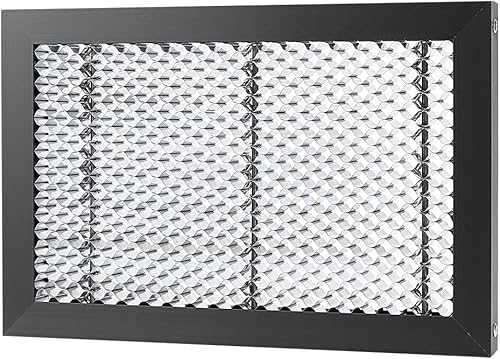
BENECREAT Honeycomb Working Table: Best for compact laser setups
- 11.81 x 7.87 x 0.87 inch working area
- Iron honeycomb grid
- Metal frame
- Open structure for airflow
The BENECREAT table fits a smaller work area and uses an iron honeycomb grid with a metal frame. Its open structure supports airflow while protecting the desktop below.
Pros
- Compact footprint
- Iron grid resists deformation
- Bright light below can help show a completed cut
Cons
- Smaller work area than the Cloudray bed
- Check machine clearance before ordering
BENECREAT is the better choice for a compact CO2 laser setup that needs an 11.81 x 7.87 inch work area. The table is about 0.87 inches thick and weighs 1.47 lb.
Its iron honeycomb grid is joined to a metal frame with rivets. The open holes allow airflow beneath the material, while the grid supports the workpiece above the desktop.
The smaller footprint can be an advantage when your machine has limited room. It can also be a limitation if you cut large panels or need space for repeated pieces in one setup.
A metal plate below the honeycomb can emit bright light when the laser has cut through the material. That visual cue may help you see when a cut is complete, but it does not replace your machine's focus and safety checks.
For eye protection, review our CO2 laser safety glasses.
The table is described as suitable for various carving and cutting machines, including CO2 laser carving machines, when the size is appropriate. Measure the inside of your machine before choosing it.
Pick BENECREAT if the compact dimensions match your work area. Choose Cloudray instead if you need a 400 x 400 mm surface and have enough clearance for the larger bed.
Laser Engraving Materials Kit: Best for trying varied materials
- 185 pieces
- Basswood, acrylic, PVC, felt, paper, leather, metal, cork and stone
- Materials for engraving pens and laser engravers
- Includes blanks such as tags, keychains and coasters
The K KERNOWO kit gives beginners and makers several surfaces for comparing power, speed and engraving depth. The mix includes both flat materials and ready-to-use blanks.
Pros
- Wide mix of material types
- Useful for practice and project planning
- Includes wood, metal and stone blanks
Cons
- Different materials need different settings
- Not every material is automatically suitable for every CO2 machine
The K KERNOWO kit is best for makers who want to try many materials before buying larger sheets. It contains 185 pieces covering basswood, acrylic, PVC, felt, craft paper, metal, leather, cork, stone and other blanks.
The mix includes wood sheets, acrylic sheets, PVC sheets, felt sheets, craft paper, metal business cards, leather and wooden keychains, cork and rock coasters, and stainless steel tags.
That variety lets you compare how different surfaces respond to power, speed and engraving depth. Start with small test pieces and record settings as you learn how each material behaves on your machine.
The kit is suitable for engraving pens and laser engravers. That broad use does not mean every item should be run with identical settings, so sort materials by type before beginning a project.
The blanks also support practical projects such as coasters, keychains, tags, cards and ornaments. This makes the kit useful for both practice and early design work.
Choose it if you want a range of surfaces in one package. If you already know the exact material you use most, buying that material in a larger matching format may create less waste.
Blulu 50 Pcs Magnetism Honeycomb Pin: Best for holding soft materials
- 50 blue magnetic pins
- Magnet and plastic construction
- 1.18 inch diameter
- Designed for honeycomb beds
These magnetic pins help hold soft materials against a honeycomb bed during cutting or engraving. The 50-piece pack suits projects that need several hold-down points.
Pros
- Large 50-piece pack
- Magnetic attachment
- Blue color is easy to spot
Cons
- Needs a compatible honeycomb grid
- Designed for soft-material hold-down rather than general clamping
Blulu's pins are best for holding soft material on a compatible honeycomb bed. The pack includes 50 blue pins made from magnet and plastic, with each small head measuring about 1.18 inches, or 3 cm.
The magnetic design lets the pins attach to the honeycomb bed without a separate clamp. That can reduce movement when a soft sheet curls, shifts or fails to lie flat.
Use only as many pins as the material needs, and place them outside the cutting path. The bright blue color can make them easier to find on a busy work surface.
The 50-piece count is useful for larger layouts or repeated projects. It also gives you spare pins if a project needs several hold-down points at once.
These pins are not a replacement for checking focus or bed level. Use a laser engraver focus gauge to set a repeatable head-to-material distance.
They hold material in place, but the machine still needs the correct height and a clear path for the laser head.
If the head needs replacement, compare replacement laser engraver heads.
Choose Blulu when you already have a suitable honeycomb bed and need magnetic workholding for soft materials. Check the 1.18 inch head size against your grid and material before ordering.
What should you buy first for a CO2 laser engraver?
Start with the accessory that fixes your biggest setup problem. If smoke containment is your concern, compare Creality laser engraver enclosures.
For most desktop users, that means a honeycomb bed if the machine currently cuts over a plain surface, followed by a hold-down method for material that moves.
A honeycomb bed is the foundation because it supports the workpiece and leaves space below it. The bed should fit inside the machine without blocking movement or reducing access to the focus area.
Cloudray is the broad-work-area choice at 400 x 400 mm. BENECREAT is the compact option at 11.81 x 7.87 inches.
Add magnetic pins when thin or soft materials lift, curl or shift. Pins are most useful after you have confirmed that the bed is level and the material is positioned safely.
Choose the K KERNOWO kit when your main goal is learning how different surfaces respond. It is a practice and project supply, not a replacement for machine-specific safety equipment.
How do honeycomb beds improve CO2 laser cutting?
Honeycomb beds support material across many small contact points while leaving openings below the workpiece. That open structure can improve airflow and give smoke, heat and debris a route away from the cut.
A bed can also help reduce backside burn marks compared with placing material directly on a desktop. The result still depends on focus, power, speed, material and ventilation.
Size is the first buying check. Cloudray's bed is 400 x 400 mm, while BENECREAT's working area is 11.81 x 7.87 inches.
Thickness and construction matter too. Cloudray uses a 2 mm aluminum alloy honeycomb plate, and BENECREAT uses an iron honeycomb grid with a metal frame.
Keep the bed clean after each use. Brush away debris, then use a soft cloth or brush when needed to avoid scratching the surface.
For a deeper explanation of machine height and focus, see What Is the Z Axis on a Laser Engraver?. That adjustment affects how the laser meets the material, even when the bed itself is correctly installed.
Which accessories help with CO2 laser metal marking?
A compatible metal marking compound helps when your CO2 laser cannot create the desired dark mark on uncoated metal by itself. BRILLIANCE LASER INKS is the only product here made specifically for that job.
The powder works with aluminum, stainless steel, brass, copper and pewter. CO2 compatibility requires a minimum stated power of 25 W.
Application requires a 1:1 mixture of powder and denatured alcohol. The alcohol is not included, and the metal should be clean before applying the mixture with the included brush.
Allow the surface to dry before engraving. Afterward, wipe or rinse away excess marking material to reveal the finished design.
A metal marking powder does not solve workholding or ventilation problems. You still need a stable surface, the correct focus and safe handling around the laser and alcohol.
If you are still choosing the machine itself, compare our Best CO2 Laser Engraver guide before buying accessories. The machine's work area and power affect which beds, materials and marking products make sense.
How do you choose workholding accessories?
Choose workholding accessories by material thickness, surface shape and bed design. Flat sheets may need little help, while soft, thin or irregular materials often need several hold-down points.
Blulu's magnetic pins are designed for honeycomb beds and soft material. Their 1.18 inch diameter and 3 cm size should be checked against the grid and the area around the cut.
Cloudray also offers optional positioning fixture clamps. These can help secure or raise thin, small or irregular workpieces.
Keep every pin or clamp clear of the laser path. A hold-down device should support the material without becoming part of the cut or blocking the moving head.
Do not use workholding to compensate for an incorrectly focused machine. If the material sits at the wrong height, solve that adjustment first.
How should you care for laser accessories?
Brush debris from a honeycomb bed after each use and wipe the aluminum surface regularly. A soft cloth or brush helps reduce the chance of scratches during cleaning.
Inspect the bed for residue that could affect how material sits. A level, clean surface gives you a more consistent starting point for focus and placement.
Store pins together so they do not scatter into the machine. Check magnetic pins for damage before use, and replace any piece that no longer holds material safely.
Keep the K KERNOWO materials sorted by type. Wood, acrylic, felt, paper, metal and stone can need different settings, so labeling test results prevents accidental reuse of the wrong setup.
For cooling-related accessories, our Best Chiller For CO2 Laser guide covers the separate role of water cooling. A honeycomb bed and a chiller solve different machine needs.
Which CO2 laser engraver accessories should you choose?
Choose Cloudray if your machine can use a 400 x 400 mm bed and you want the strongest all-around work surface. Choose BENECREAT if your setup is compact and its 11.81 x 7.87 inch area is enough.
Pick BRILLIANCE LASER INKS for black marks on compatible uncoated metals with a CO2 laser rated at least 25 W. Pick the K KERNOWO kit if you need many materials for testing and early projects.
Choose Blulu when soft material moves on a honeycomb bed and you want magnetic hold-down pins. Measure first, keep accessories out of the laser path and match every purchase to your machine's usable area.
Cloudray 400x400mm Honeycomb Laser Bed: Best for full-size desktop work areas
- 400 x 400 mm size
- 2 mm aluminum alloy honeycomb plate
- 4-panel assembly
- Optional positioning fixture clamps
The Cloudray bed gives a 400 x 400 mm desktop CO2 laser setup a rigid honeycomb surface. Its 4-panel design is useful when you need a broad work area and airflow beneath the material.
Pros
- Large 400 x 400 mm work area
- Aluminum alloy construction
- Supports airflow and heat dissipation
Cons
- Needs assembly from 4 panels
- Confirm the dimensions match your machine
BRILLIANCE LASER INKS 50 Grams Black Metal Marking: Best for black metal marking
- 50 grams of black marking powder
- For aluminum, stainless steel, brass, copper and pewter
- Compatible with CO2 lasers of 25 W minimum
- Foam brush included
This black marking powder is for CO2 users who want to mark uncoated metal. It also works with fiber, YAG and diode lasers, but CO2 machines need at least 25 W.
Pros
- Works on several uncoated metals
- Includes a brush
- Dries within minutes
Cons
- Denatured alcohol is not included
- Requires surface preparation and mixing
BENECREAT Honeycomb Working Table: Best for compact laser setups
- 11.81 x 7.87 x 0.87 inch working area
- Iron honeycomb grid
- Metal frame
- Open structure for airflow
The BENECREAT table fits a smaller work area and uses an iron honeycomb grid with a metal frame. Its open structure supports airflow while protecting the desktop below.
Pros
- Compact footprint
- Iron grid resists deformation
- Bright light below can help show a completed cut
Cons
- Smaller work area than the Cloudray bed
- Check machine clearance before ordering
Laser Engraving Materials Kit: Best for trying varied materials
- 185 pieces
- Basswood, acrylic, PVC, felt, paper, leather, metal, cork and stone
- Materials for engraving pens and laser engravers
- Includes blanks such as tags, keychains and coasters
The K KERNOWO kit gives beginners and makers several surfaces for comparing power, speed and engraving depth. The mix includes both flat materials and ready-to-use blanks.
Pros
- Wide mix of material types
- Useful for practice and project planning
- Includes wood, metal and stone blanks
Cons
- Different materials need different settings
- Not every material is automatically suitable for every CO2 machine
Blulu 50 Pcs Magnetism Honeycomb Pin: Best for holding soft materials
- 50 blue magnetic pins
- Magnet and plastic construction
- 1.18 inch diameter
- Designed for honeycomb beds
These magnetic pins help hold soft materials against a honeycomb bed during cutting or engraving. The 50-piece pack suits projects that need several hold-down points.
Pros
- Large 50-piece pack
- Magnetic attachment
- Blue color is easy to spot
Cons
- Needs a compatible honeycomb grid
- Designed for soft-material hold-down rather than general clamping
| Product | Best for | Working area | Material | Load capacity | Our score |
|---|---|---|---|---|---|
| Cloudray 400x400mm Honeycomb Laser Bed | full-size desktop work areas | 400 x 400 mm | Aluminum alloy | 110 lb | 9.7 |
| BRILLIANCE LASER INKS 50 Grams Black Metal Marking | black metal marking | 9.5 | |||
| BENECREAT Honeycomb Working Table | compact laser setups | 11.81 x 7.87 x 0.87 in | Iron | 9.3 | |
| Laser Engraving Materials Kit | trying varied materials | 9.0 | |||
| Blulu 50 Pcs Magnetism Honeycomb Pin | holding soft materials | Magnet and plastic | 8.7 |
Our top 3 picks at a glance
-
1
Best for full-size desktop work areas
Cloudray 400x400mm Honeycomb Laser Bed
9.7/10 our score
See it on Amazon -
2
Best for black metal marking
BRILLIANCE LASER INKS 50 Grams Black Metal Marking
9.5/10 our score
See it on Amazon -
3
Frequently asked questions
What accessories do you need for a CO2 laser engraver?
Most CO2 laser users should start with a honeycomb bed, a way to hold material flat and suitable cleaning tools. A marking product or material kit can come next if your projects include metal marking or frequent practice.
Match every accessory to the machine's work area, material type and safe operating requirements.
Is a honeycomb bed useful for a CO2 laser engraver?
Yes. A honeycomb bed supports thin or flexible material while allowing airflow beneath the workpiece.
It can help reduce backside burn marks and protect the work surface during cutting.
Measure your machine's usable area before choosing a bed.
The Cloudray model here measures 400 x 400 mm, while the BENECREAT model has an 11.81 x 7.87 inch working area.
Can CO2 lasers mark metal?
A CO2 laser can work with a suitable metal marking compound. BRILLIANCE LASER INKS states that its black powder works with CO2 lasers rated at 25 W minimum and with uncoated aluminum, stainless steel, brass, copper and pewter.
The powder is mixed with denatured alcohol, which is not included.
How do you hold material on a laser honeycomb bed?
Use magnetic pins or another hold-down method that fits the bed and does not interfere with the laser path. Blulu's pins attach magnetically to honeycomb beds and are intended for soft material.
Keep pins outside the cutting path, and confirm their size fits your grid before use.
How do you choose a honeycomb bed size?
Choose a bed that fits inside the machine while covering the area you plan to cut. Compare both length and width, then leave room for the machine frame, focus movement and material placement.
A larger bed is not automatically better if it reduces clearance or cannot sit flat inside the machine.