8 Best Laser Cutters with Camera Positioning (November 2026)
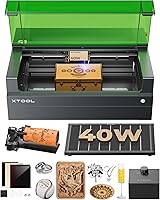
The best laser cutters with camera positioning include the xTool S1 40W Laser Cutter and Laser for larger flat projects, the BlazeX M3 10W Laser Engraver Machine for an included camera kit, and the WECREAT Vision Pro 45W Laser Engraver for camera and rotary work.
On this page (4 sections)
The best laser cutter with camera positioning for most buyers is the WECREAT Vision Pro 45W, which pairs an HD camera with an auto-lifting system and Rotary Pro attachment. The BlazeX M3 is a camera-ready bundle for beginners, while the Creality Falcon A1 offers a pre-calibrated camera and full-frame view.
A camera can show where a design will land on the material, reducing guesswork when you position blanks or arrange multiple items. For another laser cutter comparison, see Bambu laser cutters.
The right laser engraver with camera still depends on bed size, software compatibility and the materials you plan to use.
If you need a machine for a home workspace, compare these picks with our best laser cutter for home use guide. Buyers weighing enclosed designs can also review best enclosed laser engravers.
Our picks at a glance
-
1

-
2
 Best for an included camera kit
BlazeX M3 10W Laser Engraver Machine
9.4/10 our score
See it on Amazon -
3
 Best for camera and rotary work
WECREAT Vision Pro 45W Laser Engraver
9.3/10 our score
See it on Amazon
- 4
 Check it
CREALITY FALCON A1 10W Laser Engraver
Best for a pre-calibrated camera - 5
 Check it
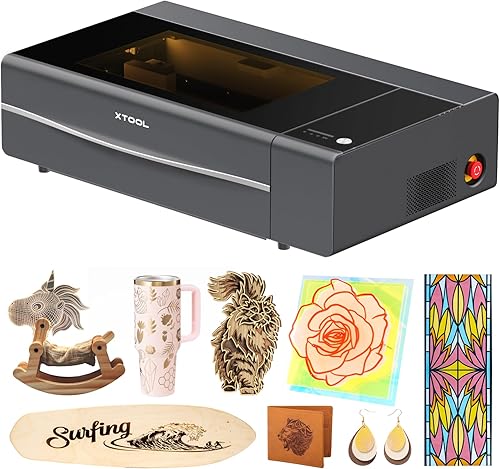
xTool P2S 55W CO2 Laser Cutter
Best for dual-camera previews - 6
 Check it
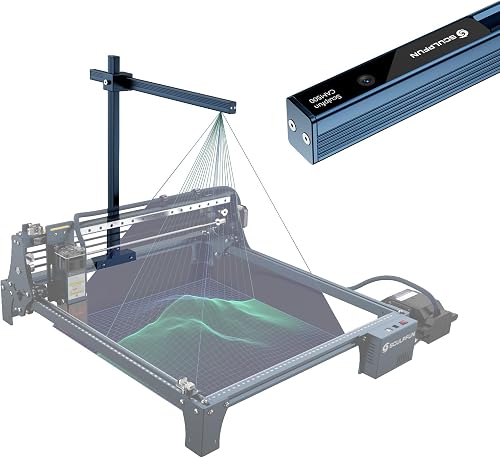
SCULPFUN CAM500 Lightburn Camera
Best for upgrading a compatible laser - 7
 Check it
Creality Falcon A1 Pro 20W Laser Engraver
Best for autofocus and camera view - 8
 Check it
Woxcker Laser Cutter and Engraver Machine 20W
Best for a compact enclosed setup
How we chose laser cutters with camera positioning
We compared camera support, positioning features, work area, software compatibility and included accessories. We also checked whether a camera is included or whether the machine uses another positioning method, since that difference changes what you need to buy and set up.
Our score weighs specs, features and buyer feedback against what you’re shopping for. A camera earns more weight when it helps preview placement directly, while software limits, missing camera details and material restrictions count against a pick.
For camera add-ons, fit matters as much as image quality. Check your frame style, working area and camera height before buying an accessory, and confirm it works with the laser software you already use.
| Product | Best for | Bed size | Engraving speed | Positioning | Our score |
|---|---|---|---|---|---|
| xTool S1 40W Laser Cutter and Laser | larger flat projects | 23.93 x 15.16 in | Up to 600 mm/s | Pin-point Positioning technology | 9.5 |
| BlazeX M3 10W Laser Engraver Machine | an included camera kit | 9.4 | |||
| WECREAT Vision Pro 45W Laser Engraver | camera and rotary work | 22.83 x 15.75 in | 9.3 | ||
| CREALITY FALCON A1 10W Laser Engraver | a pre-calibrated camera | Up to 600 mm/s | 9.0 | ||
| xTool P2S 55W CO2 Laser Cutter | dual-camera previews | 26 x 14 in | 8.8 | ||
| SCULPFUN CAM500 Lightburn Camera | upgrading a compatible laser | 8.6 | |||
| Creality Falcon A1 Pro 20W Laser Engraver | autofocus and camera view | 8.3 | |||
| Woxcker Laser Cutter and Engraver Machine 20W | a compact enclosed setup | 8.0 |
The best laser cutters with camera positioning
The WECREAT Vision Pro leads for buyers who want an included camera with rotary flexibility, while the BlazeX M3 is a bundled option with stated LightBurn support. The remaining picks cover larger work areas, camera add-ons and machines with other positioning tools.
xTool S1 40W Laser Cutter and Laser: Best for larger flat projects
- 23.93 x 15.16 in bed
- Engraving speeds up to 600 mm/s
- Pin-point Positioning technology
- AutoPassthrough for projects up to 118 in
A large bed and Pin-point Positioning technology suit larger projects where placement accuracy matters. Its listed features do not include a camera, so consider it if you want positioning support without making camera preview a requirement.
Pros
- Large work bed
- Pin-point Positioning technology
- AutoPassthrough for long projects
Cons
- Camera preview is not specified
- Large machine at 86.8 lb
The xTool S1 is the strongest fit here for larger flat projects where its 23.93 x 15.16 in bed is useful. It supports engraving speeds up to 600 mm/s and includes xTool’s Pin-point Positioning technology.
Pin-point Positioning gives the S1 a placement feature, but a camera is not specified for this model. That distinction matters if you want a live view of the material in software.
For an explanation of the process, see how a laser engraver works.
AutoPassthrough supports projects up to 118 inches long, so the machine can accommodate work beyond the bed with the passthrough setup. At 86.8 lb, it also calls for a sturdy, planned workspace.
Choose the S1 if bed size and positioning technology matter more than a camera preview. If camera visualization is essential, compare the camera-equipped models below before deciding.
BlazeX M3 10W Laser Engraver Machine: Best for an included camera kit
- Smart camera
- LightBurn and CutlabX support
- Enclosure and honeycomb bed included
- 13 engraving materials included
The camera preview is paired with an enclosure, honeycomb bed and materials, giving beginners a bundled start. Its camera works with LightBurn and CutlabX according to BlazeX.
Pros
- Camera included
- LightBurn and CutlabX compatibility
- Bundle includes enclosure and materials
Cons
- 10W laser output
- Check work area dimensions for your projects
The BlazeX M3 gives you a camera as part of an all-in-one package. Its smart camera syncs with LightBurn and CutlabX, letting you preview a design over the material before engraving.
The bundle includes an enclosure, honeycomb bed, tool kit and 13 engraving materials. That can reduce the number of separate items a beginner needs to source, though you should still confirm that the working area suits your projects.
BlazeX lists compatibility with LightBurn, LaserGRBL and CutLabX across Windows, macOS, iOS and Android. Its camera guidance is specifically described for LightBurn and CutlabX, so check your preferred workflow before relying on other software.
Pick the M3 when camera preview and included setup pieces are priorities. Its 10W output and unspecified work area are reasons to compare the size and material needs of your projects first.
WECREAT Vision Pro 45W Laser Engraver: Best for camera and rotary work
- HD camera
- 22.83 x 15.75 in bed
- Rotary Pro included
- Auto-lifting system
The HD camera supports precise placement, while the included Rotary Pro and auto-lifting system add options for tumblers and varied material heights. The bed gives room for larger flat designs.
Pros
- HD camera included
- Rotary Pro included
- Auto-lifting system
Cons
- 35 kg machine
- Switchable 2W IR module sold separately
The WECREAT Vision Pro pairs an HD camera with a 22.83 x 15.75 in bed, auto-lifting and Rotary Pro. This combination makes it the most flexible camera pick here for buyers working with both flat materials and cylindrical items.
Its auto-lifting system adjusts for materials from 1 mm to 140 mm, and the Rotary Pro is included in this version. The machine also supports engraving speeds up to 600 mm/s, which may matter when processing repeated or larger designs.
WECREAT describes its camera as providing precise positioning, with a preview intended to show where the design will land. The machine weighs 35 kg, so plan for a stable surface and enough room around the full enclosure.
Choose it if you want a camera, rotary attachment and a spacious bed in one setup. The optional 2W switchable IR module is sold separately, so don't count on that capability being included.
CREALITY FALCON A1 10W Laser Engraver: Best for a pre-calibrated camera
- Pre-calibrated HD camera
- Full-frame work-area view
- Engraving speeds up to 600 mm/s
- 381 x 305 mm work area
Its pre-calibrated HD camera shows the full work area and helps position designs around an object. The 10W model has a defined 381 x 305 mm work area.
Pros
- Pre-calibrated HD camera
- Full-frame view
- Supports LightBurn, LaserGRBL and Cutlabx
Cons
- Acrylic cutting is not supported
- Reflective materials are prohibited
The Creality Falcon A1 suits buyers who want a pre-calibrated HD camera and full-frame view of the engraving area. Its camera helps you place a design around the object, while the machine reaches engraving speeds up to 600 mm/s.
The stated work area is 381 x 305 mm. Creality also lists support for LightBurn, LaserGRBL and Cutlabx, alongside its own Falcon Design Space software.
Material limits are important for this 10W version. Reflective materials are prohibited, and acrylic cutting is not supported; the acrylic surface must be coated for engraving.
Pick the Falcon A1 if a pre-calibrated camera and enclosed design suit your workflow. If you need acrylic cutting or work with reflective surfaces, choose another machine with limits that match your materials.
xTool P2S 55W CO2 Laser Cutter: Best for dual-camera previews
- Dual 16MP cameras
- 26 x 14 in bed
- Engraving speeds up to 600 mm/s
- Auto-Passthrough for materials up to 118 in
Two 16MP cameras provide real-time previews for a large bed, making this a fit for buyers who want camera visibility across broader projects. The P2S is a Class 4 laser, so review its setup and safety requirements.
Pros
- Dual 16MP cameras
- Large 26 x 14 in bed
- Auto-Passthrough
Cons
- Class 4 laser
- Heavy at 130.7 lb
The xTool P2S is the camera option for larger projects, with a 26 x 14 in bed and dual 16MP cameras for real-time previews. Its CO2 laser makes fiber vs CO2 laser differences relevant to material choice.
Its 55W CO2 laser and Auto-Passthrough add capacity for long materials and broader work.
The P2S also supports engraving speeds up to 600 mm/s and uses LiDAR ranging for autofocus. A riser base accommodates objects up to 8.4 inches high, and the machine is compatible with the RA2 Pro rotary.
This model is a Class 4 laser, unlike the Class 1 enclosed options in this roundup. Review the safety requirements and plan the workspace and exhaust arrangement before choosing it.
Choose the P2S if dual cameras and a larger-format CO2 setup match your work. Its 130.7 lb weight and enclosure size make installation planning especially important.
SCULPFUN CAM500 Lightburn Camera: Best for upgrading a compatible laser
- 5MP camera
- 400 x 400 mm working range
- LightBurn camera function
- Positioning deviation under 1 mm
This camera adds positioning and image tracing to a compatible existing machine. It is designed for LightBurn, and the recommended camera height is 325 mm above the engraving area.
Pros
- Can add camera positioning to a compatible machine
- 5MP resolution
- Batch engraving support
Cons
- Requires LightBurn
- Mount compatibility depends on machine frame
The SCULPFUN CAM500 adds camera positioning to a compatible laser engraver. It has a 400 x 400 mm working range and is designed for LightBurn’s camera function.
SCULPFUN states a positioning deviation under 1 mm when set up at its recommended height of 325 mm above the engraving area. The camera can also trace images and support batch engraving, where the software identifies multiple objects for separate tasks.
Compatibility depends on the frame and mount. The package has T-shaped and U-shaped clamps for specified machine styles, but the additional purchased area expansion kit is not applicable.
Choose the CAM500 if you already have a compatible machine and use LightBurn. Check the frame fit and camera height first, and compare the machine’s working area with the 400 x 400 mm camera range.
Creality Falcon A1 Pro 20W Laser Engraver: Best for autofocus and camera view
- HD smart camera
- Autofocus in about 3 seconds
- Engraving speeds up to 600 mm/s
- Touchscreen
The HD camera gives a full-bed preview, and autofocus is listed at about 3 seconds. A touchscreen and app control offer additional ways to manage projects.
Pros
- Full-bed camera preview
- Fast autofocus
- Touchscreen and app control
Cons
- Optional 2W infrared module costs extra
- Confirm its footprint before planning a workspace
The Creality Falcon A1 Pro 20W combines an HD smart camera, full-bed preview and autofocus. Autofocus is listed at about 3 seconds, and the machine reaches engraving speeds up to 600 mm/s.
A touchscreen gives quick access to history files and recent projects, while app control is also listed. The enclosure includes a lid-open stop, emergency stop and air assist.
The stated cutting limits include 10 mm basswood and 8 mm black acrylic. Its optional 2W infrared module is sold separately, so include that extra module only if you plan to buy it separately.
Choose the A1 Pro when you want camera placement help plus autofocus and touchscreen controls. Confirm the machine’s footprint and your material needs before setting up a workspace.
Woxcker Laser Cutter and Engraver Machine 20W: Best for a compact enclosed setup
- 20W laser output
- 300 x 300 mm work area
- 0.01 mm focus
- LightBurn, LaserGRBL and CutLabX support
An enclosed 20W machine with a 300 x 300 mm area suits buyers who value a contained setup and software choice. Camera positioning is not specified, so choose it for its other stated features.
Pros
- Enclosed operation
- Supports three software options
- 300 x 300 mm work area
Cons
- Camera positioning is not specified
- Confirm material compatibility for your project
The Woxcker is a compact enclosed option with a 300 x 300 mm work area and 20W output. Compare it with 20W enclosed laser engravers if enclosure is a priority.
It supports LightBurn, LaserGRBL and CutLabX, with Wi-Fi, USB, app and TF card control.
Its 0.01 mm square focus is intended for detailed engraving, and the enclosure includes flame detection, tilt protection, automatic shutdown and an emergency stop. The stated compatible materials include wood, coated metal, leather, acrylic, glass and stone.
Camera positioning is not specified for this model. Consider it if enclosure, software choice and its work area are a fit, but choose a camera-equipped option if preview placement is a requirement.
Read our guide to how much power a laser engraver uses to understand the power demands behind different machine types.
What should you compare in a laser engraver with a camera?
The most useful camera features are a clear work-area preview, software compatibility and a camera view that matches the size of your projects. Check those details alongside bed dimensions and material limits before comparing extra features.
Does the camera cover the whole work area?
Match the camera’s field of view to the machine’s usable bed. The CAM500 has a 400 x 400 mm working range, while the WECREAT Vision Pro and xTool P2S describe camera previews for their machine work areas.
A camera preview is only helpful when the item sits within view and the system is set up correctly. Follow the recommended camera height and positioning steps for an add-on camera, then check alignment on a scrap piece before an important job.
Which software does the camera support?
Camera compatibility can be narrower than machine compatibility. The SCULPFUN CAM500 is designed for LightBurn, while BlazeX describes camera support with LightBurn and CutlabX.
If you already use a particular program, confirm the camera workflow works in that software before buying. Also check operating system support when the manufacturer provides it, especially if you switch between a computer and a mobile device.
Do you need a built-in camera or an add-on?
A built-in camera comes as part of a machine bundle and is intended to work with its setup. An add-on such as the CAM500 can suit an existing compatible laser, but frame style, height and software fit become your responsibility.
For a new machine, built-in camera support usually means fewer compatibility steps. For an existing machine, an add-on may cost less than replacing the laser, provided its mounting and software requirements fit.
Does the machine match your materials and workspace?
Camera accuracy does not expand what the laser can process. Compare the machine’s stated material limits, output, enclosure, work area and exhaust needs with your projects.
For wood projects, compare the options in our best laser cutter for wood guide. To explore larger desktop setups and footprint tradeoffs, see best desktop laser engraver.
Which laser cutter with camera should you choose?
Choose the WECREAT Vision Pro if you want a camera with a rotary attachment and auto-lifting, or the BlazeX M3 if its bundled camera, enclosure and software support suit your beginner setup. Pick the Creality Falcon A1 for a pre-calibrated camera, the xTool P2S for dual-camera previews and a larger CO2 bed, or the CAM500 to add LightBurn camera positioning to a compatible machine.
Before you buy, confirm the work area, supported software and material limits against your actual projects. For an existing laser, verify the camera mount and height; for a new one, compare enclosure size and workspace needs.
Our top 3 picks at a glance
-
1
-
2
Best for an included camera kit
BlazeX M3 10W Laser Engraver Machine
9.4/10 our score
See it on Amazon -
3
Best for camera and rotary work
WECREAT Vision Pro 45W Laser Engraver
9.3/10 our score
See it on Amazon
Frequently asked questions
What does a camera do on a laser engraver?
A camera shows the material or work area in the design software so you can place artwork relative to the item before engraving. Some systems also support batch positioning or tracing.
Check which software the camera requires and whether the camera covers your full work area.
Do all laser engravers with cameras include the camera?
No. Some machines include a camera, while others rely on a positioning feature or can use a separate camera accessory.
Confirm that the camera is included and compatible with your software and machine frame before choosing.
Can I add a camera to my existing laser cutter?
Yes, if the camera mount, work area and software match your machine. The SCULPFUN CAM500 is designed for LightBurn and includes T-shaped and U-shaped mounting options for specified frame styles.
Measure the camera height and check fit before setup.
Is camera positioning more accurate than manual placement?
A camera can make placement easier by showing the workpiece in the design software, but accuracy depends on calibration, camera height, lens setup and software. SCULPFUN states a positioning deviation under 1 mm for the CAM500 under its recommended setup.
What should I check before buying a laser engraver with a camera?
Compare the camera view, supported software, usable bed size, included accessories and material limits. For an enclosed machine, also check the laser class and smoke management.
Match the work area to your largest item, not just the camera's preview.