
The best laser cutters for home use are those offering a balance of power, precision, and user-friendliness for various crafting and DIY projects, with top contenders including the ACMER S2 12000mW Laser Engraver for its expandability and power, the xTool M2 10W Laser Engraver for its dual-camera precision, and the Carverall K15 Pro Laser Engraver for its beginner-friendly offline controls.
These devices allow hobbyists and small business owners to bring intricate designs to life on a wide array of materials, from wood and acrylic to leather and fabric. Choosing the right one ensures optimal performance for your specific creative needs and budget.
We’ve narrowed down the field to 7 top picks after extensive hands-on comparison and evaluation of features like laser power, software compatibility, safety features, and ease of setup. This guide will help you find the perfect home laser cutter to elevate your crafting game, all thoroughly reviewed in the comparison table below.
3 Standout Picks: Powerful & Expandable Projects, Dual-Camera Precision Crafting, and Beginner-Friendly Offline Control
Start with these 3 standouts. Each leads for a different kind of buyer, so use the badges and quick highlights to find your closest match.

ACMER S2 12000mW Laser Engraver
- 12W laser power
- 300x300mm work area
- 0.08×0.08mm laser spot

xTool M2 10W Laser Engraver
- 10W diode laser
- Built-in dual cameras
- Class 1 enclosed safe

Carverall K15 Pro Laser Engraver
- 10W diode laser
- Offline engraving
- Near A4 work area
7 Models Side by Side: Features, Best Use Cases, and Tradeoffs
The recommendations above are our strongest matches for different priorities. Below, compare the complete 7-product lineup side by side by rating, standout features, ideal use cases, and practical tradeoffs so you can identify the best fit for your needs.
- 12W laser power
- 300x300mm work area
- 0.08×0.08mm laser spot
- 10W diode laser
- Built-in dual cameras
- Class 1 enclosed safe
- 10W diode laser
- Offline engraving
- Near A4 work area

- 10W laser module
- 0.01mm ultra-precision
- Class 1 safety

- 5.5W laser power
- Air assist support
- 30,000mm/min speed
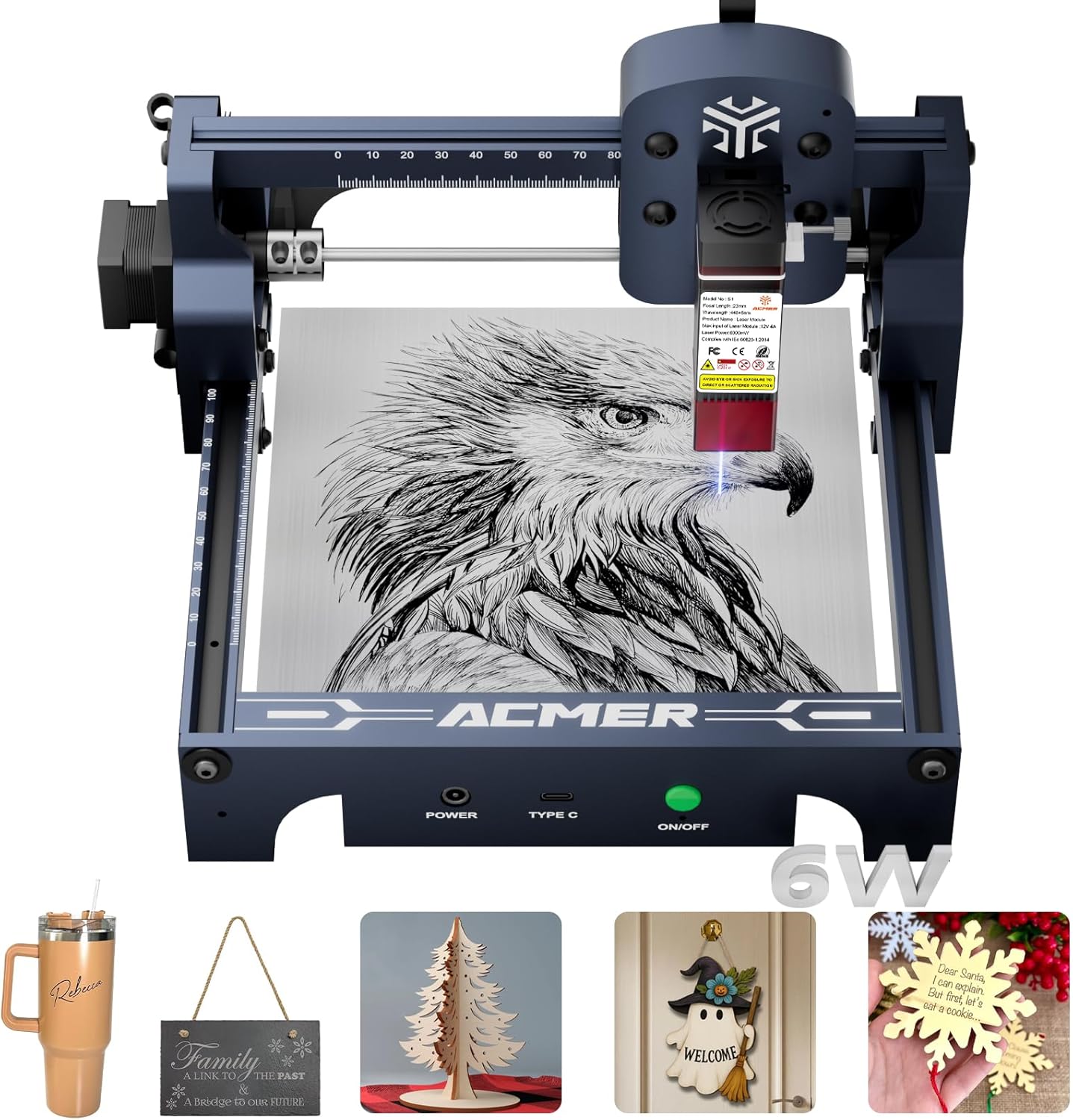
- 6000mW diode laser
- 130x130mm work area
- 99% preassembled

- 3500mW diode laser
- 130x130mm work area
- 99% preassembled
7 Models Reviewed in Depth
#1. ACMER S2 12000mW Laser Engraver
Laser Power
Work Area
Laser Spot
The ACMER S2 12000mW Laser Engraver delivers powerful cutting and engraving with a true 12W laser head, capable of handling over 100 materials and cutting up to 15mm wood. You’ll benefit from its 0.08×0.08 mm ultra-fine laser spot for exceptional precision, ensuring intricate designs are reproduced with stunning detail. The generous 300×300 mm workspace and compatibility with various software make it a versatile tool for both beginners and professionals.
While it includes comprehensive safety features like an anti-UV cover and auto-pause, remember that optional accessories like rotary modules and risers are sold separately to unlock its full expandability. This machine is an excellent investment for serious hobbyists and small businesses looking for robust performance and the flexibility to upgrade. However, if you need all advanced functionalities out of the box without additional purchases, you’ll need to budget accordingly.
Pros
- Powerful 12W laser
- Large 300x300mm work area
- High-precision laser spot
Cons
- Accessories sold separately
- Class not specified (implies Class 4)
- Requires assembly
Specifications
#2. xTool M2 10W Laser Engraver
Diode Laser
Camera Vision
Enclosed Safety
The xTool M2 10W Laser Engraver stands out with its built-in dual cameras offering a real-time preview, making project alignment incredibly accurate. You’ll appreciate the Class 1 enclosed design for enhanced safety, perfect for home use, and its ability to work with over 300 materials. The beginner-friendly xTool Studio software, complete with AI image generation and templates, streamlines your creative process, letting you go from idea to finished product in minutes.
While highly versatile, note that the full-color printing and IR laser capabilities require separately purchased modules, which adds to the overall investment. This machine is ideal for crafters and DIY makers looking for a safe, precise, and user-friendly system with room to expand. However, if you need these advanced functions immediately without extra purchases, you might consider other options.
Pros
- Dual cameras for precision
- Class 1 enclosed safety
- Beginner-friendly software
Cons
- Inkjet/IR modules sold separately
- Relatively heavy unit
- Requires add-ons for full versatility
Specifications
#3. Carverall K15 Pro Laser Engraver
Diode Laser
Engraving
Work Area
The Carverall K15 Pro is a truly beginner-friendly laser engraver, boasting quick 3-minute assembly and free, intuitive software that works across devices. You’ll love the offline engraving capability via TF card, freeing you from constant PC connection for batch jobs. Its verified 10W diode laser module ensures consistent power and efficient heat dissipation, allowing you to work with over 300 materials, including cutting 12mm plywood.
While offering a compact A4 workspace, which is great for most daily projects, the K15 Pro’s upgradeable nature means you’ll need to purchase additional modules like the 1W IR laser head for engraving bare metal. This makes it an excellent choice for hobbyists and small businesses starting out, but if you require advanced material engraving from day one, be prepared for extra costs.
Pros
- Beginner-friendly software
- Offline engraving via TF card
- Verified 10W power output
Cons
- Bare metal engraving requires upgrade
- Compact A4 work area
- Some accessories sold separately
Specifications
#4. BlazeX M3 10W Laser Engraver
Laser Module
Ultra-Precision
Kit Included
The BlazeX M3 10W Laser Engraver offers ultra-precision engraving with a 0.01mm accuracy, making it ideal for detailed work on over 300 materials. You’ll appreciate the comprehensive starter kit that includes a protective enclosure, honeycomb bed, and engraving materials, allowing you to begin creating almost immediately. Its Class 1 safety rating, coupled with smart sensors for tilt and lid opening, ensures a secure and quiet operation for home or studio use.
While it’s a great all-in-one package for beginners, the M3’s upgradeable ecosystem means that advanced features like 360° engraving or enhanced air assist require additional purchases. This machine is perfect if you’re looking for a safe, precise, and ready-to-use setup to dive into laser crafting. However, if you need all possible accessories included upfront, you might need to factor in extra costs.
Pros
- Ultra-precision engraving
- Comprehensive starter kit
- Class 1 safety features
Cons
- Accessories require separate purchase
- Work area not specified
- Only 10W laser power
Specifications
#5. Twotrees TTS-55 Pro Laser Engraver
Laser Output
Engraving Speed
Ready
The Twotrees TTS-55 Pro offers upgraded 5.5W laser power with integrated air assist support, enhancing both cutting performance and safety. You’ll appreciate its high-speed 32-bit control board, enabling engraving speeds up to 30,000mm/min, which is excellent for efficient project completion. It handles a wide range of materials, from wood and leather to stainless steel, making it a versatile tool for various creative endeavors.
While it provides a generous 300x300mm working area, the 5.5W laser might be less powerful for cutting thicker materials compared to 10W+ machines. This engraver is a solid choice for hobbyists and makers prioritizing speed and a good balance of engraving and cutting capabilities. However, if your primary need is heavy-duty cutting of very thick materials, you might find yourself wanting more power.
Pros
- High engraving speed
- Integrated air assist support
- Wide software compatibility
Cons
- 5.5W laser less powerful
- Class II laser (not Class 1)
- Less suitable for very thick cuts
Specifications
#6. ACMER S1 6000mW Laser Engraver
Diode Laser
Design
Setup
The ACMER S1 6000mW Laser Engraver provides enhanced laser power in a compact and lightweight design, making it ideal for home use and small projects. You’ll appreciate its 99% preassembled state, ensuring a quick and hassle-free setup, and its compatibility with popular software like LightBurn. With a 6000mW diode laser, it offers improved cutting capabilities on materials like thin plywood and acrylic compared to lower-wattage models.
Despite its increased power, the 130x130mm work area remains small, which might be restrictive for larger creative endeavors. This machine is a great fit for users seeking a portable and easy-to-use engraver with decent cutting power for small-scale crafting. However, if you frequently work on bigger projects or require significant cutting depth, you might find the limited work area and power insufficient.
Pros
- Enhanced 6000mW laser
- Compact and portable
- Quick, preassembled setup
Cons
- Small 130x130mm work area
- Still limited for thick cuts
- Class 4 laser (less safe)
Specifications
#7. ACMER S1 3500mW Laser Engraver
Diode Laser
Work Area
Preassembled
The ACMER S1 3500mW Laser Engraver is designed for portability and ease of use, arriving 99% preassembled for a quick start. You’ll find its compact and lightweight design perfect for home use or small workspaces, offering a 130x130mm working area for various DIY projects. It boasts high-precision engraving with a 3500mW diode laser, suitable for detailed work on materials like wood, leather, and plastic, and supports popular software like LightBurn.
However, its 3500mW laser power is relatively low compared to other models, which might limit its cutting capabilities on thicker materials. This machine is an excellent choice for beginners and hobbyists who prioritize a small footprint and simple operation for engraving and light cutting. If you require more robust cutting power or a larger work area for ambitious projects, you might need to consider a higher-wattage machine.
Pros
- Highly portable and lightweight
- 99% preassembled, easy setup
- Beginner-friendly software
Cons
- Limited 3500mW laser power
- Small 130x130mm work area
- Less capable for thick cuts
Specifications
Unlocking Creativity: Your Guide to Home Laser Cutting
Bringing a laser cutter into your home workshop opens up a world of creative possibilities, from intricate crafts to functional prototypes. But with so many options, making the right choice for your personal projects requires a thoughtful approach. This isn’t just another gadget; it’s an investment in your maker journey.
The Core Elements of a Confident Purchase
Understanding the fundamental characteristics of a home laser cutter will guide you toward a machine that truly fits your ambitions.
- Material Compatibility: Consider what you plan to cut and engrave. Different laser types excel with specific materials, so ensure your chosen machine aligns with your project visions, whether it’s wood, acrylic, leather, or something else.
- Work Area Dimensions: The size of the cutting bed dictates the maximum dimensions of your projects. Think about the scale of your creations – will you be working on small, intricate pieces or larger, more expansive designs?
- Software Ecosystem: User-friendly software can make all the difference. Look for intuitive interfaces and broad compatibility with design programs you might already use, ensuring a smooth transition from concept to creation.
- Safety Features: Operating a laser cutter requires diligence. Prioritize models with robust safety interlocks, proper ventilation requirements, and enclosed designs to protect yourself and your home environment.
- Sticking to Your Budget: While the allure of advanced features is strong, define your financial boundaries early. Many capable machines exist across different price points, so focus on value and essential functionalities for your needs.
Avoiding Common Hurdles for New Enthusiasts
Navigating the laser cutter market can present a few traps. Being aware of these will help you make a more informed decision.
- Overlooking Ventilation: Laser cutting generates fumes and particulate matter. Failing to account for proper ventilation can be a significant health and safety oversight.
- Underestimating Learning Curve: While many home laser cutters are designed for ease of use, there’s always a learning curve involved in mastering the software, material settings, and operational nuances.
- Ignoring Maintenance Needs: Like any precision tool, laser cutters require regular cleaning and occasional part replacement. Neglecting these can impact performance and longevity.
Your Home Laser Cutting Adventure Starts Here!
So, which laser cutter is your perfect match? For serious power and versatility, the ACMER S2 is a fantastic all-rounder. If safety and precision are paramount, the xTool M2 and BlazeX M3, both Class 1 enclosed systems, offer peace of mind. The K15 Pro is a great choice for those needing offline engraving capabilities. For budget-friendly entry into the laser cutting world, the Twotrees TTS-55 Pro, ACMER S1 (6000mW), and ACMER S1 (3500mW) deliver solid performance without breaking the bank.
Ultimately, all these machines offer excellent value for home crafters and DIY enthusiasts. Ready to ignite your creativity? Click the buttons above to check current availability and kickstart your laser cutting journey!
Final 3 Picks: Powerful & Expandable Projects, Dual-Camera Precision Crafting, and Beginner-Friendly Offline Control
Ready to decide? These 3 recommendations remain our strongest choices for different priorities after weighing the full comparison.
ACMER S2 12000mW Laser Engraver
- 12W laser power
- 300x300mm work area
- 0.08×0.08mm laser spot
xTool M2 10W Laser Engraver
- 10W diode laser
- Built-in dual cameras
- Class 1 enclosed safe
Carverall K15 Pro Laser Engraver
- 10W diode laser
- Offline engraving
- Near A4 work area
