xTool F2 Ultra vs F2 Ultra UV: Which Should You Choose? (November 2026)
Choose the F2 Ultra UV for fine glass work and the F2 Ultra 60W MOPA for metal-focused engraving. The right xTool F2 Ultra vs F2 Ultra UV choice depends on the materials and detail you need.
On this page (7 sections)
Choose the F2 Ultra UV for fine glass and crystal work; choose the F2 Ultra 60W MOPA when metal engraving is the priority. The xTool F2 Ultra vs F2 Ultra UV decision is mainly about laser technology and the materials you plan to mark.
The UV model uses a 5W UV laser and is described for 3D inner engraving in glass and crystal. The F2 Ultra 60W MOPA is a different configuration, so compare the machines around your actual materials rather than treating them as simple power variations.


xTool F2 Ultra vs F2 Ultra UV: what is the key difference?
The F2 Ultra UV uses a 5W UV source, while the F2 Ultra MOPA version uses a different laser type for metal-oriented work. That changes which materials and finishes should guide your choice.
xTool positions the UV model for glass, crystal, acrylic, ceramics, plastic and other heat-sensitive or fragile materials. Its stated spot size is smaller than 10 μm, and the machine is designed for surface work as well as 3D inner engraving.
The 60W MOPA model is the alternative to consider when your work centers on metals and the marking control that MOPA laser technology offers. Read our xTool F2 Ultra 60W MOPA review for a closer look at that configuration.
These are different tools within the same product family, not a simple choice between a weak and strong version. Start with your most common material, then check whether each model covers the finish and detail your work requires.
Which machine suits your materials?
Choose by the material you expect to engrave most often. A machine aimed at glass and crystal work may be a better fit than a metal-focused machine even if both belong to the F2 Ultra family.
When does the F2 Ultra UV make more sense?
The UV version makes more sense if your work includes glass blocks, crystal trophies, glass gifts, acrylic or ceramics. It is specifically described for 3D inner engraving in transparent materials while leaving the outside surface untouched.
xTool also describes the UV source as cold processing, with minimal heat and clean edges. Treat those as the brand's stated capabilities, and confirm that your chosen material and design suit the available workflow.
The machine has dual 48MP cameras for positioning and autofocus. Its software also supports turning 2D text or images into 3D engraving designs, which can lower the modeling work for a beginner.
When should you choose the 60W MOPA version?
The 60W MOPA version is the more relevant option when your regular jobs involve metal marking. For a lower-power fiber alternative, compare 30W fiber laser engravers.
Its laser technology and power level are distinct from the UV unit, so compare the exact material support and marking results you need before deciding.
If metals are only occasional jobs and glass or crystal work makes up most of your plans, the UV model may better match your mix. For a broader view of another machine pairing, see our xTool F1 Ultra vs F2 comparison.
How does glass engraving change the decision?
Glass and crystal work point toward the F2 Ultra UV because it is designed for surface and 3D inner engraving. The UV laser's stated spot size is smaller than 10 μm, which is relevant when you want fine detail.
Inner engraving places the design within the glass, rather than marking the outside face. That can create a 3D effect while leaving the surface untouched, but the shape, artwork and material still determine what a finished piece can look like.
The UV model is also described for heat-sensitive and fragile materials. If your projects include glass, acrylic and ceramics alongside other materials, compare those needs against the MOPA model's metal focus.
For more on how laser types fit different projects, start with our guide to choosing a laser engraver. It helps frame the decision around material, intended finish and the work area you need.
For a specific fiber-and-diode pairing, see our fiber and diode dual laser guide.
Are cameras and workflow tools different?
The F2 Ultra UV includes dual 48MP cameras and software features for autofocus, positioning and 2D-to-3D design conversion. Those tools are relevant when alignment and setup time affect your work.
The UV machine is also described with a speed of up to 15,000 mm/s. Speed alone does not tell you how quickly a particular job will finish, since the material, design and settings matter too.
Think about your workflow from setup through final inspection. If you process small custom items, camera positioning and a direct design workflow may be useful; if your jobs focus on metal marking, the MOPA machine's material fit should remain the first comparison.
Can either F2 Ultra engrave curved objects?
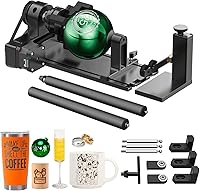
The F2 Ultra UV supports rotary engraving, and the xTool RA3 is listed as compatible with the F2 Ultra. A rotary attachment can help with rounded items such as tumblers, rings and ornaments.
The RA3 includes chuck, roller, sphere and ring attachments with magnetic swaps. Its 360° LiDAR mapping is described for 3D previews and alignment on curved objects.
Check the object's shape and size against the attachment you plan to use. Batch processing kits for the RA3 are separate purchases, so include that in your workflow planning.
What should you compare before buying?
Compare material support, finished detail, workspace and the workflow tools you will use most. For other xTool options, see best xTool laser cutters.
The laser label alone won't tell you whether a machine suits a specific project.
Use this short checklist:
- Main materials: glass and crystal point toward UV; metal-focused work points toward MOPA.
- Finished look: decide whether you need a surface mark, an inner glass engraving or a particular metal finish.
- Design needs: consider whether dual cameras and 2D-to-3D software fit your setup.
- Curved items: check rotary compatibility and the attachment needed for the object.
- Space and safety: the F2 Ultra UV is fully enclosed, but it is still a Class 4 laser engraver. Follow the manufacturer's safety instructions for the machine and your workspace.
If you are still weighing machine types, our xTool F1 Ultra review covers another model in the family. You can also compare options in our best dual laser engraver guide.
Which F2 Ultra should you choose?
Pick the F2 Ultra UV for glass, crystal and other UV-oriented work; pick the F2 Ultra 60W MOPA when metal engraving is central to your projects. Let the materials you make products from decide the comparison.
The UV version's 5W source, fine spot and inner-glass capabilities make its purpose clear. If those features fit your work, review the machine details for your planned material and setup.
For occasional curved items, the RA3 rotary is a compatible accessory to consider. A button switch can also support hands-free starts during a compatible F2 Ultra workflow.
If your projects span several laser types, use this guide to choosing a laser engraver to match the machine to your materials and intended results.
Frequently asked questions
What is the main difference between the xTool F2 Ultra and F2 Ultra UV?
The main difference is the laser technology and the material work each is designed to handle. The F2 Ultra UV uses a 5W UV laser and is positioned for fine glass and crystal engraving, including 3D inner engraving.
The 60W MOPA version is the metal-focused option.
Is the F2 Ultra UV good for engraving glass?
Yes, the F2 Ultra UV is designed for glass and crystal work, including 3D engraving inside glass. xTool describes its UV source as cold processing with clean edges, but results depend on the material, design and settings you use.
Can the F2 Ultra UV engrave materials besides glass?
Yes. The F2 Ultra UV is also described for acrylic, ceramics, plastic, silicone and other materials, including transparent, heat-sensitive or fragile ones.
Check that your exact material and project fit the machine's supported workflow before you commit to a design.
Which F2 Ultra should I choose for metal?
Choose the F2 Ultra 60W MOPA if metal engraving is your main job, and compare its capabilities with your specific metal and mark requirements. Choose the UV version when fine glass, crystal or other UV-friendly materials matter more.
Can the F2 Ultra UV engrave tumblers?
The F2 Ultra UV supports rotary engraving for 360° curved work, and the xTool RA3 rotary is listed as compatible with the F2 Ultra. Check the tumbler's material, dimensions and rotary setup before planning a full-wrap design.