5 Best Cricut Vinyl Cutters (November 2026)
The best Cricut vinyl cutters include the Siser EasyWeed Heat Transfer Vinyl 11.8" x for everyday iron-on projects, the Siser EasyWeed Heat Transfer Vinyl 11.8" x for larger iron-on batches, and the Gold Permanent Vinyl for Cricut Cutting Machine for permanent adhesive designs.
On this page (8 sections)
- Best vinyl cutter Cricut picks for different projects
- How we compared Cricut vinyl cutter options
- Which Cricut machine family is best for vinyl cutting?
- What vinyl should you use with a Cricut?
- How much workspace does a Cricut vinyl setup need?
- Is a Cricut better than a laser cutter for vinyl?
- How should you choose a Cricut vinyl cutter setup?
- Verdict: which is the best vinyl cutter Cricut setup?
The best vinyl cutter Cricut setup for most projects is a Cricut cutting machine paired with Siser EasyWeed, because the material works with Cricut and supports common iron-on work. Gold Permanent Vinyl is a better fit for adhesive decals, while ZICOTO PET sheets suit reusable stencils.
A Cricut machine is only one part of a vinyl workflow. You also need the right material, enough room to feed it, and a way to clear scraps from the mat.
Start with our guide to what is a vinyl cutting machine if you are still comparing machine types.
Our picks at a glance
-
1
 Best for everyday iron-on projects
Siser EasyWeed Heat Transfer Vinyl 11.8" x
9.7/10 our score
See it on Amazon -
2
 Best for larger iron-on batches
Siser EasyWeed Heat Transfer Vinyl 11.8" x
9.5/10 our score
See it on Amazon -
3
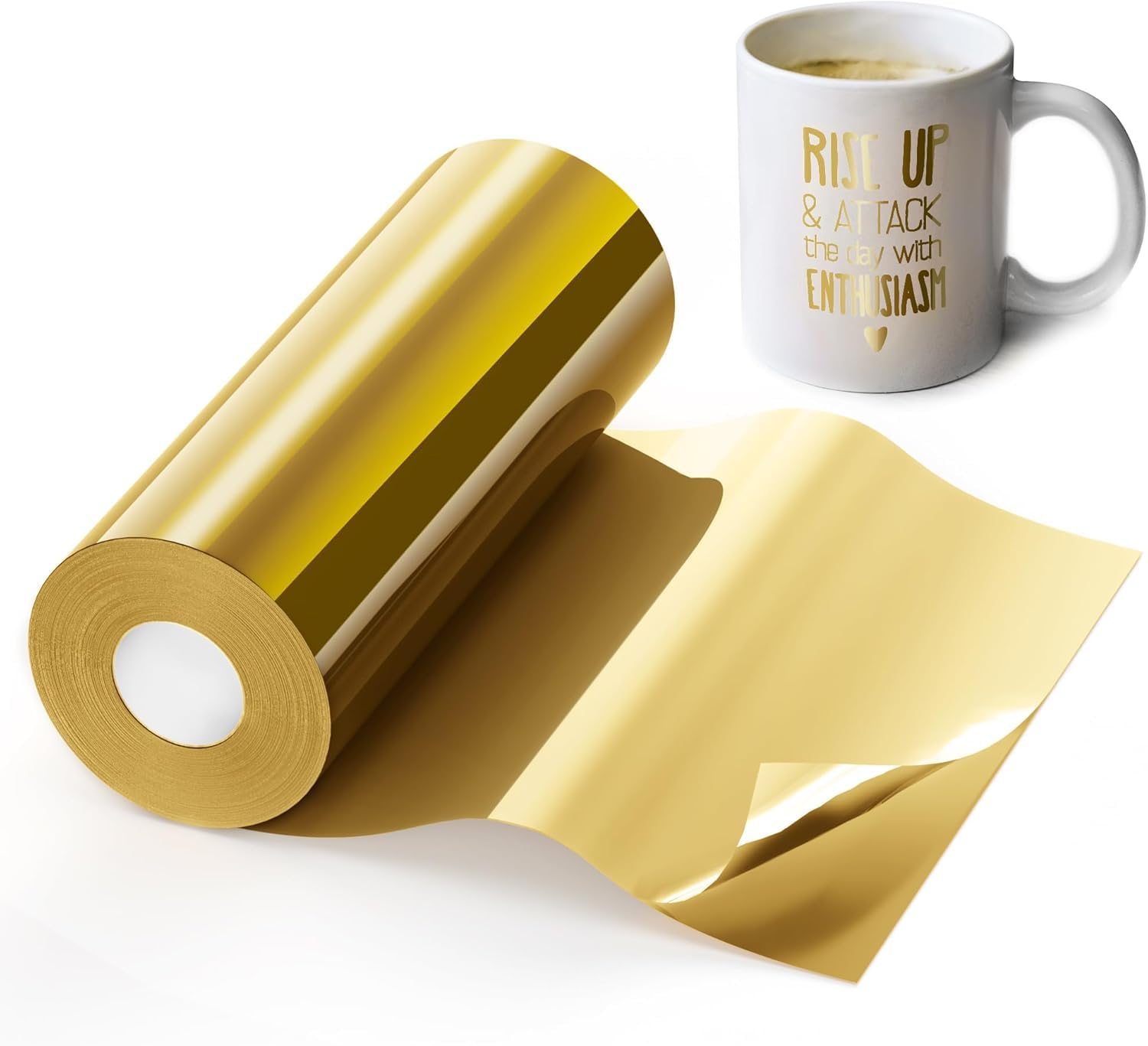 Best for permanent adhesive designs
Gold Permanent Vinyl for Cricut Cutting Machine
9.5/10 our score
See it on Amazon
- 4
 Best for clearing large cutting matsCheck it
- 5
 Check it
ZICOTO Easy Cut Stencil Sheet Set of
Best for reusable Cricut stencils
Best vinyl cutter Cricut picks for different projects
The best choice depends on the material you plan to cut and the size of your designs. For broader production capacity, compare commercial vinyl cutters.
The 11.8 in and 12 in material widths here suit many Cricut workflows, but the roll length, finish and material type change how often you restock.
Siser EasyWeed Heat Transfer Vinyl 11.8" x: Best for everyday iron-on projects
- 11.8 in x 15 ft roll
- White
- Compatible with Siser, Cricut, Silhouette and other craft or professional cutters
- CPSIA certified
The white 11.8 in x 15 ft roll gives Cricut users a practical supply for iron-on designs. Its compatibility with Cricut and other cutters makes it useful when your workspace includes more than one machine.
Pros
- Long 15 ft roll
- White works with many design colors
- Compatible with multiple cutter brands
Cons
- Heat transfer vinyl is for iron-on projects
- White may not suit every design
Siser EasyWeed Heat Transfer Vinyl 11.8" x: Best for larger iron-on batches
- 11.8 in x 30 ft roll
- Black
- Compatible with Siser, Cricut, Silhouette and other craft or professional cutters
- CPSIA certified
The 30 ft black roll is the better match for repeated iron-on work or designs that need a strong dark color. It uses the same 11.8 in width as the smaller white roll but offers twice the stated length.
Pros
- 30 ft roll for repeat projects
- Black suits bold lettering
- Compatible with multiple cutter brands
Cons
- Black is less flexible for light-on-dark designs
- Heat transfer vinyl needs a heat application step
Gold Permanent Vinyl for Cricut Cutting Machine: Best for permanent adhesive designs
- Gold permanent vinyl
- 12 in x 40 ft adhesive vinyl
- Made for Cricut cutting machines
This gold adhesive vinyl gives Cricut users a wide, long roll for permanent-style decals and lettering. Its 12 in width fits a common Cricut material workflow, while the gold finish sets it apart from the black and white heat transfer rolls.
Pros
- Longest roll in this group
- 12 in width
- Gold finish for decorative designs
Cons
- Adhesive vinyl is different from iron-on vinyl
- Gold is a specific color choice
Cricut XL Scraper: Best for clearing large cutting mats
- 5.75 in x 3.25 in active surface
- Works with vinyl, Iron-On, paper and more
- Manual operation
- Compatible with Cricut cutting machines
The extra-large surface covers more area than a small scraper when you burnish vinyl or clear scraps from a cutting mat. It is a useful companion for Cricut users handling larger designs.
Pros
- Large 5.75 in x 3.25 in surface
- Works with vinyl, Iron-On and paper
- Useful for mat clearing
Cons
- Accessory rather than a cutting machine
- Sized for larger work, not fine weeding
ZICOTO Easy Cut Stencil Sheet Set of: Best for reusable Cricut stencils
- 24 12 in x 12 in PET sheets
- 4 mil or 0.1 mm thickness
- Washable and reusable
- For Cricut vinyl cutting projects
The 24-sheet set gives Cricut users blank PET material for reusable stencils. The 12 in x 12 in sheets suit square cutting layouts, while the 4 mil thickness balances flexibility with repeated use.
Pros
- 24 sheets for many designs
- Washable and reusable
- Works on wood, metal, walls, glass and ceramics
Cons
- Stencil sheets are not adhesive vinyl
- A 4 mil sheet needs suitable cut settings
Siser EasyWeed Heat Transfer Vinyl 11.8" x: Best for everyday iron-on projects
- 11.8 in x 15 ft roll
- White
- Compatible with Siser, Cricut, Silhouette and other craft or professional cutters
- CPSIA certified
The white 11.8 in x 15 ft roll gives Cricut users a practical supply for iron-on designs. Its compatibility with Cricut and other cutters makes it useful when your workspace includes more than one machine.
Pros
- Long 15 ft roll
- White works with many design colors
- Compatible with multiple cutter brands
Cons
- Heat transfer vinyl is for iron-on projects
- White may not suit every design
Siser EasyWeed in white suits routine iron-on designs where a light base color gives lettering and shapes a clean look. The 11.8 in x 15 ft roll offers enough length for repeated projects without moving to the larger black roll.
It is compatible with Siser, Cricut, Silhouette and other craft or professional cutters. That broad compatibility helps if you use a Cricut at home but share designs or materials with another cutter.
The roll length is useful for planning several projects from one supply. It gives you more material than a small sheet while remaining shorter than the 30 ft and 40 ft options, so it can be a sensible fit when you want regular use without committing to the longest roll.
The key trade-off is material type. This is heat transfer vinyl, so it belongs in an iron-on workflow rather than a self-adhesive decal workflow.
Plan the design, cut the material with the correct side facing the mat for your process, weed the unwanted areas and apply heat according to the material instructions.
Choose it for white names, numbers and simple apparel designs. Pick the black 30 ft roll instead when your projects need a dark color or you expect to make iron-on designs often.
Siser EasyWeed Heat Transfer Vinyl 11.8" x: Best for larger iron-on batches
- 11.8 in x 30 ft roll
- Black
- Compatible with Siser, Cricut, Silhouette and other craft or professional cutters
- CPSIA certified
The 30 ft black roll is the better match for repeated iron-on work or designs that need a strong dark color. It uses the same 11.8 in width as the smaller white roll but offers twice the stated length.
Pros
- 30 ft roll for repeat projects
- Black suits bold lettering
- Compatible with multiple cutter brands
Cons
- Black is less flexible for light-on-dark designs
- Heat transfer vinyl needs a heat application step
The black Siser EasyWeed roll is the stronger choice for repeated iron-on work because it measures 11.8 in x 30 ft. That gives you the same stated width as the white roll but twice the length, which can reduce interruptions during a batch of similar designs.
Black works well for bold lettering and silhouettes when the base surface is light. It can also serve as a dependable contrast color when your design includes bright or pale elements.
Like the white version, this is heat transfer vinyl compatible with Siser, Cricut, Silhouette and other craft or professional cutters. Its role is different from permanent adhesive vinyl, so separate your design workflow before cutting.
The longer roll can matter when your designs repeat, because the stated 30 ft length gives you more material to organize for a continuing project. The shared 11.8 in width also makes it easier to compare this option directly with the white roll when your machine setup is already planned around that width.
The trade-off is color flexibility. Choose it when black fits the project or when long roll length matters more than having a neutral light color.
For a small set of white iron-on designs, the shorter white roll may be easier to justify.
Gold Permanent Vinyl for Cricut Cutting Machine: Best for permanent adhesive designs
- Gold permanent vinyl
- 12 in x 40 ft adhesive vinyl
- Made for Cricut cutting machines
This gold adhesive vinyl gives Cricut users a wide, long roll for permanent-style decals and lettering. Its 12 in width fits a common Cricut material workflow, while the gold finish sets it apart from the black and white heat transfer rolls.
Pros
- Longest roll in this group
- 12 in width
- Gold finish for decorative designs
Cons
- Adhesive vinyl is different from iron-on vinyl
- Gold is a specific color choice
Gold Permanent Vinyl for Cricut Cutting Machine suits adhesive designs that need a decorative metallic color. Its 12 in x 40 ft format gives you the longest roll in this group and a width suited to Cricut cutting layouts.
Use this type of material for permanent-style lettering, signs and decals where the design adheres to a surface. It is not the same as heat transfer vinyl, so it should not be chosen simply because you plan to decorate fabric with an iron-on method.
The 40 ft length favors frequent users, small businesses and crafters who make many similar designs. For a machine suited to repeat orders, compare vinyl cutters for small businesses.
Before cutting a long roll, confirm that your workspace can support the material as it feeds and that the design fits your mat or cutting setup.
Its 12 in width is slightly wider than the 11.8 in Siser rolls, which gives it a different planning reference when you are arranging designs. The long roll may reduce how often you replace material, but it also makes storage and straight feeding part of the setup decision.
The main trade-off is the gold finish. It adds a specific look, but it is less flexible than a neutral white or black supply.
Choose it for decorative adhesive work, and choose Siser EasyWeed when the project requires heat transfer vinyl.
Cricut XL Scraper: Best for clearing large cutting mats
- 5.75 in x 3.25 in active surface
- Works with vinyl, Iron-On, paper and more
- Manual operation
- Compatible with Cricut cutting machines
The extra-large surface covers more area than a small scraper when you burnish vinyl or clear scraps from a cutting mat. It is a useful companion for Cricut users handling larger designs.
Pros
- Large 5.75 in x 3.25 in surface
- Works with vinyl, Iron-On and paper
- Useful for mat clearing
Cons
- Accessory rather than a cutting machine
- Sized for larger work, not fine weeding
The Cricut XL Scraper suits anyone who spends time clearing large cutting mats or burnishing broad vinyl designs. Its 5.75 in x 3.25 in active surface covers more area per pass than a small scraper.
It works with vinyl, Iron-On, paper and more, so it can stay beside the machine across different projects. Use it to press material down during application or remove scraps and debris from the mat after cutting.
The scraper is compatible with Cricut cutting machines and uses manual operation. Its role is support rather than cutting, but that support matters when scraps cover a large portion of the mat or when a wide design needs even pressure.
The surface size makes it especially relevant when your material is wide or the design covers a broad section of the mat. Clearing the mat promptly can also help keep the work area ready for the next cut, while burnishing gives the accessory a role during application as well as cleanup.
The trade-off is precision. An extra-large surface is efficient for broad areas, but it is not intended to replace a fine weeding tool for tiny interior pieces.
Choose it with Siser or adhesive vinyl when your projects are large enough to benefit from quicker mat clearing.
ZICOTO Easy Cut Stencil Sheet Set of: Best for reusable Cricut stencils
- 24 12 in x 12 in PET sheets
- 4 mil or 0.1 mm thickness
- Washable and reusable
- For Cricut vinyl cutting projects
The 24-sheet set gives Cricut users blank PET material for reusable stencils. The 12 in x 12 in sheets suit square cutting layouts, while the 4 mil thickness balances flexibility with repeated use.
Pros
- 24 sheets for many designs
- Washable and reusable
- Works on wood, metal, walls, glass and ceramics
Cons
- Stencil sheets are not adhesive vinyl
- A 4 mil sheet needs suitable cut settings
The ZICOTO Easy Cut Stencil Sheet Set suits Cricut users who want reusable stencils instead of one-time adhesive vinyl masks. The set includes 24 PET sheets, each measuring 12 in x 12 in, with a stated thickness of 4 mil or 0.1 mm.
PET gives the sheets a flexible base for designs used on wood, metal, walls, glass and ceramics. The sheets are washable and reusable, so one cut design can support more than one project when it is cleaned and stored carefully.
The square format works well for common Cricut mat layouts. Cut a test section first because a 4 mil sheet needs settings that match the material and the machine.
After cutting, remove the unwanted areas carefully before applying paint or another finish through the stencil.
The 24-sheet quantity also gives you room to keep several designs available instead of cutting the same stencil again immediately. Because the material is washable, cleanup becomes part of the reuse process, while the flexible PET base can work on more than one surface type.
The trade-off is that these sheets are not adhesive vinyl. They require a separate way to hold the stencil in place during use.
Choose them for repeatable stencil work, and choose Gold Permanent Vinyl when the design itself needs to remain as an adhesive decal.
How we compared Cricut vinyl cutter options
We compared these options by material purpose, roll or sheet size, stated compatibility and the type of Cricut project each one supports. A cutting machine does not make every vinyl material interchangeable, so the material category carried more weight than color alone.
The 2 heat transfer rolls serve iron-on work. The white 15 ft roll is easier to match to general projects, while the black 30 ft roll favors longer batches and dark designs.
The gold 40 ft roll serves adhesive work, not iron-on work. Its longer length can suit frequent decal production, but the gold finish makes it a more specific choice.
The scraper and stencil sheets support the workflow rather than replace the machine. The scraper helps with broad burnishing and mat clearing, while the PET sheets expand what you can make with a Cricut beyond standard vinyl decals.
We also considered how width affects preparation. The Siser rolls state an 11.8 in width, the gold adhesive roll states 12 in, and the stencil sheets are square 12 in x 12 in pieces.
Those differences are small, but they matter when you plan feeding, storage and available mat space.
Our score weighs stated specs, material use and fit for the searcher's project.
Which Cricut machine family is best for vinyl cutting?
The best Cricut family depends on whether you need basic vinyl cutting, broader material options or larger-format work. Compare the machine's supported materials, working area and available space before choosing a model.
Cricut Maker for broader material choices
Cricut Maker models are the better direction when you plan to move beyond routine vinyl and use a wider range of craft materials. Their appeal is flexibility, but that flexibility may be unnecessary if your main projects are simple adhesive decals and iron-on lettering.
Cricut Explore for everyday vinyl work
Explore models suit many standard vinyl and iron-on workflows. If you mainly cut common designs and want a familiar middle ground, read our comparison of Cricut Maker vs Cricut Explore Air 2.
Cricut Joy for compact workspaces
Cricut Joy models make more sense when storage and desk space matter most. Their smaller format can be convenient for short labels and small designs, but check the material width before planning large projects.
Our Cricut Maker vs Cricut Joy comparison covers the size trade-off.
Cricut Venture for larger vinyl projects
Cricut Venture is the family to consider when your main need is larger-format cutting and you have room for the machine and material feed. It is a workspace decision as much as a machine decision.
See Cricut Maker vs Venture before choosing a larger setup.
What vinyl should you use with a Cricut?
Use heat transfer vinyl for iron-on designs, permanent adhesive vinyl for decals, and PET stencil sheets for reusable masks. Do not select material by color alone because the application method changes with the material type.
Heat transfer vinyl
Siser EasyWeed is the heat transfer option in this roundup. The white 15 ft roll suits general iron-on work, while the black 30 ft roll favors repeated designs that need a dark color.
Plan the design before cutting and keep the material aligned as it feeds. Weed the excess carefully, then follow the material's heat application directions.
Permanent adhesive vinyl
Gold Permanent Vinyl is the adhesive option here. Its 12 in x 40 ft size favors repeated decal work, signs and decorative lettering.
Measure the surface before cutting and leave enough workspace to handle the roll. Adhesive vinyl and heat transfer vinyl serve different jobs, even when both are cut on a Cricut.
Reusable stencil material
ZICOTO PET sheets are for reusable stencils. The 12 in x 12 in format gives you a square working area, and the 24-sheet quantity supports multiple designs.
Test the cut before committing to a detailed stencil. Clean the sheet after use and store it flat enough to protect the design edges.
Matching material to the finished surface
The finished surface should guide the supply choice before the color does. Fabric-oriented iron-on work points to heat transfer vinyl, while a sign or decal points to adhesive vinyl, and a repeatable painted pattern points to stencil material.
This distinction also helps prevent a common planning error: treating every Cricut-compatible material as if it uses the same application process. The machine may cut several materials, but the steps after cutting are different.
How much workspace does a Cricut vinyl setup need?
A Cricut vinyl setup needs room for the machine, mat, material feed and finished designs. Measure the full path around the machine, not just the footprint of the machine itself.
Rolls measuring 11.8 in or 12 in wide need space to stay straight as they enter and leave the cutter. A crowded desk can cause the material to bend, catch or interfere with nearby tools.
Keep a clear area for weeding and application too. The XL Scraper becomes more useful when you can lay a broad design flat and work across it without folding the material.
For a compact room, smaller projects may be easier to manage than long rolls. For a dedicated craft table, the 30 ft and 40 ft rolls reduce restocking but require better storage.
Plan storage as well as cutting space
Long rolls should have a place where they can remain organized between projects. The 15 ft, 30 ft and 40 ft options are not just different supply amounts, because their lengths also affect how much material you need to store and guide.
The 24 PET sheets have a different storage need. Their 12 in x 12 in shape makes a flat or protected location useful, especially if you want to keep cut stencil edges ready for reuse.
Is a Cricut better than a laser cutter for vinyl?
A Cricut is the safer starting point for vinyl cutting because it is designed around craft cutting workflows. A laser cutter is a different tool category, and vinyl should not be treated as a universal laser material.
If your main projects include wood engraving or cutting, compare options in our guide to the Best Laser Cutter For Wood. For vinyl specifically, read Can You Laser Cut Vinyl? before considering a laser setup.
The choice depends on the material and the result you want. Cricut workflows suit cut vinyl, iron-on designs and stencils.
Laser machines suit other materials and processes, but their material safety rules require careful checking.
How should you choose a Cricut vinyl cutter setup?
Choose the machine and supplies together. Start with the project type, then check material width, available workspace, storage and the tools needed for application.
For apparel and iron-on lettering, choose a Cricut machine that fits your design size and pair it with Siser EasyWeed. Select white for flexible light designs or black when a dark color and longer roll matter more.
For signs and decals, Gold Permanent Vinyl offers a 12 in x 40 ft adhesive roll. For reusable masks, choose the ZICOTO 12 in x 12 in PET sheets instead of adhesive vinyl.
If you are deciding between Cricut families, our guides to Cricut Maker vs Explore and Cricut Maker vs Explore 5 explain the differences in a more focused way.
A useful final check is to identify the step after cutting. If you will apply heat, choose the heat transfer option.
If you will adhere a decal, choose adhesive vinyl, and if you will paint through a mask, choose reusable stencil sheets.
Verdict: which is the best vinyl cutter Cricut setup?
The best vinyl cutter Cricut setup for most everyday iron-on projects is Siser EasyWeed 11.8 in x 15 ft in white, paired with the Cricut machine that fits your project size and workspace. It offers a practical material type, useful roll length and compatibility with Cricut and other cutters.
Choose the black 30 ft Siser roll for larger iron-on batches. Choose Gold Permanent Vinyl for long adhesive designs, the Cricut XL Scraper for broad mat clearing and burnishing, and ZICOTO PET sheets for reusable stencils.
The right choice is less about one universal Cricut machine and more about matching the machine family and material to your work. Measure your workspace, identify the application method and then choose the supply that supports the designs you plan to make.
Our top 3 picks at a glance
-
1
Best for everyday iron-on projects
Siser EasyWeed Heat Transfer Vinyl 11.8" x
9.7/10 our score
See it on Amazon -
2
Best for larger iron-on batches
Siser EasyWeed Heat Transfer Vinyl 11.8" x
9.5/10 our score
See it on Amazon -
3
Best for permanent adhesive designs
Gold Permanent Vinyl for Cricut Cutting Machine
9.5/10 our score
See it on Amazon