Why Does Laser Cut Plywood Have Burn Marks on One Side?
Plywood burn marks one side only laser usually come from uneven heat, airflow, focus, or reflected flame under the sheet. Check the underside for flashback, then inspect the bed, masking, airflow, focus height, speed, and plywood flatness.
On this page (9 sections)
- Why does laser cut plywood burn on one side?
- Is the dark side caused by underside flashback?
- Can warped plywood cause burn marks on one side?
- How do focus and alignment affect one-sided scorching?
- Could airflow make one side darker?
- How can you prevent surface soot on laser cut plywood?
- What safety gear helps with plywood smoke and dust?
- Why does pine or veneer burn more than the rest?
- What should you change first when only one side burns?
Plywood burn marks one side only laser problems usually come from uneven heat, flashback, airflow, focus, or a warped sheet. Check whether the dark side is the top or underside, because that separates surface smoke from heat reflecting below the plywood.
A clean cut needs steady motion, consistent height, open support, and enough exhaust to remove smoke. If one edge is darker, compare the material height and airflow on that side before raising power or lowering speed.
Why does laser cut plywood burn on one side?
One-sided scorching means heat, smoke, or airflow is uneven across the plywood. A tilted or warped sheet can change focus, while blocked airflow or heat reflecting from a dirty bed can darken one side or the underside.
Smoke may also stain one face when ventilation pulls across the work area instead of away from it. If the burn follows the airflow, check the exhaust path and vents.
Start with a flat sheet, clean bed, open support below the cut, and consistent lens height. For a broader checklist, read Why Is My Laser Leaving Burn Marks?.
Is the dark side caused by underside flashback?
Underside flashback happens when heat and flame collect beneath the plywood instead of leaving through open support. It often produces dark dots, streaks, or a brown halo on the bottom face.
Look beneath a small test cut. For a Thunder Bolt-specific case, see Thunder Bolt marks under wood.
If the top looks acceptable but the bottom is heavily scorched, inspect the support and airflow before changing the design.
Lift the sheet evenly above the work surface with support that leaves space beneath the cut lines. Keep the supports clear of the exhaust route.
A dirty bed can worsen flashback. Remove loose char and scraps while following the machine's shutdown and cleaning instructions.
Do not leave a flare-up unattended. Stop the job if you see sustained flame, smoke building inside the enclosure, or material shifting into the beam path.
How should you reduce underside heat?
Reduce underside heat with open support, clear airflow, and less heat dwell time. A suitable speed and power test is safer than changing several settings together.
If the cut nearly completes but leaves heavy char, test a modestly faster pass or lower power within your machine and material limits. A setting that fails to cut through can require another pass and create more heat.
Keep a fire-safe work area and remain with the machine. OSHA's nonionizing radiation resources explain why enclosure, access control, and protective procedures matter.
Can warped plywood cause burn marks on one side?
Yes. Warped plywood can move one side out of focus or closer to the bed, causing uneven scorching or flashback.
The risk is higher with thin, wide, or internally stressed panels.
Check the corners, center, and design area with a straightedge. A sheet may look flat at the edges while lifting in the middle.
Use only an approved hold-down method, and keep the panel clear of moving parts and ventilation paths. If the same design burns differently after rotating the plywood, suspect the material shape before the file.
Read Fixing Warped Plywood: Laser Cutting Solutions for ways to check flatness and limit movement.
When should you reject the plywood?
Set aside plywood with strong bowing, loose plies, bubbling glue, unknown coating, or a sharp smell during a small test. Internal glue lines can cut differently from the face veneer.
Furniture, craft, or construction plywood may not behave the same way under a laser. Check the material guidance and avoid treated or coated sheet goods unless they are specifically suitable.
For a different material, see EVA foam cutting on a Beambox.
A small test square is more useful than judging the full panel after it burns. If the finished dimensions still come out small, see why Universal Laser cuts shrink.
Test the same thickness and, when possible, the same section of the sheet.
How do focus and alignment affect one-sided scorching?
Focus should stay consistent across the plywood. A raised, lowered, or tilted side can reduce cutting efficiency and leave extra heat in the material.
Check focus at several points, not just the center. This can reveal a lifted corner or uneven bed.
If the burn stays in the same machine location after moving the plywood, inspect alignment and the optical path according to the machine manual. Do not add power to compensate, since it may deepen the existing char.
For engraving, compare darkness from left to right and across pass directions. Why Is My Laser Engraving Light on One Side? covers a related pattern.
Could airflow make one side darker?
Uneven airflow can pull smoke across one face or leave it trapped around one edge. That creates soot staining even when the cutting settings are close.
For preventing soot on another sheet material, see how to prevent soot when laser cutting matboard.
Check that the exhaust path is open and the enclosure is drawing air correctly. A clogged filter, closed damper, loose hose, or blocked vent can change the smoke path.
Air assist affects the cut zone differently from room ventilation. It can move smoke and support a cleaner cut, but poorly directed airflow may push smoke toward another part of the sheet.
Watch a short test through the enclosure window. Look for smoke collecting on one side, a consistently leaning flame, or a dark trail following the airflow.
Keep your hands away from the beam path and never bypass the enclosure interlock. Eye protection must match the laser wavelength and required optical density.
Which eye protection suits a laser workspace?
The LP-LaserPair LaserPair Laser Safety Glasses 200-534nm is for equipment within the stated 200-534nm range. It has orange, wrap-around eyewear with 23% visible light transmission.
{{product B00UJBGUMM}} The listing describes orange wrap-around laser goggles covering 200-534nm, with 23% visible light transmission and an adjustable TR90 frame.
The glasses have polycarbonate lenses, a full-rim frame, scratch-resistant coating, and a package quantity of 1. Their stated protection also covers 740-900nm and 900-1095nm, so match them to the machine wavelength and required protection rating.
Do not wipe the frame with alcohol or an alcohol-containing disinfectant. Eye protection does not replace an enclosure or safe operating procedure.
How can you prevent surface soot on laser cut plywood?
Surface soot is easier to limit with clean material, suitable masking, steady exhaust, and a tuned cut than with sanding afterward. Masking can reduce smoke contact, but it will not fix flashback or poor focus.
Apply masking evenly if it suits the plywood and machine. Wrinkles, gaps, and loose edges can leave uneven marks or interfere with moving parts.
Keep the face clean before loading the sheet. Dust and adhesive residue can change how smoke settles.
Do not use masking as a reason to increase power. Test the masked material with the same thickness and design style.
For cleanup methods, see How to Remove Scorch Marks from Laser Cut Paper. Remove loose residue gently before using a stronger cleaning method.
What safety gear helps with plywood smoke and dust?
Respiratory protection must match the hazard, fit the face, and be used with effective exhaust. A respirator does not replace source ventilation or suitable plywood.
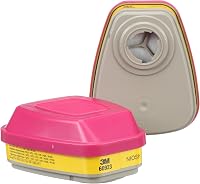
The 3M P100 Respirator Cartridge/Filter 60923, NIOSH Approved, 1 Pair is intended for compatible 3M half and full facepieces with a bayonet-style connection. When properly fitted, it helps protect against certain organic vapors, acid gases, and non-oil and oil particulates.
{{product B00AEFCKKY}} The listing describes a 1-pair 3M 60923 cartridge and filter combination for compatible 3M facepieces and certain organic vapors, acid gases, and particulates.
It works with 3M Half and Full Face Pieces 6000, 7000, and FF-400 Series with the stated connection, plus certain 3M Scott facepieces with the specified adapter. It is not for immediately dangerous to life or health environments.
The 3M Rugged Comfort Quick Latch Half Facepiece Reusable Respirator has a one-hand drop-down mechanism, adjustable head harness, silicone faceseal, and Cool Flow Valve.
{{product B00IF7RCU6}} The listing describes a reusable 3M half facepiece with a quick latch, adjustable head cradle, silicone faceseal, and Cool Flow Valve.
Its low-profile design provides a wide field of view and compatibility with welding and grinding shields. It needs compatible cartridges, filters, or supplied air systems selected for the hazard.
Follow fit, cleaning, storage, and replacement instructions. If smoke remains inside the enclosure, stop cutting and correct ventilation first.
Why does pine or veneer burn more than the rest?
Pine, veneer, glue lines, and dense internal plies can absorb laser heat differently. A plywood panel may show a dark edge even when it is flat and aligned.
The face veneer may be thin while the inner layers contain different grain directions or adhesive. A cut can slow at a glue line and leave a darker section.
Check the same sheet in several small areas. If the burn follows a particular ply, the material is less uniform than the settings.
Do not assume a setting that works on one brand or thickness will transfer to another. Record thickness, surface condition, speed, power, passes, and airflow for each test.
For a related wood problem, see Why Does Pine Scorch When Engraved with a Diode Laser?. Engraving and cutting differ, but both reveal how resin, grain, and heat affect results.
What should you change first when only one side burns?
Change one physical cause at a time, starting with flatness, support, focus, airflow, and bed cleanliness. Check these before changing settings, since extra power can hide the problem while adding char.
Run a small test in the same area of the plywood and mark its top, bottom, left, and right. If the dark area follows the material, inspect warp, plies, coating, or grain.
If it stays in one machine location, check focus, alignment, airflow, and the bed.
Darkness underneath points to poor support or debris below the cut. Darkness on top points to smoke contact, focus, masking, or excessive heat dwell.
Aim for a complete cut with the least heat needed. How to Laser Cut Wood without Burning? offers another preparation checklist.
For plywood burn marks one side only laser problems, match the fix to the pattern: underside blackening suggests flashback, edge darkness suggests focus or warp, and smoke trails suggest airflow. Clean the bed, flatten the sheet, verify ventilation, and adjust one cutting variable at a time.
Frequently asked questions
Why does laser cut plywood burn on only one side?
One-sided burning usually points to uneven heat or airflow. The sheet may be warped, the focus may be higher on one side, the air assist may be uneven, or the underside may be reflecting heat back into the cut.
Check alignment, flatness, support, and ventilation before changing power.
How do you stop flashback on laser cut plywood?
Raise the plywood slightly above the work surface with a clean, open support that does not block airflow. Keep the underside clear of scraps, reduce excess heat with a suitable speed and power test, and inspect the bed for soot or surfaces that reflect heat.
Is burnt plywood safe to use?
It depends on the plywood adhesive, finish, and the smoke produced during cutting. Use only material intended for laser work, keep exhaust running, and follow the material manufacturer's guidance.
Avoid unknown treated, painted, or coated sheet goods.
Can masking prevent burn marks on plywood?
Masking can reduce surface soot, but it cannot correct poor focus, excessive heat, flashback, or uneven airflow. Apply suitable masking evenly, keep it away from moving parts, and still tune the cut with a small test piece before cutting the full design.