Can You Laser Engrave Extruded Polystyrene?
Do not laser engrave extruded polystyrene unless the exact material is confirmed safe by its manufacturer and your laser safety process allows it. Polystyrene foam can melt, ignite, deform, and release harmful fumes, so a material test should not be your first step.
On this page (9 sections)
- Is laser engraving extruded polystyrene safe?
- Why can XPS foam melt or catch fire?
- Does extruded polystyrene release harmful fumes?
- How should you check the foam before a material test?
- What laser settings work for extruded polystyrene?
- Which protective eyewear helps during laser work?
- Is ventilation enough for a polystyrene test?
- What safer material can replace XPS foam?
- Should you try laser engraving extruded polystyrene?
Do not laser engrave extruded polystyrene unless the exact foam is confirmed safe for your machine and process. Heat can melt, shrink, deform, or ignite it, and the fumes may make the work unsafe even when the engraving looks shallow.
The safest answer to laser engraving extruded polystyrene is to stop before the material test. Identify the foam, check its safety information, confirm your machine's limits, and choose a known laser-compatible substitute if any part of the process is uncertain.
Is laser engraving extruded polystyrene safe?
Laser engraving extruded polystyrene is not a general-purpose safe process. XPS foam reacts to concentrated heat, and the same material may behave differently depending on thickness, density, color, surface coatings, and additives.
Engraving removes a small amount of material, but it still creates a hot spot. That spot can collapse the foam cells, leave a melted edge, or spread heat beyond the intended mark.
The main concern is not only appearance. A clean-looking mark does not prove that the process produced safe air or that the foam stayed stable below the visible surface.
Before considering any test, identify the exact product and read its safety information. If the manufacturer does not clearly support laser processing, treat that gap as a reason to choose another material.
For a wider look at fumes and workshop controls, read Is Laser Engraving Toxic?. The same basic rule applies here: visible smoke is not the only sign that a process needs better control.
Why can XPS foam melt or catch fire?
XPS can melt because a laser concentrates heat into a very small area. Foam has air-filled cells, and the surface can soften or shrink before you get a clean engraved line.
The result depends on the laser's wavelength and power, the spot size, the focus, the movement speed, and the number of passes. A setting that only darkens a thin sheet may burn through a thicker section or ignite loose residue.
Air assist and extraction can change the flame behavior, but they do not turn an unknown foam into an approved laser material. A fan may also move hot particles or spread smoke through the workspace.
Do not use a setting copied from another foam project. Even two sheets sold for insulation or craft work can have different surfaces, densities, and additives.
Expanded polystyrene is also not a safe substitute by default. Its bead structure can melt unevenly and leave a rough, unstable edge.
Does extruded polystyrene release harmful fumes?
Treat fumes from heated polystyrene as a serious safety issue. The odor, smoke level, and visible color of the plume cannot tell you whether the air is safe to breathe.
Keep your face away from the enclosure and never use smell as a test. A room that seems clear can still have contamination if extraction is weak, the filter is unsuitable, or the exhaust returns indoors.
A respirator is not a replacement for source capture. Use the machine's enclosure and exhaust system as the primary control, then follow the respirator manufacturer's fit, cartridge, and change guidance when respiratory protection is part of your safety plan.
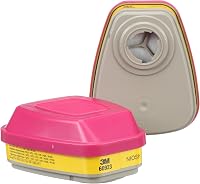
For readers who need respiratory equipment for approved workshop tasks, the 3M P100 Respirator Cartridge/Filter 60923, NIOSH Approved, 1 Pair is designed for certain organic vapors, acid gases, and non-oil and oil particulates when properly fitted. It works with 3M Half and Full Face Pieces 6000, 7000, and FF-400 Series with a bayonet-style connection, plus specified 3M Scott facepieces with the correct adapter.
The 60923 uses a bayonet connection that twists on and off, and its swept-back design is intended to support field of view and comfort. It is not for immediately dangerous to life or health environments.
How should you check the foam before a material test?
Confirm the foam's identity before turning on the laser. “Polystyrene foam” is too broad to guide a safe setting because products may vary in composition, surface treatment, thickness, and intended use.
Look for the product name, manufacturer, technical information, and safety information. Check for coatings, laminates, adhesives, flame retardants, paint, and labels that identify the foam as insulation, packaging, modeling material, or a composite.
Then compare the information with your laser manual and the machine maker's material guidance. If either source excludes the foam, do not proceed.
A material test should also have a controlled location, working extraction, suitable fire controls, and a way to stop the machine quickly. Keep the test small and isolated from loose scraps, paper, and other combustible materials.
Document the exact material and settings if the foam is confirmed safe. That record helps prevent a later mix-up between sheets that look alike.
For a related material with different behavior, compare Cast vs. Extruded Acrylic: Which is Best for Lasers?.
Acrylic types should also be identified before you rely on a setting.
What laser settings work for extruded polystyrene?
There is no universal laser setting for extruded polystyrene. Power, speed, focus, passes, and air assist must come from a confirmed material workflow, not from a nearby foam or a random online table.
Start with the safety decision, not the number. If the foam is not approved, changing speed or lowering power does not solve the material problem.
If the exact product is approved, follow the manufacturer's guidance and your machine's test procedure. Use the smallest useful test area, keep the work attended, and stop if you see flame, expanding smoke, bubbling, unexpected shrinkage, or a melted edge.
Never assume a diode laser is harmless because its power is lower than a CO2 laser. The wavelength and energy delivery still matter, and the workpiece can remain combustible.
Do not treat a setting for polystyrene in another machine as a recommendation. Our guide to What to Know Before Laser Cutting Polystyrene with an 80W Laser explains why machine power alone does not determine a safe result.
Which protective eyewear helps during laser work?
Choose eyewear by the laser's wavelength and required optical density, not by color alone. Safety glasses must match the equipment and the hazard, and they do not make unsafe foam fumes safe to breathe.
The LP-LaserPair LaserPair Laser Safety Glasses 200-534nm and 740-1095nm Laser Goggles cover 180-534nm with OD 7+, 740-900nm with OD 5+, and 900-1095nm with OD 7+. The stated range includes common wavelengths such as 355nm, 405nm, 532nm, 740nm, 808nm, 980nm, and 1064nm.
The goggles have an orange polycarbonate lens, a TR90 frame, an adjustable fit, and 23% visible light transmission. They are marked for EN207 and A1EN207 certification, with applications covering several diode, KTP, ND:YAG, and tattoo-removal laser wavelengths.
Check your machine's wavelength before using them. Do not wipe the frame with alcohol or an alcohol-containing disinfectant, and do not assume these goggles cover a wavelength outside the stated ranges.
Is ventilation enough for a polystyrene test?
Ventilation must capture fumes at the source and exhaust them safely. Opening a door or placing a desk fan near the laser does not control smoke as reliably as a properly designed enclosure and exhaust path.
Keep the enclosure closed during operation. Check that the exhaust line is connected, the fan is operating, and the discharge point does not send contaminated air toward people, windows, or air intakes.
Filters also need to match the contamination and be maintained according to the system instructions. A clogged or unsuitable filter can reduce airflow and create a false sense of protection.
A half-face respirator may help with selected airborne hazards when used correctly, but it does not protect your eyes, skin, or the material from ignition. It also does not replace ventilation.
The 3M Rugged Comfort Quick Latch Half Facepiece Reusable Respirator has a silicone faceseal, adjustable head harness, quick-latch drop-down design, Cool Flow Valve, and compatibility with 3M cartridges, filters, or supplied air systems as specified by 3M.
Its low-profile shape supports a wide field of view and compatibility with welding and grinding shields. The facepiece needs a compatible cartridge or filter, correct adjustment, and a proper fit process.
What safer material can replace XPS foam?
Choose a material with clear laser guidance and a finish that matches the project goal. If you want a dark mark, shallow texture, or a rigid sign surface, a confirmed laser-safe sheet may be easier to control than unknown foam.
If you are considering fabric as another material, review fabric laser cutting safety first.
Wood is often chosen for a natural engraved surface, but coatings, glues, and finishes still need checking. For an example of choosing suitable craft wood, see woodpile craft wood safety.
Acrylic can work for rigid signs when the exact type is suitable for your laser and the material is identified correctly.
Do not replace XPS with another plastic just because it looks similar. Polycarbonate, PVC, vinyl, silicone, and coated sheets each create their own safety questions.
For polycarbonate, review Is Laser Cutting Polycarbonate Safe? What You Need to Know before testing.
For silicone projects, see Can You Safely Engrave Silicone Bands with a Diode Laser? because flexible materials also need product-specific checks.
If your project specifically needs polystyrene, read Laser Cutting Polystyrene: Settings & Safety Guide and use its guidance to decide whether the exact material belongs in your workflow.
Should you try laser engraving extruded polystyrene?
Skip laser engraving extruded polystyrene when the foam's composition or approval is unclear. Melting, ignition, deformation, and fumes make an uncertain test a poor starting point for a small craft result.
Pick a confirmed laser-compatible substitute when you need a repeatable mark. If the exact XPS product is documented as suitable, follow that documentation, your machine manual, and your ventilation and fire-control procedures together.
The decision rule is simple: identify the foam, confirm compatibility, control the fumes, match eye protection to the wavelength, and stop at the first unexpected reaction. If any one of those checks fails, choose another material instead of forcing a setting for laser engraving extruded polystyrene.
Frequently asked questions
Can you laser engrave extruded polystyrene?
Avoid laser engraving extruded polystyrene unless the exact foam has documented approval for your machine and process. The heat can melt or ignite the material, while the fumes and residue create added safety concerns.
A safer workflow is to choose a confirmed laser-safe material with a similar look.
What happens when a laser hits polystyrene foam?
A laser can soften, melt, shrink, char, or ignite polystyrene foam. The result depends on the foam's thickness, density, additives, surface, laser type, power, speed, and airflow.
Because small setting changes can alter the result, never assume a setting for one polystyrene product will transfer to another.
Is extruded polystyrene the same as expanded polystyrene?
No. Extruded polystyrene, or XPS, is made as a more uniform closed-cell foam, while expanded polystyrene, or EPS, is made from expanded beads.
They can react differently to heat, but neither should be treated as automatically safe for laser work.
What should you use instead of laser engraving polystyrene?
Use a material with clear laser compatibility, such as a confirmed laser engraving sheet, wood, or another approved craft material that gives the texture you want. Check the material's safety information, your machine manual, and ventilation requirements before processing it.