How to Choose a CO2 Galvo Laser Engraver
Choose a CO2 galvo laser engraver by matching its scan field, laser power and material workflow to your projects. Galvo systems can mark organic materials quickly, but a larger scan area, deeper work and broader material range may require different machine designs.
On this page (11 sections)
- What does a CO2 galvo laser engraver do?
- How large should the galvo scan field be?
- Why does laser source and power matter?
- Which materials suit this kind of machine?
- How do marking, engraving and cutting differ?
- Which product fits a different buyer?
- What should you check about focus and positioning?
- How do safety and ventilation affect the choice?
- What setup and care keep results consistent?
- Is a CO2 galvo laser right for your projects?
- What is the final buying rule?
The right CO2 galvo laser engraver is the one whose scan field, laser source, power and safety setup match your regular work. Galvo scanning can be useful for fast marking, but it does not automatically make a machine suitable for large signs, deep cutting or every organic material.
Start by listing the objects you plan to mark. Include their largest usable face, the material type, the design detail and how many pieces you expect to process in one session.
A small maker may need a compact enclosed machine for wood, leather or fabric projects. A production shop may care more about repeatable positioning, scan speed, ventilation and a workflow that reduces handling between pieces.
This guide explains the decisions that matter before you compare models. For a broader look at machine types, read our How to Choose a Laser Engraver: A Complete Buying Guide.
What does a CO2 galvo laser engraver do?
A CO2 galvo laser engraver directs the beam with fast-moving mirrors across a defined work area. That design can make marking quick and repeatable, but the machine still has a fixed scan field, focal range and material limit.
The word “galvo” describes the beam-steering system. Instead of moving a heavy laser head across rails, galvo mirrors change the beam's direction over the work surface.
A CO2 laser source is suited to many non-metal materials, including several organic materials. Organic materials can include wood, leather, paper, cardboard and some fabrics, but the exact result depends on the material's treatment and composition.
Engraving removes or changes the surface. Cutting requires enough energy to pass through the material, so a machine that marks well may not cut thick stock efficiently.
The scan field is the area the beam can reach without moving the workpiece. If your design is larger than that field, you may need repositioning, tiling or a different machine layout.
Galvo speed can also be misunderstood. A high scanning speed does not guarantee a finished item will be faster if you spend substantial time aligning, focusing, masking or moving pieces.
Use galvo hardware for defined, repeatable marking jobs, and judge the complete workflow rather than the scanner speed alone.
How large should the galvo scan field be?
Choose a scan field that is a little larger than your usual design area, not merely the largest item you might process once. A field that is too small creates repositioning work, while one that is much larger may not give the fine detail you expect.
Measure the flat area where the design will sit. Curved objects need extra care because the beam reaches different distances across the surface.
A scan field is not the same as the machine's outside footprint. The enclosure, controls, ventilation connections and access space can make the complete setup much larger than the marking window.
Consider these common work patterns:
- Small logos, names and serial marks can fit comfortably in a compact field.
- Panels and plaques may require a wider field or a positioning process.
- Long objects may need a conveyor, pass-through design or repeated alignment.
- Curved items may need a rotary accessory or a method designed for their shape.
Repositioning can work for occasional large designs, but it adds alignment risk. If every job requires multiple placements, the galvo advantage may shrink.
For a machine with a larger bed rather than a compact galvo field, compare our guide to the Best Desktop CO2 Laser Engravers.
Buy around your normal design footprint, then confirm how the machine handles pieces that exceed it.
Why does laser source and power matter?
Laser source and power determine which materials you can process and how deeply you can work, but power alone does not predict the final result. Lens choice, focus, speed, passes, air movement and material composition also matter.
CO2 systems are often considered for non-metal materials. A diode laser may suit lighter craft work, while a fiber source is commonly selected for many metal-marking tasks.
A dual-laser machine changes the decision because different sources can serve different material groups.
Power affects the energy available to the workpiece. More power may support deeper engraving or thicker cutting, but it can also create more heat, smoke and edge damage if settings are not matched to the material.
Ask these questions before comparing wattage:
- Are you marking a surface or cutting through it?
- What is the thickest material you expect to process?
- Do you need one pass, several passes or only light surface detail?
- Does the machine support the material family you use?
- Can your workspace manage the heat, smoke and debris?
A manufacturer's maximum thickness is a starting point, not a promise for every wood, acrylic sheet or leather hide. Adhesives, coatings and density can change the result.
Choose power for your real material and depth needs, then confirm the machine's focus and ventilation requirements.
Which materials suit this kind of machine?
A CO2 galvo system can suit selected wood, leather, paper, cardboard, fabric and other organic materials, provided the material is approved and tested safely. “Organic” does not mean every natural material is automatically safe or predictable.
Wood varies by species, resin content, moisture and surface finish. Plywood can contain adhesives that change smoke and edge quality.
Leather may be vegetable-tanned or chemically treated, and those differences affect both safety and appearance.
Fabric can scorch, melt or fray depending on its fibers and any synthetic blend. Paper may cut cleanly at low power, but it can ignite if heat accumulates.
Before a full job:
- Confirm the material composition.
- Remove unknown coatings or avoid them if you cannot verify them.
- Run a small sample with scrap from the same batch.
- Check the color, edge, odor and smoke path.
- Keep a record of settings that worked.
Never assume that a material is safe because another maker used something with a similar name. PVC and chlorine-containing materials can release dangerous gases, and unknown plastics need special caution.
For a general explanation of laser parts and beam movement, see How Does a CO2 Laser Engraver Work?.
Treat every new material as unverified until its composition and safe processing method are clear.
How do marking, engraving and cutting differ?
Marking changes the surface lightly, engraving removes more material, and cutting aims to pass through the stock. Choose the machine and settings for the hardest operation you perform regularly, not the easiest sample.
Marking may involve a logo, code or name with limited depth. It can benefit from precise positioning and consistent focus.
Engraving needs controlled removal. Fine detail can be lost if the beam spreads, the material moves or the settings create too much heat.
Cutting demands enough energy across the full thickness. Thick material may require multiple passes, slower movement or a different power level, and the edge may show more heat effects.
A galvo scanner is often attractive for repeat marking because the beam can move rapidly across a set field. A larger moving-bed machine may be more practical when you cut broad sheets or need to place many shapes in one layout.
Do not compare machines only by the fastest stated speed. A job's total cycle includes loading, alignment, focusing, processing, cleaning and inspection.
Match the machine to your dominant operation, then confirm that secondary tasks are realistic.
Which product fits a different buyer?
The best option depends on whether you need dual-laser material range, a larger 40W cutting platform or a compact 10W enclosed craft machine. These three products do not represent the same workflow, so the right comparison is about fit rather than a single winner.
The xTool F2 Ultra combines a 60W MOPA fiber laser with a 40W diode laser. The title and product details describe work across metals and non-metal materials, including wood, acrylic, leather, glass, rubber and fabric.
The MOPA source supports metal color engraving, deep engraving and cutting up to 2 mm metal according to the supplied specifications. The diode laser is described for cutting up to 20 mm acrylic and 23 mm wood.
Its stated desktop fiber workspace is 8.7 x 8.7 in, with expansion to 8.7 x 19.7 in when used with the auto conveyor. The machine also has dual 48MP cameras, a stated positioning accuracy of 0.2 mm and speeds up to 15,000 mm/s.
It weighs 67.9 lb and measures 16.88 x 11.57 x 20.51 in. The box includes the dual laser machine and a base material kit.
Choose it when metal capability and broader material work justify a dual-laser setup.
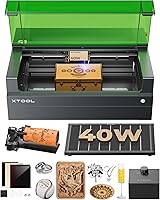
The xTool S1 is a 40W enclosed laser cutter and engraver with a 23.93 x 15.16 in bed size and stated speeds up to 600 mm/s. Its product details describe work on wood, metal, acrylic and tumblers with the rotary bundle.
The machine is described as cutting 18 mm cherry wood in one pass and supporting projects up to 118 in with AutoPassthrough Technology. It also includes auto-focus, pin-point positioning and a protective cover.
The enclosure is described as Class 1, with a cover that filters 99% of laser light. The details also mention 5 flame sensors, an emergency stop button and lid-open stop behavior.
It weighs 86.8 lb. The stated product dimensions are 19.6 x 19.6 x 0.04 in, and the product data identifies this version as the Black Rotary Bundle with a corded electric power source.
Choose it when you need a larger working bed, enclosed operation and 40W cutting power.
The xTool M2 is a 10W enclosed diode laser with built-in dual cameras. It is aimed at home DIY craft work on wood, leather, felt, fabric and paper.
The M2 has a dual-mode design that can add a CMYK inkjet module, sold separately, for color printing. A 3W IR laser is also described as a separate add-on for fine engraving on metal and plastic.
Its dual cameras provide a real-time workspace preview, while xTool Studio includes templates and an integrated AI image generator. The machine is Class 1, and the included items are the M2 machine and a base material kit.
The M2 weighs 36.2 lb, and its package dimensions are 28 x 25 x 12 in. The CMYK module and RA3 Lite Rotary are not included with this standalone version.
Choose it for enclosed home craft work when 10W diode power is enough for your materials.
What should you check about focus and positioning?
Check focus range, camera alignment and repeatable placement before buying. These details affect whether a galvo machine feels efficient after the first setup.
A focused beam concentrates energy in a smaller area. If the workpiece sits too high, too low or at an angle, the mark can lose sharpness or change in width.
Positioning matters most when you process batches. A camera preview may help place artwork, but it still needs calibration and a clear view of the work surface.
Ask how the machine handles:
- Flat objects with known dimensions.
- Curved objects that change height.
- Repeated pieces placed in a jig.
- Designs that exceed the scan field.
- Material that shifts during processing.
A jig can improve repeatability by giving every piece the same location. It does not correct a poor focus distance or an uneven object.
For curved work, a rotary tool may be needed. Confirm that the machine and software support the accessory before designing a production workflow around it.
Prioritize reliable placement and focus, because fast scanning cannot rescue a misaligned design.
How do safety and ventilation affect the choice?
Safety and ventilation are part of the machine decision, not accessories to consider later. Choose an enclosure and exhaust plan that fit your room, material and local requirements.
Laser processing can produce smoke, odors and airborne particles. Some materials can release harmful gases, while others can flare or ignite when settings are wrong.
An enclosure may reduce exposure to direct laser light and help contain smoke, but it does not remove the need for ventilation. Follow the manufacturer's instructions for exhaust, filters, electrical setup and emergency controls.
Before buying, identify:
- Where the machine will sit.
- How smoke will leave the room.
- Whether the enclosure needs clearance.
- How you will handle a flare-up.
- Which materials are prohibited.
- Who can access the machine during operation.
Never leave an active laser unattended. Keep combustible scraps away from the work area, inspect the material during early tests and use the machine's emergency stop when needed.
Class ratings can describe the condition of an enclosed product, but they do not make unsafe materials safe. A Class 1 enclosure still requires correct operation and maintenance.
Choose the safety setup first, then select the machine that can operate within it.
What setup and care keep results consistent?
Consistent results come from clean optics, stable material placement, correct focus and recorded settings. A powerful laser still needs a controlled process.
Start with the manufacturer's setup instructions. Place the machine on a stable surface, confirm access to controls and plan the exhaust path before loading material.
Keep the workpiece flat or secure. Small movement during a job can blur a design, shift a cut or create an uneven depth.
Use a settings log with the material name, thickness, finish, speed, power, passes and result. Record failed samples too, because they show which combinations to avoid.
Routine care may include checking the lens or protective window, clearing residue, inspecting belts or moving parts where applicable and keeping the work area free of debris. Follow the machine's own maintenance schedule for exact tasks.
Do not copy settings between materials just because they look similar. A finished wood board, painted leather and raw fabric can react differently at the same power and speed.
Build a repeatable setup routine, because process control matters as much as the machine's headline specification.
Is a CO2 galvo laser right for your projects?
A CO2 galvo laser is right for you when your work fits a defined scan field and benefits from fast, repeatable marking. It may be the wrong choice if most jobs involve large sheets, deep cutting or constantly changing object sizes.
Choose a galvo design when:
- Your marks fit within its working field.
- You process repeated pieces.
- Speed matters for surface marking.
- You can position work consistently.
- Your materials match the laser source.
Choose a larger bed machine when broad layouts, sheet cutting or large signs dominate your work. Choose a compact diode machine when you mainly make small home crafts and want an enclosed setup with modest power.
A dual-laser machine can make sense when your work spans metals and non-metals, but its broader capability may be unnecessary if you only engrave one material family.
Use our Best CO2 Laser Engraver guide to compare other machine layouts. If metal work is central, our What Is a Galvo Laser? guide explains why the scanner design deserves closer attention.
Buy the workflow you will use every week, not the specification that sounds most impressive.
What is the final buying rule?
The final rule is simple: choose a CO2 galvo laser engraver by scan field first, material and power second, and speed third. A compact field with dependable positioning can beat a faster machine that does not fit your objects.
Before ordering, measure your largest regular design, plan ventilation, confirm material safety and check how you will repeat placement. Then choose the machine whose actual workflow matches those limits.
Frequently asked questions
What is a CO2 galvo laser engraver best for?
A CO2 galvo laser engraver is best for fast, precise marking across a defined scan field, especially when you need repeatable work on suitable organic materials. Check the machine's actual laser source, scan area, focus method and material limits before assuming it can cut or engrave every item.
Is a galvo laser better than a moving-head laser?
A galvo laser can be faster for marking because mirrors move the beam instead of moving the entire laser head across the work area. A moving-head machine may offer a larger usable bed, so the better choice depends on object size, production speed, cutting depth and the shapes you process.
Can a CO2 laser engrave organic materials?
CO2 lasers are commonly used for suitable organic materials such as wood, leather, paper and some fabrics, but results depend on composition, coatings, moisture and thickness. Test a small approved sample, use ventilation and follow the machine's material safety guidance before production.
How large should a galvo scan field be?
Choose a scan field slightly larger than your largest regular design, while remembering that a larger field can affect spot size and detail. If your work varies widely in size, compare a galvo system with a larger bed or an available positioning method.
What should I check before buying a CO2 galvo laser?
Check the laser source, power, scan field, focal distance, enclosure, exhaust plan, controls, compatible materials and service path. Confirm that the machine suits your workflow instead of choosing by speed alone, because marking, engraving and cutting place different demands on a laser.