CNC Router vs Laser Cutter: Which Should You Choose? (November 2026)
Pick a CNC router for 3D carving and thicker stock, and pick a laser cutter for fast cutting and fine engraving on thinner sheets. In this cnc router vs laser cutter comparison, material thickness, detail and your upgrade plans decide the better machine.
On this page (12 sections)
- CNC router vs laser cutter: the quick verdict
- How a CNC router cuts compared with a laser
- CNC router vs laser cutter for wood, acrylic and metal
- Depth and 3D carving: where routers pull ahead
- Speed and detail: where lasers pull ahead
- Working area and shop space compared
- Software and control compared
- Safety, dust and fumes compared
- Set-up, clamps and daily care compared
- Which machine should you buy first?
- Laser cutter vs CNC router for beginners and classrooms
- Verdict: CNC router vs laser cutter
Choose a CNC router for depth and 3D shape, and choose a laser cutter for speed and fine detail on thin material. A cnc router vs laser cutter choice starts with the work you make most often.
Routers physically remove material with spinning bits. Lasers cut and mark with a focused beam, so they excel at flat patterns and surface detail.
This comparison looks at depth, materials, precision, workspace, safety and upgrade paths. We checked the specs for the 4 machines below and weighed them against common workshop use.
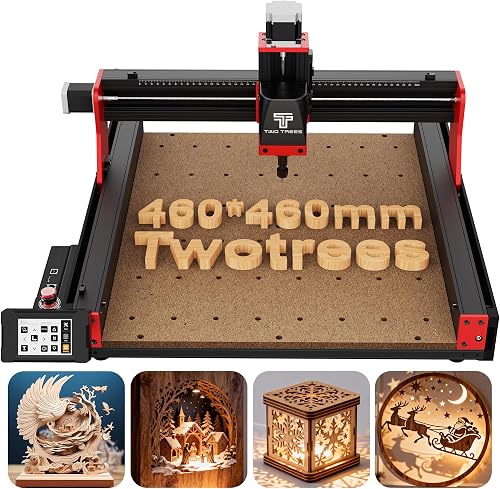 Best for larger routed projects
Twotrees TTC450 Pro All-Metal CNC Router Machine
CNC router vs laser cutter: the quick verdict
A router wins for carving and thicker stock, and a laser wins for fast flat cutting and engraving. Your first project types should make the choice clear.
Pick a router if you plan signs with raised letters, bowls, reliefs, pockets and parts from thick boards. Pick a laser if you plan flat ornaments, small text, thin acrylic shapes and repeat cuts.
If you want later, a laser attachment can add laser work to a router. That path suits a router first buyer who wants to expand step by step.
Our best laser attachment guide explains that upgrade path. It also shows what to check before you add a laser module to a CNC machine.
How a CNC router cuts compared with a laser
A router cuts by moving a bit through stock, while a laser cuts by heating a narrow line with light. That basic difference shapes every other result.
A router can plunge, clear pockets and leave curved 3D surfaces. A laser follows a flat path and cannot reach inside a pocket the same way.
Routers also leave bit marks that need sanding or a cleanup pass. Lasers leave a heat-affected edge that may need cleaning on some materials.
The Genmitsu CNC 3018-PRO Router Kit uses GRBL control and a 20,000 rpm maximum rotational speed. Its bit-based cutting suits wood, acrylic, PVC, plastic, PCB and soft aluminum with the right settings.
The Twotrees TTC450 Pro All-Metal CNC Router Machine goes deeper with 80 mm of Z travel. Its larger frame suits panels and batch work that would crowd a small desktop router.
CNC router vs laser cutter for wood, acrylic and metal
Routers handle thicker wood and soft metals better, while lasers handle thin acrylic and surface marks better. Material and thickness should lead your decision.
For wood, a router carves letters, contours and reliefs in boards. A laser cuts flat outlines and engraves fine lines, but thick stock needs more passes or more power.
For acrylic, a laser makes clean flat shapes in thin sheets. A router can cut acrylic too, but small details and tight corners need the right bit and feed rate.
For metal, a router can engrave soft aluminum and PCB material. A laser marks many metals, and the ORTUR Laser Master 2 S2 LU2-10A Laser states it can cut 30 mm acrylic and 20 mm wood.
The BlazeX M3 10W Laser Engraver Machine lists wood, metal, glass and leather for its laser work. Those surface types suit gifts, labels and small crafted parts.
Start with a material list for your next 5 projects. The tool that matches most of that list is the safer first buy.
Depth and 3D carving: where routers pull ahead
A laser cannot carve true 3D reliefs, so routers win any job that needs depth. Pockets, steps and curved surfaces need a bit.
The Genmitsu 3018-PRO gives you 300 x 180 x 45 mm of working space for small carving and milling. That Z range suits shallow reliefs, engraving and PCB work.
The Twotrees TTC450 Pro gives you 460 x 460 x 80 mm, with a high-precision Z-axis driven by a NEMA 57 stepper motor. Twotrees states positioning accuracy up to 0.0025 mm for depth control.
That extra Z travel helps with multi-layer engraving and intricate relief work. It also helps with thicker blanks that a compact router cannot reach.
A laser can vary power and speed to mark depth on a surface. It still cannot shape a bowl or cut a mortise the way a router bit can.
If 3D work is a core goal, buy the router first. You can add laser work later with a module or a second machine.
Speed and detail: where lasers pull ahead
Lasers are faster on flat cuts and crisper on fine lines and small text. They do not stop for bit changes or corner slowdowns in the same way.
The BlazeX M3 lists 0.01 mm ultra-precision for complex patterns and text. Its smart camera previews placement on the material before a run starts.
The ORTUR Laser Master 2 S2 LU2-10A Laser uses a 0.05 x 0.1 mm compressed spot. That small spot helps with fine detail on metal and other marked surfaces.
A router can engrave detail too, but bit diameter sets the smallest line it can make. Tiny text often needs a small bit, slower feeds and careful clamp setup.
Lasers also cut the same flat file again and again with less tool wear to track. That repeatability helps with ornaments, tags and batch parts.
For ornate flat work, a laser usually saves time. For carved depth, speed matters less than shape.
Working area and shop space compared
Routers in this group range from a compact bench kit to a large panel machine, while lasers favor flat sheets. Measure the machine and the project, not just the bench.
The Genmitsu 3018-PRO has a 300 x 180 x 45 mm working area and weighs 15.3 pounds. It fits a home workshop, classroom or maker space without taking over the bench.
The Twotrees TTC450 Pro has a 460 x 460 x 80 mm working area. That size suits furniture panels and shop signage, so plan the bench and loading space before setup.
The ORTUR laser has a 390 x 410 mm engraving area. That flat area suits sheet goods, tiles and grouped small parts.
The BlazeX M3 includes an enclosure and honeycomb bed for supported flat work. The enclosure helps contain smoke and noise, but it also limits very large panels.
Use painter's tape on your bench to mark each footprint. Then check that you can load, clamp and remove stock without hitting a wall or shelf.
Software and control compared
Routers use GRBL and CAM workflows, while lasers use laser software such as LightBurn. Neither tool works well without the right file for the job.
The Genmitsu 3018-PRO uses open-source GRBL control and Candle for movement and G-code runs. Its included offline controller lets you run basic functions and compatible G-code without a computer.
The Twotrees TTC450 Pro also uses GRBL and works with ArtCam, Fusion 360, Easel and Carveco Maker on Windows, macOS and Linux. It adds a 3.5-inch capacitive touch screen for direct control.
The BlazeX M3 works with LightBurn and CutlabX, and it also lists LaserGRBL support. Its camera syncs with the software to preview design placement.
The ORTUR laser works with LaserGRBL and LightBurn on Windows and Mac systems. It supports SVG, DXF, JPG, JPEG, PNG, BMP, TIF and CR2 files.
Routers need a design and CAM step to turn art into toolpaths. Lasers need a design and laser step to set power, speed and passes.
If you already know one workflow, that can sway the choice. If you know neither, pick the machine whose manual and community match your patience for setup.
Safety, dust and fumes compared
Routers throw chips and dust, while lasers create smoke and need strict fire and eye safety. Both need ventilation and a clear work plan.
A router needs firm clamping, sharp bits and dust collection at the cut. Our best CNC router dust shoe guide helps you plan chip control before the first run.
The Twotrees TTC450 Pro uses dual limit switches on the XYZ axes and a frame built to suppress vibration. Those features support stable, repeatable cuts on larger work.
The BlazeX M3 has a Class 1 safety rating, an integrated fan and sensors that stop the machine if it tilts or the lid opens. Its enclosure also helps with noise control.
The ORTUR laser is Class 4 and includes a laser protective cover, safety glasses and sensors that stop the beam when the machine tilts or stalls. Class 4 power demands rated eyewear and a fire watch.
Never leave a laser running unattended. Keep flammable stock away from the beam path and keep a suitable extinguisher nearby.
Set-up, clamps and daily care compared
Routers need bit changes and firm clamping, while lasers need focus, air assist and clean optics. Simple routines keep both tools accurate.
For routers, check bit condition, collet fit and clamp hold before each job. Our best CNC router clamps guide helps you hold small stock without blocking the toolpath.
The Genmitsu 3018-PRO is aimed at beginners, makers and DIY projects with reduced setup complexity. Its raised base improves stability for learning cuts.
The Twotrees TTC450 Pro includes 10 cutting tools, 6 clamping plates and test engraving materials. That kit helps you start with pointed carving bits, flat end mills and chamfer cutters.
For lasers, clean the lens and mirrors as the manual directs. The ORTUR laser has an air-assist interface for cutting, and the BlazeX M3 lists air assist as an accessory option.
Also check belts, rails and frame screws on both types. A quick wipe and a test cut will show drift before it ruins a good panel.
Our CNC spindle vs router guide helps if you plan to upgrade spindle power later. It explains when a router motor is enough and when a spindle makes sense.
Which machine should you buy first?
Buy a router first for 3D and thick stock, and buy a laser first for flat cuts and fine marks. Your project list is the best guide.
Genmitsu CNC 3018-PRO Router Kit: Best for beginners learning CNC

- 300 x 180 x 45 mm working area
- GRBL control with offline controller
- 20,000 rpm maximum rotational speed
A compact 3-axis router kit for beginners who want to learn carving, engraving and milling in wood, acrylic, PVC, plastic and PCB.
Pros
- Compact desktop size for home shops and classrooms
- Offline controller allows use without a computer
- GRBL control has wide community resources
Cons
- 45 mm Z travel limits thicker work
- Light-duty design is not for deep metal cutting
- Small working area restricts larger signs
The Genmitsu 3018-PRO suits beginners who want a compact learning platform. It cuts wood, acrylic, PVC, plastic, PCB and soft aluminum with the right bits and settings.
Its 300 x 180 mm area keeps projects small and manageable. The offline controller also helps when you want to run a file without keeping a computer tied to the machine.
Twotrees TTC450 Pro All-Metal CNC Router Machine: Best for larger routed projects
- 460 x 460 x 80 mm working area
- 3.5-inch capacitive touch screen
- NEMA 57 stepper motor
- Laser module and 4th-axis ports
A larger all-metal CNC router for furniture panels, signage and batch work, with ports for a laser module or 4th-axis upgrade.
Pros
- Large 460 x 460 mm work area for signage and panels
- Touch screen and expansion ports support upgrades
- Aluminum alloy and stainless steel frame reduces vibration
Cons
- Assembly and driver setup take more time
- Bit and material choices still limit metal work
The Twotrees TTC450 Pro suits makers who need a larger work area. Its 460 x 460 x 80 mm space handles furniture panels, large signage and batch production.
Its laser module port and 500W spindle speed control port support future upgrades. That path can turn a router shop into a combined CNC and laser shop over time.
BlazeX M3 10W Laser Engraver Machine: Best for camera-guided laser work

- 10W laser with 0.01 mm precision
- Smart camera with LightBurn and CutlabX support
- Protective enclosure and honeycomb bed
- Class 1 safety rating
An enclosed laser cutter and engraver with camera guidance, honeycomb bed and included materials for precise placement on wood, metal, glass and leather.
Pros
- Camera preview helps reduce placement waste
- Enclosure and fan manage smoke and noise
- Honeycomb bed and materials support first projects
Cons
- Laser cutting is limited to thinner materials than routed stock
- Camera and software setup takes practice
- Enclosure size limits very large panels
The BlazeX M3 suits laser buyers who want camera guidance and an enclosed setup. Its smart camera, protective enclosure, tool kit, 13 engraving materials and honeycomb bed support a fast start.
Its Class 1 safety rating and fan help with home and studio use. It is a strong pick for precise flat cutting and engraving on wood, metal, glass and leather.
ORTUR Laser Master 2 S2 LU2-10A Laser: Best for open-frame laser cutting

- 10000mW laser module with 10W optical power
- 390 x 410 mm engraving area
- 0.05 x 0.1 mm laser spot
- Air-assist interface for cutting
An open-frame 10W laser engraver and cutter for wood and acrylic up to the stated limits, with safety sensors and eye protection included.
Pros
- Large 390 x 410 mm engraving area
- Air-assist interface supports cleaner cuts
- Safety sensors stop the laser when it tilts or stalls
Cons
- Class 4 laser needs strict eye and fire safety
- Open frame produces more smoke and noise
- Cuts 30 mm acrylic and 20 mm wood at most in stated limits
The ORTUR Laser Master 2 S2 LU2-10A Laser suits open-frame laser buyers who want a large flat area. Its 10000mW module and 390 x 410 mm area support wood and acrylic cutting within the stated limits.
Its modular design helps with assembly, repair and part updates. The included eye protection and safety sensors support safer daily use when you follow the manual.
Laser cutter vs CNC router for beginners and classrooms
Beginners should pick the tool that matches the first 3 projects they truly want to finish. A starter kit helps, but project fit matters more.
A router starter suits learners who want signs, carvings and small milled parts. The Genmitsu 3018-PRO gives a compact way to learn carving, engraving and milling.
Our what is a CNC router machine guide explains core parts and terms in plain language. Read it before you compare bits, spindles and frames.
A laser starter suits learners who want flat ornaments, labels and marked gifts. The BlazeX M3 includes materials and a honeycomb bed to support early runs.
Our how to choose a laser engraver guide and our follow-up laser engraver buying guide help you match power and safety to your goals. Use them to check beam type, area and eyewear needs.
Our best desktop CNC router guide helps if bench size is your main limit. Compare working area first, then frame strength and upgrade ports.
Classrooms should favor enclosed lasers or guarded routers with clear rules. The BlazeX M3 enclosure and the Twotrees limit switches both support safer shared use.
Verdict: CNC router vs laser cutter
Pick the Genmitsu 3018-PRO to learn CNC on a small bench, pick the Twotrees TTC450 Pro for larger routed work, and pick a laser for flat speed and detail. This cnc router vs laser cutter verdict comes down to depth versus flat work.
Choose the Genmitsu CNC 3018-PRO Router Kit if you want a compact starter for wood, acrylic, PVC and PCB. Choose the Twotrees TTC450 Pro if you need a 460 x 460 mm area for panels and signage.
Choose the BlazeX M3 if you want camera-guided precision in an enclosure. Choose the ORTUR Laser Master 2 S2 LU2-10A Laser if you want an open frame with a large engraving area and 10W optical power.
If you still want both skills, start with the tool for your first 90 days of projects. Add a laser attachment or a second machine only after you know which cuts you repeat most.
Our score weighs specs, features and buyer feedback against what you are shopping for. Use your material list, bench size and safety setup to make the final call.
Frequently asked questions
Is a CNC router or laser cutter better for wood?
A CNC router is better for deep carving, 3D reliefs and thicker boards, while a laser cutter is better for flat cuts and fine surface detail. Choose based on depth: routers remove material with bits, and lasers cut and mark with a focused beam on thinner stock.
Can a laser cutter replace a CNC router?
A laser can replace a router for flat cutting and engraving, but it cannot carve true 3D shapes or pockets the way a bit can. If your projects include reliefs, joinery and thicker panels, keep a router as the main machine and add laser power later.
Can a CNC router replace a laser cutter?
A router can cut flat shapes and engrave, but it cannot match laser speed or fine detail on thin sheets. Small text, intricate lines and clean thin cuts are faster and crisper with a laser, especially on acrylic and thin wood.
Which is safer for a home shop?
Neither is safe without guards, ventilation and eye protection matched to the tool. Routers need dust control and secure clamping, while lasers need fire watch, fume control and rated eyewear, so follow the manual for the exact machine you buy.
What materials can each machine handle?
Routers handle wood, acrylic, PVC, plastic, PCB and soft aluminum with the right bits, while lasers handle wood, acrylic, leather, metal surfaces and glass in the ways each maker states. Check thickness limits before you plan a project around either tool.