6 Best CNC Engraving Machines for Wood (November 2026)
The best CNC engraving machines for wood include the xTool M2 10W Laser Engraver for enclosed home crafting, the TTC3018 CNC Router Machine 3-Axis Engraving Machine for basic 3-axis carving, and the Twotrees TTC3018 Pro CNC Router Machine for small desktop wood projects.
On this page (11 sections)
- Best CNC engraving machine for wood by project type
- How we compared wood engraving machines
- Which machine is best for mechanical wood carving?
- Are laser engravers good for wood projects?
- Does air assist help with wood engraving?
- What size CNC machine do you need for wood?
- What should you look for in a wood engraving CNC machine?
- How do you prepare wood for CNC engraving?
- What can you make with a CNC wood router?
- Verdict: which is the best CNC engraving machine for wood?
- The Creality Falcon Pro 10W is the better fit when built-in air assist, TF card control and extra safety controls matter most. Match the machine to your tool path first, then confirm the work area, material process and ventilation plan before you buy.
The best CNC engraving machine for wood depends on whether you want a cutting router or a laser engraver. Choose a mechanical 3-axis router for carved grooves and relief work, or choose an enclosed laser when you want fast surface marking, clean layouts and craft-friendly controls.
A machine for wood should match your project size, detail level and preferred workflow. Genmitsu 4040-PRO owners can compare accessories and upgrades.
The products here include compact CNC routers and 10W laser machines, so they do not all solve the same problem.
Read our guide to what is a CNC router machine before you compare spindle-based carving with laser engraving. If your main goal is furniture parts or deeper woodworking, our guide to the best CNC routers for woodworking covers that wider use case.
Our picks at a glance
-
1

-
2
 Best for basic 3-axis carving
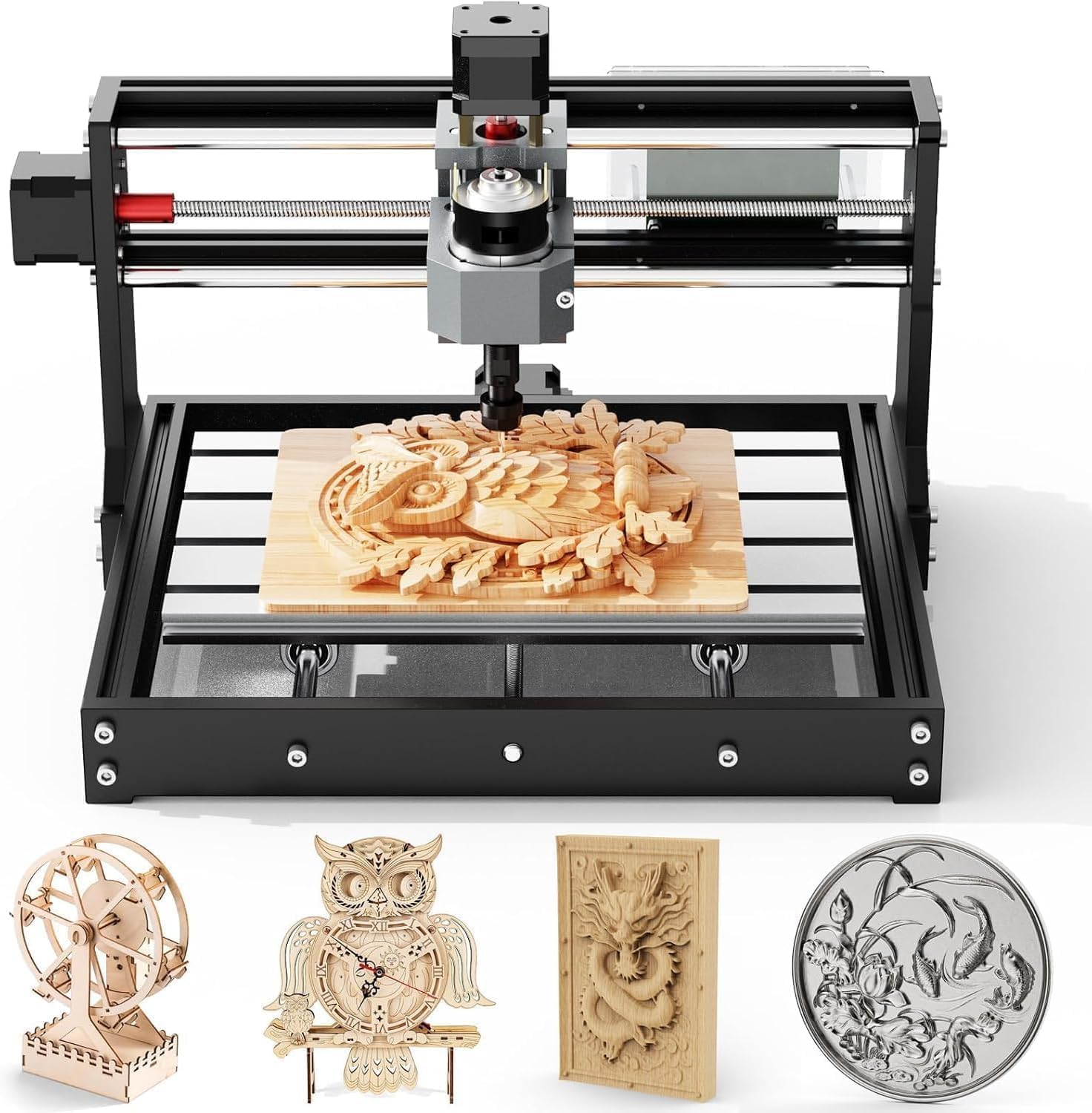
TTC3018 CNC Router Machine 3-Axis Engraving Machine
9.3/10 our score
See it on Amazon -
3
 Best for small desktop wood projects
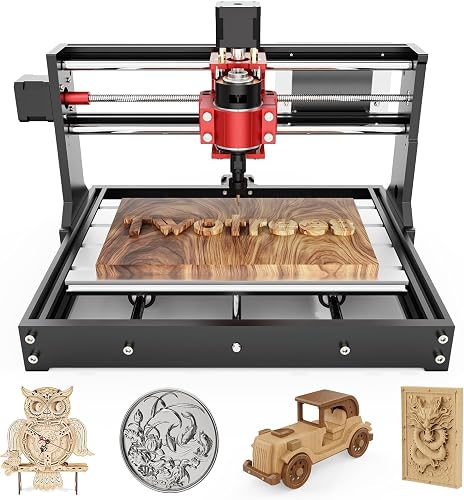
Twotrees TTC3018 Pro CNC Router Machine
8.9/10 our score
See it on Amazon
- 4
 Check it
Carverall K15 Pro Laser Engraver 10W Laser
Best for compact laser versatility - 5
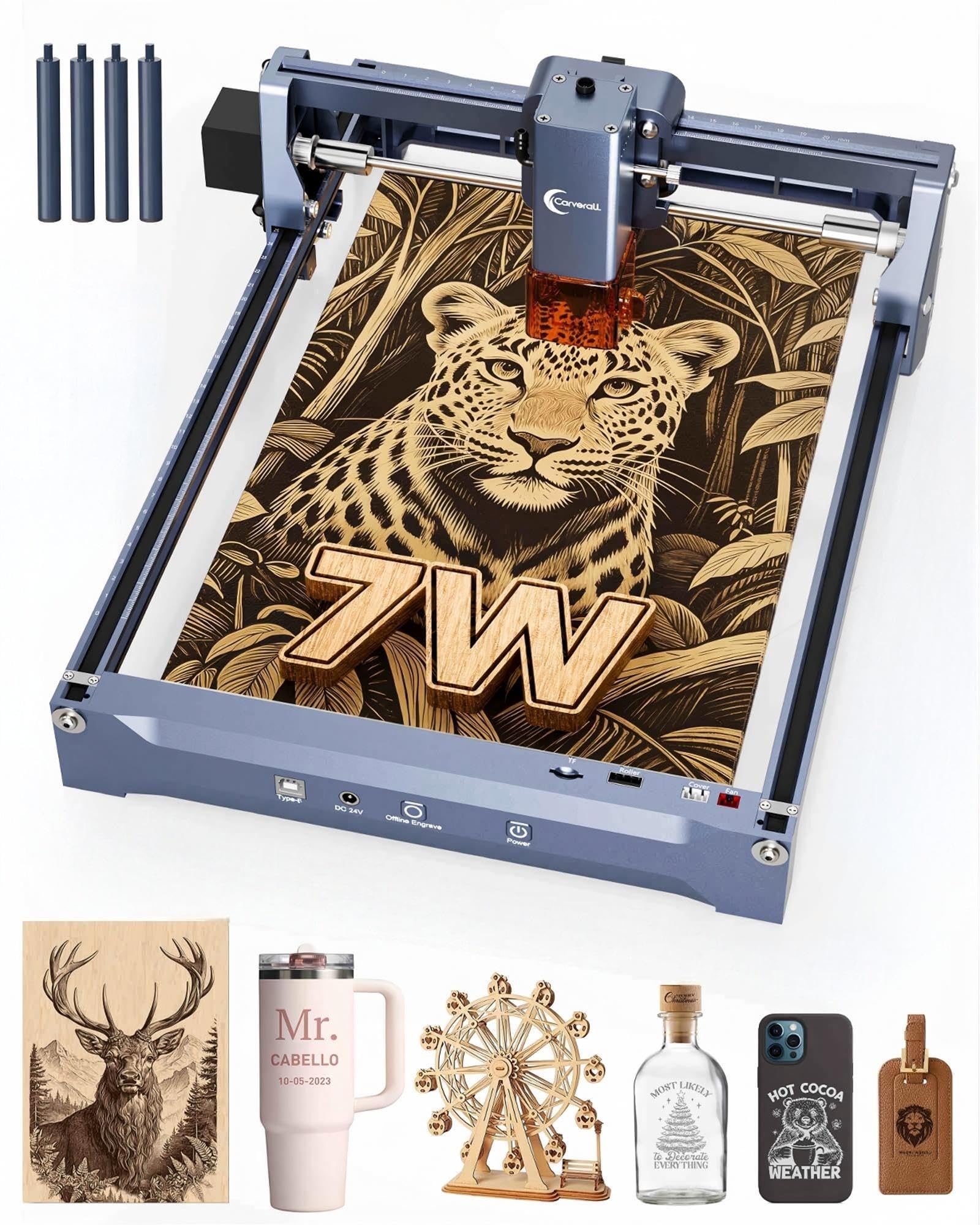 Check it
K15 Pro Laser Engraving Machine with App
Best for app-based DIY work - 6
 Check it
Creality 72000mW Output Power Laser Engraver
Best for air-assisted laser work
Best CNC engraving machine for wood by project type
The xTool M2 is the strongest all-around choice for enclosed home crafting, while the TTC3018 models make more sense for direct mechanical carving. The other laser picks focus on compact work areas, app control or air-assisted cutting.
We compared the stated power, work areas, control methods, safety design and material claims against common wood projects. Our score weighs specs, features and buyer feedback against what you're shopping for.
| Product | Best for | Laser | Safety | Weight | Our score |
|---|---|---|---|---|---|
| xTool M2 10W Laser Engraver | enclosed home crafting | 10W diode | Class 1 enclosed | 36.2 lb | 9.3 |
| TTC3018 CNC Router Machine 3-Axis Engraving Machine | basic 3-axis carving | 9.3 | |||
| Twotrees TTC3018 Pro CNC Router Machine | small desktop wood projects | 15 lb | 8.9 | ||
| Carverall K15 Pro Laser Engraver 10W Laser | compact laser versatility | 8.9 | |||
| K15 Pro Laser Engraving Machine with App | app-based DIY work | Class 1 | 8.8 | ||
| Creality 72000mW Output Power Laser Engraver | air-assisted laser work | 8.4 |
How we compared wood engraving machines
We separated the products into 2 groups: mechanical routers and laser engravers. A router uses a spinning cutter to remove wood, while a laser marks or cuts by focusing light on the surface.
For CNC machines intended for metal, compare CNC engraving machines for aluminum.
That difference affects the finish, setup and project types you can handle. Mechanical routers are the better fit for grooves, pockets, lettering with depth and carved reliefs.
Lasers are often easier for detailed surface artwork, small gifts and repeat designs.
We also looked at the working area. The Twotrees TTC3018 Pro has a 300 x 180 x 40 mm area, while the Carverall and second K15 Pro use near-A4 workspaces.
Measure your largest blank before choosing a machine.
Control style matters too. USB-only operation keeps the Twotrees model simple but wired.
App control, dual cameras, TF card operation and one-button controls can reduce setup steps on laser machines.
Safety needs separate attention. Enclosed Class 1 designs, emergency stops, safety locks and laser protection covers are useful features, but wood dust and laser smoke still need careful handling.
Follow the machine's instructions for ventilation, focus and material use.
For a clearer explanation of the process, read what is CNC engraving before buying based only on power numbers.
Which machine is best for mechanical wood carving?
The Twotrees TTC3018 Pro is the clearest pick for small mechanical wood carving because it has a defined 3-axis work area, a 7000–9000 rpm spindle and a metal Z-axis. The other TTC3018 is also a mechanical option, but its available data gives fewer details for comparing setup and capacity.
Choose the Twotrees TTC3018 Pro for a defined desktop workflow
Twotrees TTC3018 Pro CNC Router Machine: Best for small desktop wood projects
- 300 x 180 x 40 mm working area
- 0.1 mm positioning accuracy
- 7000–9000 rpm spindle
- 10 standard cutters
The Twotrees TTC3018 Pro gives small projects a defined work area and a metal Z-axis. It suits makers who want to learn 3-axis motion and carve wood, acrylic, MDF or nylon at a desk.
Pros
- Compact 15 lb build
- Metal Z-axis
- 10 standard cutters included
Cons
- No Bluetooth or Wi-Fi
- USB wired connection only
The Twotrees TTC3018 Pro is the best fit here if you want a compact CNC wood engraving machine that physically cuts the material. Its 300 x 180 x 40 mm working area suits nameplates, small signs and other projects that fit within a desktop footprint.
The upgraded metal Z-axis and stated 0.1 mm positioning accuracy are useful when repeated vertical movement matters. Its 7000–9000 rpm spindle gives the machine a clear mechanical carving role, unlike the laser products in this roundup.
The package includes 10 standard cutters, an ER11 collet for 0.5–7 mm tooling, a 775 spindle motor and professional tools. For another work setup accessory, compare CNC touch probes.
It weighs 15 lb and measures 420 x 355 x 280 mm, so it needs a stable desk with room for the workpiece.
Control is wired through USB. It has no Bluetooth, Wi-Fi or built-in TF card slot, so plan to transfer .nc or G-code files through the attached USB cable.
Choose the TTC3018 3-axis machine when the router format matters most
TTC3018 CNC Router Machine 3-Axis Engraving Machine: Best for basic 3-axis carving
- 3-axis engraving machine
- Metal engraver
- Mechanical CNC router format
This TTC3018 is the direct mechanical-router option in the group. It fits buyers who want a 3-axis engraving machine rather than a laser-focused craft tool.
Pros
- 3-axis router format
- Designed for engraving
- Mechanical cutting approach
Cons
- Product data gives few operating details
- Work area and control system need confirmation
The TTC3018 CNC Router Machine suits buyers who want a 3-axis engraving machine with a metal engraver format. It is the most direct match for someone searching for a wood engraving CNC machine that removes material with a cutter instead of marking the surface with a laser.
Its main advantage in this group is the mechanical workflow. You can evaluate it as a router first, then compare the other TTC3018 Pro when you need more specific information about work area, spindle speed, cutters or computer connection.
The available product information does not give a working-area measurement, spindle speed, control method or included cutter count. That makes it harder to match with a precise project before ordering, especially if your wood blanks are large or your design needs a certain depth.
Choose this model when the 3-axis router format is your main requirement and you can confirm the missing setup details. Choose the Twotrees TTC3018 Pro when its stated 300 x 180 x 40 mm work area and included 10 standard cutters fit your projects.
Are laser engravers good for wood projects?
Laser engravers are good for wood signs, names, patterns, gifts and surface artwork, especially when you want a compact setup. They are not a direct replacement for a mechanical router when the project needs deep grooves or carved relief.
Choose the xTool M2 for an enclosed home craft setup
xTool M2 10W Laser Engraver: Best for enclosed home crafting
- 10W diode laser
- Built-in dual cameras
- Class 1 enclosed design
- Works with wood, leather, felt, fabric and paper
The xTool M2 combines a 10W diode laser with dual cameras and an enclosed Class 1 design. It suits home crafters who want guided placement and more than mechanical wood carving.
Pros
- Dual-camera workspace preview
- Enclosed Class 1 design
- Beginner-friendly xTool Studio
Cons
- CMYK module and RA3 Lite Rotary sold separately
- Not a mechanical cutting router
The xTool M2 is the best cnc engraving machine for wood if your priority is an enclosed laser workflow for home DIY crafts. Its 10W diode laser, built-in dual cameras and Class 1 enclosure make it the most guided laser option here.
The cameras give a real-time view of the workspace, while xTool Studio offers templates and an integrated AI image generator. That combination suits personalized gifts, home decor, name tags, door signs and other designs where placement matters.
The M2 works with wood, leather, felt, fabric and paper. Its dual-mode architecture can also accept a separately sold CMYK Inkjet module, while a separately sold 3W IR laser is intended for fine engraving on metal and plastic.
The standalone machine includes the M2 and a base material kit.
At 36.2 lb with package dimensions of 28 x 25 x 12 in, it is less portable than the smaller desktop options. Its trade-off is a more enclosed and guided experience, not mechanical wood carving.
Choose the Carverall K15 Pro for compact laser versatility
Carverall K15 Pro Laser Engraver 10W Laser: Best for compact laser versatility
- 10W laser
- 11.8 x 7.9 in near-A4 work area
- 15,000 mm/min speed
- One-touch smart focus
The Carverall K15 Pro is a compact 10W laser with a near-A4 work area and app control. It fits small businesses and home studios making wood signs, coasters and gifts.
Pros
- Near-A4 work area
- Offline TF card control
- 1-year manufacturer warranty
Cons
- Bare-metal engraving needs the optional IR head
- Add-ons expand the total setup
The Carverall K15 Pro suits a small studio that wants a 10W laser, a near-A4 work area and several control options. Its 11.8 x 7.9 in workspace is large enough for many signs, coasters, tags and small craft batches without taking over a desk.
One-touch smart focus and the stated 15,000 mm/min speed target a faster setup for repeat work. The machine supports CutLabX, LightBurn and LaserGRBL, plus wireless app control and offline TF card jobs.
Carverall says the K15 Pro works with more than 300 materials, including wood, acrylic, leather and coated metal. It also supports multi-pass cutting on 12 mm plywood and 8 mm acrylic.
Treat those as task-specific capabilities, and set your passes according to the material and the machine's instructions.
The 10W diode starts with wood and acrylic. A separately sold 1W IR laser head is needed for bare metal work, so the upgrade path adds flexibility but also adds another purchase.
Choose the app-controlled K15 Pro for simple DIY projects
K15 Pro Laser Engraving Machine with App: Best for app-based DIY work
- App control
- 7.87 x 11.81 in near-A4 work area
- Class 1 laser
- Works with wood, acrylic, leather and stone
This K15 Pro focuses on app control and a near-A4 workspace. It suits DIY users who want a compact laser for wood, acrylic, leather and stone projects.
Pros
- App control
- Near-A4 work area
- Class 1 design
Cons
- Product data gives limited power detail
- Mechanical carving features are not specified
This K15 Pro Laser Engraving Machine is a good match for DIY users who value app control and a near-A4 workspace. Its 7.87 x 11.81 in work area gives you room for many small wood, acrylic, leather and stone projects.
The Class 1 design is a useful safety detail for a compact home machine. The product name also points to a laser engraving workflow, so choose it for surface designs and small craft projects rather than for the deeper material removal associated with a mechanical router.
The available information does not provide a power rating, focused spot size, included accessories or spindle details. Those gaps matter if you need a specific cutting depth, repeat speed or material process.
Use the work-area measurement as your first check. Lay out your largest sign, plaque or panel within 7.87 x 11.81 in, then confirm the machine's current setup details before ordering.
Does air assist help with wood engraving?
Air assist can help manage smoke and debris during laser work, and it can support cleaner cutting when the material and settings are suitable. It does not turn a laser into a mechanical carving router.
Choose the Creality Falcon Pro for built-in air assist
Creality 72000mW Output Power Laser Engraver: Best for air-assisted laser work
- 72000mW output power
- Falcon Pro 10W
- Built-in air assist
- 0.06 mm focused spot
The Creality Falcon Pro 10W adds built-in air assist, offline TF card control and a 0.06 mm focused spot. It suits laser users who want cleaner wood work and simple one-button controls.
Pros
- Built-in air assist
- Emergency stop and safety lock
- Offline TF card operation
Cons
- Laser format, not a mechanical router
- Air-assisted cutting needs suitable ventilation
The Creality Falcon Pro 10W fits laser users who want built-in air assist, offline operation and extra safety controls. Its stated 72000mW output power is paired with a 10W Pro laser format, so compare the complete machine and workflow rather than treating the larger milliwatt figure as the only buying factor.
The built-in air-assist device is intended to support cleaner results in one pass. A 6-lens array focuses to a stated 0.06 mm spot, which suits detailed wood artwork and fine line work.
Offline controls let you preview, start, pause or stop from one button, while a TF card can transfer a file without a computer connection. The emergency stop button, laser protection cover, safety lock and active stop function add clear control points during operation.
The machine weighs 11.24 lb and has product dimensions of 12.2 x 24.21 x 7.68 in. It is a laser engraver for wood, paper, leather, plastic and dark acrylic, not a 3-axis router.
What size CNC machine do you need for wood?
Choose the smallest work area that fits your largest regular project, then leave room for clamps, positioning and safe operation. A compact machine is easier to place, but a workpiece that barely fits can slow every job.
Small plaques, tags and craft blanks
The Twotrees TTC3018 Pro's 300 x 180 x 40 mm area is suited to small nameplates, personalized pieces and desktop projects. The Carverall K15 Pro and second K15 Pro offer near-A4 laser work areas for signs, coasters and gifts.
Make a paper template of your largest blank before buying. Include the full design, not just the visible artwork, because the machine also needs usable margins.
Larger wood panels and sign work
A small desktop machine may not be the best answer for wide signs or long boards. Consider a larger router when your work regularly exceeds the listed areas.
For sign-focused projects, continue with our guide to the best CNC routers for sign making. It can help you compare sign size and router format before you commit to a compact model.
Tall objects and irregular pieces
The Carverall K15 Pro has 4 heightening columns for tall items such as gift boxes and skateboards. That feature matters when you want to work on an object instead of a flat sheet, but check the actual clearance needed for your piece.
A flat work area is easier to measure and secure. Tall or uneven objects need extra planning for focus, support and movement.
What should you look for in a wood engraving CNC machine?
Look first at machine type, work area, control method and safety design. Power matters, but it only makes sense alongside the tool path, material thickness and finish you want.
Router or laser?
Pick a router for physical carving, pockets, grooves and relief work. Pick a laser for surface marking, fine artwork, names, patterns and many craft cuts.
The Twotrees TTC3018 Pro is the strongest mechanical choice here because its spindle, cutters and 3-axis movement are clearly described. The xTool M2 is the strongest enclosed laser choice because its cameras and Class 1 design support guided home crafting.
Power and detail
The xTool, Carverall and Creality options use 10W laser formats. The Creality also states a 0.06 mm focused spot, while the Carverall states 0.01 mm precision and 4K clarity.
Do not compare those figures as if they describe the same thing. A focused spot, positioning accuracy and laser output each describe a different part of the workflow.
Software and file transfer
USB-only control can be fine if your machine stays beside a computer. App control, wireless operation or TF card transfer can suit users who want to work away from a desk.
The Twotrees TTC3018 Pro supports GRBL, ArtCam and Fusion360 and transfers .nc or G-code files through USB. The Carverall supports CutLabX, LightBurn and LaserGRBL, with TF card operation for offline jobs.
Safety and ventilation
Class 1 enclosed designs can make home laser work easier to manage. The Creality adds an emergency stop, safety lock and laser protection cover, while the xTool M2 uses a fully enclosed Class 1 design with real-time monitoring.
Wood dust from routers and smoke from lasers still need attention. Keep the work area clear, follow the machine's instructions and plan ventilation before starting regular projects.
How do you prepare wood for CNC engraving?
Start with a flat, stable piece of wood and a design that fits the machine's working area. Secure the material, set the correct focus or cutter depth, and use a small test area before committing to the final piece.
Mechanical routers need suitable cutters and a tool path that matches the wood and desired depth. Laser machines need correct focus and settings for the material, along with careful attention to smoke and burn marks.
Wood choice changes the result. Grain, knots, glue layers and surface finish can affect both engraving detail and cutting behavior.
Our guide to top 7 best wood for laser engraving explains how material choice affects laser work.
You can also compare the broader best wood for laser engraving guide when your project is mainly decorative laser artwork. Test on a scrap from the same sheet when possible, because one board can behave differently from another.
For router projects, clamp the blank firmly and keep the cutter path clear. Do not assume a deeper pass is better.
Several controlled passes can be easier to manage than one aggressive cut.
What can you make with a CNC wood router?
A CNC wood router can make carved lettering, small signs, nameplates, decorative panels, pockets and relief-style details. A laser engraver is better suited to surface artwork, fine marks, personalized gifts and many thin craft materials.
Explore CNC wood router designs for project ideas that match a router's mechanical movement. Start with a simple flat design, confirm the work area and leave enough margin around the artwork.
For a first project, choose a material that fits the machine and a design with clear lines. Avoid making the first job too large or too detailed, because setup errors become harder to isolate as the project grows.
The xTool M2 can also support templates for stickers, keychains, name tags, cake toppers and door signs. The Carverall K15 Pro suits coasters, pet tags, jewelry blanks and small business crafts.
These are laser-centered workflows rather than deep router carving.
Verdict: which is the best CNC engraving machine for wood?
The xTool M2 is the best CNC engraving machine for wood for enclosed home crafting, with a 10W diode laser, dual cameras, Class 1 enclosure and guided software. Choose it when your projects focus on signs, gifts, decor and detailed surface work.
Pick the Twotrees TTC3018 Pro if you want a true mechanical wood engraving CNC machine with a 300 x 180 x 40 mm work area, 0.1 mm positioning accuracy and a 7000–9000 rpm spindle. Pick the other TTC3018 when the 3-axis router format matters more than detailed published setup information.
Choose the Carverall K15 Pro for a compact near-A4 laser with app, software and offline options. Choose the second K15 Pro if app control is your main priority and your work fits its 7.87 x 11.81 in area.
The Creality Falcon Pro 10W is the better fit when built-in air assist, TF card control and extra safety controls matter most. Match the machine to your tool path first, then confirm the work area, material process and ventilation plan before you buy.
Our top 3 picks at a glance
-
1
-
2
Best for basic 3-axis carving
TTC3018 CNC Router Machine 3-Axis Engraving Machine
9.3/10 our score
See it on Amazon -
3
Best for small desktop wood projects
Twotrees TTC3018 Pro CNC Router Machine
8.9/10 our score
See it on Amazon