9 Best Small Laser Engravers for Wood (November 2026)
The best small laser engravers for wood include the xTool S1 40W Laser Cutter and Laser for large wood signs, the BlazeX M3 10W Laser Engraver Machine for beginners with a kit, and the xTool F2 5W IR & 15W Diode for fast small-batch work.
On this page (8 sections)
- Small wood laser engravers compared by bed, power and enclosure
- How we compared these small wood laser engravers
- How small should a small laser engraver for wood be?
- What power do you need for wood?
- Do you need an enclosed Class 1 machine?
- Which software and setup are easiest?
- How do you set up and care for a small wood laser engraver?
- Verdict: which small laser engraver for wood should you buy?
The best small laser engraver for wood is the xTool S1 40W for most buyers, because it pairs a 23.93 x 15.16 in bed with 40W power and an enclosed Class 1 frame. You can fit dog tags, coasters and signs on one bed, and xTool says it cuts 18mm cherry wood in a single pass.
Small does not mean the same thing for every bench. Some picks are small because the frame is light, like the 2 kg ACMER S1.
Others are small because the cabinet is enclosed, like the Creality Falcon A1. We checked specs, bed size, power, safety class and kit items for all 9 machines.
Our scoring weighs specs and feedback against your likely use. A 10W diode suits most small wood blanks.
Higher wattage helps with thicker stock and batch jobs. Enclosure matters more with kids, pets or shared rooms.
Bed size affects workflow as well as fit. A wide bed lets you nest tags in rows, while a narrow bed forces frequent reloads.
Power affects pass count on plywood and MDF, changing edge quality and time per order.
If you want a wider search first, start with our Best Laser Engraver For Wood guide. For true carry-on use, read our best portable laser engraver for wood picks.
New buyers may prefer the best laser engraver for wood for beginners list.
Our picks at a glance
-
1

-
2
 Best for beginners with a kit
BlazeX M3 10W Laser Engraver Machine
9.4/10 our score
See it on Amazon -
3

- 4
 Best for wood, leather and fabricCheck it
- 5
 Check it
ORTUR Laser Master 2 S2 LU2-10A Laser
Best for a large open frame - 6
 Check it
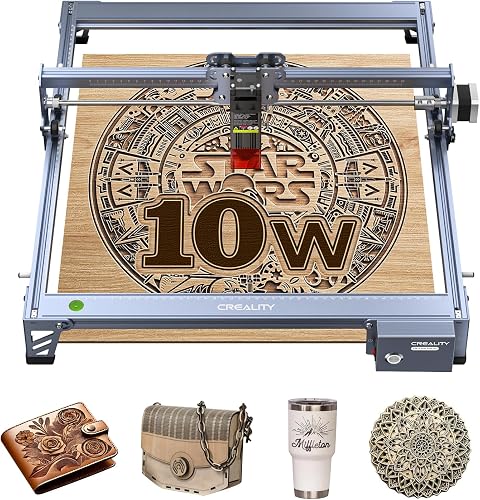
Creality Laser Engraver Machine 10W Output Power
Best for basswood cutting - 7
 Check it
ACMER S1 Laser Engraver Machine
Best for the smallest desk - 8
 Check it
Carverall K15 Pro Laser Engraver 10W Laser
Best for A4 wood blanks - 9
 Check it
Creality Falcon A1 10W Laser Engraver
Best for a large enclosed bed
Small wood laser engravers compared by bed, power and enclosure
The xTool S1 leads on bed size and power. The BlazeX M3 and xTool M2 lead on camera-guided placement for small blanks.
The ACMER S1 leads on weight and desk space.
The gap between these groups is practical, not just numeric. The xTool S1 at 86.8 lb needs a fixed bench, while the ACMER S1 at 3.98 lb can move between a desk and a shelf.
The Falcon A1 sits between those extremes, with a 15.0 x 12.0 in area inside a 30 x 25 x 15 in cabinet. Choose the frame that matches the room you will actually use, not the smallest number on the spec sheet.
Material range also splits the list. Wood is the starting point for every pick here, but some also claim leather, felt, fabric, paper, acrylic or coated metal.
That extra range matters for gift shops, yet it should not distract from wood performance. Check spot size, pass count and bed size first, then treat extra materials as a bonus for later projects.
xTool S1 40W Laser Cutter and Laser: Best for large wood signs
- 40W laser
- 23.93 x 15.16 in bed
- 600mm/s speed
- Class 1 enclosed design
Biggest bed and power here, with enclosure for small shops that still do large door signs.
Pros
- Cuts 18mm cherry wood in a single pass per xTool
- Large bed for batch blanks
- Enclosed Class 1 safety
Cons
- 86.8 lb, so not truly portable
- Largest footprint in this group
The xTool S1 suits a maker who wants one small-space machine for signs, dog tags and larger wood projects. Its bed measures 23.93 x 15.16 in, so xTool says up to 119 dog tags fit in one run.
That helps when you batch small blanks instead of reloading after each piece.
Power is the other draw. This 40W (40,000mW) laser runs to 600mm/s, and xTool says it slices 18mm cherry wood in a single pass.
You can engrave fine surface detail, then cut the same sheet without moving to a second machine.
The rotary bundle also suits curved blanks such as tumblers. Pin-point Positioning and AutoPassthrough, described for items up to 118 inches, help with placement on long or curved stock.
Those features suit sellers who mix flat signs with round gifts.
The trade-off is size and weight. At 86.8 lb, this is not the pick to carry between rooms.
The enclosed cover filters 99% of laser light per xTool, and flame sensors stop operation if a flame is detected. That Class 1 design helps in a shared home, but the cabinet still needs a stable bench with airflow.
BlazeX M3 10W Laser Engraver Machine: Best for beginners with a kit
- 10W laser
- 0.01mm precision
- Smart camera
- Enclosure and honeycomb bed
Camera-guided 10W engraver with enclosure, honeycomb and 13 engraving materials in the bundle.
Pros
- Camera preview helps placement
- Includes enclosure and materials
- LightBurn and CutLabX support
Cons
- 14.97 lb claimed weight in specs
- Work area not stated in data
The BlazeX M3 suits a beginner who wants camera placement and a ready kit for wood, metal, glass and leather. Its precision is 0.01mm per BlazeX, which helps with fine text on small wooden blanks.
A high-density beam also supports clean cuts on wood and acrylic, so one machine covers marking and shaping.
The bundle is the practical win. You get a smart camera, protective enclosure, tool kit, 13 engraving materials and a honeycomb laser bed.
That saves a first accessory order for coasters, tags or ornaments. The honeycomb bed lifts thin wood off the base, which helps keep smoke marks off the back face.
BlazeX says the camera syncs with your software and previews your design on the material. It works with LightBurn and CutLabX, plus LaserGRBL in the compatibility list.
That preview matters on small blanks, where a shift of a few millimeters can ruin a name or photo layout.
Safety design is simple to understand. This is a Class 1 machine with an integrated fan for smoke and odor, plus sensors that stop the laser if the machine tilts or the lid opens.
The trade-off is that the data does not state a work area, so measure your largest blank against the bed before you order.
xTool F2 5W IR & 15W Diode: Best for fast small-batch work
- 15W diode and 5W IR
- 50MP camera
- 6000mm/s speed
- 4.6 kg portable desktop design
Dual-laser portable model built for speed and metal marking, not just wood.
Pros
- Very fast for cards and small items
- Built-in 50MP camera
- Enclosed leak-proof design
Cons
- Class 4 laser per xTool
- IR focus is not needed for wood alone
The xTool F2 suits a seller who needs speed on small items and occasional metal marking. Its 15W diode and 5W IR pair handles wood embossing and cutting, while the IR handles color marking on metal.
For wood alone, the diode does most of the work, with the IR saved for metal blanks in the same shop.
Speed sets it apart. xTool claims up to 6000mm/s, finishing a card engraving in 3 seconds. That pace helps with coasters, phone cases and market-day personalization.
A Slide Extension is mentioned for batch items like coasters, which means you can lay out repeating jobs instead of resetting each piece by hand.
Portability is real here, at 4.6 kg (10 lb) in the specs. The built-in 50MP camera gives up to 0.1 mm alignment accuracy on small pieces.
That camera view is useful for tiny blanks such as tags, where manual placement is slow and error prone.
The trade-off is safety class and focus. xTool calls the F2 a Class 4 laser, so use the enclosed leak-proof design and eye protection as directed. If you only engrave wood and never need metal color marking, a simpler 10W enclosed model may be easier to live with at home.
xTool M2 10W Laser Engraver: Best for wood, leather and fabric
- 10W diode laser
- Dual cameras
- Class 1 enclosed design
- xTool Studio templates
Enclosed 10W machine with dual cameras and templates for home craft blanks.
Pros
- Real-time camera preview
- Good for wood, felt and leather
- Beginner-friendly software
Cons
- CMYK module sold separately
- 36.2 lb is heavy for a small bench
The xTool M2 suits home crafters who engrave wood, leather, felt, fabric and paper on one machine. Its 10W diode laser output is 10000mW, and the Class 1 enclosed frame protects your family during indoor use.
Dual cameras give a real-time preview, which helps you place small designs without guessing.
Software is simple for this group. xTool Studio offers hundreds of templates and an AI image generator, so you can go from text to a gift or home decor piece in minutes. That library saves design time on name tags, keychains and cake toppers, and reduces layout work on batch orders.
Material handling is a strength. The M2 seals felt and fabric edges to prevent fraying and keeps wood cuts clean by minimizing burn marks.
Intricate paper designs also release easily. That mix suits craft sellers who move between wood signs and fabric gifts.
The trade-off is weight and add-ons. At 36.2 lb, it is heavy for a small desk.
The CMYK inkjet module and RA3 Lite Rotary are not included, and the inkjet module is sold separately. Choose it for craft variety and guided placement, not for raw cutting power on thick stock.
ORTUR Laser Master 2 S2 LU2-10A Laser: Best for a large open frame
- 10000mW laser
- 390 x 410mm engraving area
- 0.05 x 0.1mm spot
- Class 4
Open-frame 10W workhorse with a wide area for wood up to 20mm per ORTUR.
Pros
- Large 390 x 410mm area
- 10-15 minute assembly
- LightBurn and LaserGRBL support
Cons
- Open frame, not enclosed
- Class 4 needs eye protection
The ORTUR Laser Master 2 S2 suits a budget-minded maker who wants a wide open frame for wood. Its engraving area is 390 x 410mm, and ORTUR says it can cut 30mm acrylic and 20mm wood.
That area fits signs and boards that smaller beds cannot hold, including plywood sheets for home decor.
Power is 10000mW with a 0.05 x 0.1mm compressed spot. That fine spot helps with detailed lines on wood, while the built-in air-assist interface is designed for cutting.
Assembly takes about 10-15 minutes in a full metal structure. The modular design also makes part replacement simpler over time.
Software support is broad. The machine works with LaserGRBL and LightBurn, and ORTUR lists Windows systems plus Mac support through LightBurn.
File formats include SVG, DXF, JPG, PNG and BMP, which covers most design sources for wood signs and cut files.
The trade-off is openness. This is a Class 4 machine with a protective cover that filters 98% UV light, and goggles are in the package.
Safety sensors stop the laser if the machine is displaced, the computer halts, or movement stops for a long time. For a shared living room, an enclosed Class 1 pick may be a better fit.
Creality Laser Engraver Machine 10W Output Power: Best for basswood cutting
- 10W output power
- 17 x 16 in size in title
- 0.06mm spot
- Class IIIa
Aluminum-frame 10W cutter that Creality says cuts 5mm basswood in one pass.
Pros
- Fine 0.06mm spot for detail
- Wi-Fi, USB and SD transfer
- 10-20 minute assembly
Cons
- Open frame in this data
- Not Class 1 enclosed
The Creality 10W engraver suits makers who cut basswood and engrave dark acrylic, paper and leather. Its output power is 10W from a 72000mW machine, and Creality says it cuts 5mm basswood or 3mm black acrylic in one pass.
Speed reaches 10000mm/m in that data, which helps with repeat cuts on craft stock.
Detail comes from a 0.06 x 0.06mm spot focus. Creality says accuracy is controlled within 0.004 inches, with repositioning accuracy under 0.007 inches.
That level suits small text and line art on wood blanks. A fine spot also helps posters and paper designs where lines sit close together.
The frame is all aluminum alloy with a steel shaft wheel guide rail and belt tension adjustment. You can transfer data by Wi-Fi, USB or SD card, and Creality says assembly takes 10-20 minutes.
The focusing plate on the laser head helps you set focus without extra tools, which saves time between material changes.
The trade-off is safety class. This is Class IIIa, not an enclosed Class 1 cabinet, so plan eye protection and ventilation.
The anti-UV filter acrylic on the module is said to filter 97% of UV rays. For a garage or workshop, that setup is workable, but it is less suited to a shared family room.
ACMER S1 Laser Engraver Machine: Best for the smallest desk
- 2500mW diode laser
- 130 x 130mm working area
- 2 kg weight
- 99% preassembled
Lightest pick here, with a small 130 x 130mm area for tags, coasters and ornaments.
Pros
- 2 kg and 250 x 250 x 162mm machine size
- 1-minute laser head install
- LightBurn and LaserGRBL support
Cons
- 2500mW is slower on thick wood
- 130 x 130mm limits sign size
The ACMER S1 suits a desk with almost no spare room. It weighs 2 kg (3.98 lb) and measures 250 x 250 x 162mm, with a 130 x 130mm working area for tags, ornaments, coasters and small plaques.
That small footprint is the main reason to choose it over a 10W cabinet.
Power is 2500mW with a 2mm focal length and 0.01mm repeatable positioning accuracy, and ACMER says speed reaches 10000mm/min. That suits thin plywood, MDF and acrylic cuts, but thick wood will need more passes than a 10W or 40W model.
Setup is simple. It arrives 99% preassembled with a 1-minute laser head install, and Acmerstudio is free to use.
It also supports LightBurn and LaserGRBL on macOS, Windows and Linux, with NC, DXF, BMP, JPG and PNG files listed.
The trade-off is capacity. A 130 x 130mm bed forces one-at-a-time work on many blanks and rules out door signs.
The aluminum alloy frame and 2 kg weight make storage and transport far easier than any enclosed cabinet here. Choose it for portability and small blanks, not for thick batch work.
Carverall K15 Pro Laser Engraver 10W Laser: Best for A4 wood blanks
- 10W laser
- 11.8 x 7.9 in A4 workbed
- 0.01mm precision
- Class 1
Compact A4 10W system with offline TF-card use and a starter kit.
Pros
- A4 bed fits most small blanks
- Assembles in 3 minutes per Carverall
- CutLabX, LightBurn and LaserGRBL support
Cons
- 2.68 kg weight in specs
- Multi-pass cutting on 12mm plywood per Carverall
The Carverall K15 Pro suits a buyer who wants an A4 bed that slides under a desk. Its workbed is 11.8 x 7.9 inches, covering most daily projects from wood signs to coasters.
Carverall says that covers 98% of daily projects, and four heightening columns let you engrave tall items like gift boxes and skateboards.
Power is 10W with 0.01mm precision and 15000mm/min speed. A dual-fan diode module helps reduce heat buildup on longer jobs.
Carverall says it supports multi-pass cutting on 12mm plywood and 8mm acrylic, which covers many craft blanks.
Setup is fast. Assembly takes 3 minutes with 6 screws, and the starter kit includes safety glasses, materials and tools.
CutLabX is free, and you can run offline jobs from a TF card without a PC. Wireless app control also helps when the machine sits in a different room.
The trade-off is expansion cost. An optional 1W IR head, honeycomb plate, rotary roller and air purifier are add-ons, so budget for them if you plan metal work or round blanks.
A 1-year warranty and lifetime support are listed. Choose it for A4 versatility, not for a one-piece purchase that covers every material.
Creality Falcon A1 10W Laser Engraver: Best for a large enclosed bed
- 10W diode laser
- 15.0 x 12.0 in engraving area
- 600mm/s speed
- Class 1 enclosed
Pre-assembled enclosed 10W model with camera and dual-door access.
Pros
- Large 15.0 x 12.0 in area
- Cuts 6mm wood in a single pass per Creality
- Dual-door loading
Cons
- 28.7 lb and 30 x 25 x 15 in
- Honeycomb limited to 18.11 x 13.62 in
The Creality Falcon A1 suits a maker who wants a large enclosed bed for wood and metal. Its engraving area is 15.0 x 12.0 inches, and the dual-door design with side openings makes loading easier.
Transparent top and side panels give clear visibility during a run.
Power is 10W with a 0.06 x 0.08mm spot and up to 0.01mm precision. Creality says it cuts up to 6mm wood and 9.6mm black acrylic in a single pass.
Speed reaches 600mm/s with auto-tensioned XY belts and a CoreXY system.
Safety and setup help beginners. This Class 1 fully enclosed model comes pre-assembled, with an emergency stop and lid-open pause.
It works with Falcon Design Space, LightBurn and LaserGRBL. The built-in camera helps position designs before you start, which reduces waste on larger sheets.
The trade-off is footprint. At 28.7 lb and 30 x 25 x 15 inches, it needs a dedicated bench.
The honeycomb panel is limited to 18.11 x 13.62 inches, and Creality warns against highly reflective materials. Choose it for enclosed access and bed size, not for moving between rooms.
How we compared these small wood laser engravers
We compared bed size, laser power, safety class, camera help, software support and weight for all 9 machines. We looked at what each machine includes, because a honeycomb bed, enclosure or material kit changes your first-week cost.
We ranked by fit for small wooden blanks in limited workspaces. A best small laser engraver for wood should engrave thin plywood, MDF and solid wood blanks without a huge footprint.
It should also keep smoke, noise and eye risk under control in a home.
Scores reflect that fit. The xTool S1 scores highest for bed size and 40W power.
The ACMER S1 scores lower despite its small size because 2500mW is slower on thick stock. The ORTUR and Creality open frames score well on area and power, but lose points for Class 4 or IIIa safety.
Included accessories changed the ranking in close cases. A bundle with a honeycomb bed, enclosure and starter materials can save a new owner an extra order and a week of waiting.
On the other hand, a strong machine with no camera may cost you more in wasted blanks. We treated included kit items as part of value, not as a separate purchase you can ignore.
What the scores reward most
Bed size and enclosure safety carried the most weight in our scoring. Power came next, because a 10W diode covers most small wood work while 40W mainly helps with thicker stock.
Weight mattered only where it changed daily use, such as carrying a machine between rooms.
If you sell finished work, add our Top 8 Best Laser Engraver For Small Business guide to your reading. If you also want a second business option, see Best Laser Engraver For Small Business.
| Product | Best for | Power | Bed Size | Speed | Our score |
|---|---|---|---|---|---|
| xTool S1 40W Laser Cutter and Laser | large wood signs | 40W | 23.93 x 15.16 in | 600mm/s | 9.5 |
| BlazeX M3 10W Laser Engraver Machine | beginners with a kit | 10W | 9.4 | ||
| xTool F2 5W IR & 15W Diode | fast small-batch work | 15W diode, 5W IR | 6000mm/s | 9.4 | |
| xTool M2 10W Laser Engraver | wood, leather and fabric | 10W | 9.3 | ||
| ORTUR Laser Master 2 S2 LU2-10A Laser | a large open frame | 10000mW | 9.1 | ||
| Creality Laser Engraver Machine 10W Output Power | basswood cutting | 10W | 9.1 | ||
| ACMER S1 Laser Engraver Machine | the smallest desk | 2500mW | 9.0 | ||
| Carverall K15 Pro Laser Engraver 10W Laser | A4 wood blanks | 10W | 8.9 | ||
| Creality Falcon A1 10W Laser Engraver | a large enclosed bed | 10W | 600mm/s | 8.8 |
How small should a small laser engraver for wood be?
A small laser engraver for wood should fit your bench with room to open the lid and load blanks. The ACMER S1 at 250 x 250 x 162mm is the smallest machine here.
The Falcon A1 at 30 x 25 x 15 inches is the largest enclosed pick.
Measure twice. Leave space for ventilation, a laptop and material storage.
A compact machine still needs clearance around it for heat and smoke flow.
Bed size for small blanks
Small blanks include coasters, tags, ornaments and keychains. A 130 x 130mm bed, like the ACMER S1, fits those items one at a time.
An A4 bed, like the K15 Pro at 11.8 x 7.9 inches, fits more blanks per run.
When a large bed helps
A bed over 15 inches wide, like the xTool S1 at 23.93 x 15.16 inches, helps with door signs and batch dog tags. xTool says up to 119 dog tags fit in one go. That batch layout saves time if you sell small pieces.
What power do you need for wood?
You need 10W for most small wood projects. A 10W diode engraves basswood, plywood and MDF well, and cuts thin stock in one or a few passes.
The Creality 10W model cuts 5mm basswood in one pass per Creality.
2500mW for thin blanks
A 2500mW machine, like the ACMER S1, engraves thin wood and cuts thin plywood and MDF. Expect more passes on thicker stock.
It suits ornaments and thin plaques where detail matters more than speed.
10W for daily craft work
A 10W diode, like the BlazeX M3, xTool M2 and K15 Pro, covers most home craft work. You get faster engraving, cleaner cuts and more material choices.
That is the sweet spot for a small wood laser engraver.
40W for thick wood and speed
A 40W laser, like the xTool S1, cuts 18mm cherry wood in a single pass per xTool. That power helps with thick signs and batch jobs.
It costs more bench space and weight at 86.8 lb.
Do you need an enclosed Class 1 machine?
You need an enclosed design if you work where kids, pets or guests are present. Class 1 machines filter laser light and stop when the lid opens.
The xTool S1, BlazeX M3, xTool M2, K15 Pro and Falcon A1 are Class 1 in this data.
Open frames for garage shops
Open frames, like the ORTUR at Class 4 and the Creality 10W at Class IIIa, give you wide access for loading. They need eye protection, ventilation and a clear work zone.
A garage or shed suits that setup better than a living room.
Cameras for small blanks
A camera helps you place small blanks without waste. The BlazeX M3 has a smart camera, the xTool F2 has a 50MP camera, and the xTool M2 has dual cameras.
The Falcon A1 also has a built-in camera for positioning.
Which software and setup are easiest?
You want software that previews your design on the wood before you burn it. xTool Creative Space, xTool Studio and Falcon Design Space are beginner-friendly in this group. LightBurn and LaserGRBL give you more control if you learn them.
Pre-assembled machines
Pre-assembled models save your first evening. The Falcon A1 comes pre-assembled per Creality.
The K15 Pro assembles in 3 minutes per Carverall. The ACMER S1 arrives 99% preassembled.
Offline and wireless control
Offline control helps when your laptop stays busy. The K15 Pro loads files onto a TF card for batch jobs without a PC.
The Creality 10W model transfers data by Wi-Fi, USB or SD card.
How do you set up and care for a small wood laser engraver?
You set up a small wood laser engraver on a stable, level bench with ventilation. Place the blank flat, focus the laser, run a small test on scrap wood, then start your full design.
Keep a fire extinguisher nearby and never leave a running laser unattended.
Focus and test cuts
Focus changes your line quality on wood. Use the focusing plate on the Creality 10W model, or the one-touch focus on the K15 Pro.
Test on offcuts first, because each wood species burns differently.
Cleaning and upkeep
Clean the lens and rails as the maker directs, and check belts for tension. The Creality 10W model has belt tension adjustment.
A clean honeycomb bed also lifts your blank so smoke marks stay off the back.
Verdict: which small laser engraver for wood should you buy?
Pick the xTool S1 40W if you want the largest bed and the most power for wood signs and batch blanks. Pick the BlazeX M3 if you want a camera, enclosure and materials kit for a first machine.
Pick the ACMER S1 if desk space is your main limit.
For photo work on wood, read our Best Laser Engraver For Photo Engraving On Wood guide before you buy. Fine detail on wood depends on spot size and software settings, not just wattage.
If you want the best small laser engraver for wood on a tight bench, start with bed size and safety class, then add power. A 10W enclosed machine fits most small craft needs.
A 40W model fits thick wood and batch work.
Our top 3 picks at a glance
-
1
-
2
Best for beginners with a kit
BlazeX M3 10W Laser Engraver Machine
9.4/10 our score
See it on Amazon -
3


