9 Best Mini Laser Engravers (November 2026)
The best mini laser engravers include the xTool S1 40W Laser Cutter and Laser for larger batch projects, the xTool F2 5W IR & 15W Diode for compact metal marking, and the ACMER S1 Laser Engraver Machine for a compact open frame.
On this page (6 sections)
Best Mini Laser Engravers
The Twotrees TS1 Mini is the best mini laser engraver for tight desks, with an 80 x 80 mm work area and a fully enclosed cover. For a larger project area, look at the ACMER S1 or Carverall K15 Pro, and choose the LaserPecker LP1 Plus if portability matters most.
Mini machines trade work area for a smaller frame. For lower-cost options, compare laser engravers under 200 dollars.
Check the machine dimensions, material size and safety setup together, since “mini” can describe very different footprints.
If you need more power in an enclosed design, compare 20W enclosed laser engravers.
For a machine you can move between work areas, see our Best Portable Laser Engraver. If your projects need a compact handheld tool, compare the Best Handheld Laser Engraver.
Our picks at a glance
-
1
 Best for larger batch projects
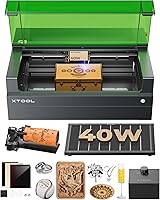
xTool S1 40W Laser Cutter and Laser
9.5/10 our score
See it on Amazon -
2

-
3

- 4
 Check it
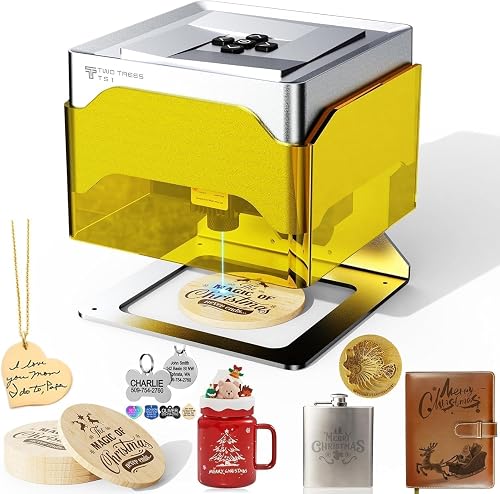
Twotrees TS1 Mini 3W Laser Engraver
Best for the smallest desk - 5
 Check it
Carverall K15 Pro Laser Engraver 10W Laser
Best for a compact A4 workbed - 6
 Check it
Creality Falcon A1 10W Laser Engraver
Best for an enclosed desktop setup - 7
 Check it
ATOMSTACK 5W Black Laser Engraver
Best for phone and PC control - 8
 Check it
LONGER RAY5 Mini Laser Engraver
Best for portable craft projects - 9
 Check it
LaserPecker LP1 Plus Mini Laser Engraver
Best for pocket sized portability
Which mini laser engravers fit small projects?
The Twotrees TS1 Mini is the smallest option here, while the ACMER S1, ATOMSTACK and LONGER RAY5 offer larger work areas in compact machines. The xTool and Creality models take more room, but bring larger beds or added positioning features.
We compared stated work areas, machine dimensions, weight, laser type, control options and safety features against the needs of small projects and restricted desk space. Our score weighs specs and features against what you're shopping for.
| Product | Best for | Bed size | Engraving speed | Laser power | Our score |
|---|---|---|---|---|---|
| xTool S1 40W Laser Cutter and Laser | larger batch projects | 23.93 x 15.16 in | Up to 600 mm/s | 40W | 9.5 |
| xTool F2 5W IR & 15W Diode | compact metal marking | 9.4 | |||
| ACMER S1 Laser Engraver Machine | a compact open frame | 9.0 | |||
| Twotrees TS1 Mini 3W Laser Engraver | the smallest desk | 3W adjustable | 8.9 | ||
| Carverall K15 Pro Laser Engraver 10W Laser | a compact A4 workbed | 10W | 8.9 | ||
| Creality Falcon A1 10W Laser Engraver | an enclosed desktop setup | 10W | 8.8 | ||
| ATOMSTACK 5W Black Laser Engraver | phone and PC control | 8.6 | |||
| LONGER RAY5 Mini Laser Engraver | portable craft projects | 2.5W | 8.1 | ||
| LaserPecker LP1 Plus Mini Laser Engraver | pocket sized portability | 8.1 |
xTool S1 40W Laser Cutter and Laser: Best for larger batch projects
- 23.93 x 15.16 in bed
- Up to 600 mm/s engraving speed
- 40W laser
- Rotary bundle
Its large bed and 40W laser suit buyers who want more capacity for larger or multiple projects. It takes substantially more desk and storage space than a mini machine.
Pros
- Large stated work bed
- Rotary bundle
- Auto-focus
Cons
- 86.8 lb item weight
- Large footprint for a compact workspace
The xTool S1 is the largest machine in this roundup, with a 23.93 x 15.16 in bed and a 40W laser. It makes sense if “mini” is more about fitting the machine into a home studio than carrying it or keeping a tiny footprint.
The included rotary bundle broadens the kinds of projects you can set up, and xTool lists engraving speeds up to 600 mm/s. For fiber models with rotary capability, compare fiber laser engravers with rotary attachments.
Auto-focus and the xTool Creative Space software are included in the feature set.
At 86.8 lb, this is not a light desktop tool. Measure the complete setup area and route for moving it before choosing it for a tight room.
Choose it for a larger batch or oversized workpiece where a compact frame is not the main priority. For a smaller work area with metal marking, compare our best small laser engravers for metal.
xTool F2 5W IR & 15W Diode: Best for compact metal marking
- 5W IR and 15W diode lasers
- 50MP camera
- 6.89 x 9.33 in dimensions
- 10 lb item weight
Two laser types give this compact desktop model flexibility across metal marking and other materials. Its camera helps position designs on small pieces.
Pros
- Dual laser types
- Built-in 50MP camera
- Fully enclosed design
Cons
- Class 4 laser
- Item height is not stated
The xTool F2 combines a 5W IR laser with a 15W diode laser in a machine measuring 6.89 x 9.33 in. Its built-in 50MP camera is designed to help align small pieces, which can reduce the setup guesswork for compact work.
The IR laser is intended for metal color marking, while the diode handles other materials and 3D embossing. The F2 is a Class 4 laser, so plan the work area and follow the manufacturer’s safety directions.
At 10 lb, it is not pocket sized, but it has a notably small stated footprint for a dual laser desktop engraver. It is a fit for buyers who want material flexibility without the bed of a large frame machine.
ACMER S1 Laser Engraver Machine: Best for a compact open frame
- 130 x 130 mm work area
- 2 kg item weight
- 2500mW diode laser
- 99% preassembled
The small frame offers a defined 130 x 130 mm work area while weighing 2 kg. It arrives 99% preassembled and works with ACMER Studio, LightBurn and LaserGRBL.
Pros
- Compact dimensions
- Lightweight frame
- Multiple software options
Cons
- Class 4 laser
- Open frame needs a planned safety setup
The ACMER S1 has a 130 x 130 mm work area and a machine size of 250 x 250 x 162 mm. Its 2 kg weight and 99% preassembled setup make it a practical option when you want a compact frame with more room than an 80 mm mini engraver.
The 2500mW diode laser is specified for engraving and cutting thin plywood, MDF and acrylic. ACMER says the machine also works with wood, bamboo, leather, plastic, PCB, aluminum oxide and ceramics.
It supports ACMER Studio, LightBurn and LaserGRBL, with Windows, macOS and Linux compatibility. Because it is a Class 4 open frame machine, make safety planning part of the workspace setup.
Pick it when you want a defined 130 x 130 mm area in a small frame. If metal is your main material, read our best small laser engraver for metal guide before deciding.
Twotrees TS1 Mini 3W Laser Engraver: Best for the smallest desk
- 80 x 80 mm work area
- 157 x 157 x 167 mm footprint
- About 1 kg
- Fully enclosed acrylic cover
Its tiny footprint and enclosed cover suit very small objects and desks. The 80 x 80 mm work area limits it to compact projects.
Pros
- Very small footprint
- Fully enclosed cover
- Bluetooth phone control
Cons
- Small work area
- Light cutting only
The Twotrees TS1 Mini is the best fit for the smallest work surface, with a 157 x 157 x 167 mm footprint and an 80 x 80 mm work area. For more enclosed models, see enclosed laser engravers.
Its fully enclosed acrylic cover contains light and debris, and the machine weighs about 1 kg.
A 3W adjustable laser is designed for fine detail work and light cutting on thin materials. The stated object height limit is 30 mm, so check both the item’s length and height before starting a design.
You can control it from an iOS or Android phone over Bluetooth, or connect it to a computer by USB. It works with LightBurn and supports NC and G-code files.
This is a small-project tool, not a choice for signs or larger panels. Choose it for keychains, bookmarks and leather patches that fit inside its work area.
For machines suited to patch work, compare laser engravers for leather patches.
Carverall K15 Pro Laser Engraver 10W Laser: Best for a compact A4 workbed
- 11.8 x 7.9 in workbed
- 10W laser
- One-touch focus
- Offline TF card jobs
The A4 workbed balances a compact frame with room for items such as coasters and signs. Its stated setup includes one-touch focus and offline jobs from a TF card.
Pros
- A4-size workbed
- Offline job support
- One-touch focus
Cons
- Larger than the smallest mini models
- Optional IR head is separate
The Carverall K15 Pro offers an 11.8 x 7.9 in A4 workbed, giving it substantially more room than the smallest mini engravers while keeping its weight at 2.68 kg. Four heightening columns support taller items such as gift boxes and skateboards.
Its 10W diode laser is described for engraving and cutting, with one-touch focus and a 15,000 mm/min stated speed. The machine supports CutLabX, LightBurn and LaserGRBL, plus offline jobs from a TF card.
Carverall says the K15 Pro works with more than 300 materials, including wood, acrylic, leather and coated metal. The optional 1W IR head is a separate upgrade for buyers who want bare metal marking.
Choose it if your projects need an A4 work area without stepping up to a full-size bed. For a business workflow, compare it with our Top 8 Best Laser Engraver For Small Business and Best Laser Engraver For Small Business guides.
Creality Falcon A1 10W Laser Engraver: Best for an enclosed desktop setup
- 15 x 12 in engraving area
- Fully enclosed
- Built-in camera
- Pre-assembled
The enclosed design and built-in camera suit buyers who want a desktop machine with a larger work area. Its 30 x 25 in footprint needs dedicated space.
Pros
- Fully enclosed design
- Built-in camera
- Pre-assembled
Cons
- Large footprint
- 28.7 lb item weight
The Creality Falcon A1 combines an enclosed frame with a 15 x 12 in engraving area, built-in camera and 10W diode laser. Its frame measures 30 x 25 x 15 in and weighs 28.7 lb, so it is better suited to a fixed desktop station than a tiny desk.
The camera helps position artwork, and the machine arrives pre-assembled. Creality specifies a Class 1 safety design, with an emergency stop button and a lid-opening pause function.
This is a larger enclosed option if you want the added work area and can give up the space. Avoid mirror-finished metals and mirrored acrylic, which Creality says are not compatible.
ATOMSTACK 5W Black Laser Engraver: Best for phone and PC control
- 135 x 145 mm workspace
- Wi-Fi and hotspot modes
- Windows, macOS, Android and iOS support
- Tip-over and flame shutoff
This small engraver offers phone and computer control, with Wi-Fi or direct hotspot options. Its 135 x 145 mm workspace fits small signs, patches and keychains.
Pros
- Mobile and PC control
- Several connection options
- Compact work area
Cons
- Conflicting laser output details
- Exact machine dimensions are unclear
The ATOMSTACK offers a 135 x 145 mm workspace and control from Windows, macOS, Android and iOS. Wi-Fi suits a home setup, while direct hotspot mode lets a phone connect without relying on a home network.
Its frame uses 20 x 20 mm aluminum alloy, and the machine supports LightBurn and LaserGRBL. ATOMSTACK also describes tip-over and flame shutoff systems.
There is conflicting output information in the specifications, so confirm the exact laser configuration before buying. Its workspace and connection options may suit small craft projects, but buyers who need a precisely stated power level should check with the manufacturer first.
LONGER RAY5 Mini Laser Engraver: Best for portable craft projects
- 5.51 x 5.12 in area
- 2.5W diode laser
- 1.8 kg item weight
- USB, Wi-Fi, app and offline options
Its compact work area and 1.8 kg weight suit small crafts that may need a portable machine. It supports several connection methods and works with LaserGRBL or LightBurn.
Pros
- Lightweight
- Multiple connection options
- Pre-assembled
Cons
- Small work area
- Protective glasses are included, but no enclosure is stated
The LONGER RAY5 Mini has a 5.51 x 5.12 in work area and weighs 1.8 kg. Its frame is small enough for a home craft bench, while the stated 11.5 x 11.26 x 6.5 in dimensions show why it is worth measuring the whole machine rather than the engraving area alone.
The 2.5W diode laser is specified for engraving more than 300 materials, including wood, leather and acrylic. The maker lists USB, Wi-Fi, app and offline connection options, plus compatibility with LaserGRBL and LightBurn.
Protective glasses and an emergency stop button are included. This is an open frame setup, so set it up with the maker’s safety guidance and a suitable work area.
LaserPecker LP1 Plus Mini Laser Engraver: Best for pocket sized portability
- Pocket sized design
- Adjustable stand
- 360 degree positioning
- Mobile app control
The LP1 Plus pairs a pocket sized engraver with an adjustable stand for different angles. It uses the mobile app and does not support metal engraving.
Pros
- Portable setup
- Adjustable stand
- Magnetic base
Cons
- No direct PC control
- Metal engraving is not supported
The LaserPecker LP1 Plus is the portability pick, with a pocket sized body, 2.4 lb item weight and an adjustable stand. The stand supports 360 degree positioning, while a magnetic base helps hold small objects in place.
It works through the LaserPecker Design Space mobile app and does not support direct PC control. The manufacturer says to set the distance between lens and material to 200 mm with the included ruler.
Use compatible non-metal materials such as wood, leather and paper. Metal engraving is not supported, so this is a focused choice for small personal projects rather than a general metal tool.
How do you choose a small laser engraver?
Choose by the largest item you expect to engrave, then check the full machine footprint and the safety arrangement. Work area alone does not tell you whether a machine fits your desk or whether an item will clear the frame.
The Twotrees TS1 Mini gives you an 80 x 80 mm work area, while the ACMER S1 expands that to 130 x 130 mm. The Carverall K15 Pro provides an A4 workbed, and the xTool S1 and Creality Falcon A1 need much more room.
Also consider how you will connect and position designs. A built-in camera may help with alignment, while phone app control can simplify small projects if you prefer not to use a computer.
Compare laser cutters with camera positioning if alignment is a priority.
Which materials can mini laser engravers handle?
Material compatibility depends on the machine’s laser type and the material’s surface, so match those details before you buy. The product names alone do not mean every material can be engraved safely or cleanly.
The Twotrees TS1 Mini is described for plywood, MDF, bamboo, paper, painted metal and leather. The ACMER S1 lists wood, bamboo, leather, plastic, PCB, aluminum oxide and ceramics, while the LaserPecker LP1 Plus explicitly excludes metal engraving.
Bare metal work deserves special attention. The xTool F2 includes an IR laser for metal marking, while the Carverall K15 Pro requires an optional IR head for bare metal marking.
What safety features should you compare?
Check the laser class, enclosure and stop features before choosing a mini machine. A small footprint does not make a laser harmless, and each machine needs to be used according to its safety instructions.
The Twotrees TS1 Mini has a fully enclosed acrylic cover, while the Creality Falcon A1 is described as Class 1 and enclosed. The xTool F2 is Class 4, and the ACMER S1 is also Class 4 with an open frame.
Plan for ventilation, supervision and eye protection as directed by the manufacturer. If you are setting up a craft station with a heat press too, our guide on how to use Cricut EasyPress Mini covers a different tool with its own safe-use steps.
Which mini laser engraver should you choose?
Choose the Twotrees TS1 Mini when desk space is extremely limited and your pieces fit within 80 x 80 mm. Pick the ACMER S1 for a compact frame with a larger work area, or the Carverall K15 Pro when an A4 workbed matters.
For metal marking, compare the xTool F2 with the Carverall’s optional IR head and review our best small laser engravers for metal guide. If carrying the machine matters most, consider the Best Battery Powered Laser Engraver.
Our top 3 picks at a glance
-
1
Best for larger batch projects
xTool S1 40W Laser Cutter and Laser
9.5/10 our score
See it on Amazon -
2
-
3
Frequently asked questions
What is the best mini laser engraver for a very small desk?
The Twotrees TS1 Mini has the smallest stated footprint here at 157 x 157 x 167 mm, with an 80 x 80 mm work area. Measure space for the machine and anything needed around it before choosing.
Its small work area is best suited to small items such as keychains and bookmarks.
Are mini laser engravers suitable for small business work?
Some can handle small batches, but check the work area, material fit and safety setup against the items you plan to make. The xTool F2 supports batch processing with an optional slide extension, while the Carverall K15 Pro has an A4 workbed and offline job support.
Can a mini laser engraver mark metal?
Some models can mark certain metals, but the laser type and surface matter. The xTool F2 combines an IR laser with a diode laser, while the LaserPecker LP1 Plus does not support metal engraving.
For metal focused options, see our guide to the best small laser engraver for metal.
Do mini laser engravers need an enclosure?
An enclosure can help contain laser light and debris, but it does not remove the need to follow the machine's safety instructions. The Twotrees TS1 Mini is fully enclosed, while the ACMER S1 is an open frame.
Check the laser class and plan suitable protection, ventilation and supervision for your workspace.
How much workspace does a mini laser engraver need?
Allow for the machine footprint, the material area, cables and any safety or ventilation equipment. A machine may have a small engraving area but a larger frame, as with the LONGER RAY5 Mini.
Measure your desk before buying and leave room to load materials without crowding the machine.