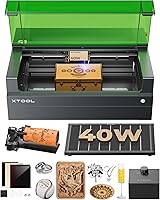
6 Best Laser Cutter Kits (November 2026)
The best laser cutter kits include the Creality Air Assist Kit for Laser Engraver for Falcon 10W airflow, the TOOPLAS 26L/min Air Assist Pump Kit for adjustable airflow, and the Cregrant3D Skouphy Updated Integrated Laser Engraver Enclosure for smoke and light control.
On this page (6 sections)
- Which laser cutter kits are best for different projects?
- Which complete laser cutter kit should you choose?
- How to choose a laser cutter kit for your workspace
- What materials can these laser cutter kits handle?
- How should you set up and care for a laser cutter kit?
- Which laser cutter kit is the best choice?
The best laser cutter kit for most DIY users is the Algolaser 10W Laser Engraver and Cutter, with a rotary roller, riser kit and built-in touchscreen.
That combination suits makers who want one package for flat pieces and cylindrical objects.
Choose the Longer Ray5 20W for higher stated power.
Choose an air assist kit when you already own a compatible machine.
This guide compares complete laser machines with assembly and upgrade kits.
For another brand's machine options, see VEVOR laser cutters.
Some picks help you start engraving.
Others improve smoke control or cover the work area.
Others make a compatible machine useful for longer projects.
The difference matters because an accessory can only work with the right host machine.
A complete kit includes controls, the laser module and project accessories in one set.
An accessory kit adds airflow, enclosure space or a larger bed to a machine you already use.
If you are new to the category, start with what is a laser cutter and how does it work.
For more machine options, see our guide to the best bambu laser cutter.
Read those guides first if terms such as air assist, rotary roller or work area are new.
That background makes the trade offs in this roundup easier to judge.
Beginners often need simple controls and clear safety features.
Experienced makers may already have a machine and only need one specific upgrade.
This post keeps those two paths separate.
Complete machines are compared on power, speed, connections and included accessories.
Air assist kits are compared on airflow, control options and compatibility.
The enclosure and extension kit are compared on workspace coverage and added length.
Use the short answer as a starting point, then check each pick for fit.
Confirm compatibility before ordering any accessory.
Measure your machine and bench space before ordering an enclosure or extension.
That simple check prevents most returns and extra assembly work.
Our picks at a glance
-
1
 Best for Falcon 10W airflow
Creality Air Assist Kit for Laser Engraver
9.7/10 our score
See it on Amazon -
2

-
3
 Best for smoke and light control
Cregrant3D Skouphy Updated Integrated Laser Engraver Enclosure
9.2/10 our score
See it on Amazon
- 4
 Check it
AlgoLaser DIY KIT MK2 Y-Axis Extension Kit
Best for longer workpieces - 5
 Check it
Algolaser 10W Laser Engraver and Cutter
Best complete kit for beginners - 6
 Check it
QFLONGER Longer Ray5 20W Laser Engraver
Best for higher cutting power
Which laser cutter kits are best for different projects?
The best laser cutter kit depends on whether you need a complete machine, cleaner airflow, a covered work area or a longer engraving bed. For a comparison of common laser types, see fiber vs CO2 vs UV lasers.
The products below are ordered by score, with each score weighing stated specs, features and buyer feedback against the needs of this search.
Best laser cutter kits for airflow and cleaner cuts
Air assist is the right upgrade when smoke, dust and heat are affecting your cutting area. It does not replace a laser machine, so confirm the connection and size before adding one to your setup.
| Product | Best for | Airflow | Weight | Dimensions | Our score |
|---|---|---|---|---|---|
| Creality Air Assist Kit for Laser Engraver | Falcon 10W airflow | 22 L/min | 3.41 lb | 7.2 x 7 x 3.3 in | 9.7 |
| TOOPLAS 26L/min Air Assist Pump Kit | adjustable airflow | 3.08 lb | 9.4 | ||
| Cregrant3D Skouphy Updated Integrated Laser Engraver Enclosure | smoke and light control | 9.2 | |||
| AlgoLaser DIY KIT MK2 Y-Axis Extension Kit | longer workpieces | 3.7 lb | 9.0 | ||
| Algolaser 10W Laser Engraver and Cutter | complete kit for beginners | 8.7 | |||
| QFLONGER Longer Ray5 20W Laser Engraver | higher cutting power | 10–30 L/min adjustable | 8.6 |
Creality Air Assist Kit for Laser Engraver: Best for Falcon 10W airflow
- 22 L/min airflow
- Designed for Falcon 10W and 10W laser module kits
- Low working noise
- Velcro cable management
This air assist kit focuses on smoke and dust control for compatible Creality laser setups. Its 22 L/min airflow and Velcro design suit buyers who want a tidier machine area.
Pros
- 22 L/min airflow
- Low working noise
- Simple installation
Cons
- Designed around Falcon 10W and 10W laser module compatibility
- It is an air assist kit rather than a complete laser machine
TOOPLAS 26L/min Air Assist Pump Kit: Best for adjustable airflow
- Adjustable airflow up to 26 L/min
- 8 x 5 mm hoses
- Direct machine connection or external power supply
- Power supply included
TOOPLAS is a flexible air assist choice for users who want adjustable output and 2 control modes. The included power supply and replaceable air tube support different setup layouts.
Pros
- Highest stated airflow among the 2 air assist kits
- 2 control modes
- Power supply included
Cons
- You may need to replace the tube and nozzle for special sizes
- It is an accessory, not a complete laser machine
Cregrant3D Skouphy Updated Integrated Laser Engraver Enclosure: Best for smoke and light control
- 720 x 720 x 400 mm size
- 5-watt LED light strip
- 4500 RPM ventilation fan
- Aluminum, fiber and Oxford cloth construction
This enclosure suits buyers who need a larger covered workspace with built-in lighting and ventilation. Its visual window and 4500 RPM fan support observation and smoke control.
Pros
- Large enclosure size
- Built-in LED light
- 4500 RPM ventilation fan
Cons
- Measure your machine and rotary roller before ordering
- It is an enclosure rather than a laser machine
AlgoLaser DIY KIT MK2 Y-Axis Extension Kit: Best for longer workpieces
- Expands the area to 400 x 880 mm
- Designed for DIY KIT MK2 10W
- Extension frame, belts and cable included
- No drilling required
This extension kit is for DIY KIT MK2 10W owners who need room for longer signs, panels and crafts. The frame, belts and cable support an assembly-focused upgrade.
Pros
- 400 x 880 mm expanded area
- Designed for DIY KIT MK2 10W
- No drilling required
Cons
- Compatibility is specific to DIY KIT MK2
- It extends a machine rather than replacing one
Algolaser 10W Laser Engraver and Cutter: Best complete kit for beginners
- 10,000 mW laser module
- 3.5-inch smart touchscreen
- Rotary roller and riser kit
- Up to 12,000 mm/min speed
This complete laser engraver includes a rotary roller and riser kit for cylindrical and thicker projects. Its touchscreen and multiple connection options suit beginners and small creative businesses.
Pros
- Rotary roller and riser included
- Built-in touchscreen
- Class 1 laser safety design
Cons
- The air assist pump is not included
- 10W power is lower than the Longer 20W machine
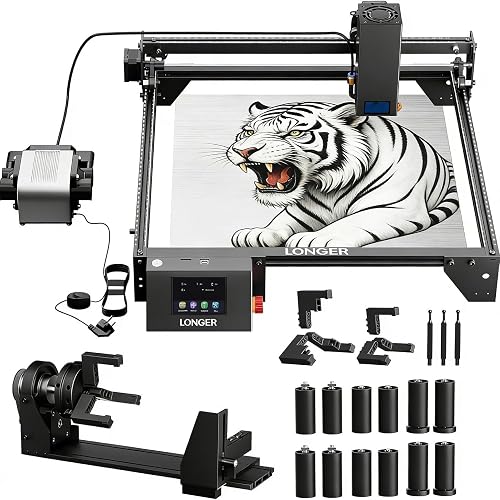
QFLONGER Longer Ray5 20W Laser Engraver: Best for higher cutting power
- 20,000 mW laser module
- Up to 24,000 mm/min speed
- 400 x 365 mm work area
- Air assist and rotary roller kit
The Longer Ray5 20W is the strongest machine choice here for buyers who want higher stated laser power and faster engraving. Its air assist, rotary attachment and 12 risers widen the project range.
Pros
- 20W laser module
- Up to 24,000 mm/min speed
- Air assist and rotary kit included
Cons
- Laser Class IV requires careful safety planning
- It weighs 20.1 lb
Creality Air Assist Kit for Laser Engraver: Best for Falcon 10W airflow
- 22 L/min airflow
- Designed for Falcon 10W and 10W laser module kits
- Low working noise
- Velcro cable management
This air assist kit focuses on smoke and dust control for compatible Creality laser setups. Its 22 L/min airflow and Velcro design suit buyers who want a tidier machine area.
Pros
- 22 L/min airflow
- Low working noise
- Simple installation
Cons
- Designed around Falcon 10W and 10W laser module compatibility
- It is an air assist kit rather than a complete laser machine
The Creality Air Assist Kit for Laser Engraver is the focused choice for compatible Falcon 10W and 10W laser module setups.
Its 22 L/min airflow is intended to move smoke and dust away from the work surface and laser lens.
Creality describes the pump as low noise.
That matters when the machine runs in a home workshop or shared room.
The airflow can also reduce the surface temperature of the cutting material.
That support helps produce smoother edges in daily use.
The kit measures 7.2 x 7 x 3.3 inches and weighs 3.41 lb.
Its Velcro design helps keep the machine area tidier after installation.
That cable control suits small benches where loose tubing can snag.
Set up is meant to be simple for existing Creality users.
This is a good fit when you want a simple airflow upgrade for a compatible Creality setup.
It is not the right pick if you need a complete laser machine.
It is also not a general purpose expansion kit for other brands.
Check your exact Falcon model before you order.
Keep the pump intake clear so airflow stays steady during long runs.
Clean the lens and work area regularly even with air assist fitted.
That care helps the kit do the job it is designed for.
TOOPLAS 26L/min Air Assist Pump Kit: Best for adjustable airflow
- Adjustable airflow up to 26 L/min
- 8 x 5 mm hoses
- Direct machine connection or external power supply
- Power supply included
TOOPLAS is a flexible air assist choice for users who want adjustable output and 2 control modes. The included power supply and replaceable air tube support different setup layouts.
Pros
- Highest stated airflow among the 2 air assist kits
- 2 control modes
- Power supply included
Cons
- You may need to replace the tube and nozzle for special sizes
- It is an accessory, not a complete laser machine
The TOOPLAS 26L/min Air Assist Pump Kit suits buyers who want more airflow and adjustable control.
Its maximum output is 26 L/min.
The pump supports both direct machine control and manual control through an external power supply.
That choice suits different layouts and software setups.
The kit includes 8 x 5 mm hoses and a power supply.
TOOPLAS also says the air tube and nozzle can be replaced for special sizes.
That gives more setup flexibility than a fixed connection.
Airflow can move smoke and residue away from the cutting area.
It can also help reduce surface heat during cutting.
That makes this kit useful for buyers who already have a laser cutter.
It suits users who want a more adjustable air assist arrangement.
The pump is portable and lightweight for moving between benches.
That portability helps in shared workshops or small rooms.
Choose TOOPLAS when the extra airflow range matters.
Choose Creality when you need a smaller, brand specific option for a Falcon 10W or 10W laser module kit.
Check hose size and nozzle fit for your machine before assembly.
Set the control mode before your first test cut.
That avoids surprises during the first run.
Best laser cutter kits for smoke control and larger work
An enclosure helps organize the working area and manage smoke around the machine. An extension kit solves a different problem by giving a compatible engraver more room for long materials.
Cregrant3D Skouphy Updated Integrated Laser Engraver Enclosure: Best for smoke and light control
- 720 x 720 x 400 mm size
- 5-watt LED light strip
- 4500 RPM ventilation fan
- Aluminum, fiber and Oxford cloth construction
This enclosure suits buyers who need a larger covered workspace with built-in lighting and ventilation. Its visual window and 4500 RPM fan support observation and smoke control.
Pros
- Large enclosure size
- Built-in LED light
- 4500 RPM ventilation fan
Cons
- Measure your machine and rotary roller before ordering
- It is an enclosure rather than a laser machine
The Cregrant3D Skouphy Updated Integrated Laser Engraver Enclosure is the strongest choice for a covered workspace.
It measures 720 x 720 x 400 mm.
It is designed to fit most laser engraver machines.
That includes models from xtool, Creality, Ortur, Sculpfun and Atomstack.
Its 5-watt LED light strip helps you observe the carving area.
The visual window uses thickened PVC.
The integrated bottom cover is designed to reduce smoke escape.
A 4500 RPM ventilation fan helps extract smoke, particles and odors.
That fan suits indoor use where fumes are a concern.
The enclosure uses aluminum, fiber and Oxford cloth materials.
It weighs 2.49 kg and includes a 1-year warranty.
The lightening fiber support rods reduce weight while adding strength.
That helps with assembly and carrying the unit.
Measure your machine and any rotary roller before ordering.
The enclosure has room for a rotary roller according to its product description.
Exact fit still depends on your machine dimensions.
Leave clear space for cables and the exhaust path.
That space keeps daily operation practical.
AlgoLaser DIY KIT MK2 Y-Axis Extension Kit: Best for longer workpieces
- Expands the area to 400 x 880 mm
- Designed for DIY KIT MK2 10W
- Extension frame, belts and cable included
- No drilling required
This extension kit is for DIY KIT MK2 10W owners who need room for longer signs, panels and crafts. The frame, belts and cable support an assembly-focused upgrade.
Pros
- 400 x 880 mm expanded area
- Designed for DIY KIT MK2 10W
- No drilling required
Cons
- Compatibility is specific to DIY KIT MK2
- It extends a machine rather than replacing one
The AlgoLaser DIY KIT MK2 Y-Axis Extension Kit is for DIY KIT MK2 10W owners who need a longer work area.
It expands the engraving area to 400 x 880 mm.
That is about 15.7 x 34.6 inches.
That extra length is useful for larger wood panels, acrylic sheets, signs and crafts.
The kit includes an extension frame, belts and cable.
It is designed for assembly without drilling or complex modifications.
That approach suits beginners who can follow frame instructions.
It also suits experienced users who want a straightforward upgrade.
The kit measures 42.9 x 4.1 x 3.1 inches and weighs 3.7 lb.
Its specific compatibility is also its main limitation.
This is an upgrade for the DIY KIT MK2 10W.
It is not a universal extension for every laser engraver.
Choose it when your current machine is compatible.
Choose it when your projects are limited by length.
Choose the enclosure when your main concern is smoke, light or keeping the work area covered.
Check bench length before you start assembly.
Long pieces need clear room beyond the frame ends.
Keep belts evenly tensioned for smooth travel.
That care helps the longer bed track correctly.
Which complete laser cutter kit should you choose?
The Algolaser 10W is the more approachable complete kit, while the Longer Ray5 20W is aimed at buyers who want higher stated power, a faster maximum speed and more included accessories. Both support more than one workflow, but their strengths are different.
Algolaser 10W Laser Engraver and Cutter: Best complete kit for beginners
- 10,000 mW laser module
- 3.5-inch smart touchscreen
- Rotary roller and riser kit
- Up to 12,000 mm/min speed
This complete laser engraver includes a rotary roller and riser kit for cylindrical and thicker projects. Its touchscreen and multiple connection options suit beginners and small creative businesses.
Pros
- Rotary roller and riser included
- Built-in touchscreen
- Class 1 laser safety design
Cons
- The air assist pump is not included
- 10W power is lower than the Longer 20W machine
The Algolaser 10W Laser Engraver and Cutter is the best complete kit for beginners who want several project options in one package. It includes a rotary roller and riser kit for tumblers, mugs, cups, bottles and other cylindrical objects, while the riser supports thicker materials.
Its 10,000 mW laser module works with wood, coated metal, leather, acrylic and glass for engraving or cutting applications described by AlgoLaser. The machine reaches speeds up to 12,000 mm/min and includes a 3.5-inch smart touchscreen with AlgoOS.
You can transfer files through WiFi, USB, TF card or app control. It is compatible with LightBurn and LaserGRBL on Windows and Mac OS.
The machine has Class 1 laser safety, flame detection, an emergency stop button and dual-lock authorization. AlgoLaser includes a 1-year warranty and lifetime technical support.
Choose it if you want a complete machine with a touchscreen and rotary accessories. An air assist pump is not included, so add one only after checking the setup requirements.
QFLONGER Longer Ray5 20W Laser Engraver: Best for higher cutting power
- 20,000 mW laser module
- Up to 24,000 mm/min speed
- 400 x 365 mm work area
- Air assist and rotary roller kit
The Longer Ray5 20W is the strongest machine choice here for buyers who want higher stated laser power and faster engraving. Its air assist, rotary attachment and 12 risers widen the project range.
Pros
- 20W laser module
- Up to 24,000 mm/min speed
- Air assist and rotary kit included
Cons
- Laser Class IV requires careful safety planning
- It weighs 20.1 lb
The QFLONGER Longer Ray5 20W Laser Engraver is the higher-power complete machine in this roundup. Its 20,000 mW laser module reaches a stated maximum engraving speed of 24,000 mm/min and has a 400 x 365 mm working area.
The Ray5 includes an air assist kit with adjustable airflow from 10–30 L/min, a multifunctional rotary roller and 12 risers. Each riser adds 60 mm of engraving height, giving you more room for cylindrical or taller projects.
The machine includes a 3.5-inch touchscreen and supports USB, WiFi, app and TF card connections. It works with LaserGRBL and LightBurn, and it can operate offline.
Longer describes the machine as Laser Class IV and includes a shield and protective goggles. It also lists an emergency stop, motion detection, overheat protection and an active cooling system.
Choose the Longer when higher stated power, faster speed and included air assist matter most. Plan your safety setup carefully because the laser class and 20.1 lb weight make this a more demanding machine than the 10W option.
How to choose a laser cutter kit for your workspace
Choose a complete machine if you do not already own a laser engraver. The Algolaser 10W and Longer Ray5 20W include controls and project accessories, while the other products improve or expand an existing setup.
Air assist is useful when you want airflow directed at the cutting area. Creality provides 22 L/min airflow for compatible Falcon 10W and 10W laser module kits, while TOOPLAS provides adjustable output up to 26 L/min and 2 control methods.
An enclosure matters when smoke, odors and blue light are concerns in your work area. The Cregrant3D enclosure adds a 5-watt light strip and a 4500 RPM ventilation fan, but you still need to measure the machine and attachments.
Work area is the key reason to choose the AlgoLaser extension kit. Its 400 x 880 mm area favors long signs and panels, but it is designed specifically for the DIY KIT MK2 10W.
For a clearer explanation of the machine types and workflow, read How to Choose a Laser Engraver: A Complete Buying Guide. You can also learn the basic process in How Does a Laser Engraver Work?.
What materials can these laser cutter kits handle?
Material support depends on the machine and the task.
For a wavelength comparison, see fiber vs UV lasers.
The Algolaser 10W is described for wood, coated metal, leather, acrylic and glass.
The Longer Ray5 20W is described for stainless steel, cotton fabric, leather, metal, wood, glass and acrylic.
Those lists reflect stated product data, not a promise for every grade.
Thin wood and acrylic are common for cutting tasks.
Leather suits engraving and small cut pieces in many home shops.
Coated metal and glass are generally for surface marking.
That distinction matters when you plan settings and passes.
The AlgoLaser extension kit is intended to create more room for wood panels, acrylic sheets, signs, crafts and DIY projects.
It does not change the laser power.
Your original machine settings and material limits still apply.
Air assist can help move smoke and dust away from the cutting area.
It does not make every material suitable for laser processing.
Check the machine instructions and material guidance before starting a project.
For wood-specific comparisons, see Best Laser Cutter For Wood.
If acrylic is your main material, our Best Laser Cutter For Acrylic guide may be more useful.
Test on a small offcut first in all cases.
That test shows how your machine handles the specific sheet.
How should you set up and care for a laser cutter kit?
Set up the machine on a stable surface with enough room for its stated dimensions, cables and moving parts.
Keep the work area clear during every run.
Confirm that the enclosure, rotary roller or extension kit fits before final assembly.
Measure the full footprint, including open covers and cable loops.
That check saves time and prevents awkward reassembly.
Use ventilation appropriate for the materials and workspace.
An enclosure can help contain smoke.
Air assist can direct smoke and dust away from the laser head and cutting surface.
Those tools work best together with a clear exhaust path.
Do not block the fan outlet when you position the unit.
Keep the lens and work area clear of smoke and residue.
Air assist is designed to help protect the laser lens.
It does not remove the need for regular cleaning.
Wipe surfaces after runs and inspect the lens before long jobs.
Safe operating habits matter as much as the accessories.
Review the machine safety features and instructions before use.
The Algolaser 10W includes Class 1 safety, flame detection and an emergency stop.
The Longer Ray5 includes a shield, protective goggles, emergency stop, motion detection and overheat protection.
Learn where the stop control is before you start any job.
Keep children and pets away from the work area.
Store materials away from heat and the laser path.
Check cables and hoses for damage before each use.
Replace worn parts rather than forcing a setup to work.
That routine keeps daily use safer and more predictable.
Record settings that work for each material.
Those notes help you repeat good results.
They also make setup faster for repeat projects.
Which laser cutter kit is the best choice?
The Algolaser 10W Laser Engraver and Cutter is the best all-around complete kit for beginners.
It brings a touchscreen, rotary roller and riser in one setup.
That range suits gifts, signs and small craft projects.
The Longer Ray5 20W is the better fit for buyers focused on higher stated power and faster engraving.
It also includes air assist and a rotary kit.
Choose the Creality Air Assist Kit for a compatible Falcon 10W setup.
Choose the TOOPLAS pump when adjustable airflow and 2 control modes matter more.
Choose the Cregrant3D enclosure for smoke, light and workspace control.
Choose the AlgoLaser Y-Axis Extension Kit when you own a DIY KIT MK2 10W and need a 400 x 880 mm working area.
Match the pick to the problem you actually have.
Buy a complete machine if you do not own one yet.
Buy an accessory if your current machine needs airflow, coverage or length.
Check compatibility and dimensions before you order.
That final check is the simplest way to get the right kit.
Start with small test pieces after setup.
Adjust settings in small steps.
Keep the work area clean and well ventilated.
Those habits matter more than extra features.
Your best choice is the one that fits your machine, room and projects.
Our top 3 picks at a glance
-
1
Best for Falcon 10W airflow
Creality Air Assist Kit for Laser Engraver
9.7/10 our score
See it on Amazon -
2
-
3
Best for smoke and light control
Cregrant3D Skouphy Updated Integrated Laser Engraver Enclosure
9.2/10 our score
See it on Amazon
Frequently asked questions
What are the best laser cutter kits for beginners?
The Algolaser 10W Laser Engraver and Cutter is the most complete beginner-oriented choice in this group. It includes a 3.5-inch touchscreen, rotary roller and riser kit, plus WiFi, USB, TF card and app control.
The Creality and TOOPLAS kits are better starting points when you already own a compatible laser machine and only need air assist.
Should you buy a complete laser cutter kit or an accessory kit?
Buy a complete laser cutter kit when you need the machine, controls and project accessories together. Choose an accessory kit when your current machine already works but needs better airflow, smoke control, enclosure space or a larger work area.
Check compatibility before choosing an air assist pump or extension.
What does air assist do on a laser cutter?
Air assist directs airflow toward the cutting area to move smoke and dust away from the laser lens and work surface. It can also reduce surface temperature and help produce cleaner edges.
The Creality kit provides 22 L/min airflow, while the TOOPLAS pump offers adjustable airflow up to 26 L/min.
Is a laser cutter enclosure necessary?
An enclosure can help contain smoke and odors while giving you a covered area for the machine. The Cregrant3D enclosure has a 720 x 720 x 400 mm size, a 5-watt LED light strip and a 4500 RPM ventilation fan.
Measure the machine, rotary attachment and available room before choosing an enclosure.
Is a 20W laser cutter better than a 10W model?
A 20W laser cutter offers a higher stated laser power than a 10W model, which may suit buyers focused on cutting performance. The Longer Ray5 20W also lists speeds up to 24,000 mm/min and includes air assist and a rotary kit.
A 10W machine can be easier to match with a smaller workspace or a beginner workflow.