Genmitsu 4040-PRO MAX Review: Worth It? (November 2026)
The Genmitsu 4040-PRO MAX suits buyers who want a more capable desktop CNC router than the standard 4040-PRO. Pair it with the right controls and tool-setting aids, and you can move its spindle with finer hand control, set Z height faster, and add laser work for detailed engraving.
On this page (12 sections)
- The Genmitsu 4040-PRO MAX at a glance
- Who the Genmitsu 4040-PRO MAX suits best
- What "MAX" adds over the standard 4040-PRO
- Specs that matter in daily use
- Handwheel control and the X1, X10, X100 gears
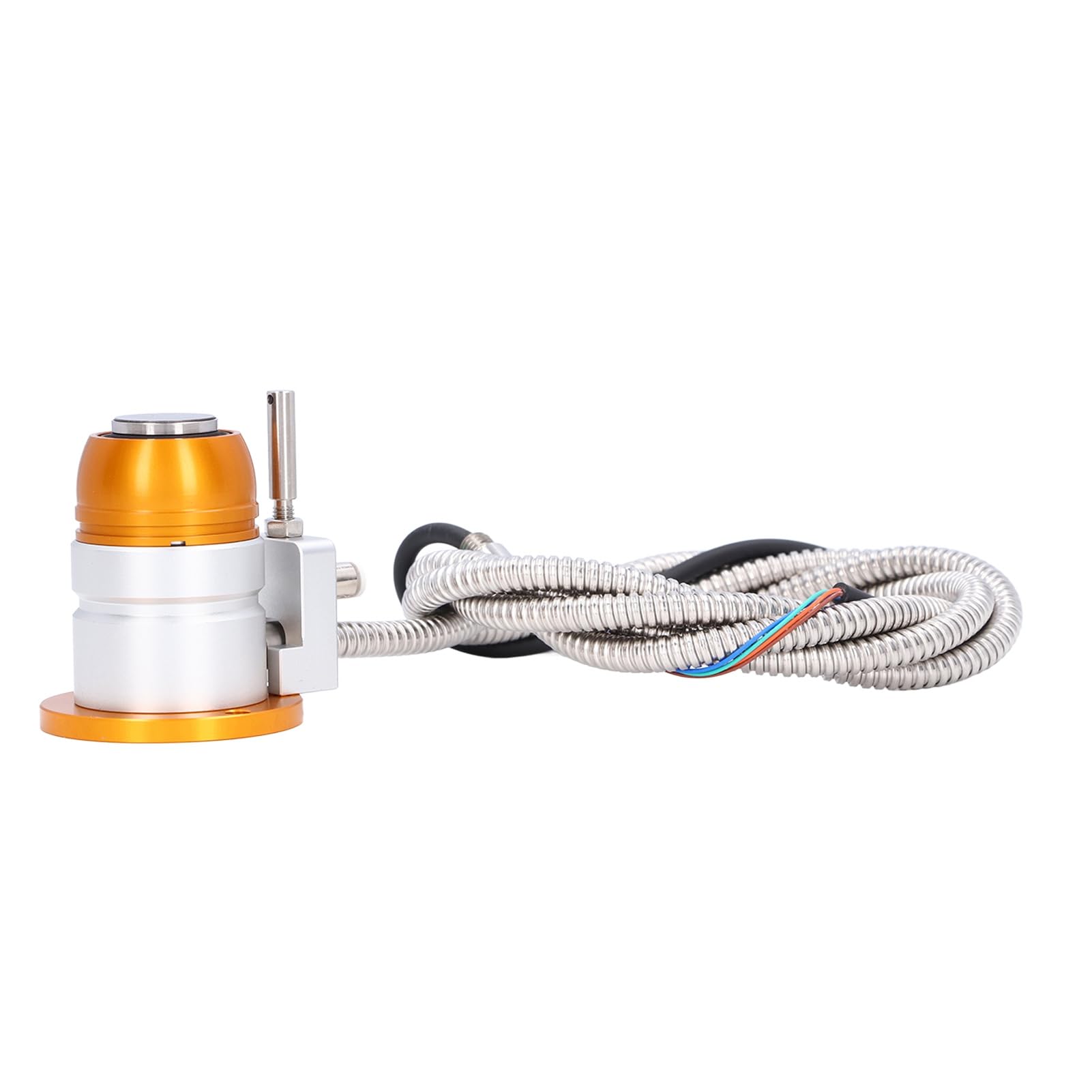
- Setting Z height with the photoelectric probe
- Laser work with the CFL55 module
- Materials you can engrave and cut
- Setup: connecting controls and probes
- Care, safety and routine checks
- Trade-offs between the three accessories
- Verdict: should you buy the Genmitsu 4040-PRO MAX?
The Genmitsu 4040-PRO MAX is a more capable desktop CNC router for buyers ready to step up from the standard 4040-PRO.
This genmitsu 4040 pro max review looks at how the MAX fits a workshop and where to spend first.
It will not replace a large industrial machine.
It does give you a compact platform that can route, probe, jog by hand and, with the right module, engrave with a laser. Compare CNC routers and laser cutters when deciding which process suits your work.
The Genmitsu 4040-PRO MAX at a glance
The 4040-PRO MAX sits in the Genmitsu line for buyers who want more capability on a desktop footprint.
It shares the family approach to the 4040-PRO, and it accepts the same style of upgrades that make daily operation easier. For spindle choices, see Genmitsu 4040-PRO spindle upgrades.
SainSmart Genmitsu CNC MPG Handwheel Controller: Best for manual jogging control

- Manual XYZ-Axis control
- X1, X10 and X100 speed gears
- Metal handwheel with 100PPR encoder
- No driver needed
- USB connectivity
A handwheel controller for moving the Genmitsu 4040-PRO and related models by hand, with three speed gears and no driver step.
Pros
- Direct manual control of X, Y and Z axes
- Three speed gears for coarse and fine moves
- Metal handwheel and 100PPR encoder
- No driver needed
Cons
- Wired USB connection ties it to the controller board
- Best suited to listed Genmitsu models only
Our score weighs specs, features and buyer feedback against what you are shopping for.
The handwheel controller scores 9.7, the Z probe scores 9.5 and the laser module scores 9.2, in that order.
If you want the broader picture first, our guide on what is a cnc router machine explains how these desktop routers fit into a workshop.
Who the Genmitsu 4040-PRO MAX suits best
The MAX suits hobbyists, small shops and makers who will use it weekly.
If you plan signs, enclosures, jigs, inlays or small production runs, the extra capability over the standard model is easier to justify. For bed preparation, see fitting a 4040-PRO spoilboard.
It also suits buyers who work in a garage, classroom or makerspace.
A desktop machine fits where a floor-standing router cannot, and accessories travel with it. See small CNC routers if you are comparing compact machines.
Skip it if you need a large work area for full-size doors or furniture parts.
A desktop router trades reach for footprint, and no accessory changes that limit.
Skip it, too, if you want a machine that needs no setup learning.
You will still need to learn feeds, speeds, tool changes and workholding.
Our best Genmitsu CNC routers guide helps you place the MAX against other Genmitsu models before you commit.
What "MAX" adds over the standard 4040-PRO
The MAX badge signals a more capable tier within the 4040 family, aimed at buyers who want headroom.
That headroom shows up in compatibility: the accessories below list the 4040-PRO MAX by name, alongside the 4040-PRO and other Genmitsu models. For the wider set, see Genmitsu 4040-PRO accessories and upgrades.
For a direct comparison with the base model, read our Genmitsu 4040-PRO review.
It covers the standard machine in depth, so this review can focus on what the MAX tier adds.
In practical terms, the MAX makes most sense when you plan to grow into the machine.
You might start with routing wood and plastics, then add a Z probe, a handwheel and a laser module. For wood projects, compare CNC router bits for wood.
That growth path matters more than any single spec.
A machine you can upgrade is easier to keep than one you outgrow in six months.
Buyers often choose the MAX for the fifth and fiftieth jobs, when setup speed and repeatability start to matter.
Specs that matter in daily use
Daily specs are the ones you touch every session: jogging, zeroing, tool changes and focus.
The handwheel controller has 10 buttons, a black finish and USB connectivity, and it weighs 0.83 kg.
That weight tells you it is a bench tool, not a pendant you carry around the shop.
The Z probe is a single Z probe item with high measurement accuracy.
Its two indicator lights do the talking: blue for connection to the control board, red for contact with the bit.
The laser module weighs 0.56 kg, uses aluminum, and runs in automatic mode.
Its model number is CFL55, and it takes 12V at 2.5A with a three-core XH2.54-3Pin cable.
Those numbers shape your bench.
A 0.83 kg handwheel stays in place when you turn it.
A 0.56 kg laser module is light enough to swap without straining the mount.
Handwheel control and the X1, X10, X100 gears
The handwheel lets you jog the X, Y and Z axes by hand, with speed in three gears.
You select X1, X10 or X100, then turn the wheel at a speed you control yourself.
That design solves a common annoyance.
Keyboard jogging is slow for long moves and too fast for fine moves.
A wheel gives you both, because your hand sets the pace.
The wheel itself is metal with a 100PPR high-quality encoder.
PPR refers to pulses per revolution, and higher counts mean finer control per turn.
In daily use, that means small adjustments feel deliberate, not jumpy.
No driver is needed.
You connect it to the controller board of the CNC router machine, and it works.
SainSmart provides a one-year manufacturer's warranty and lifetime customer support for this controller.
Setting Z height with the photoelectric probe
The Z probe replaces paper checks with a photoelectric touch and two lights.
With a mouse click, the machine returns to a predefined position so you can change and calibrate tools more easily.
The blue indicator lights when the probe connects to the control board.
The red indicator lights when the CNC bit touches the probe.
That matters because Z height errors ruin parts.
A bit set a fraction too high cuts shallow.
A bit set too low can plunge into the work or the spoilboard.
Genmitsu says the photoelectric design works more accurately than a mechanical switch.
No more using paper, and an auto-check setting probe saves time in setup.
The probe comes with a 3-pin connector.
It is compatible with the 3018-PROVer V2, 4040-PRO, 4040-PRO MAX, 4040 Reno, 3020-PRO Ultra and 3020-PRO MAX V2.
If you change bits often, you will feel its value every session.
Laser work with the CFL55 module
The CFL55 adds laser engraving and cutting to the 4040-PRO MAX with a 0.1mm x 0.1mm spot.
Genmitsu says it can cut 4mm plywood in one pass, and the output power is 5500mW.
A spot that small and consistent improves accuracy for detailed work.
Smaller spots hold fine lines, small text and tight corners better than a larger, softer spot.
The stock air assist nozzle is light-weight aluminum.
It delivers air to the cut zone, improves engraving speed and quality, and protects the optics from smoke and dust.
Fixed focus means the focus stays set, with upgraded heat dissipation for longer operation life.
You trade focus adjustment for stability and a longer service life.
The module also has a laser shield to filter laser radiation and avoid accidental exposure.
Genmitsu notes this is a Class 4 module, so wear necessary protection when using it.
Our best laser modules for the Genmitsu 4040-PRO page compares this module with other options.
Materials you can engrave and cut
Material lists help you match the module to your projects, not the other way around.
Genmitsu lists engravable materials as cardboard, plastic, PCB, aluminium alloy, stainless steel and black metal.
Cuttable materials include wood, acrylic, cardboard, non-woven fabric, bamboo and laser safe plastic.
Use that list to plan your first projects.
Signs, tags, enclosures and PCB work all fit the engravable list.
Thin plywood and acrylic fit the cuttable list.
Avoid assuming every plastic is laser safe.
The phrase "laser safe plastic" in the list matters.
If you cannot confirm a material is safe to laser, do not laser it.
Kerf also matters in laser work.
Our guide on what is laser kerf explains why the beam removes material and why joints need clearance.
Keep a notebook of settings by material.
Record power, speed, passes and focus.
Setup: connecting controls and probes
Setup starts with matching every accessory to the 4040-PRO MAX by name.
Check compatibility before you order, because the lists are specific.
The handwheel lists the 4040-PRO, 4040 Reno, 3020-PRO MAX V2, 3018-PROVer V2, 3018-PROVer Mach3 and 3018-MX3.
Its description also lists 4th axis operation for the 4040-PRO only.
The Z probe lists the 3018-PROVer V2, 4040-PRO, 4040-PRO MAX, 4040 Reno, 3020-PRO Ultra and 3020-PRO MAX V2.
The CFL55 lists the 4040-PRO and 4040-PRO MAX, plus 3020-PRO Ultra, 3030-PROVer MAX, PROVerXL 4030, 4030V2 and 6050 Plus.
Follow our how to use the Genmitsu 4040-PRO guide for the basic workflow.
Connect the handwheel to the controller board over USB with no driver step.
Select the axis, choose X1, X10 or X100, and turn the wheel by hand.
Connect the Z probe with its 3-pin connector.
Watch for the blue light, then lower the bit until the red light signals contact.
Mount the laser module only when you plan laser work.
The fixed focus removes one variable, and the three-core cable connects PWM, ground and 12VDC.
Care, safety and routine checks
Care is mostly cleaning, checking connections and respecting laser safety.
Wipe the handwheel and keep its cable clear of the work area.
Keep the Z probe clean and dry, and store it where a falling tool cannot bend it.
For the laser module, protect the optics.
The air assist nozzle helps by pushing smoke away from the lens.
Still, inspect the lens and nozzle before long runs.
Wear proper eye protection for the Class 4 module.
The UV laser shield filters radiation and reduces reflection risk, but it does not replace rated eye protection.
Never leave a laser running unattended.
Keep a fire extinguisher nearby, use only laser safe materials, and ventilate the room.
Check cables and connectors before each session.
A loose 3-pin or XH2.54 connection can cause a failed probe or weak laser output.
Trade-offs between the three accessories
Each accessory solves a different bottleneck, so the trade-off is about your workflow, not a single winner.
The handwheel helps every session where you jog by hand.
The Z probe helps every session where you change bits.
The laser module helps only laser sessions, but it opens a new category of work.
If money is tight, buy in the order of your most common task.
Most buyers route first, so the Z probe or handwheel usually comes before the laser module.
If you already route well and want detail, the laser module jumps the queue.
Its 0.1mm spot and air assist are hard to match with a router bit.
Alternative 1: the handwheel controller in depth
{{product B07V35T5G6}} The metal handwheel has X1, X10, and X100 jogging gears.
Its 10 buttons cover axis select, speed and mode functions, including 4th axis for the 4040-PRO.
The trade-off is a wired USB link.
You will keep it at the bench, not carry it across the shop.
Alternative 2: the Z probe in depth
{{product B0BRZSSKXN}} A photoelectric probe shows blue and red status lights.
Its auto-check and one-click return to a preset position save minutes per setup.
The trade-off is single-purpose design.
Buyers who rarely change bits may skip it at first.
Alternative 3: the laser module in depth
{{product B09PYDY25K}} A 5.5W module fits the 4040-PRO MAX and has a 0.1mm spot.
This module is for buyers who want laser detail.
It can cut 4mm plywood in one pass and engrave fine work with a compressed spot.
The trade-off is safety and focus.
It is Class 4, so protection is required, and fixed focus means you cannot adjust focus by hand.
Verdict: should you buy the Genmitsu 4040-PRO MAX?
Buy the MAX if you want a desktop router you can grow into, and add accessories in the order your workflow needs them.
Start with the Z probe if you change bits often, the handwheel if you jog by hand often, and the CFL55 if laser detail is your goal.
Choose the standard 4040-PRO instead if your budget is tight and you will not use the MAX tier's headroom.
Read our Genmitsu 4040-PRO review to compare the base model feature by feature.
Choose a larger machine if your parts exceed a desktop work area.
For most step-up buyers, the MAX earns its place.
It pairs a capable router platform with accessories that each remove a real daily friction point: jogging, zeroing and laser detail.
Frequently asked questions
What is the difference between the Genmitsu 4040-PRO and the 4040-PRO MAX?
The MAX model is positioned for buyers who want a more capable desktop router than the standard 4040-PRO. In this genmitsu 4040 pro max review, we compared the MAX on its compatibility with upgraded controls, a photoelectric Z probe and a 5.5W laser module, which suit repeatable setup and detailed work.
Is the Genmitsu 4040-PRO MAX good for beginners?
It suits beginners who learn the basics of a CNC router machine first and then add setup aids. A handwheel controller, a Z probe and clear workholding help you jog, zero and change tools with fewer errors, which shortens the learning curve for new owners.
Can you add a laser module to the Genmitsu 4040-PRO MAX?
Yes. The Genmitsu CFL55 is made for the 4040-PRO MAX among other Genmitsu models.
It has a 0.1mm x 0.1mm spot, 5.5W output and an air assist nozzle, and it can cut 4mm plywood in one pass.
It is a Class 4 module, so wear the necessary protection when using it.
What accessories help most with a Genmitsu 4040-PRO MAX?
Buyers get the most from three kinds of accessories. A handwheel controller speeds manual jogging, a photoelectric Z probe speeds tool height setup, and a laser module adds engraving and cutting.
Each one targets a real bottleneck in daily use rather than adding bulk to the bench.