CNC Router vs CNC Lathe: Which Should You Choose? (November 2026)
Choose a CNC router for flat sheets, panels and carving, or choose a CNC lathe for cylindrical parts made by turning. The right machine depends on the shape of your workpiece and the cutting motion it needs.
On this page (12 sections)
- CNC router vs CNC lathe: what is the quick answer?
- How do the 2 machines work side by side?
- Which machine fits flat stock and panels?
- Which machine fits round and cylindrical parts?
- How do workholding and setup differ?
- What size should your first CNC machine be?
- Which materials favor a router?
- Which materials favor a lathe?
- Which machine is easier for a beginner?
- Should you choose a router with rotary expansion?
- Which product should you choose?
- Final CNC router vs CNC lathe decision
Choose a CNC router for flat stock and carved panels, or a CNC lathe for cylindrical parts made by turning. In this CNC router vs CNC lathe comparison, the workpiece shape matters more than the machine's label.
A router moves a spinning cutter across material held on a bed. A lathe rotates the workpiece while a cutting tool removes material from its outside or inside diameter.
That difference affects your projects, tooling, setup and learning curve. It also explains why a router can be the right choice for a wooden sign while a lathe is the better choice for a round spacer.
 Best for first desktop router projects
Genmitsu CNC 3018-PRO Router Kit
 Best for larger router work
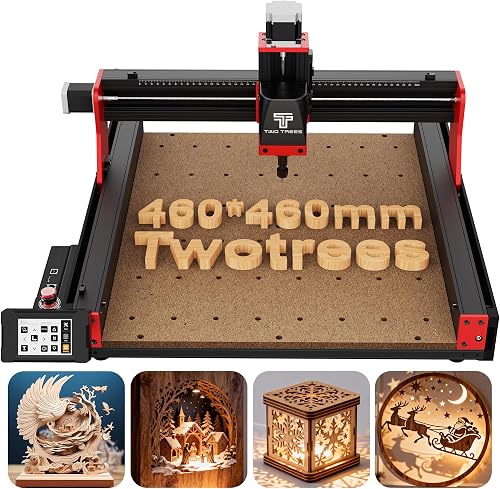
Twotrees TTC450 Pro All-Metal CNC Router Machine
CNC router vs CNC lathe: what is the quick answer?
Buy a CNC router if your work starts as a sheet, panel or fixed block. Buy a CNC lathe if your work starts as a round bar or needs rotational symmetry.
Routers are suited to cutting profiles, pockets, slots, lettering and 3D reliefs across a work surface. Lathes are suited to turning diameters, shoulders, grooves and other features that follow the centerline of a rotating part.
A router can handle many small projects without requiring the stock to spin. The CNC router buying guide explains the basic machine layout and the types of work a router can perform.
A lathe makes more sense when you would otherwise need to rotate a part by hand between cuts. Its core advantage is controlled turning around one axis.
For a broader comparison involving a rotating cutter and a fixed workpiece, see CNC lathe vs CNC mill. That comparison helps when your parts need more rigid cutting than a typical router provides.
For the router-versus-mill choice, see CNC milling machine vs router.
How do the 2 machines work side by side?
A router moves the tool over the material, while a lathe spins the material under the tool. That motion creates the main difference in finished-part shape.
| Feature | CNC router | CNC lathe |
|---|---|---|
| Main motion | Cutting tool travels across the workpiece | Workpiece rotates against the cutting tool |
| Best starting stock | Sheet, panel or fixed block | Round bar, tube or cylindrical blank |
| Common part shapes | Signs, panels, pockets, plates and carved surfaces | Shafts, spacers, bushings, tapers and turned handles |
| Typical workholding | Bed, clamps or spoilboard | Chuck, collet or another turning fixture |
| Main setup concern | Keeping flat stock secure and cutting depth controlled | Centering the stock and setting tool height correctly |
| Main design reference | X, Y and Z movement across the bed | Diameter, length and the centerline |
The table describes the machine families, not every possible configuration. A router with a rotary attachment can work on round objects, and some lathes can use additional tooling, but the normal workflow remains different.
Which machine fits flat stock and panels?
Choose a CNC router for flat sheets, signs, cabinet parts, plaques and carved panels. The bed gives you a place to secure the material while the cutter follows a programmed path.
A router is useful when the outline matters as much as the surface detail. It can cut an outside profile, make an inside pocket and add lettering without turning the whole workpiece.
Work area is a practical limit. A small machine may be capable of the cut but unable to hold the full panel, so measure the stock and compare it with the usable XYZ area.
The Genmitsu CNC 3018-PRO Router Kit has a 300 x 180 x 45 mm XYZ working area. That suits small woodworking, engraving, PCB milling and prototype projects, but it is not a panel-sized machine.
{{product B07P6K9BL3}} The listing describes a compact 3-axis router for beginners working on small signs, engraving, PCB projects and light cuts in wood, acrylic, PVC, plastic, PCB and soft aluminum.
For larger router work, the Twotrees TTC450 Pro All-Metal CNC Router Machine has a 460 x 460 x 80 mm working area. That gives it more room for large signs, furniture panels and batch production than the compact 3018-PRO.
{{product B0D8T9CQVV}} The listing describes a larger router option for signs, furniture panels and batch work, with a 460 x 460 x 80 mm area, touch screen and ports for rotary or laser expansion.
If plastics are central to your projects, compare cutter choice, workholding and chip control in our guide to the best CNC routers for plastics.
Which machine fits round and cylindrical parts?
Choose a CNC lathe when the part must stay centered around a rotating axis. Turning is the natural process for reducing a round blank to a smaller diameter or creating steps along its length.
A lathe suits shafts, pins, spacers, bushings and round handles. It can also create tapers, grooves and other details that repeat around the circumference.
The key measurement is usually the diameter and length of the stock. A long round part may need support, while a short part may need a different workholding setup.
A router can cut a circle from flat stock, but that is different from turning a cylinder. Cutting a disk produces a round outline.
Turning changes the diameter of a rotating blank along its length.
These are lathe tools for a compatible holder, not a complete CNC lathe.
How do workholding and setup differ?
Router setup focuses on holding flat stock firmly and keeping the cutting path clear. Lathe setup focuses on centering the stock and aligning the tool with the rotation axis.
On a router, clamps, a spoilboard or another bed fixture must keep the material from shifting. The cutter needs enough clearance to travel over the work without striking clamps or leaving unsupported edges.
A dust shoe needs clearance too; compare 65mm CNC dust shoes for a 65 mm spindle.
Mark the usable work area before you create the toolpath. A design that fits the material may still fail if the clamps occupy the cutter's path.
The 3018-PRO uses GRBL control and includes an offline controller. It can be operated with compatible sender software such as Candle, while a computer-based workflow gives you more control over G-code preparation and machine movement.
The TTC450 Pro also uses an open-source GRBL control system. Its stated software compatibility includes ArtCam, Fusion 360, Easel and Carveco Maker, with support for Windows, macOS and Linux.
Lathe setup has a different first priority. The stock must be held securely and centered, and the tool must approach the material at the correct height and direction.
A small setup error can change the finished diameter or leave an uneven surface. Work slowly through the zeroing and tool-setting process, and follow the machine and tooling instructions for safe operation.
What size should your first CNC machine be?
Choose the smallest machine that comfortably holds your regular work, not the largest machine you can fit. Extra capacity helps only when your stock, workspace and workflow can use it.
The 3018-PRO is a compact desktop choice with a 300 x 180 x 45 mm work area and a listed weight of 15.3 lb. It can fit a learning-focused workspace more easily than a larger router, but its area limits the size of signs and panels.
The TTC450 Pro has a 460 x 460 x 80 mm working area and a listed weight of 20.5 kg. That larger bed supports more substantial router projects, but moving and assembling the machine requires more room and planning.
A lathe needs room for the machine, the stock and the operator's access around the workholding area. Long material may also need clearance beyond the main body.
Measure doorways, benches and power access before choosing. Leave room to load material, inspect the cut and clean chips without blocking another tool.
For chip collection on a router with an 80 mm spindle, compare 80mm CNC dust shoes.
Which materials favor a router?
Choose a router when your material is wood, acrylic, PVC, plastic, PCB material or another sheet-like stock that needs carving or profiling. Cutting settings and tool choice still control the quality of the result.
The Genmitsu 3018-PRO is described for wood, acrylic, PVC, plastic, PCB and soft aluminum. Its stated use is better suited to engraving and light-duty work than deep metal cutting.
That distinction matters when you compare a desktop router with a milling machine. A compact router can teach you toolpaths and create useful small parts, but heavier cuts demand more rigidity and suitable tooling.
The TTC450 Pro is described for wood, acrylic, carbon fiber, aluminum, copper and stainless steel. Those material claims do not remove the need to match the cut, bit, spindle setup and workholding to the material.
For router tooling, compare a compression bit for a CNC router when a project needs a suitable cutting approach for sheet goods. For edge details, see the guide to the best CNC router roundover bit.
Which materials favor a lathe?
Choose a lathe when the material arrives as round stock and the finished part is defined by diameter, length and concentric features. The cutting tool works against the rotating blank rather than traveling across a fixed panel.
The material can be metal, plastic or wood, but the turning process remains the deciding factor. A round metal bar that needs several stepped diameters is a lathe job even if the part is small.
It does not replace the lathe or provide the machine's workholding.
Use coolant or mist equipment only when the machine, material, tooling and shop setup support it. Keep the work area controlled, and follow the equipment instructions for fluids, air and chip management.
Which machine is easier for a beginner?
A compact CNC router is often the simpler first step for flat-stock projects, while a lathe requires more attention to centering, tool height and diameter control. Your project type can outweigh the general learning curve.
The 3018-PRO is designed for beginners and DIY projects. Its GRBL control, offline controller and small work area give a new user a contained way to learn movement, toolpaths and light cutting.
That does not make every router task easy. You still need to prepare G-code, secure the material, set the origin and choose cutting settings that match the bit and stock.
A lathe may be the easier machine for someone whose entire project list is cylindrical. Learning on the wrong machine creates extra fixtures and workarounds, even if the machine itself appears approachable.
Start with one repeatable project. A flat sign favors a router.
A round spacer favors a lathe. Let the shape teach you which workflow you actually need.
Should you choose a router with rotary expansion?
Choose a router with rotary expansion when you need occasional work on round objects but still spend most of your time on flat stock. It can extend a router's range without changing the main machine you use every day.
The TTC450 Pro includes a 4th-axis rotation port and a laser module port. Its control box also includes a 500W spindle speed control port, giving the machine an expansion path described for 4-axis engraving or a laser and CNC combination.
A rotary setup changes the workholding and toolpath process. You need to understand how the object is secured, how the axis is mapped and how the tool clears the rotating surface.
Do not choose rotary expansion simply because it sounds flexible. If most of your projects are shafts with precise diameters, a dedicated lathe remains the more direct fit.
A router with rotary capability is strongest when your main work still includes signs, panels, engraving and carved surfaces. The rotary option then covers occasional cylindrical work.
Which product should you choose?
Choose the Genmitsu 3018-PRO for a compact beginner router, the Twotrees TTC450 Pro for a larger router bed, and HSS square bits when your lathe already needs basic tooling.
The Genmitsu has the smaller 300 x 180 x 45 mm area and a 3-axis layout. It fits small projects and learning, with stated support for wood, acrylic, PVC, plastic, PCB and soft aluminum.
The Twotrees has the larger 460 x 460 x 80 mm area, a 3.5 in capacitive touch screen and expansion ports. Choose it when signs, furniture panels or batch work need more room.
The HSS square tool-bit set is the lathe choice in this group, but it is not a machine. It makes sense only if you already have a compatible lathe tool holder and need the stated 2-piece, 1/2 x 1/2 x 4 in bars.
The mist coolant system is also an accessory rather than a machine. It belongs in a metal-cutting setup where compatible cooling and lubrication support the process.
Final CNC router vs CNC lathe decision
Pick a CNC router for flat stock, panels, signs, pockets and carved surfaces. Pick a CNC lathe for round stock, turned diameters and parts built around a centerline.
Choose the Genmitsu 3018-PRO when compact size and beginner-friendly GRBL control matter most. Choose the Twotrees TTC450 Pro when you need its larger router work area and expansion ports.
Choose the HSS square tool bits only as lathe tooling for a compatible holder. Choose the mist coolant system only as supporting equipment for a compatible metal-cutting setup.
The best CNC router vs CNC lathe decision starts with one question: will the material stay fixed while the cutter moves, or must the material rotate while the tool cuts? Answer that first, then match the machine's work area, tooling and setup needs to your real projects.
Frequently asked questions
What is the main difference between a CNC router and a CNC lathe?
A CNC router moves a cutting tool across a mostly fixed sheet, panel or block, while a CNC lathe turns the workpiece against a cutting tool. Routers suit flat and carved parts.
Lathes suit round parts such as shafts, spacers and other cylindrical shapes.
Can a CNC router replace a CNC lathe?
A CNC router can make some shapes that look round, especially with suitable rotary equipment, but it does not replace a lathe for ordinary turning work. If your main parts are cylinders with concentric diameters, choose a lathe and the correct turning tools.
Is a CNC lathe harder to learn than a router?
A CNC lathe may feel less forgiving because workholding, tool height and part diameter directly affect the cut. A router can be easier for beginners working on flat stock, especially with a compact 3-axis machine and a supported GRBL workflow.
Which is better for wood, a CNC router or lathe?
Choose a CNC router for signs, panels, lettering, pockets and carved surfaces in wood. Choose a lathe for turned wood parts such as legs, handles and round blanks.
The material alone does not decide the machine; the part shape does.