9 Best Laser Marking Machines (November 2026)
The best laser marking machines include the xTool F2 5W IR & 15W Diode for color marking on metal, the xTool M2 10W Laser Engraver for home craft and gifts, and the ORTUR Laser Master 2 S2 LU2-10A Laser for a large flat work area.
On this page (9 sections)
- Best laser marking machine picks by job
- Laser marking machine comparison: power, speed and area
- How we compared these laser marking machines
- Fiber, IR or diode: which laser type marks your material?
- What working area and speed do you actually need?
- How do safety class and enclosures affect home use?
- Can one machine cut, engrave and mark?
- What software and setup should you budget time for?
- Verdict: pick the best laser marking machine by material
The best laser marking machine for most buyers is the xTool F2 5W IR & 15W Diode, because it marks metal in color with its infrared laser and still cuts and embosses with its diode. If your main job is deep metal marking, the GWEIKE G2 Plus 20W fiber laser is a stronger specialist.
Our score weighs specs, features and buyer feedback against what you are shopping for.
A marking machine is judged by the material it marks every day. Bare metal needs fiber or infrared.
For crystal personalization, compare 3D photo crystal laser engravers.
Wood, leather and acrylic suit diode lasers. The picks below split those jobs, so you can match the laser type to your product line before you compare speed or size.
Laser type also drives safety, speed and cost. A galvanometer fiber system moves far faster on small metal parts than a gantry diode frame.
A diode frame covers a much larger flat sheet and cuts through wood. Neither type is better in the abstract, because the work itself decides which limits matter most.
Our picks at a glance
-
1

-
2

-
3
 Best for a large flat work area
ORTUR Laser Master 2 S2 LU2-10A Laser
9.1/10 our score
See it on Amazon
- 4
 Check it
Creality Laser Engraver Machine 10W Output Power
Best for wood and acrylic work - 5
 Best for small business detailCheck it
- 6
 Check it
LONGER Ray5 Laser Engraver and Cutter Machine
Best for high power cutting - 7
 Check it
CREALITY FALCON 10w Laser Engraver with Air
Best for tumblers and round items - 8
 Check it
G·WEIKE G2 Plus 20W Fiber Laser
Best for deep metal engraving - 9
 Check it
ACMER S1 3.5W Laser Engraver Machine
Best for beginners on a budget
Best laser marking machine picks by job
The xTool F2 leads for mixed metal and craft work, the GWEIKE G2 Plus leads for pure metal depth, and the diode machines below cover wood, acrylic, gifts and tumblers. For a higher-power fiber option, see 60W fiber laser engravers.
Start with material, then check area and safety class.
Power alone does not settle the choice. Spot size controls detail, motion accuracy controls repeatability, and the safety class controls where the machine can run.
Those three specs explain most of the price and size gaps in this list. The short write-ups below tie each spec to a real daily task, so you can see what changes on your bench.
xTool F2 5W IR & 15W Diode: Best for color marking on metal
- 5W infrared and 15W diode dual lasers
- Built-in 50MP camera
- Speed up to 6000mm/s
- Color marking on metal and 3D embossing
A dual-laser desktop machine for metal color marks, embossing and batch work on small parts.
Pros
- IR laser for metal color marking
- 50MP camera for placement
- Fully enclosed design
Cons
- Class 4 laser, needs proper eye and room safety
- Working area suits small parts
The xTool F2 suits sellers who mark metal and also cut or emboss craft material. Its 5W IR laser makes deep, dark color marks on metal, while the 15W diode handles 3D embossing and cuts thicker material.
That split is rare in one desktop unit, and it avoids buying two separate machines for a mixed product line.
Daily use centers on the built-in 50MP camera. You see the workspace before you start, and xTool says alignment reaches 0.1mm on small pieces, with motion accuracy of 0.00199 inches for fine detail.
At up to 6000mm/s, a card engraving can finish in about 3 seconds, which helps at markets and pop-ups where speed and placement both matter.
The trade-off is scope and safety class. This is a small part machine, not a large sign cutter, and it is Class 4.
The enclosed, leak-proof body, built-in fan and optional purifier help for indoor use, and at 4.6 kg it travels well. For pure metal depth, the fiber pick below goes further and faster.
xTool M2 10W Laser Engraver: Best for home craft and gifts
- 10W diode laser
- Built-in dual cameras
- Class 1 enclosed design
- For wood, leather, felt, fabric and paper
An enclosed home machine for craft materials, with camera placement and template software.
Pros
- Class 1 enclosed safety
- Dual camera preview
- Beginner friendly software
Cons
- CMYK module and rotary are separate add-ons
- Metal marking needs optional IR laser
The xTool M2 suits home crafters who want a safer enclosed machine for wood, leather, felt, fabric and paper. Its 10W diode and Class 1 enclosed design make it a fit for a shared home space.
Dual cameras give a real-time preview, so placement takes less guesswork and wastes less material on small pieces.
Software is part of the appeal. xTool Studio has hundreds of templates and an AI image generator, which helps beginners go from text to a finished gift or home decor item. xTool says the machine seals felt and fabric edges and keeps wood cuts clean by limiting burn marks, which matters for stickers, keychains and name tags.
The limit is metal and add-ons. The base M2 is a diode machine, so fine metal marking needs the separate 3W IR laser add-on.
The CMYK inkjet module and rotary are also separate, and at 36.2 pounds it is not a portable pick. If metal labeling is your main work, a fiber or IR machine will serve you better.
ORTUR Laser Master 2 S2 LU2-10A Laser: Best for a large flat work area
- 10000mW laser module
- Engraving area 390 x 410mm
- Compressed point 0.05 x 0.1mm
- Works with LaserGRBL and LightBurn
An open frame 10W machine for larger flat pieces and metal marking projects.
Pros
- Large 390 x 410mm area
- Open frame for bigger pieces
- Mature software support
Cons
- Class 4 open design needs careful safety setup
- No built-in camera placement
The ORTUR Laser Master 2 S2 suits buyers who want a large flat bed for low cost marking and cutting. Its 390 x 410mm engraving area fits bigger signs and parts than the compact picks.
The 10000mW module has a compressed point of 0.05 x 0.1mm for fine lines on wood, paper and coated metal.
Assembly takes about 10 to 15 minutes, and the full metal frame helps accuracy. It works with LaserGRBL and LightBurn, so you can use mature software you already know across Windows and Mac.
ORTUR says it can cut 30mm acrylic and 20mm wood, with air assist built in for cutting, and the 235g module keeps motion light.
The trade-off is safety and setup. This is an open Class 4 machine with no camera, so you need goggles, ventilation and a controlled room.
Protective glasses are in the package, but an enclosure is not, and the G-sensor stops the beam if the frame moves. Choose it for space and value, not for grab-and-go ease.
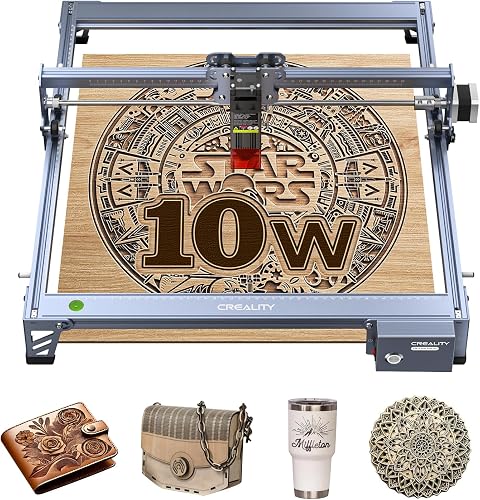
Creality Laser Engraver Machine 10W Output Power: Best for wood and acrylic work
- 10W output power
- 0.06 x 0.06mm spot
- 17 x 16 inch work area
- For wood, metal, paper, acrylic and leather
A 10W diode machine with a fine spot for cutting and marking wood, acrylic and coated metal.
Pros
- Fine 0.06mm spot
- Cuts 5mm basswood in one pass
- Wi-Fi, USB and SD transfer
Cons
- Metal marking is light compared with fiber or IR
- Class IIIa needs eye protection
The Creality 10W Laser Engraver suits a workshop that marks wood, paper, acrylic, leather and coated metal. Its 0.06 x 0.06mm spot gives fine detail, and Creality says it cuts 5mm basswood or 3mm black acrylic in one pass at up to 10000mm per minute.
Repositioning accuracy is under 0.007 inches, which helps with repeated small parts.
The 17 x 16 inch area is a middle ground. It fits larger flat pieces than compact machines, but it is not as wide as the ORTUR or LONGER beds.
You can send files by Wi-Fi, USB or SD card, and Creality gives a focusing plate so you can set focus without tools. The all aluminum alloy structure and steel shaft rail support steadier motion on long jobs.
The limit is bare metal. A diode laser marks metal coatings and dark finishes better than polished bare metal, so deep metal labels need fiber or IR.
The anti-UV shield filters 97% of UV rays, but you still need eye protection. Pick it for craft cutting plus light marking, not for deep metal work.
ACMER S2 Laser Engraver: Best for small business detail
- 7000mW laser output
- 300 x 300mm working area
- 0.08 x 0.08mm spot
- Speed up to 10000mm/min
A 7W machine with a 300mm square bed for signs, gifts and detailed small batch work.
Pros
- 300 x 300mm bed
- Fine 0.08mm spot
- ACMER Studio plus LightBurn support
Cons
- 7W is slower for thick cuts than 10W picks
- Rotary and enclosure are optional
The ACMER S2 suits small business buyers who need detail on a 300 x 300mm bed. Its true 7W output and 0.08 x 0.08mm spot help with small text, logos and patterns.
Engraving speed reaches 10000mm per minute, and ACMER says accuracy reaches 0.01mm, which suits personalized gifts and coated metal tags.
The bed size is the practical win. A 300mm square area fits signs, decor and gifts without constant repositioning, and the platform suits home workshops and classrooms.
You can cut up to 13mm paulownia wood or 6mm black acrylic with multiple passes, according to ACMER, across more than 100 materials.
The trade-off is power. At 7W, thick cuts take more passes than 10W or 20W machines here.
Rotary modules, risers, enclosures and air assist are optional add-ons, so budget for them if you plan tumblers or taller objects. If you mostly mark thin stock and coated metal, the S2 is a strong value.
If you cut thick wood daily, look at the 20W pick.
LONGER Ray5 Laser Engraver and Cutter Machine: Best for high power cutting
- 20W laser module
- 400 x 365mm working area
- Speed up to 24000mm/min
- 3.5 inch touchscreen
A 20W diode machine for thicker wood and acrylic, with a large bed and touch controls.
Pros
- 20W for thicker material
- Large 400 x 365mm area
- Touchscreen plus app and TF card
Cons
- Open design needs safety enclosure and goggles
- Large footprint for a home desk
The LONGER Ray5 20W suits buyers who cut as much as they mark. Its 20W module can cut 15mm pine in one pass, according to LONGER, and up to 25mm wood with multiple passes.
That power also helps with stainless steel and acrylic work, including 8mm acrylic in one pass and 35mm with multiple passes.
The 400 x 365mm working area is the largest here. You can run larger signs and batch layouts with fewer moves.
A 3.5 inch touchscreen shows progress, and you can use USB, TF card, Wi-Fi or an app. LONGER also supports LaserGRBL, LightBurn and its own LaserBurn software, and the 240MHz ESP32 chipset aims for stable high speed work.
The trade-off is footprint and safety. This is a big open machine that needs goggles and a protective enclosure for home use, with emergency stop, motion, overheating and cooling protections listed.
It is built for studios that can give it bench space. For a small desk or a shared room, the enclosed xTool picks are easier to live with.
CREALITY FALCON 10w Laser Engraver with Air: Best for tumblers and round items
- 10W output with air assist
- Rotary roller for cylindrical objects
- 0.06mm spot
- Cuts 12mm wood in one pass
A 10W machine bundled for round objects, with air assist for cleaner cuts on wood and acrylic.
Pros
- Rotary roller included
- Air assist for cleaner edges
- Handles tumblers and cylinders
Cons
- Class 4, needs eye protection and ventilation
- Heavier at 20.1 lb
The CREALITY FALCON 10W suits sellers who mark tumblers and round objects. Its rotary roller clamps cylinders from 1 to 110mm outside diameter, and the kit also handles inside diameters from 25 to 75mm, spheres and ring shapes.
That makes it a fit for cups, bottles and tubes that a flat bed cannot mark.
Air assist is the other key feature. The adjustable air pump clears smoke and dust during cutting, which helps keep edges clean and protects the laser module over time.
With 10000mW output, Creality says it cuts 12mm wood or 3mm black acrylic in one pass at up to 10000mm per minute, and assembly takes 10 to 20 minutes.
The trade-off is size and safety class. At 20.1 lb and Class 4, it needs proper goggles, ventilation and a controlled space, with emergency stop and tilt alert features.
The 0.06mm spot gives fine detail, but bare metal marking still favors fiber or IR. Choose this one when round objects are a core part of your shop.
G·WEIKE G2 Plus 20W Fiber Laser: Best for deep metal engraving
- 20W 1064nm fiber laser
- Speed up to 15000mm/s
- 150 x 150mm engraving area
- 0.001mm accuracy
A true fiber laser for metals, with deep engraving, color marks and very fast batch work.
Pros
- True fiber laser for metal
- 15000mm/s galvanometer speed
- Electric lifting column
Cons
- 150 x 150mm area is small for large pieces
- Class 4 safety level
The GWEIKE G2 Plus suits metal shops that need depth and speed. Its 20W 1064nm fiber laser marks most metals, alloys and many plastics.
A galvanometer head drives speed to 15000mm per second, which is far faster than gantry diode machines for small batch work such as serial numbers and labels.
The 150 x 150mm area with electric lifting helps with focusing. You press a button to set height, and dual red light preview helps with placement.
GWEIKE says accuracy reaches 0.001mm, with 2k, 4k and 8k resolution options, and the machine can mark stainless steel and titanium in more than 30 colors.
The trade-off is area and safety. At 150mm square, large pieces will not fit, and it cannot cut wood like a diode machine.
It is also Class 4, so you need protective glasses, a cover and an emergency stop routine. For metal labels, serial numbers and deep marks, this is the specialist pick.
ACMER S1 3.5W Laser Engraver Machine: Best for beginners on a budget
- 3.5W laser, 36W machine output
- 130 x 130mm working area
- Speed up to 10000mm/min
- 99% preassembled
A light, preassembled 3.5W machine for wood, acrylic and classroom or hobby marking.
Pros
- Very light and portable
- Quick 1 minute head install
- Good for thin material
Cons
- 3.5W limits thick cutting and metal depth
- Small 130 x 130mm area
The ACMER S1 suits beginners, classrooms and hobby users who mark thin wood and acrylic. Its 3.5W laser with 36W machine output engraves at up to 10000mm per minute, with 0.01mm repeatable positioning.
At 2kg, it is easy to carry and store, and the 455nm diode wavelength suits wood, bamboo, leather and plastic.
Setup is simple. ACMER says it arrives 99% preassembled, with a 1 minute laser head install.
The 130 x 130mm working area fits ornaments, tags, coasters and small gifts, and the 250 by 250mm machine footprint suits a home desk. You can pair it with a protective enclosure to create a Class 1 setup, according to ACMER.
The trade-off is power and area. A 3.5W diode will not cut thick stock or deeply mark bare metal.
It cuts thin plywood, MDF and acrylic, and engraves wood, bamboo, leather, plastic, PCB, aluminum oxide and ceramics. Choose it to learn the workflow for less money, then upgrade when your material list grows.
Laser marking machine comparison: power, speed and area
The table below compares the specs that change daily work. Fiber and IR machines lead for metal, diode machines lead for wood and acrylic, and bed size decides what fits.
Read the table by job, not by headline power. A 20W diode and a 20W fiber do different work, because wavelength and motion system differ.
The fiber pick wins on small metal speed, while the 20W diode wins on thick wood cutting. Area then decides whether a sign, a tumbler or a batch of tags fits in one run.
| Product | Best for | Laser power | Speed | Camera | Our score |
|---|---|---|---|---|---|
| xTool F2 5W IR & 15W Diode | color marking on metal | 5W IR + 15W diode | 6000mm/s | 50MP built-in | 9.4 |
| xTool M2 10W Laser Engraver | home craft and gifts | 10W | 9.3 | ||
| ORTUR Laser Master 2 S2 LU2-10A Laser | a large flat work area | 10W | 9.1 | ||
| Creality Laser Engraver Machine 10W Output Power | wood and acrylic work | 10W | 9.1 | ||
| ACMER S2 Laser Engraver | small business detail | 7W | 10000mm/min | 9.0 | |
| LONGER Ray5 Laser Engraver and Cutter Machine | high power cutting | 20W | 24000mm/min | 8.9 | |
| CREALITY FALCON 10w Laser Engraver with Air | tumblers and round items | 10W | 8.8 | ||
| G·WEIKE G2 Plus 20W Fiber Laser | deep metal engraving | 20W fiber | 15000mm/s | 8.7 | |
| ACMER S1 3.5W Laser Engraver Machine | beginners on a budget | 3.5W | 8.1 |
How to read spot size and accuracy
Spot size sets the smallest line you can hold. A 0.06mm spot can carry finer text and tighter logos than a 0.08mm spot, but both can look soft if focus is off.
Accuracy claims, such as 0.01mm on several picks, depend on material, focus and speed as well as the motion system.
Test a small grid before a customer order. That one step shows whether color, depth and edge quality match the finish you promised.
It also shows whether your chosen speed is too high for the material, which is a common cause of light marks.
How we compared these laser marking machines
We checked the specs for laser type, output power, speed, working area, spot size, safety class and included accessories. We grouped the picks by material first, because bare metal, coated metal and wood need different lasers.
We also checked software support, file transfer and safety features such as enclosures, goggles, emergency stops and tilt or motion protection. Scores weigh those specs and features against the job each buyer wants done.
Our fiber laser engraving guide explains why fiber lasers suit metal. Our MOPA laser explainer covers color marking on stainless steel and other metals.
If you are new to the workflow, our how to use a fiber laser engraver guide walks through focus, preview and test cuts.
What we did not compare
We did not rank these picks by price, because pricing changes by seller and bundle. We also did not treat a larger watt number as a better marking result across laser types.
A fiber laser at 20W and a diode at 20W solve different material problems, so the comparison keeps those jobs separate.
We gave more weight to specs that affect daily output. That includes camera placement, air assist, rotary support and enclosed safety, because those features decide how often a job is scrapped.
A machine that wastes fewer blanks often pays back faster than a faster machine with poor placement.
Fiber, IR or diode: which laser type marks your material?
A fiber laser is the best laser marking machine type for bare metal. It marks stainless steel, aluminum, brass, copper, titanium and many plastics, and it can engrave deeply.
The GWEIKE G2 Plus is the fiber pick here.
Infrared lasers for color marks on metal
An infrared laser, like the 5W IR in the xTool F2, makes color marks on metal and fine marks on plastic. It suits jewelry, tags and small parts where color matters.
Speed and depth depend on the metal and finish.
Diode lasers for wood, acrylic and coated metal
A diode laser marks wood, leather, paper, dark acrylic and coated metal well. It also cuts, which a fiber laser does not do well.
If your shop sells wood signs and gifts, a diode machine may be the better buy. Our engraving vs marking guide explains the difference.
Coated metal is a special case
Many diode picks here mark coated metal well because the coating absorbs the beam and reveals the metal below. That is not the same as deep engraving into bare stainless or aluminum.
If your product is a coated blank, a diode can be enough. If your product is bare metal, plan for fiber or IR from the start.
What working area and speed do you actually need?
Working area decides your largest part. The ORTUR at 390 x 410mm and the LONGER at 400 x 365mm fit large flat signs.
The GWEIKE at 150 x 150mm and the ACMER S1 at 130 x 130mm fit small parts and batch work.
Measure your largest blank, then add room for clamps and safe margins. A bed that is only slightly larger than the part can still force awkward repositioning.
Rotary work also needs vertical room, so tumbler sellers should check height as well as flat area.
Speed for batch labeling and small business use
Speed matters when you mark dozens of pieces. The GWEIKE G2 Plus reaches 15000mm/s with a galvanometer head.
The xTool F2 reaches 6000mm/s. Diode gantry machines at 10000mm/min or 24000mm/min suit larger pieces but move slower on small batch marks.
If you run a shop, our best laser engraving machine for small business guide adds context on throughput and cost per part. For metal only shops, our best fiber laser for metal guide narrows the field.
Speed claims need context
Top speed is rarely the speed you use for deep marks. Deep engraving takes multiple passes at lower speed, while a light surface mark can run near the top rate.
Compare picks at the finish you actually sell, not at the empty frame speed on the spec sheet.
How do safety class and enclosures affect home use?
Safety class is not a small detail. Class 1 enclosed machines, like the xTool M2, are easier to use in a home room.
Class 4 machines need laser safety goggles, a controlled area and strict rules about eye exposure.
Enclosed vs open frame machines
An enclosed machine blocks light and contains fumes better. The xTool F2 has a fully enclosed, leak-proof design with a built-in fan.
The xTool M2 is also enclosed and Class 1. Open frame machines, like the ORTUR and Creality models, need a separate enclosure for safer home use.
Always read the manual for your model. Use the goggles that come with the machine, keep children and pets out of the room, and never look at the beam directly.
Ventilation and fume control
Cutting wood, acrylic and leather produces smoke that can coat the lens and irritate lungs. A fan, purifier or window exhaust should be part of the setup plan, not an afterthought.
Clean optics and rails on the schedule in the manual, because buildup reduces output and shortens module life.
Can one machine cut, engrave and mark?
Some machines do more than one job. The xTool F2 pairs a 15W diode for cutting and embossing with a 5W IR for metal marks.
The LONGER Ray5 20W cuts thick wood and acrylic and can mark stainless steel.
When a specialist machine wins
A specialist fiber laser wins for deep metal work. The GWEIKE G2 Plus engraves deeper and faster on metal than any diode pick here.
A specialist diode wins for wood and acrylic cutting. Trying to do both jobs with one weak laser often means slow cuts and light metal marks.
Choose the job you do most. Add a second machine later if your material mix changes.
Mixed shops should plan the workflow
A mixed shop can mark metal parts on the IR or fiber side, then cut wood and acrylic on the diode side, often in the same session. That works best when the diode power is high enough for the thickest stock you sell.
A low power diode may mark light wood but stall on thicker signs, so match diode watts to your thickest blank.
What software and setup should you budget time for?
Software affects how fast you learn. xTool Studio gives templates and AI design tools for the F2 and M2. ACMER Studio does the same for the ACMER S2 and S1.
LightBurn and LaserGRBL support many of the diode picks here.
Set-up, focus and test cuts
Most diode machines here assemble in 10 to 20 minutes. Fiber and IR machines need focus setup for each material thickness.
Always run a small test grid on scrap material first. Change power and speed in small steps, then check depth and color.
Keep a ventilation plan ready. Wood and acrylic make smoke and smell.
A fan, purifier or window exhaust helps, and it protects the laser module over time. Clean the lens and rails as the manual directs.
Accessories that change the job list
Rotary rollers add tumblers and bottles, air assist cleans cut edges, and risers add height for taller objects. Enclosures change the safety class and fume control for home use.
Add those costs to the machine price before you judge value, because they decide which products you can actually sell.
Verdict: pick the best laser marking machine by material
Pick the xTool F2 if you want one desktop machine for metal color marks plus cutting and embossing. Pick the GWEIKE G2 Plus if deep metal marking and speed are your main jobs.
Pick the xTool M2 or ACMER S1 if you want an easier home start.
For large flat signs, pick the ORTUR or LONGER. For tumblers, pick the CREALITY FALCON with the rotary roller.
For a 300mm square bed with fine detail, pick the ACMER S2. Start with your material, then match laser type, area and safety class.
Our top 3 picks at a glance
-
1
-
2
-
3
Best for a large flat work area
ORTUR Laser Master 2 S2 LU2-10A Laser
9.1/10 our score
See it on Amazon
Frequently asked questions
What is the best laser marking machine for metal?
A fiber or infrared laser is the best laser marking machine for bare metal. The GWEIKE G2 Plus 20W fiber laser marks most metals deeply, while the xTool F2 5W IR adds color marking on metal.
Diode only machines suit coated metal and wood better.
Is a fiber laser better than a diode laser for marking?
Yes, for metal. A fiber laser at 1064nm marks most metals, alloys and many plastics.
A diode laser works best on wood, leather, paper and dark acrylic.
Choose the laser type by the material you mark most often.
What safety class should I expect?
Class 1 enclosed machines are easier for home use. Class 4 machines, including many open frame and fiber models here, need proper laser safety goggles, a controlled room and no direct eye exposure.
Always follow the manual for your exact model.
How fast does a laser marking machine need to be?
Speed matters for batch work. The GWEIKE G2 Plus reaches 15000mm/s and the xTool F2 reaches 6000mm/s.
Slower diode machines at 10000mm/min still suit single pieces, but batch labeling will take longer.
Can one machine cut and mark?
Some can. The xTool F2 pairs a 15W diode for cutting and embossing with a 5W IR for metal marks.
The LONGER Ray5 20W cuts thicker wood and acrylic.
A dedicated fiber laser marks metal well but is not a wood cutter.