7 Best Cricut Maker Accessories (November 2026)
The best Cricut Maker accessories include the CRAFT WORLD 0.4 Tip Fine Point Pens for writing and drawing, the WORKLION Cutting Mat 12x24 Compatible With Explore for large material layouts, and the Carrying Case Bag for Circut Maker for mobile crafting.
On this page (11 sections)
- The best Cricut Maker accessories for different projects
- How we compared these Cricut Maker accessories
- What accessories do you need first for a Cricut Maker?
- Which Cricut Maker accessories help with vinyl?
- Do Cricut Maker accessories work with every Maker model?
- Which Cricut Maker accessories improve writing and drawing?
- How do you choose a Cricut Maker cutting mat?
- When should you add a rotary blade?
- How should you organize Cricut Maker accessories?
- More guides on this topic
- The best Cricut Maker accessories: final verdict
The best Cricut Maker accessories combine a reliable cutting surface, writing tools, project-specific blades and organized storage. The CRAFT WORLD 0.4 Tip Fine Point Pens and WORKLION 12 x 24 mats are the strongest starting points, while the bundles make sense when you need materials for several types of crafts.
Cricut Maker machines can write, cut and work with many materials, but the right accessory depends on your next project. A pen set helps with cards and labels, a rotary blade helps with fabric, and a long mat gives you more room for larger layouts.
If you're new to this type of machine, start with our guide to what is a vinyl cutting machine. It explains how a cutting machine fits into a vinyl workflow before you add tools and supplies.
Our picks at a glance
-
1

-
2
 Best for large material layouts
WORKLION Cutting Mat 12x24 Compatible With Explore
9.6/10 our score
See it on Amazon -
3
- 4
 Check it
Sophia’s DESING Rotary Blade+Drive Housing Works for Maker
Best for fabric cutting - 5
 Check it
Cricut Deluxe All-in-One Materials & Accessories Bundle
Best for trying many materials - 6
 Check it
Cutaswish Craft Accessories for Maker & Explore
Best for an all-in-one vinyl workflow - 7
 Check it
Convend The Ultimate Accessories Bundle for Maker
Best for a broad starter collection
The best Cricut Maker accessories for different projects
The best Cricut Maker accessories are not one identical kit for every user. Pens, mats, storage, blades and material bundles solve different problems, so choose the product that matches the work you do most often.
CRAFT WORLD 0.4 Tip Fine Point Pens: Best for writing and drawing
- 0.4 tip
- 30-pack
- Assorted tools and accessories
- Compatible with Maker 3, Maker, Explore 3 and Air 2
A large assorted pen set suits card making, labels and drawn details when writing is as important as cutting.
Pros
- Largest stated pen count here
- Fine point for writing and drawing
- Works with several Cricut machine families
Cons
- Does not replace mats or cutting tools
- The data does not specify individual ink colors
WORKLION Cutting Mat 12x24 Compatible With Explore: Best for large material layouts
- 3 mats
- Standard, light and strong adhesive
- 12 x 24 in adhesive area
- PVC construction
Three adhesive levels give Maker users more control over lightweight paper, vinyl, cardstock, fabric and thicker boards.
Pros
- Three adhesive strengths
- Long 12 x 24 in cutting area
- Clear storage and cleaning guidance
Cons
- The mats are larger than a standard 12 x 12 in area
- Strong adhesive may need careful material removal
Carrying Case Bag for Circut Maker: Best for mobile crafting
- Large opening
- Storage for Cricut accessories and supplies
- Compatible with Maker 4, Maker 3, Explore 4, Explore 3 and Explore Air 2
A large-opening case is useful when you move a compatible Cricut machine between a craft room, classroom or storage area.
Pros
- Supports several Maker and Explore models
- Large opening for loading
- Stores accessories and supplies
Cons
- The data does not specify bag dimensions
- The data does not identify padding or carrying hardware
Sophia’s DESING Rotary Blade+Drive Housing Works for Maker: Best for fabric cutting
- Rotary blade and drive housing
- Stainless steel
- Works with Maker and Maker 3
- For fabric and delicate materials
The rotary blade and drive housing suit Maker users cutting unbacked fabric, felt, silk, denim, lace and other listed materials.
Pros
- Blade and housing are included together
- Stainless steel blade
- Supports fabric, quilting and sewing projects
Cons
- The data specifies Maker and Maker 3, not every Explore model
- Fabric cutting requires a suitable FabricGrip mat
Cricut Deluxe All-in-One Materials & Accessories Bundle: Best for trying many materials
- 74 pieces
- Permanent vinyl
- Heat transfer vinyl
- Sticker paper and card materials
This 74-piece sampler suits beginners who want to try vinyl, HTV, stickers and cards before buying larger material packs.
Pros
- Broad material mix
- Made for Cricut Maker and Explore machines
- Supports cards, apparel, gifts and labels
Cons
- A sampler may not suit a crafter who already knows one preferred material
- The bundle is material-focused rather than tool-focused
Cutaswish Craft Accessories for Maker & Explore: Best for an all-in-one vinyl workflow
- 88 pieces
- Vinyl, HTV and transfer tape
- Two cutting mats
- Pens, pen adapters and weeding tools
The 88-piece kit covers cutting, weeding and transfer in one package, with materials for shirts, stickers, stencils and gifts.
Pros
- Largest stated piece count here
- Includes tools and materials
- Printable transfer paper for light and dark fabric
Cons
- Many material types require storage and labeling
- The data does not specify exact Cricut model-by-model limits
Convend The Ultimate Accessories Bundle for Maker: Best for a broad starter collection
- Accessory bundle for Maker and Explore Air
- Designed for a broad crafting setup
This bundle is a broad option for Maker and Explore Air owners who want one accessory collection rather than a single replacement or tool.
Pros
- Made for Maker and Explore Air users
- Covers a broad accessory need
- Useful when building a first collection
Cons
- The data does not specify piece count
- The data does not identify individual included accessories
CRAFT WORLD 0.4 Tip Fine Point Pens: Best for writing and drawing
- 0.4 tip
- 30-pack
- Assorted tools and accessories
- Compatible with Maker 3, Maker, Explore 3 and Air 2
A large assorted pen set suits card making, labels and drawn details when writing is as important as cutting.
Pros
- Largest stated pen count here
- Fine point for writing and drawing
- Works with several Cricut machine families
Cons
- Does not replace mats or cutting tools
- The data does not specify individual ink colors
The CRAFT WORLD set suits Maker owners who want to add writing and drawing to cutting projects. Its 0.4 tip is intended for fine-point work, and the pack contains 30 assorted tools accessories writing drawing pens.
Compatibility covers Cricut Maker 3, Maker, Explore 3 and Air 2. That makes it a flexible choice for households with more than one compatible machine, or for anyone replacing a smaller pen collection.
Use fine-point pens for drawn outlines, handwritten-style details, labels and card designs. The main trade-off is that pens add a writing function, but they do not solve material holding or cutting problems.
You still need a suitable mat and blade for the material in each project.
The product title does not identify individual ink colors, so plan your projects around the colors confirmed at purchase. If your main goal is writing, this is the most direct pick in the group.
WORKLION Cutting Mat 12x24 Compatible With Explore: Best for large material layouts
- 3 mats
- Standard, light and strong adhesive
- 12 x 24 in adhesive area
- PVC construction
Three adhesive levels give Maker users more control over lightweight paper, vinyl, cardstock, fabric and thicker boards.
Pros
- Three adhesive strengths
- Long 12 x 24 in cutting area
- Clear storage and cleaning guidance
Cons
- The mats are larger than a standard 12 x 12 in area
- Strong adhesive may need careful material removal
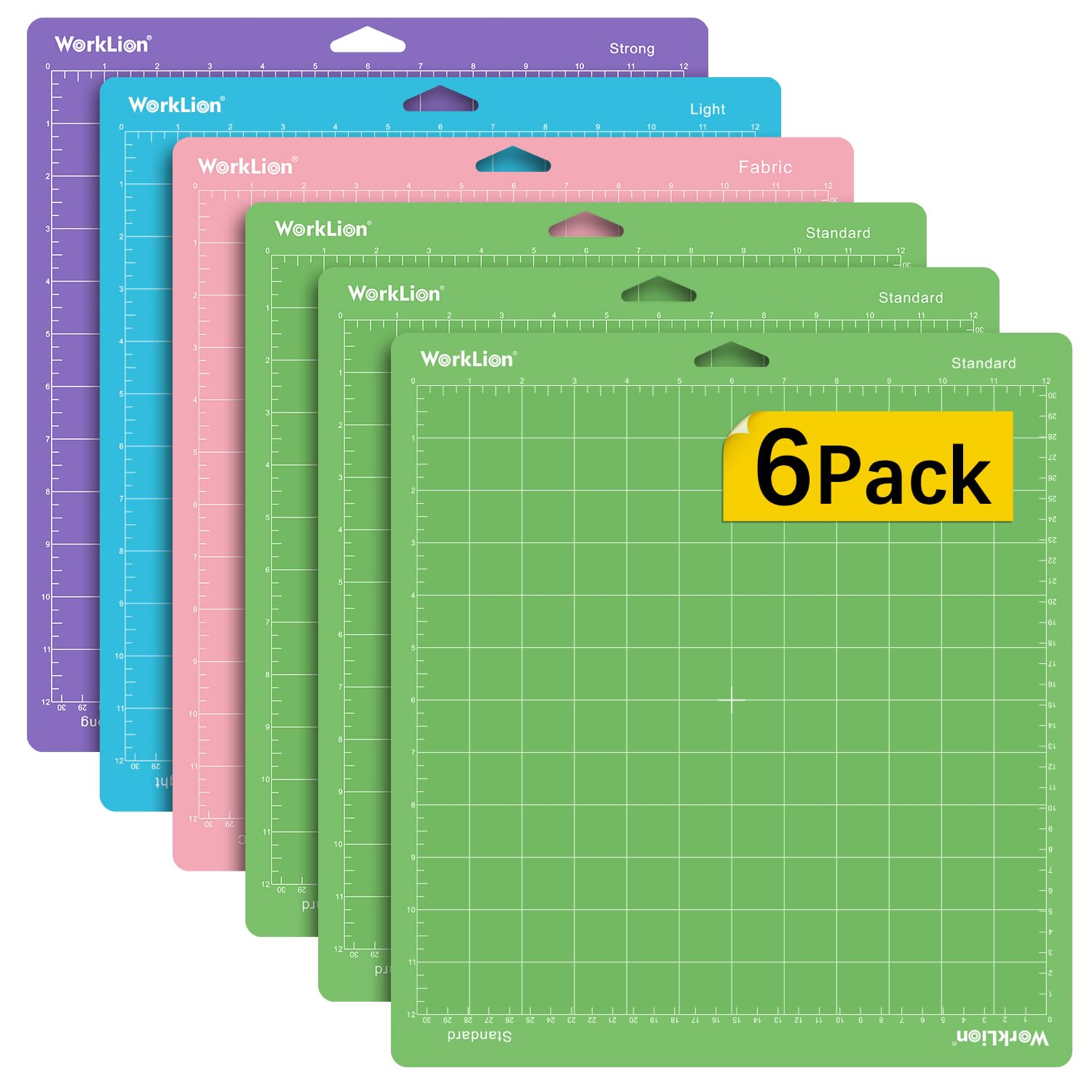
The WORKLION set is the strongest choice when your Maker projects need a 12 x 24 in cutting area. It includes 3 PVC mats: one standard adhesive mat, one light adhesive mat and one strong adhesive mat.
That range helps you match the hold to the material. The light mat suits common office paper, vinyl, vellum and light cardstock.
The standard mat is intended for cardstock, printable paper, iron-on, vinyl, washi and window cling. The strong mat is for thicker cardstock, faux leather, poster board, chipboard and backed fabric.
Each mat has a 12 x 24 in square-gridded area, while the full mat measures 13 x 26 in. The longer format gives you more layout room than a 12 x 12 in mat, but it also needs a larger storage space.
Keep the clear film cover on each mat during storage. Use a scraper for scraps and a spatula when lifting cut pieces.
Carrying Case Bag for Circut Maker: Best for mobile crafting
- Large opening
- Storage for Cricut accessories and supplies
- Compatible with Maker 4, Maker 3, Explore 4, Explore 3 and Explore Air 2
A large-opening case is useful when you move a compatible Cricut machine between a craft room, classroom or storage area.
Pros
- Supports several Maker and Explore models
- Large opening for loading
- Stores accessories and supplies
Cons
- The data does not specify bag dimensions
- The data does not identify padding or carrying hardware
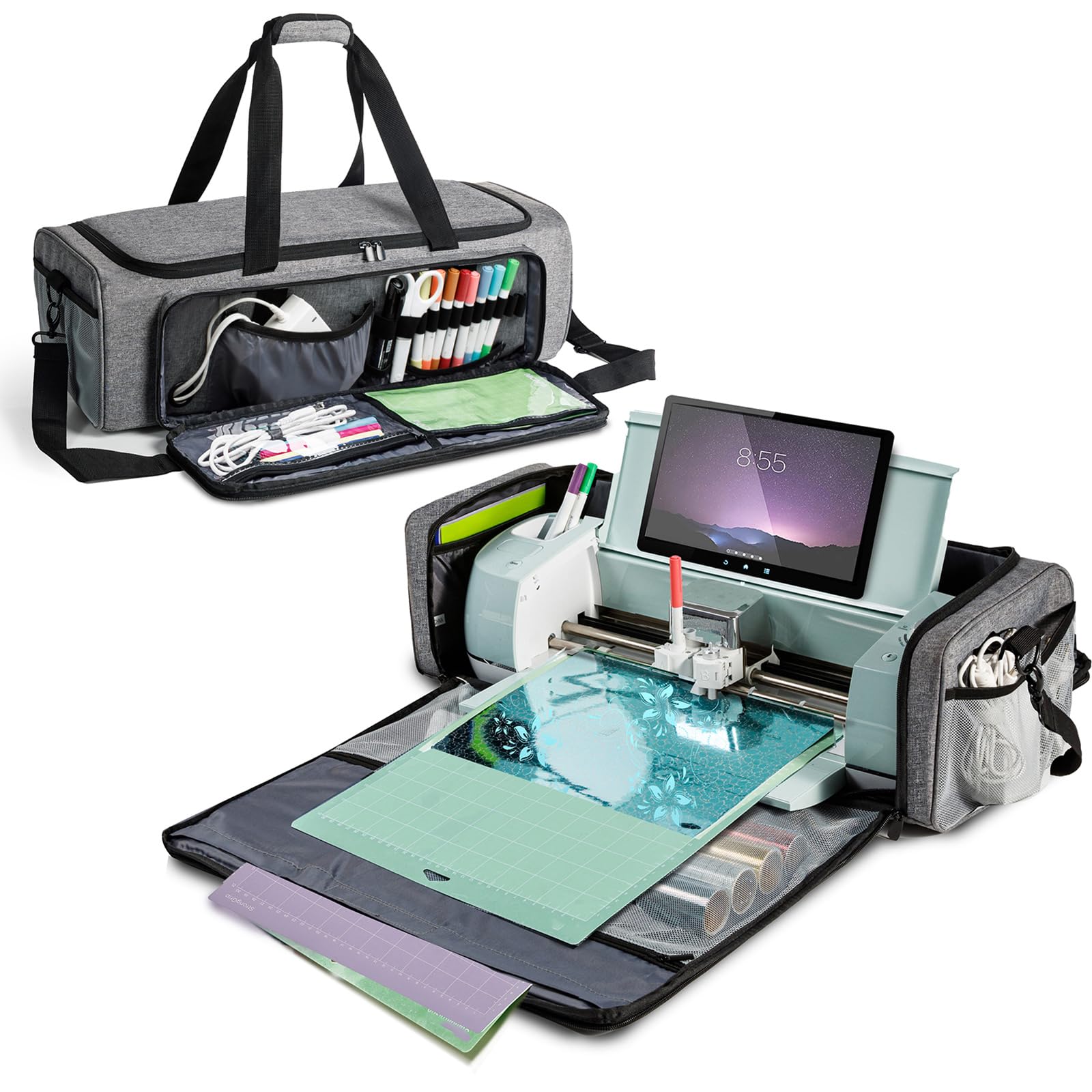
The Carrying Case Bag for Circut Maker suits crafters who move their machine between rooms or need a dedicated place for accessories. It has a large opening and storage for compatible Cricut accessories and supplies.
Compatibility covers Circut Maker 4, Maker 3, Explore 4, Explore 3 and Explore Air 2. That broad model range makes it useful when a household has different machines, although you should match your exact machine before ordering.
A case protects your workflow by keeping the machine and supplies together. It can also reduce setup time when crafting in a shared room, classroom or temporary workspace.
The main limitation is missing bag measurements in the available product information. Check the exact case dimensions and the space around your machine before relying on it for a particular setup.
Compared with the WORKLION mats, this is an organization accessory rather than a cutting accessory. Choose it when storage and transport are the problem, not when you need a better adhesive surface.
Sophia’s DESING Rotary Blade+Drive Housing Works for Maker: Best for fabric cutting
- Rotary blade and drive housing
- Stainless steel
- Works with Maker and Maker 3
- For fabric and delicate materials
The rotary blade and drive housing suit Maker users cutting unbacked fabric, felt, silk, denim, lace and other listed materials.
Pros
- Blade and housing are included together
- Stainless steel blade
- Supports fabric, quilting and sewing projects
Cons
- The data specifies Maker and Maker 3, not every Explore model
- Fabric cutting requires a suitable FabricGrip mat
Sophia’s DESING Rotary Blade+Drive Housing is the best fit for Maker users who cut fabric and other delicate materials. The set includes 1 stainless steel rotary blade and drive housing, and it works with Cricut Maker and Cricut Maker 3.
The blade is intended for cardstock, foil poster, kraft board, fabric, quilting squares and sewing projects. The listed fabric examples include lace, felt, quilt batting, silk, denim, crepe, tissue paper and mulberry.
The rotary design suits unbacked fabric because it rolls across the material instead of using the same cutting approach as a fine-point blade. The product information also says it handles images larger than 0.75 in.
Use it with a FabricGrip mat made from a stronger, dense material. The trade-off is compatibility: the data confirms Maker and Maker 3, so this is a more focused choice than the pen set or general bundles.
For a deeper explanation of the tool, read when should you use a Cricut Maker rotary blade.
Cricut Deluxe All-in-One Materials & Accessories Bundle: Best for trying many materials
- 74 pieces
- Permanent vinyl
- Heat transfer vinyl
- Sticker paper and card materials
This 74-piece sampler suits beginners who want to try vinyl, HTV, stickers and cards before buying larger material packs.
Pros
- Broad material mix
- Made for Cricut Maker and Explore machines
- Supports cards, apparel, gifts and labels
Cons
- A sampler may not suit a crafter who already knows one preferred material
- The bundle is material-focused rather than tool-focused
The Cricut Deluxe All-in-One Materials & Accessories Bundle suits beginners who want to sample several project types. It contains 74 pieces for 12 in machines, with permanent vinyl, heat transfer vinyl, printable sticker paper and card-making supplies.
The material mix supports water bottles, tumblers, mugs, shirts, greeting cards, labels, home decor, party decorations, gifts and stickers. It also includes vinyl, heat transfer vinyl, Infusible Ink and cardstock.
This bundle is useful when you are still deciding whether you prefer decals, apparel, cards or labels. Trying several materials can help you learn the cut, weed and transfer steps before buying full-size packs.
The trade-off is that it focuses on materials rather than replacement parts or machine storage. If your current problem is a dull blade, a worn mat or a missing cable, choose a targeted accessory instead.
The bundle is made for Cricut Maker and Explore machines, including Maker 3, Maker 4, Explore Air 2, Explore 3, Explore 4 and Explore 5.
Cutaswish Craft Accessories for Maker & Explore: Best for an all-in-one vinyl workflow
- 88 pieces
- Vinyl, HTV and transfer tape
- Two cutting mats
- Pens, pen adapters and weeding tools
The 88-piece kit covers cutting, weeding and transfer in one package, with materials for shirts, stickers, stencils and gifts.
Pros
- Largest stated piece count here
- Includes tools and materials
- Printable transfer paper for light and dark fabric
Cons
- Many material types require storage and labeling
- The data does not specify exact Cricut model-by-model limits
Cutaswish is the broadest all-in-one workflow kit here, with 88 pieces for cutting, weeding and transfer. It includes 5 glitter heat transfer vinyl sheets, 20 permanent adhesive colored vinyl sheets, 3 transfer tapes, 10 Mylar stencil sheets and 10 matte vinyl sticker papers.
The kit also includes a vinyl scraper, 2 pen adapters, a cutting machine tool kit, 24 colored pens and printable light and dark fabric transfer paper. The transfer paper works with inkjet and laser printers and is designed for light and dark fabrics.
That mix suits beginners making shirts, tote bags, mug decals, stickers, greeting cards, invitations, stencils and home decor. Two sticky cutting mats provide standard and light viscosity options.
The main trade-off is organization. A large collection with several vinyl types, transfer materials and tools needs labels and storage, especially if you work in a small craft area.
Choose this over the Cricut sampler when you want more tools in the same kit. Choose the Cricut bundle when you prefer a brand-specific materials sampler.
Convend The Ultimate Accessories Bundle for Maker: Best for a broad starter collection
- Accessory bundle for Maker and Explore Air
- Designed for a broad crafting setup
This bundle is a broad option for Maker and Explore Air owners who want one accessory collection rather than a single replacement or tool.
Pros
- Made for Maker and Explore Air users
- Covers a broad accessory need
- Useful when building a first collection
Cons
- The data does not specify piece count
- The data does not identify individual included accessories
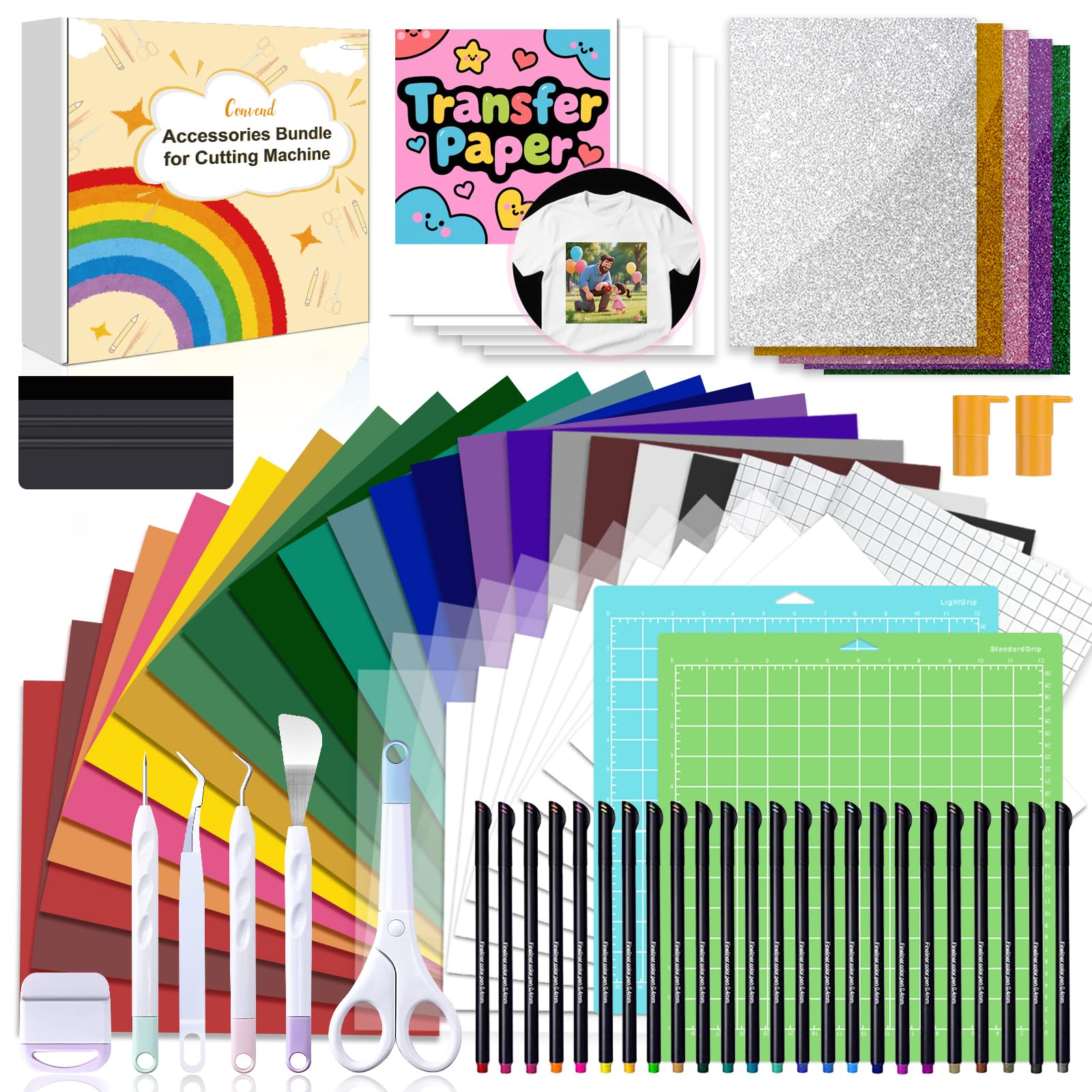
Convend’s Ultimate Accessories Bundle is a broad starter choice for Maker and Explore Air owners. The confirmed information identifies it as an accessories bundle for Maker and Explore Air, but it does not specify the piece count or individual items included.
That makes it harder to compare directly with the Cutaswish 88-piece kit or Cricut’s 74-piece bundle. Still, a broad bundle can make sense when you are building a first collection and want accessories grouped around your compatible machine family.
Before choosing it, identify the tools you already own. If you have mats, pens and weeding tools, a less-defined bundle may create overlap.
If you have only the machine, compare the included contents carefully against your first projects.
This pick is best for shoppers who want a general accessory collection and have confirmed the exact contents and compatibility. It is not the strongest choice for a specific need such as fabric cutting, long-format mats or machine transport.
How we compared these Cricut Maker accessories
We compared the products by checking their stated compatibility, included items, material coverage and usefulness for common Maker workflows. The score weighs specs, features and buyer feedback against what you're shopping for.
A useful accessory should solve a clear task. The CRAFT WORLD pens add writing and drawing.
WORKLION mats control material hold. Sophia’s DESING adds rotary fabric cutting.
The cases and bundles support storage or a wider project range.
We also separated confirmed details from unknowns. For example, the WORKLION set gives exact mat dimensions and adhesive levels, while the Convend bundle does not identify its piece count or individual contents.
That distinction matters because a large-sounding bundle is not automatically better than one precise tool. A buyer who makes fabric projects may get more value from a rotary blade than from a mixed vinyl kit.
What accessories do you need first for a Cricut Maker?
Start with a mat, a suitable blade and a way to remove small cut pieces. Add pens if you write or draw, then choose storage or materials based on your workspace and project type.
A practical starter setup usually includes:
- A cutting mat matched to the material's weight and surface.
- A fine-point blade for standard cuts.
- A scraper or spatula for lifting scraps and finished pieces.
- Pens for cards, labels and drawn details.
- Project materials such as vinyl, HTV, cardstock or fabric.
- A case if the machine moves between locations.
The WORKLION set covers the mat part with 3 adhesive levels. Cutaswish includes mats, pens, pen adapters, a scraper and other tools, while the Cricut bundle focuses more on materials.
If you also use other craft machines, our guide to what accessories you need for a laser engraver explains how machine-specific tools differ from general workshop supplies.
Which Cricut Maker accessories help with vinyl?
Vinyl projects need a mat with the right hold, a cutting blade, a scraper or weeding tool and transfer material when the design must move to another surface. The Cutaswish bundle brings these steps together.
The WORKLION standard mat is intended for vinyl, iron-on and several paper materials. Its light mat suits lightweight materials, while the strong mat is aimed at thicker cardstock, chipboard and backed fabric.
Cutaswish adds permanent adhesive vinyl, glitter HTV, transfer tape, sticker paper and a scraper. It also includes printable fabric transfer paper for light and dark fabrics, so it supports more than standard adhesive vinyl.
The Cricut bundle is another choice for trying materials across decals, shirts, cards and stickers. It is better suited to sampling a brand-specific material mix than replacing every machine tool.
For project ideas involving metal, continue with the best Cricut metal engraving blanks. For wood projects, read how to choose Cricut Maker wood.
Do Cricut Maker accessories work with every Maker model?
No. Compatibility varies by accessory, so match the product to the exact machine model before ordering.
The broadest confirmed range here is the CRAFT WORLD pen set, while the rotary blade is confirmed for Maker and Maker 3.
The CRAFT WORLD pens work with Maker 3, Maker, Explore 3 and Air 2. The WORKLION mats are compatible with Maker, Maker 3, Maker 4, Air 2, Explore 3 and Explore 4.
The carrying case covers Maker 4, Maker 3, Explore 4, Explore 3 and Explore Air 2. Sophia’s DESING specifically names Cricut Maker and Cricut Maker 3.
Bundles use wider language, but their practical compatibility still depends on the individual material or tool. Check the exact model list for your machine, especially when buying blades, pen adapters or replacement parts.
If you need repair items instead, compare the best Cricut Maker parts, the best Cricut Maker power cord replacement and the best Cricut Maker USB cable.
Which Cricut Maker accessories improve writing and drawing?
Fine-point pens are the most direct upgrade for writing and drawing. The CRAFT WORLD set has a 0.4 tip and 30 pens, while Cutaswish includes 24 colored pens plus 2 pen adapters in its larger kit.
Choose CRAFT WORLD if pens are the main thing you need. Its 30-pack gives you more stated pens than the Cutaswish bundle, and the title confirms compatibility with Maker 3, Maker, Explore 3 and Air 2.
Choose Cutaswish if you also need vinyl, transfer tape, mats and weeding tools. Its pens are one part of a larger workflow kit rather than the main focus.
A pen adapter can matter when you want to use a different pen shape or size, but compatibility should be confirmed before use. For a focused comparison, read the best Cricut Maker pen adapter.
Use pens for card details, labels and drawn designs, then keep the cutting and writing steps separate in your project planning. A fine tip does not replace a blade or cutting mat.
How do you choose a Cricut Maker cutting mat?
Choose a mat by material weight and the amount of adhesive hold needed. Light adhesive suits paper, vellum and lightweight materials, standard adhesive covers common vinyl and cardstock, and strong adhesive suits thicker boards and backed fabric.
WORKLION makes that choice simple by putting all 3 adhesive levels in one set. Its 12 x 24 in cutting area is useful for longer layouts, but the full 13 x 26 in mat needs more room during loading and storage.
Keep the protective film on the mat when it is not in use. Remove scraps with a scraper, lift delicate pieces with a spatula and avoid leaving paper dust on the adhesive surface.
For standard 12 x 12 in projects, a smaller mat may be easier to store. For repeated long designs, the WORKLION 12 x 24 in format can reduce the need to split a layout.
See the best Cricut Maker mats for more mat-specific comparisons.
When should you add a rotary blade?
Add a rotary blade when you plan to cut fabric or other delicate, unbacked materials. Sophia’s DESING includes the rotary blade and drive housing and is confirmed for Cricut Maker and Maker 3.
The listed materials include lace, felt, quilt batting, silk, denim, crepe, tissue paper and mulberry. The blade also suits quilting squares, sewing projects, custom cards and some paper materials.
Use the blade with a FabricGrip mat made from a stronger, dense material. Prepare the fabric flat and secure, then follow the machine's software guidance for the selected material.
A rotary blade is not the first accessory for someone who only cuts adhesive vinyl. In that case, a mat, scraper, transfer tape and fine-point blade are more relevant.
If you need a blade for thicker materials, read what the Cricut Maker deep cut blade is used for. For standard blade replacements, compare the best fine point replacement blades for Cricut Maker.
How should you organize Cricut Maker accessories?
Keep mats flat, cover adhesive surfaces, group blades by type and store vinyl where it stays clean and easy to identify. A carrying case helps when the machine and supplies move between rooms.
The Circut Maker carrying case has a large opening and storage for accessories and supplies. It is compatible with Maker 4, Maker 3, Explore 4, Explore 3 and Explore Air 2.
For a fixed craft room, separate pens, blades, mats, weeding tools and materials into labeled groups. Store the WORKLION mats with their clear film covers, and keep rotary equipment away from loose scraps.
Bundle buyers should label the different vinyl and transfer materials as soon as they unpack them. Cutaswish includes several vinyl types, transfer tapes, stencil sheets, sticker papers and printable transfer papers, so mixing them can slow down projects.
If you carry your machine often, compare the best Cricut Maker bag. If your workflow includes pressing HTV onto clothing, see the best Cricut Maker heat press.
More guides on this topic
- Best Replacement Rollers for Cricut Maker
The best Cricut Maker accessories: final verdict
The best Cricut Maker accessories depend on the task you repeat most. Choose CRAFT WORLD for writing and drawing, WORKLION for long layouts and flexible adhesive levels, or Sophia’s DESING for fabric cutting.
Pick the Cricut Deluxe bundle if you want to sample vinyl, HTV, sticker paper, cards and other materials. Pick Cutaswish if you want a larger all-in-one kit with mats, pens, adapters, tools and printable fabric transfer paper.
The Circut Maker case is the practical choice for mobile crafting. Convend is a general starter option, but confirm its individual contents before deciding.
For most new Maker owners, start with the CRAFT WORLD pens and WORKLION mats, then add a rotary blade or material bundle only when your projects call for it. That gives you the best Cricut Maker accessories collection without buying tools that sit unused.
Our top 3 picks at a glance
-
1
-
2
Best for large material layouts
WORKLION Cutting Mat 12x24 Compatible With Explore
9.6/10 our score
See it on Amazon -
3