xTool vs Glowforge: Which Brand Should You Choose? (November 2026)
Pick xTool if you want a wider choice of machines, materials and accessories, and pick Glowforge if you want a simpler, built-in camera based workflow. In this xTool vs Glowforge guide, your main needs are the work area, the materials you plan to cut, and how much setup you want to do yourself.
On this page (10 sections)
- The quick verdict on xTool vs Glowforge
- xTool and Glowforge side by side
- Product range and machine sizes
- Software, camera placement and ease of use
- Materials you can cut and engrave
- Accessories and growth path
- Ownership, space and safety needs
- Cost over time and what you get
- Who should buy which
- The verdict for xTool vs Glowforge
Pick xTool for range and options, and pick Glowforge for a simpler camera based start. This xTool vs Glowforge comparison looks at product range, software, materials, accessories and ownership needs, since those points shape what you can make each week.
The choice rarely comes down to one test cut. It comes down to the mix of work you expect to sell in the next year.
A flat sign shop, a tumbler seller and a metal card maker will each weigh the same brand names in a different way.
We compared specs, accessory options and buyer patterns for both brands. Our score weighs specs, features and buyer feedback against what you are shopping for.
Think about your first ten products before you compare logos. That list will show whether you need curved work, small parts, metal or only flat sheets.
The quick verdict on xTool vs Glowforge
xTool wins on choice, and Glowforge wins on simple first use. That split is the core of the Glowforge vs xTool choice for most buyers.
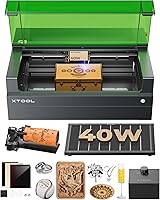
xTool sells a wider spread of laser machines, from compact engravers to larger cutters, plus rotary tools, panels and material packs. Glowforge focuses on a smaller set of machines built around a camera view of the bed.
If you want to grow from flat cuts into tumblers, rings and balls, xTool gives you a clearer upgrade path. If you want to place a design on material with less measuring, Glowforge may feel faster on day one.
For a focused flat goods line, Glowforge keeps the decision short. For a mixed shop that may add curved, small or metal items, xTool keeps more doors open inside one brand.
xTool and Glowforge side by side
The table shows the real split: range against simplicity. Use it as a short check before you read the detail in each section below.
| Point | xTool | Glowforge |
|---|---|---|
| Machine range | Compact to large models across several tiers | Smaller range focused on flat cutting |
| Main workflow | Manual placement with guides, plus software control | Camera view helps place designs on material |
| Accessories | Rotary attachments, panels, risers and material packs | Built in tools plus add on material options |
| Best first use | Flat goods, engraving and curved items | Flat goods with quick placement |
| Growth path | More steps up as needs change | Focused path with fewer model jumps |

The side by side view also hides an important detail. Two machines can have similar work areas but very different daily routines.
One routine may ask you to measure, level and set focus by hand. The other may show the bed on screen and let you drag a design into place.
That routine difference matters more during a busy week than a spec sheet difference. It shapes how long each job takes from loading material to removing finished parts.
Accessories also change the routine. A rotary tool for a tumbler takes setup time that a flat sheet does not need.
A honeycomb panel for small cuts keeps parts in place, but it also adds a step when you switch between engraving and cutting.
Product range and machine sizes
xTool offers more sizes and power levels, while Glowforge keeps its range tighter. That wider range helps if you plan to change focus after the first year.
A compact xTool model can suit a desk and small items. A larger xTool cutter can suit bigger sheets and batch work.
You can move within the brand as your orders change.
Glowforge takes a narrower path. Its machines are built for flat sheets and a set work area.
That focus can make choosing easier, since you have fewer models to compare.
Size also affects what you can sell without cutting material down. A larger bed can take a full sheet in one pass, while a smaller bed may need trimming or smaller designs.
Measure the machine footprint and the space you need to load and unload material.
Our best laser cutter xTool guide helps you compare xTool models by size and use. Start there if you lean toward xTool and want a closer look at bed size and power.
Software, camera placement and ease of use
Glowforge has the edge for camera based placement, and xTool has the edge for control. Your software preference may decide the whole choice.
Glowforge shows the material in your design tool, so you can place art by eye on the bed. That helps with names on wood, shapes on acrylic and work with irregular material sizes.
xTool also uses software for design and control, with options such as Laserbox Basic, LaserGRBL and LightBurn for some models. That gives you more control over settings, speed and passes.
Neither workflow removes the need for test cuts. Camera placement helps position a design, but it does not tell you the right power, speed or focus for a new material.
Control based software can help when you need fine adjustments. Small changes to speed, power or passes can change depth, contrast and edge quality on wood and metal.
A best camera for Glowforge guide can help if camera quality is a key point for you. It explains what to check when placement accuracy matters for your work.
Materials you can cut and engrave
Both brands handle wood, acrylic and paper style goods, but metal and curved work need closer checks. Always match the material to the exact machine before you buy stock.
MDF can be a practical test material for flat cutting, but check the exact machine guidance and fit before buying stock.
Metal cards show a second use case. These aluminum blanks are 3.38 by 2.12 inches and 0.21 mm thick, so they suit business cards, tags and small signs if your machine can engrave metal.
200 aluminum blanks in 10 colors, each 3.38 by 2.12 inches, for cards and tags on laser machines.
The pack gives you 200 cards in 10 colors, with 20 cards in each color. That mix lets you test which colors suit your market before you commit to a single finish for client work.
Each card is close to bank card size, so it fits wallets, card holders and tag hardware. The thin profile also makes batch layout easier when you set up repeated names or small logos.
Do not assume every metal item will work. Coated and anodized metal often mark more easily than raw metal.
Test on a blank and check the exact model limits before you sell metal items.
Our guide on whether the xTool S1 can engrave metal is useful if metal work is part of your plan. It helps you set fair hopes for that model before you buy blanks in bulk.
Accessories and growth path
xTool has the deeper accessory line, and Glowforge keeps the setup leaner. This point matters most for sellers who plan to add new product types.
xTool offers rotary tools for curved items, honeycomb panels for flat cutting and risers for taller work. Those add-ons let one machine handle more product types over time.
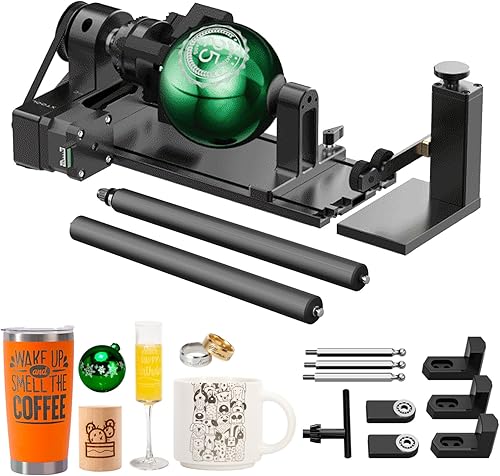
This rotary unit is a 4-in-1 tool with roller, chuck, sphere and ring modules. It can engrave wine glasses, tumblers, rings, balls and mugs with a handle, with a top vector speed of 360 degrees per second.
A 4-in-1 rotary tool for tumblers, wine glasses, rings and balls, made for select xTool machines.
The RA2 Pro is listed as compatible with xTool S1, F1, F1 Ultra, P2, M1 Ultra and D1 Pro, plus most laser engravers on the market. That wide list matters if you already own one of those models and want to add curved work without buying a new machine.
For flat cutting, a honeycomb panel keeps small pieces from falling through and getting burned. This panel is made for the xTool P2 and P2S and measures 28.35 by 15.35 inches.
A honeycomb panel made for the xTool P2 and P2S, for cleaner flat cuts and batch work.
The panel weighs 6.69 pounds and has dimensions of 28.35 x 15.35 x 2.36 inches. That size is made to fit the P2 and P2S bed, so you do not need to trim it or force it into place.
Glowforge users can also add material and tools, but the brand path is tighter. If you need curved items, check support for a rotary option before you buy, since that can limit your product range.
How accessories change your daily workflow
A rotary accessory changes setup time. You must center the object, set height and check that it turns without slipping.
That extra setup can still pay off if curved items are part of your best sellers. A tumbler or wine glass order may be worth the added minutes when flat goods alone cannot fill the order book.
A honeycomb panel supports small cut pieces and helps keep the underside of a cut cleaner during repeated runs. It is less useful if you only engrave flat items with no through cuts, since it then adds storage without adding value.
Risers add height for taller items that would not fit at the standard height. Each add-on also adds cleaning and checks, with more surfaces to keep clear before a job starts.
Our best xTool 20W laser engravers guide helps you match an xTool model to engraving work. It is a good next step if you plan to add metal cards or small engraved items.
Ownership, space and safety needs
Both brands need ventilation, eye protection and a clear work area. Ownership cost is not just the machine price, since accessories, material and space add up.
A larger machine needs a larger table, plus room to load sheets and store materials. Measure your table and doorways before you order either brand.
Ventilation matters with wood, MDF and acrylic. Fumes from MDF and acrylic can be strong, so plan for outdoor venting or a suitable filter setup from the start.
Safety checks are part of daily use. Keep the lid or guard in place, wear correct eye protection for your machine type and never leave a cut running while you leave the room.
Glowforge machines are enclosed, which can help with containment and noise. Some xTool models are open frame, which can help with larger items but need more care with guards and eye protection.
Buy the safety gear for your exact model, not just for the brand. Check the manual for power, enclosure and allowed materials before your first cut, and leave room for storage and setup.
Cost over time and what you get
xTool often gives more options across price tiers, while Glowforge charges for its focused package. Compare total cost, not just the machine price.
With xTool, you may add a rotary tool, a honeycomb panel or a riser as your product line grows. That staged cost can help if you start small and add tools after sales prove out.
With Glowforge, more of the core workflow is built in. That can feel simpler, but it can also mean you pay for features you may not use each week.
Material cost also shapes the choice. Acrylic sheets, blanks and metal cards add up fast for a small shop.
A 200 pack of metal card blanks gives you stock for cards, tags and small signs.
Accessory cost should be tied to a product you already plan to sell, and software and support costs deserve a check.
Who should buy which
Buy Glowforge for a simple flat goods start, and buy xTool for range and growth. Your main products should make the choice clear within a few minutes.
Choose Glowforge if your first products are flat signs, names, shapes and small cut items. The camera based placement can speed up setup on irregular or pre cut material.
Choose xTool if you expect to sell curved items such as tumblers, wine glasses, rings or balls. The RA2 Pro rotary path gives you modules for those shapes on select xTool machines.
Choose xTool if you prefer control over settings and passes, or want to add curved work later. A seller who plans metal cards should check the exact machine limits first, since both brands need the right power, finish and settings for clean metal marks.
A seller with limited space should measure before they choose.
The verdict for xTool vs Glowforge
Pick the brand that matches your first product list and your growth plan. That match matters more than a general brand preference.
If your list is flat goods with quick placement, Glowforge offers the simpler start. If your list mixes flat, curved, small and metal items, xTool offers the wider path.
Check the work area, material list and accessory support for the exact model you plan to buy. Those three checks will prevent most surprises after the first week.
Buy a small test stock first and learn the settings for your main material. That test work will teach you more than a spec table can.
Add accessories only when a product needs them. A rotary tool, a honeycomb panel or a riser should earn its place through orders, not through a general upgrade plan.
In a direct xTool vs Glowforge choice, range favors xTool and simplicity favors Glowforge. Let your product list, space and budget break the tie.
Frequently asked questions
Is xTool or Glowforge better for beginners?
Glowforge is often simpler for a first user because the camera helps place designs on material. xTool can also suit beginners if you choose a model with clear guides and practice material. Your comfort with setup, software and safety checks will matter more than the brand name alone.
Can both brands engrave metal?
Both brands can engrave some metal items, but results depend on the exact machine, power and finish. Anodized aluminum and coated metal often engrave more easily than raw bare metal.
Check the exact model specs and test on a blank before you plan paid metal work.
Which brand is better for a small business?
The better choice is the one that matches your main products and order volume. xTool offers more machine and accessory options for varied work. Glowforge suits a focused flat goods line where speed of setup matters.
Match the machine to your best selling items first.
Do I need extra accessories with either brand?
Flat cutting often needs only a clean work surface and tested material. Curved items need a rotary attachment, and small parts can need a honeycomb panel.
Buy accessories after you know your main products, since each add-on adds cost, space and setup time.