xTool F1 Laser Engraver Review: Worth It? (November 2026)
The xTool F1 suits personal engraving projects where a compact machine matters, but confirm the exact materials, work area and laser configuration before choosing it. Its accessories can add rotary engraving or smoke filtration.
On this page (6 sections)
The xTool F1 is a compact option for personal engraving projects, especially when a smaller machine format fits your workspace and plans. Choose accessories around the work you expect to do: the RA2 Pro adds rotary options, while xTool's desktop smoke purifier is designed for the F1.
We checked the available product details and compared the F1 accessory paths. Confirm the exact machine configuration, material compatibility and workspace needs before you buy.
For another xTool model option, see the xTool F2 Ultra MOPA review.
What does the xTool F1 laser engraver review find?
The xTool F1 is worth considering when your priority is a compact engraver for personal projects, with accessory options for cylindrical work and fume collection. Your decision depends on the materials you want to mark and whether the machine's work area suits your objects.
The phrase xTool laser engraver F1 can refer to the compact F1 model, while the F1 Ultra is a separate machine. Keep that distinction clear when checking accessories: the RA3 is listed for the F1 Ultra, but not the F1.
For the F1, the RA2 Pro is described as compatible and covers several rotary formats. The desktop smoke purifier is also designed for the F1, giving you an accessory path for capturing fumes and debris.
What should you confirm before choosing the xTool F1?
Check the machine's supported materials, working area and required ventilation against your actual projects. Those details determine whether the F1 fits your needs more than a general label like “compact.”
Make a short list of the items you want to engrave, including their material and largest dimensions. For round objects, note their shape and diameter, since rotary setups use different ways to hold an object.
Also consider where the engraver will run and how you will handle fumes. xTool's purifier is designed for the F1, and its guidance suggests adding an exhaust pipe for sensitive users.
If you are comparing a dual-laser setup, our Best Dual Laser Engraver guide explains how to weigh machine features against the materials and projects you have in mind.
Which rotary attachment fits the xTool F1?
The RA2 Pro is the rotary attachment in this set explicitly described as compatible with the xTool F1. It includes roller, chuck, sphere and ring modules for a range of round or curved objects.
xTool RA2 Pro for xTool S1: Best for cylindrical projects
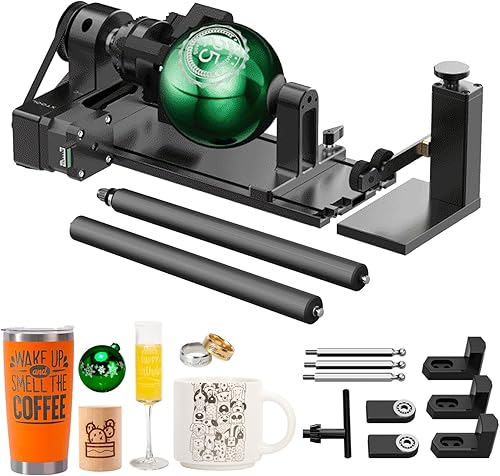
- 4-in-1 rotary attachment
- Roller, chuck, sphere and ring modules
- Adjustable Z-axis and chuck diameter
Adds rotary options for cylindrical, spherical and ring-shaped objects. Check the setup requirements and compatibility with your exact machine.
Pros
- Four rotary modules in one attachment
- Supports mugs with handles and irregular cylinders
- Adjustable Z-axis and chuck diameter
Cons
- Requires a riser
- Rotary setup adds steps before engraving
The RA2 Pro is described for objects such as wine glasses, tumblers, mugs with handles, rings, balls and baseball bats. It requires a riser, so include that setup requirement in your planning.
The RA3 has magnetic, tool-free changes among its four attachments, but its stated compatibility covers the P3, F2 Ultra, F1 Ultra and F2. It is not identified for the original F1.
xTool RA3 World's First Smart MagSwap Rotary: Best for quick rotary changes

- Tool-free magnetic attachment changes
- Chuck, roller, sphere and ring attachments
- For xTool F1 Ultra and F2 series
A rotary accessory with magnetic changes between four attachment types. It is listed for the F1 Ultra and F2 series, so confirm compatibility before considering it for an F1.
Pros
- Four rotary attachment types
- Tool-free magnetic changes
- 3D preview and alignment features with supported machines
Cons
- Not listed as compatible with the xTool F1
- Batch processing kits are separate purchases
If you are choosing between a newer F1 Ultra and F2, our xTool F1 Ultra vs F2 comparison can help you decide which machine category better matches your work. For a deeper look at the newer model, see our xTool F1 Ultra review.
How does smoke control affect an F1 setup?
A smoke purifier can collect fumes and debris produced during engraving, which makes workspace planning part of the machine decision. The xTool desktop purifier is designed for the F1 and uses three-layer filtration that includes an H13 HEPA filter and activated charcoal.
xTool Desktop Smoke Purifier for M2: Best for indoor fume capture

- Three-layer filtration
- H13 HEPA filter and activated charcoal
- Designed for xTool F1
A dedicated purifier option for the xTool F1, with three-layer filtration. The product guidance suggests an extra exhaust pipe for sensitive users.
Pros
- Designed for the xTool F1
- Pre-assembled operation
- Replaceable filters
Cons
- Requires filter replacement
- An exhaust pipe may be needed for sensitive users
The purifier is pre-assembled and is described as starting and stopping with the F1 process. Its guidance recommends an extra exhaust pipe for sensitive users, and filters need replacement after the pre-filters have been used.
Think about ventilation before setting up the machine. The right plan depends on the materials, where the machine sits and how you will direct exhaust.
Our guide to how a laser engraver works gives useful context on the process, while how to use a laser engraver covers setup and operating steps.
Should you choose the F1 or a larger xTool machine?
Choose the F1 when its compact format and supported work area fit your personal projects. Consider a different machine when you need a setup designed for larger objects, a different workflow or a particular laser configuration.
The F1 Ultra and F2 have distinct accessory compatibility, including the RA3. The xTool F2 Ultra vs F2 Ultra UV comparison helps sort through another newer-machine choice, while our xTool P3 laser review covers a different machine option.
Don't buy based only on a model name or a rotary accessory's feature list. Confirm the exact machine and accessory compatibility, then compare the work area and material support with your project list.
Is the xTool F1 a good fit for your projects?
The xTool F1 makes sense if you want a compact engraver for personal projects and its supported materials and work area match what you plan to make. Add the RA2 Pro if cylindrical, spherical or ring engraving is part of that plan, and consider the F1 purifier for smoke capture.
Pick another configuration if you need features tied to a different machine, or if your object size and material needs do not fit the F1. The key decision is the exact F1 configuration and accessory match, not the brand name alone.
Frequently asked questions
What projects suit the xTool F1?
The xTool F1 is aimed at personal engraving projects, with a compact machine format. Before buying, check that the materials and object sizes you plan to engrave fit the exact machine configuration, and decide whether rotary work or smoke capture calls for an accessory.
Can the xTool F1 engrave tumblers?
Rotary engraving can support tumbler-shaped objects when paired with a compatible setup. The xTool RA2 Pro is described for cylindrical objects, including tumblers, but requires a riser; confirm the machine configuration and workspace requirements before choosing it.
Does the xTool F1 need a smoke purifier?
A smoke purifier can collect fumes and debris during engraving, and xTool's desktop purifier is designed for the F1. Its guidance suggests an extra exhaust pipe for sensitive users, so consider the material, ventilation and your workspace before starting a project.
Is the xTool RA3 compatible with the xTool F1?
The xTool RA3 is listed for the P3, F2 Ultra, F1 Ultra and F2, not the xTool F1. If you have the original F1, compare its compatibility options carefully; the RA2 Pro is explicitly described as compatible with the F1.