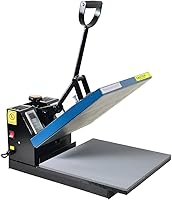
How to Use a Fancierstudio Heat Press
To use a Fancierstudio heat press, confirm your exact model and size, set the temperature and time, adjust the pressure, and test on scrap fabric first. Load the garment, close the platen, press for the set time, and open slowly to check the transfer.
On this page (9 sections)
- Which Fancierstudio heat press model do you have?
- How do you set up a Fancierstudio heat press for the first time?
- How do you use the digital controls on a Fancierstudio press?
- What is the basic pressing workflow for a T-shirt?
- How do you adjust pressure on a Fancierstudio heat press?
- How do you use a Fancierstudio heat press for sublimation and rhinestones?
- How do you clean and care for a Fancierstudio heat press?
- Which Fancierstudio size should you choose for your projects?
- How do you get clean results with a Fancierstudio heat press?
To learn how to use a Fancierstudio heat press, identify your model, set the digital controls, adjust pressure for your fabric, and do a test press first. That order keeps the transfer even and helps you avoid scorch marks or weak adhesion.
The basic workflow is simple once the machine is set up. Prepress the garment, position the transfer, close the platen for the full time, and peel or cool the result as the material requires.
Which Fancierstudio heat press model do you have?
Check the model number, platen size, and color code before you look up settings. Fancierstudio makes several sizes, and instructions for one size do not always match another.
The Fancierstudio Digital Heat Press 15 x 15 model we compared has a 15 by 15 inch platen, model number FS 15x15 BB, and blue and black coloring. It runs at 110 volts and 1800 watts, with a temperature range of 0 to 699 degrees F and a time range of 0 to 999 seconds.
We checked the specs, and the included 15 by 15 inch sheet and silicon-gel base board are useful to know before your first press. The machine is an upward-opening model, which means it takes less floor space when open.
Names like 15x15, 16x20, and 16x24 describe the platen size, not the garment size. A larger platen fits wider designs, while a smaller platen is easier to store and move.
How do you set up a Fancierstudio heat press for the first time?
Place the press on a stable, level, heat-safe surface and confirm the outlet can handle the load. A 1800 watt machine draws a lot of power, so use a dedicated outlet when possible.
Read the manual for your exact model number. The FS 15x15 BB has a 3 month warranty, and Fancier Studio lists it for bags, mouse pads, and T-shirts.
Let the machine sit in a ventilated area away from children and pets. Keep the work area clear of water, loose fabric, and anything that could touch the hot platen.
If you are still choosing a machine type, our heat press machine guide explains clamshell, swing away, and drawer styles. That guide helps you decide which layout fits your space.
How do you use the digital controls on a Fancierstudio press?
Set temperature and time to match your transfer material, then start the timer and wait for the beep. The Fancierstudio 15x15 has electronic time and heat control with precise time setup.
Set temperature first so the platen can heat, following your HTV, sublimation paper, or rhinestone sheet instructions.
Set the timer second. Many HTV projects need short presses, while sublimation and rhinestone work often need longer dwell time.
For a fuller comparison, see heat press vs sublimation.
The range goes to 999 seconds, so check your material instructions before assuming a long press is safe.
Close the platen, wait for the timer to end, then open and check a test piece before a full batch.
What is the basic pressing workflow for a T-shirt?
Prepress the shirt, center the design, close the platen for the full time, and open it slowly. A short prepress removes moisture and wrinkles that can weaken adhesion.
Lay the shirt flat and smooth it across the base board. Use the included sheet or a Teflon sheet as a guide for centering, and tape the transfer in place if it shifts.
Close the platen with the handle and let the timer finish. Peeling differs by material, so follow the instructions for hot peel, warm peel, or cold peel.
Place the HTVRONT Auto Heat Press Machine for T here if you want an automatic alternative to a manual clamshell. It has a 15x15 size, auto release, and a slide-out drawer design.
For operating steps, see the HTVRONT heat press guide.
HTVRONT says it reaches 320 degrees F in 4 minutes and can adjust to material thickness up to 1 inch. That auto action suits people who want hands-free timing.
How do you adjust pressure on a Fancierstudio heat press?
Adjust the knob until the platen closes evenly and the handle takes firm but manageable force. Pressure should press the design into the fabric without wrinkling it.
The Fancierstudio 15x15 has adjustable pressure on top. Turn it in small steps and test after each change.
Thin cotton shirts need less pressure than hoodies or canvas bags. Thick items need more contact, but too much pressure can mark the fabric.
Open and close the press a few times first. The handle should open without a hard yank, and the platen should meet the base squarely.
If designs shift, check alignment before adding pressure. A best clamshell heat press guide can help you compare hinge and pressure designs.
How do you test pressure on scrap fabric?
Run a test press on scrap fabric at your planned temperature, time, and pressure. Use the same fabric type and material as the finished item when you can.
Check for clean edges, even color, and firm adhesion. If the design lifts at the corners, try a small pressure increase or a longer press.
If the fabric shows a box mark, reduce pressure or shorten the press. Record the settings that work, since they save time on the next shirt.
How do you use a Fancierstudio heat press for sublimation and rhinestones?
Match the settings to the material, use firm even pressure, and let the item cool as the instructions require. Sublimation and rhinestone work both need consistent contact across the whole design.
The Fancierstudio description lists transfers, letters, numbers, and images for T-shirts, garments, bags, mouse mats, jigsaw puzzles, ID badges, and ceramic tiles. For equipment designed around varied item shapes, compare combo heat press machines.
Only use items your material and machine manual allow.
For sublimation, press the paper flat and avoid shifting it during the timer. For rhinestones, the sheet and stone layout need steady pressure so each stone sets evenly.
Keep the Teflon coating clean, since residue can transfer to the next item. Wipe the cool platen with a clean cloth as the manual directs.
What safety steps should you follow on every press?
Keep hands clear of the platen, use the handle to close and open the machine, and never leave a hot press running unattended. Heat injuries happen fast, and the platen stays hot after the timer ends.
Set the press where children and pets cannot reach it. Use the insulated base or handle as designed, and keep water away from the electrical parts.
The HTVRONT mini press has a handle and insulated base for small work. It suits touch-ups and small designs rather than full shirt fronts.
HTVRONT lists 3 heat settings at 284, 320, and 356 degrees F. Use a tool like this for seams and small areas, not for a full logo.
How do you clean and care for a Fancierstudio heat press?
Wipe the platen when cool, clean the base board, and store the press as the manual directs. Regular cleaning keeps residue from ruining the next transfer.
Use a clean, lint-free cloth and only cleaners the manual allows. Avoid abrasive pads, since they can damage the Teflon coating.
Check the silicon-gel base board for wear or residue. It should stay flat so the garment sits evenly under the platen.
Store the machine in a dry spot with the cord coiled loosely. Keep the included sheet with the manual for quick access to settings.
If you compare an auto drawer model, our best 15x15 heat press with slide out drawer post explains that layout. Drawers help with positioning but take more counter depth.
Which Fancierstudio size should you choose for your projects?
Choose 15x15 for standard adult shirt designs, and choose a larger platen only if your designs need the extra width. Size affects storage, weight, and how many presses a design takes.
A 15x15 platen covers most chest designs in one press. A 16x20 or 16x24 platen suits wider art, but it needs more table space and power.
Weight matters if you move the press between rooms. Check the dimensions and your table space before you order, since a larger press can be hard to lift.
Our best 15x15 heat press post compares 15x15 options if you want more choices before you buy. That list can help you weigh drawer, auto, and manual styles.
How do you learn which press style fits you?
Pick a manual clamshell if you want simple controls, an auto press if you want hands-free release, and a mini if you want portability. Each style suits a different work pace.
A manual clamshell like the Fancierstudio gives you direct control over pressure. An auto press like the HTVRONT model handles timing and release for you.
A mini press is best for small fixes. If you own a small handheld tool already, our how to use cricut easypress mini guide can help you learn mini-press habits first.
What should you check before you order a replacement press?
Measure your table space, confirm the voltage, and list the largest design you plan to press. Those three checks prevent most buying mistakes.
Check the wattage and outlet rating for the model you want. The Fancierstudio 15x15 uses 1800 watts at 110 volts, which is a high draw for a home circuit.
How do you get clean results with a Fancierstudio heat press?
Test first, keep the platen clean, and match pressure, temperature, and time to each material. Most problems trace back to one of those three settings.
Use a test shirt or scrap fabric before every new material. Change one setting at a time so you know what fixed the problem.
Keep a simple log with fabric type, temperature, time, and pressure. That log turns trial and error into repeatable results.
If you want more brand options, our best htvront heat press post covers auto and mini models. Use it to compare features before you add a second machine.
Frequently asked questions
What temperature should I use on a Fancierstudio heat press?
Use the temperature required by your transfer material, since HTV, sublimation, and rhinestone work often need different heat. Start with the material maker’s setting, test on scrap fabric, and change one setting at a time so you can see what caused the result.
How much pressure should a clamshell heat press have?
Set pressure so the platen closes straight and holds firm contact without forcing the handle. Thin garments need lighter pressure than thick items, and too much force can mark fabric or make opening hard.
Test a scrap piece and adjust in small steps.
Can I use a mini press instead of a full Fancierstudio machine?
A mini press works for small areas, seams, and travel projects, but it is slower for full front designs. It has a small working area, so plan extra passes and check alignment carefully.
Full-size presses cover a 15 by 15 inch area in one press.