8 Best Cameras for Laser Engravers (November 2026)
The best cameras for laser engravers include the Creality Falcon A1C 10W AI Laser Engraver for a built-in camera, the LONGER LightBurn Camera Kit for Laser Engravers for a LightBurn camera kit, and the SVPRO 5MP 30FPS USB Camera IMX335 Sensor for a wide fixed view.
On this page (5 sections)
The best camera for a laser engraver with LightBurn is the LONGER LightBurn Camera Kit, while the SCULPFUN CAM500 offers a defined 400 × 400 mm work area. For a general-purpose camera, choose by lens angle, focus and mounting needs, then confirm that the software supports your intended camera workflow.
A camera can show the material and help place a design, but it needs a clear view of the bed and correct alignment. For balsa projects, compare laser cutting beds for balsa wood.
The right choice depends on whether you're adding a camera to an existing machine or buying an engraver with one already built in.
If you use a Glowforge, see our guide to the Best Camera For Glowforge. For better visibility around the machine, compare a Top 7 Best LED Light For Laser Engraver and the Best Work Light For Laser Engraving.
Our picks at a glance
-
1
 Best for a built-in camera
Creality Falcon A1C 10W AI Laser Engraver
9.7/10 our score
See it on Amazon -
2
 Best for a LightBurn camera kit
LONGER LightBurn Camera Kit for Laser Engravers
9.5/10 our score
See it on Amazon -
3
 Best for a wide fixed view
SVPRO 5MP 30FPS USB Camera IMX335 Sensor
9.2/10 our score
See it on Amazon
- 4
 Check it
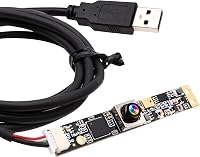
ELP 16MP Autofocus USB Camera with Microphone
Best for autofocus and detail - 5
 Check it
Carverall A1 Pro 5W Desktop Laser Engraver
Best for an enclosed camera setup - 6
 Check it
SCULPFUN CAM500 Lightburn Camera
Best for a 400 × 400 mm work area - 7
 Check it
ELP 8mp USB Camera Module with Microphone
Best for a compact autofocus module - 8
 Check it
IFWATER USB Camera 16 Megapixes High Resolution
Best for adjustable manual framing
Which cameras for laser engravers fit different setups?
The LONGER kit is the leading retrofit choice for a LightBurn setup, while the Creality Falcon A1C is the top pick if you want a machine with a camera included.
| Product | Best for | Camera | Positioning | Work area | Our score |
|---|---|---|---|---|---|
| Creality Falcon A1C 10W AI Laser Engraver | a built-in camera | Built-in AI HD camera | Up to 0.1 mm accuracy | 150 × 150 × 148 mm | 9.7 |
| LONGER LightBurn Camera Kit for Laser Engravers | a LightBurn camera kit | 9.5 | |||
| SVPRO 5MP 30FPS USB Camera IMX335 Sensor | a wide fixed view | 9.2 | |||
| ELP 16MP Autofocus USB Camera with Microphone | autofocus and detail | 9.0 | |||
| Carverall A1 Pro 5W Desktop Laser Engraver | an enclosed camera setup | Built-in HD camera | 3.94 × 3.94 in | 8.8 | |
| SCULPFUN CAM500 Lightburn Camera | a 400 × 400 mm work area | 8.6 | |||
| ELP 8mp USB Camera Module with Microphone | a compact autofocus module | 8.5 | |||
| IFWATER USB Camera 16 Megapixes High Resolution | adjustable manual framing | 8.0 |
Creality Falcon A1C 10W AI Laser Engraver: Best for a built-in camera
- Built-in AI HD camera
- Up to 0.1 mm positioning accuracy
- Auto focus
- 150 × 150 × 148 mm work area
A complete engraver option for buyers who want a camera included with the machine. Its camera helps capture material and position designs through the software.
Pros
- Camera is built in
- Auto focus
- Interchangeable laser platform
Cons
- This is an engraver, not a retrofit camera
- The package includes one selected laser module
The Creality Falcon A1C puts an AI HD camera inside the engraver, so there's no separate camera module to mount over the machine. Creality says the camera captures the material and helps position designs with up to 0.1 mm accuracy.
Auto focus is also built in, and the working area measures 150 × 150 × 148 mm. The interchangeable platform supports Falcon 5W, 10W and 1.2W laser modules, but each package comes with only the selected module.
This is an engraver rather than a camera upgrade for a machine you already own. Pick it if you're shopping for a complete desktop setup; if you only need an add-on, compare the retrofit kits and USB cameras below.
For a closer look at machine basics, see How Does a Laser Engraver Work?.
LONGER LightBurn Camera Kit for Laser Engravers: Best for a LightBurn camera kit
- 5MP camera
- LightBurn preview support
- Compatible with RAY5 and B1 series
- Supports most models on the market
A camera kit made for LightBurn workflows, with preview support and compatibility that includes LONGER's RAY5 and B1 series. Confirm mounting and fit with your machine before buying.
Pros
- Designed for LightBurn
- Supports preview
- Broad stated model compatibility
Cons
- Confirm the mount fits your machine
- Camera-to-work-area setup still matters
The LONGER kit is the best fit here when LightBurn preview support is central to your camera search. It's a 5MP time-lapse digital camera, and its stated compatibility includes the RAY5 and B1 series plus most models on the market.
That broad wording doesn't identify every compatible machine or camera mount. Before ordering, check that the camera can attach securely and that its view covers your bed from the planned position.
If you need a different support surface, compare 400 x 400 mm honeycomb beds.
Choose this kit if its mounting arrangement fits your machine and you want a camera option designed around LightBurn. If you have a different machine, compare the software and mounting requirements before treating broad compatibility as a guaranteed fit.
SVPRO 5MP 30FPS USB Camera IMX335 Sensor: Best for a wide fixed view
- 5MP resolution
- 138° horizontal field of view
- Fixed focus
- USB plug and play
A wide-angle USB camera for buyers who need a broad view of a machine bed. Its fisheye lens and fixed focus make placement and calibration important.
Pros
- Wide stated field of view
- USB connection
- 3 m USB cable
Cons
- Fixed focus
- Wide-angle distortion may affect framing
The SVPRO camera suits a setup that needs a wide view from a fixed-focus lens. Its stated field of view is 138° horizontally and 101° vertically, and it connects over USB with a 3 m cable.
A wide fisheye view can capture more of a bed from one location, but the field of view alone doesn't confirm that the image will suit a camera-positioning workflow. Fixed focus also means you'll need to check whether the camera can focus clearly at your chosen mounting distance.
For the machine's cutting optics, compare laser cutter lenses. For CO2 source options, see best CO2 laser tubes.
Consider it for general machine monitoring or a camera setup where you can confirm the lens and software fit. This is a USB camera, not a ready-made laser camera kit with a specified mounting system.
ELP 16MP Autofocus USB Camera with Microphone: Best for autofocus and detail
- 16MP still resolution
- Autofocus
- 100° lens
- UVC USB connection
This compact USB camera combines autofocus with a 16MP still image resolution. Check the camera's framing and working distance in your own setup.
Pros
- Autofocus
- Wide lens
- UVC compatibility
Cons
- High-resolution frame rate is lower than at smaller sizes
- Mounting hardware is not specified
The ELP 16MP camera is a good match for buyers who want autofocus and a wide view in a small USB module. It has a 16MP still resolution and a lens with about a 100° field of view.
The camera is UVC compliant, and the stated system compatibility includes Windows, Linux, Mac and Android. High-resolution capture runs at a lower frame rate than some smaller output sizes, so consider the resolution and frame rate you actually need for preview or monitoring.
Autofocus can help when the camera's distance from the bed may vary, but it doesn't remove the need to mount and align it. Check that the camera's view fits your working area and planned software workflow.
Carverall A1 Pro 5W Desktop Laser Engraver: Best for an enclosed camera setup
- Built-in HD camera
- Camera-based positioning
- 3.94 × 3.94 in work area
- Class 1 enclosed design
A desktop engraver with a built-in camera for material snapshots and design positioning. Consider it when replacing or adding a machine, rather than retrofitting a camera to an existing engraver.
Pros
- Camera included with machine
- Enclosed design
- Camera-based positioning
Cons
- Not a standalone camera kit
- Small stated work area
The Carverall A1 Pro is another engraver with a camera built in, rather than a camera accessory for an existing machine. Its HD camera is designed to capture a material image and help position a design; the stated work area is 3.94 × 3.94 in.
The machine has an enclosed Class 1 design and is described with AI and app control. For ventilation options, compare laser enclosures with exhaust fans.
Those machine features may suit someone choosing a compact engraver, but they don't make it a replacement camera module for a different brand's machine.
Pick this option if you're considering a camera-equipped engraver and its small work area suits your projects. If your current machine is staying, focus on a separate camera kit or USB module.
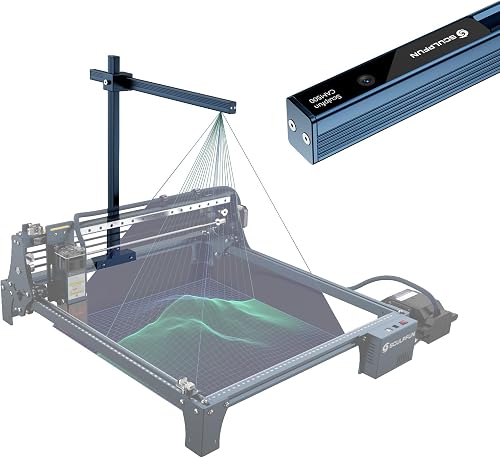
SCULPFUN CAM500 Lightburn Camera: Best for a 400 × 400 mm work area
- 5MP camera
- LightBurn CAM support
- 400 × 400 mm working area
- T- and U-shaped fixation clamps
A LightBurn-focused camera with two clamp styles and a stated 400 × 400 mm working area. Its setup guidance gives a useful starting point for camera height and object placement.
Pros
- LightBurn CAM support
- Two fixation clamp styles
- Supports image tracing and batch engraving
Cons
- Designed for LightBurn
- Camera alignment affects positioning
The SCULPFUN CAM500 has a useful setup target for buyers who want a LightBurn camera with a defined working area. It supports a 400 × 400 mm area, and SCULPFUN recommends placing it about 325 mm above the engraving position.
The camera is 5MP and supports LightBurn CAM functions such as work preview, positioning, image tracing and batch engraving. It comes with T- and U-shaped fixation clamp options; the stated fit includes SCULPFUN machines and other machines with compatible frame styles.
SCULPFUN says positioning deviation can be under 1 mm when the camera is aligned, but that depends on the setup. Keep objects near the center of the camera view, and verify compatibility if your machine uses an expansion kit or a different frame.
ELP 8mp USB Camera Module with Microphone: Best for a compact autofocus module
- 8MP still resolution
- Autofocus
- About 62° horizontal field of view
- UVC plug and play
A compact autofocus USB module for buyers who want a narrower view than a fisheye camera. Confirm that its framing covers your machine bed from the planned mounting point.
Pros
- Autofocus
- Compact module
- USB connection
Cons
- Narrower field of view than wide-angle options
- Mounting hardware is not specified
The ELP 8MP module is a compact choice when you want autofocus with a narrower view. It has an 8MP still resolution, an approximately 62° horizontal field of view and a USB connection.
Its UVC support allows connection to compatible computers and devices without extra drivers, according to the product information. That general connection support doesn't confirm dedicated camera positioning support in every laser software package.
A narrower view can help frame a smaller area, but it may not capture a large bed from the same mounting height as a wide-angle camera. Measure the area you want visible and check the frame before deciding.
IFWATER USB Camera 16 Megapixes High Resolution: Best for adjustable manual framing
- 16MP still resolution
- 5–50 mm manual varifocal lens
- UVC USB connection
- 3 m cable
A USB camera with a manual varifocal lens for adjusting the view and focus. It suits a buyer comfortable setting the lens by hand and checking the final framing.
Pros
- Adjustable lens range
- 16MP still resolution
- UVC connection
Cons
- Manual focus and adjustment
- No dedicated laser camera mount is specified
The IFWATER camera stands out for its manual 5–50 mm varifocal lens. It has a 16MP still resolution, UVC USB connection and a 3 m cable, with manual controls for focal length, aperture and focus.
Make small changes and check focus and framing again after the camera is secured.
Choose it if you want to tune the lens yourself and can handle a manual-focus setup. Buyers who want simpler focusing may prefer one of the autofocus modules or a camera kit designed for a laser engraver workflow.
How do you choose a camera for an existing laser engraver?
Choose a camera for your existing machine by checking software support, mounting, field of view and focus in that order. A high megapixel number can't make up for an incompatible mount or a view that misses part of the bed.
Start with your engraving software. The SCULPFUN CAM500 and LONGER kit specify LightBurn support, while the ELP and IFWATER modules specify USB or UVC compatibility.
Confirm that your software can use the camera for the task you want, such as positioning or simple monitoring.
Next, compare the camera's view with your work area. A wide lens can cover more space from a fixed spot, while a narrower lens may be better for a smaller area; either way, check the real framing at the height where you can mount it.
Finally, consider whether the camera focuses automatically or stays fixed. Autofocus can be useful when the camera-to-material distance varies, while a fixed or manual-focus option needs extra care when choosing its position.
What camera details matter most for engraving?
For camera-based positioning, mount stability and alignment matter as much as resolution. The camera must keep a consistent view of the work area so the software can relate the material image to the engraving bed.
Field of view tells you how much the lens can see, but it doesn't guarantee a usable image across the whole bed. Check whether the corners remain visible and clear from the planned mounting height, especially with a fisheye lens.
Resolution describes image detail, not compatibility. A 16MP camera may capture a detailed still, but you still need to confirm the software accepts the camera and that the viewing angle suits your material and machine.
For the actual engraving process and machine setup, read How to Use a Laser Engraver?. You can also compare Top 7 Best LED Light For Laser Engraver if the camera view needs better work-area lighting.
Should you buy a kit, a camera module or an engraver with a camera?
Choose a camera kit when it names your software and offers a mounting approach that suits your machine. The LONGER and SCULPFUN picks both call out LightBurn support, but you should still verify fit and work-area coverage.
Choose a USB camera module when its lens and focus match your planned setup and you can manage mounting and calibration. The SVPRO offers a wide fixed-focus view, while the ELP options provide autofocus at different resolutions and angles.
Choose an engraver with a built-in camera if you're buying a machine as well as a camera. The Creality Falcon A1C and Carverall A1 Pro are complete engraver options in this roundup, not add-on cameras for an existing laser.
Which camera for a laser engraver should you pick?
Pick the LONGER LightBurn Camera Kit if you want a retrofit camera option with stated LightBurn preview support. Choose the SCULPFUN CAM500 if its 400 × 400 mm view and clamp setup match your machine.
For a general USB camera, choose the SVPRO for a wide fixed view, an ELP autofocus module for simpler focus, or the IFWATER if you want manual lens adjustment. If you also need an engraver, compare the Creality Falcon A1C and Carverall A1 Pro as complete machine options.
For more light around your work area, see our Best Work Light For Laser Engraving guide.
Our top 3 picks at a glance
-
1
Best for a built-in camera
Creality Falcon A1C 10W AI Laser Engraver
9.7/10 our score
See it on Amazon -
2
Best for a LightBurn camera kit
LONGER LightBurn Camera Kit for Laser Engravers
9.5/10 our score
See it on Amazon -
3
Best for a wide fixed view
SVPRO 5MP 30FPS USB Camera IMX335 Sensor
9.2/10 our score
See it on Amazon
Frequently asked questions
Can I use any USB camera with a laser engraver?
Not always. The camera needs to work with your computer and the software workflow you plan to use, and it must mount in a position that captures the full work area.
Check the camera's field of view, focus type, connection and software support.
A camera that streams video may still need separate calibration or compatible positioning features.
Do laser engraver cameras work with LightBurn?
Some cameras and kits are made for LightBurn workflows, including the LONGER kit and SCULPFUN CAM500 in this roundup. Other USB cameras list general UVC compatibility, which describes connection support but does not by itself confirm LightBurn camera features.
Confirm software support before choosing a camera.
Where should I mount a camera over a laser engraver?
Mount it where the lens can see the full working area without the frame or other machine parts blocking the view. Camera height, lens angle and alignment all affect framing and positioning.
SCULPFUN recommends about 325 mm from its CAM500 to the engraving position, with objects near the center of its stated 400 × 400 mm area.
Should I buy a camera kit or a USB camera module?
Choose a camera kit when its stated software support, mount and working area fit your machine. Choose a USB module when you can confirm that its lens, focus and connection suit your setup and you're prepared to handle mounting and calibration.
If you need a machine too, compare engravers with cameras built in.