xTool RA2 Pro Review: Worth It? (October 2026)
The xTool RA2 Pro suits laser owners who want one rotary attachment for cylinders, rings and spheres. Its four modules cover different object shapes, but check machine compatibility and the required riser before choosing it.
On this page (7 sections)
The xTool RA2 Pro is a multi-module rotary attachment for engraving cylinders, rings, balls and other curved objects. Its roller, chuck, sphere and ring modules make it a fit for a workshop that handles more than one kind of shape.
The main buying checks are compatibility, clearance and object fit. The xTool S1 requires a riser, and the chuck jaws are specified for diameters from 0 to 100 mm.
What does the xTool RA2 Pro include?
The RA2 Pro combines four rotary approaches in one attachment: roller, chuck, sphere and ring engraving. You can switch modules to suit the object rather than relying on one holder for every shape.
xTool RA2 Pro for xTool S1: Best for varied curved objects
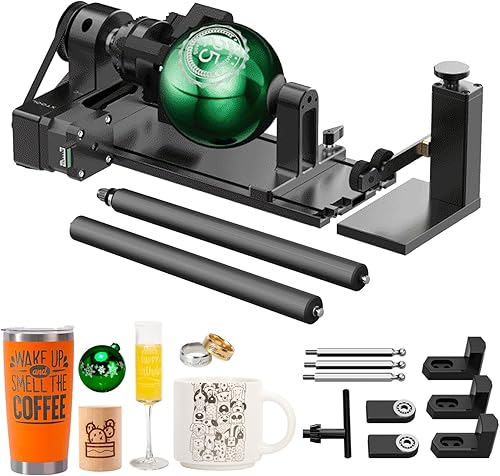
- 4-in-1 roller, chuck, sphere and ring modules
- Supports objects with handles and irregular shapes
- Ring engraving can reach the inner side
A flexible rotary setup for engraving cylinders, rings, balls and other curved objects. Check your machine, riser needs and the object’s shape before buying.
Pros
- Four modules cover several object shapes
- Separate support module helps with irregular cylinders
- Ring module supports inside engraving
Cons
- The xTool S1 requires a riser
- Jaws are specified for objects up to 100 mm in diameter
The roller and chuck modules address cylindrical objects, while the sphere module is designed for balls. The ring module adjusts to ring and bracelet diameters and supports engraving on the inside of a ring.
That range is useful if your projects vary between drinkware, round ornaments and jewelry. If most of your work is on straight-sided tumblers, a simpler best rotary roller for laser engraver comparison may help you decide whether you need all four modules.
Is the RA2 Pro suitable for cylinders and handled cups?
The RA2 Pro is designed for cylinders and irregular cylinders, including tumblers, wine glasses, wine bottles and mugs with handles. A separate support module helps support irregular shapes while you position them.
The chuck jaws hold objects with diameters from 0 to 100 mm. For larger objects, custom 3D-printed jaws can be used, but you’ll need to make or source jaws that fit your project.
Long objects such as baseball bats and ceramic vases are also described as suitable for the attachment. Their length and support needs still matter: make sure the object can sit securely and clear the laser before starting a job.
A roller can suit straight cylinders, while a chuck can hold an object by its ends or other gripping points. If the object has a handle, taper or uneven shape, plan its position carefully and check whether the support module gives it a stable resting point.
Can it engrave rings and spheres?
The ring and sphere modules extend the RA2 Pro beyond ordinary drinkware. The ring module supports inside engraving, while the sphere module is designed for ball-shaped objects.
For a ring, check the module’s adjustment range against the ring or bracelet you want to engrave. Inside engraving also depends on positioning the ring so the laser can reach the intended surface.
For a ball, think about how you’ll hold and orient it for the design. A curved surface changes the distance between the object and the laser across the engraving area, so use a design and setup suited to the surface rather than assuming a flat layout will transfer unchanged.
Which machines and software are compatible?
The RA2 Pro is compatible with the xTool S1, F1, F1 Ultra, P2, D1 Pro and M1 Ultra, as well as most laser engravers. The xTool S1 needs a riser, so include that requirement in your setup plans.
The stated software options include Laserbox Basic, LaserGRBL and LightBurn. Compatibility can depend on the machine and connection setup, so confirm that your engraver and software work together before ordering.
If you’re new to the setup, our guide to using the xTool rotary attachment covers the practical steps to consider when mounting and preparing a rotary job. For a different xTool accessory, see our xTool S1 1064nm infrared laser module review.
What should you check before engraving?
The RA2 Pro is pre-assembled and modular, with adjustable module height and chuck diameter. Still, each job needs a careful fit check before the laser runs.
Measure the object at the place where the rotary module will hold it. Check its overall length, diameter, taper and any handle or raised detail that could interfere with rotation.
Then rotate the object by hand through a full turn with the laser off. Confirm that it stays in place and clears the machine bed, frame and laser head throughout the rotation.
If bed choice affects that clearance, see alternative honeycomb laser beds.
For a curved object, the engraving area is not flat. Keep the design within a workable area and follow your machine’s guidance for focus and rotary settings.
A rotary attachment changes how the object moves under the laser. If you’re also adjusting a design to account for the width of the cut, our guide to what laser kerf means explains that separate cutting issue.
When does the xTool RA2 Pro make sense?
The RA2 Pro makes sense if you expect to engrave several kinds of curved objects, especially when rings or spheres are part of the plan alongside cylinders. One attachment with four modules can reduce the need to choose a single rotary style for every project.
It may be more than you need if you only engrave one standard cylinder shape. In that case, compare dedicated roller options and consider whether the chuck, ring and sphere modules would see regular use.
Before buying, confirm the machine fit, the S1 riser requirement if relevant, and the dimensions of your project objects. If you use an xTool F1 Ultra, our guide to best xTool F1 Ultra jigs covers another way to position work for repeatable engraving.
The other two products attached to this review are automotive scan tools, so they do not help choose a laser rotary attachment. The best laser rotary attachment guide is the relevant comparison if you want to weigh rotary choices for your engraver.
xTool RA2 Pro review: who should choose it?
The xTool RA2 Pro review comes down to shape range and fit. Choose it if the roller, chuck, sphere and ring modules match the curved objects you plan to engrave, and your machine is compatible.
If you mainly engrave one type of straight cylinder, compare a dedicated roller first. If you need to hold rings, balls, handled cups or other irregular cylinders, the RA2 Pro’s extra modules give you more ways to position the work.
For a focused comparison of chuck-style options, see the best laser engraver rotary chuck guide. Check your machine, riser needs and object clearance before you order.
Frequently asked questions
What can the xTool RA2 Pro engrave?
The RA2 Pro is designed for cylinders, rings, balls and other curved objects using its roller, chuck, sphere and ring modules. Examples include tumblers, wine glasses, mugs with handles, baseballs and rings.
Fit depends on the object and the module; the chuck jaws hold objects from 0 to 100 mm in diameter.
Does the xTool RA2 Pro work with the xTool S1?
Yes, the RA2 Pro is compatible with the xTool S1, and the S1 setup requires a riser. It is also compatible with several other xTool machines and described as working with most laser engravers.
Confirm your machine and software setup before buying.
Can the RA2 Pro engrave inside a ring?
The ring module can be adjusted to fit ring and bracelet diameters, and it supports engraving on the inside of a ring. Check that your ring fits the module and that your laser setup has the clearance needed for the job.
Should I choose a roller or a chuck rotary?
Choose based on the object’s shape and how it needs to sit. The RA2 Pro includes both roller and chuck modules, along with sphere and ring modules.
For a closer comparison of rotary styles, see our best laser engraver rotary chuck guide.