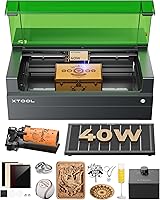
9 Best Laser Engravers for Wood Inlay (October 2026)
The best laser engravers for wood inlay include the xTool S1 40W Laser Cutter and Laser for large inlay panels, the BlazeX M3 10W Laser Engraver Machine for camera-guided placement, and the xTool F2 5W IR & 15W Diode for small detailed pieces.
On this page (4 sections)
The best laser engraver for wood inlay for most detailed work is the BlazeX M3, with camera guidance and stated 0.01 mm precision. For large panels, the xTool S1 offers a much larger bed; for small pieces, the xTool F2 specifies camera alignment accuracy.
Wood inlay depends on two matching cuts: a pocket in the base and an insert that fits it. A machine's stated precision can help with placement, but the fit also depends on wood thickness, focus, kerf, grain, and the finish you plan to apply.
If you're still choosing between a cutter and an engraver, compare our Best Laser Cutter For Wood guide with this shortlist. For cabinet work, see the best wood laser for cabinet inlays before deciding how much bed space you need.
Our picks at a glance
-
1
-
2
 Best for camera-guided placement
BlazeX M3 10W Laser Engraver Machine
9.4/10 our score
See it on Amazon -
3

- 4
 Best for enclosed home craftingCheck it
 - 5
 Check it
Creality Falcon 5W Laser Engraver Machine
Best for broad-format detail work - 6
 Check it
Creality Laser Engraver Machine 10W Output Power
Best for a versatile open-frame setup - 7
 Check it
ACMER S1 Laser Engraver Machine
Best for a compact bench - 8
 Check it
Carverall K15 Pro Laser Engraver 10W Laser
Best for A4-sized layouts - 9
 Check it
Creality 72000mW Output Power Laser Engraver
Best for air-assisted cutting
How we chose the best laser engraver for wood inlay
The best laser engraver for wood inlay offers a useful mix of positioning help, working area, and features that match the scale of your parts. We compared the stated specs and features against the needs of cutting matching pockets and inserts.
We gave more weight to a clearly described work area, camera or positioning support, and features that can help repeat a layout. Our score weighs specs and features against what you're shopping for.
| Product | Best for | Laser power | Bed size | Positioning | Our score |
|---|---|---|---|---|---|
| xTool S1 40W Laser Cutter and Laser | large inlay panels | 40W | 23.93 x 15.16 in | Pin-point Positioning technology | 9.5 |
| BlazeX M3 10W Laser Engraver Machine | camera-guided placement | 10W | Smart camera guidance | 9.4 | |
| xTool F2 5W IR & 15W Diode | small detailed pieces | 15W diode, 5W IR | 9.4 | ||
| xTool M2 10W Laser Engraver | enclosed home crafting | 10W | 9.3 | ||
| Creality Falcon 5W Laser Engraver Machine | broad-format detail work | 5W | 9.2 | ||
| Creality Laser Engraver Machine 10W Output Power | a versatile open-frame setup | 10W output | 9.1 | ||
| ACMER S1 Laser Engraver Machine | a compact bench | 2.5W | 0.01 mm repeatable accuracy | 9.0 | |
| Carverall K15 Pro Laser Engraver 10W Laser | A4-sized layouts | 10W | 8.9 | ||
| Creality 72000mW Output Power Laser Engraver | air-assisted cutting | 10W | 8.4 |
The best laser engravers for wood inlay
The xTool S1 is the strongest fit for large wood panels, while the BlazeX M3 focuses on camera-guided placement and the xTool F2 on smaller detailed work. Choose based on the size of your inlay parts and how you plan to align the wood.
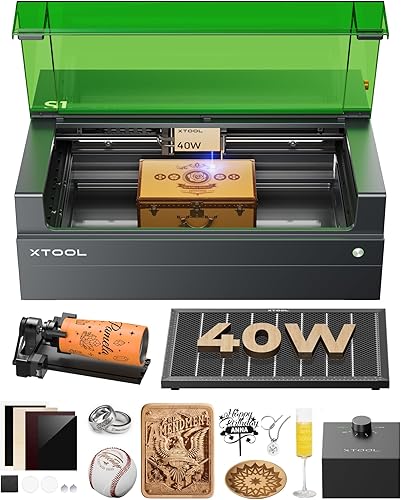
xTool S1 40W Laser Cutter and Laser: Best for large inlay panels
- 40W laser
- 23.93 x 15.16 in bed
- Pin-point Positioning
- Auto-focus
The spacious bed suits large panels and repeat layouts. Auto-focus and Pin-point Positioning help with setup and placement.
Pros
- Large stated bed size
- Auto-focus
- Enclosed design
Cons
- Large machine footprint
- 40W may be more capacity than small inlay work needs
The xTool S1 suits larger cabinet panels, signs, and repeated layouts because its stated bed measures 23.93 x 15.16 in. That gives you more room to arrange multiple pockets or position a broad wood blank without breaking the design into sections.
Its 40W laser, auto-focus, and Pin-point Positioning are useful features when a design needs consistent setup. The machine is enclosed, and xTool says the cover filters 99% of laser light; follow its safety instructions and ventilation requirements for wood cutting.
A larger machine may be more than you need for small decorative pieces. Check that you have room for the machine and the wood stock you plan to use.
Choose the S1 if bed size is your main constraint. For additional wood-cutting options, compare our Best Laser Cutter For Wood guide.
You can also compare OMTech laser engravers.
BlazeX M3 10W Laser Engraver Machine: Best for camera-guided placement
- 10W laser
- Smart camera guidance
- Stated 0.01 mm precision
- Enclosure and honeycomb bed
Camera preview can help place a pocket pattern on a wood blank. Its stated precision and included enclosure and honeycomb bed suit careful bench work.
Pros
- Camera preview
- Honeycomb bed included
- LightBurn compatibility
Cons
- Wood-specific fit tolerance is not stated
- Check the work area suits your largest panel
The BlazeX M3 is the top pick for camera-guided placement. Its smart camera previews the design on the material, and BlazeX states 0.01 mm precision, which can help when positioning a pocket pattern on a blank.
The 10W machine comes with an enclosure and honeycomb bed. It supports LightBurn and CutLabX, giving buyers familiar software options for laying out pocket and insert shapes.
The stated precision is a machine feature, not a guarantee that every wood inlay will fit without adjustment. Wood can vary, and the final fit depends on the material and settings, so run a test with the same stock first.
Choose the M3 if guided layout is more useful to you than a large listed bed. Learn more about laser wood cutting machines and how to use them.
xTool F2 5W IR & 15W Diode: Best for small detailed pieces
- 15W diode and 5W IR lasers
- Built-in 50MP camera
- Up to 0.1 mm alignment accuracy on small pieces
- Class 4
The camera and small-piece alignment accuracy suit compact inlay components. Its portable form is useful when the machine needs to move between work areas.
Pros
- Camera preview
- Specified small-piece alignment accuracy
- Portable desktop design
Cons
- Work area dimensions are not stated here
- Class 4 safety classification
The xTool F2 is suited to small inlay pieces where camera alignment is useful. Its built-in 50MP camera supports alignment accuracy up to 0.1 mm on small pieces, and the machine combines a 15W diode with a 5W IR laser.
The diode is the relevant laser for wood cutting in this dual-laser setup. The F2 is a Class 4 machine, so plan the work area and safety controls around its classification and manual.
The details here focus on small pieces; work area dimensions are not stated. Confirm that the usable area fits your parts before choosing it for larger panels.
Consider the F2 for small, detailed layouts that benefit from a camera preview. For a smaller wood-cutting machine, see our best small laser cutter for wood guide.
xTool M2 10W Laser Engraver: Best for enclosed home crafting
- 10W diode laser
- Enclosed Class 1 design
- Dual cameras
- Real-time workspace preview
Dual cameras preview the workspace for positioning wood pieces. The enclosed Class 1 design may suit a home craft area where an open-frame machine is less practical.
Pros
- Enclosed design
- Dual cameras
- 10W diode laser
Cons
- Work area dimensions are not stated here
- CMYK module and rotary are separate add-ons
The xTool M2 suits a home craft area where an enclosed machine and workspace preview are priorities. If you are comparing enclosed craft machines, see WeCreat Vision vs Vision Pro.
Its dual cameras show the work area in real time, while the 10W diode laser handles wood crafts.
The M2 has a Class 1 enclosed design. Its camera-based placement approach may help line up a wood blank and design, but the work area dimensions aren't stated here, so check that it fits your intended panels.
The optional CMYK Inkjet module and RA3 Lite Rotary are sold separately. Neither is needed for a basic wood inlay workflow, but keep those add-on costs and space needs in mind if you also want printing or cylindrical engraving.
Creality Falcon 5W Laser Engraver Machine: Best for broad-format detail work
- 5W laser
- 400 x 415 mm working area
- 0.06 x 0.06 mm spot
- Up to 10,000 mm/min
The broad working area can fit larger wood blanks, while the stated spot size gives a detail-focused starting point. A rotary roller and risers are optional.
Pros
- Large working area
- Stated spot size
- Active stop function
Cons
- 5W output
- Open-frame design
The Creality Falcon 5W gives you a 400 x 415 mm working area, which can suit broad blanks and several small components arranged in one layout. Its stated spot size is 0.06 x 0.06 mm, and the listed speed reaches 10,000 mm/min.
The larger working area makes it easier to plan a layout without shifting the blank between cuts. The 5W output is lower than several other picks, so consider the material and cut depth you need, and expect to set up test passes.
For a broader power reference, see what a 10W laser can cut.
The eye-protective cover and active stop function are included safety features. The rotary roller and risers are optional, and are not central to flat wood inlay work.
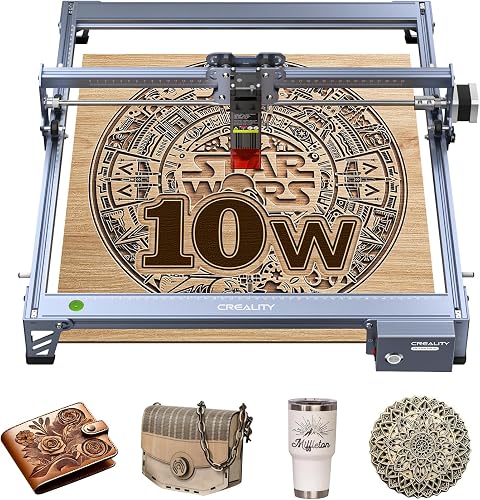
Creality Laser Engraver Machine 10W Output Power: Best for a versatile open-frame setup
- 10W output
- 17 x 16 in work area
- 0.06 x 0.06 mm spot
- LightBurn and LaserGRBL compatibility
The work area leaves room for multiple inlay parts on a larger blank. Its stated spot size and software compatibility suit buyers who want control over a wood-cutting workflow.
Pros
- Large work area
- 10W output
- Multiple data transfer options
Cons
- Open-frame design
- Requires manual focus adjustment
The Creality 10W model pairs a 17 x 16 in work area with a 0.06 x 0.06 mm spot. That combination can suit a layout with multiple matching pockets and inserts on one blank.
It supports LightBurn and LaserGRBL, with data transfer by Wi-Fi, USB cable, or SD card. Creality describes a focus plate for setting the laser head, so review the setup steps before your first test cut.
This is an open-frame machine with an anti-UV filter acrylic cover. Plan an appropriate protected work area, ventilation, and fire precautions according to the manual.
ACMER S1 Laser Engraver Machine: Best for a compact bench
- 2.5W diode laser
- 130 x 130 mm working area
- 0.01 mm repeatable positioning accuracy
- 99% preassembled
Its compact work area and stated repeatability suit small inlay pieces and a limited bench. The machine arrives mostly assembled, with just the laser head to install.
Pros
- Compact footprint
- Stated repeatable positioning accuracy
- LightBurn support
Cons
- Small working area
- Lower laser power than the other picks
The ACMER S1 is the compact pick for a small bench and small inlay parts. Its 130 x 130 mm working area leaves less room for larger panels, while its stated 0.01 mm repeatable positioning accuracy can be useful for repeated positioning.
It arrives 99% preassembled, with the laser head needing installation. The machine supports LightBurn and LaserGRBL and works with common image and vector file types, including DXF.
At 2.5W, it has the lowest stated laser power in this group. That makes it a better fit to consider for small jobs than for fast cutting of larger or thicker wood pieces.
Carverall K15 Pro Laser Engraver 10W Laser: Best for A4-sized layouts
- 10W laser
- 11.8 x 7.9 in workbed
- One-touch smart focus
- Camera-free positioning
The A4 workbed provides space for small furniture details and repeated parts. One-touch focus and offline control support a straightforward workflow.
Pros
- A4-sized workbed
- One-touch focus
- Offline file control
Cons
- Camera guidance is not specified
- Optional accessories are separate
The Carverall K15 Pro has an 11.8 x 7.9 in A4 workbed for small panels and grouped inlay parts. One-touch smart focus can simplify setup, and the machine supports offline file control.
Its 10W laser is described for wood and other materials, and the stated precision is 0.01 mm. The camera guidance is not specified, so you'll need another way to confirm that your design is positioned as intended.
The optional 1W IR head, honeycomb plate, air pump, rotary roller, and air purifier are separate upgrades. For flat wood inlays, focus on the base machine's workbed and how you'll manage smoke and cutting debris.
Creality 72000mW Output Power Laser Engraver: Best for air-assisted cutting
- 10W laser
- Air assist
- 0.06 mm spot
- Offline control
Air assist is included for buyers who want it in their cutting setup. The stated spot size and offline controls add practical workflow features for wood projects.
Pros
- Air assist included
- Emergency stop and safety lock
- TF card file transfer
Cons
- Work area dimensions are not stated here
- Open-frame design
The Creality Falcon Pro 10W is the air-assist pick in this group. Its air assist is described as helping keep cuts clean, and the stated spot size is 0.06 mm.
Offline controls let you preview, start, pause, or stop a job from the machine, with file transfer by TF card. Those features may suit a dedicated workstation where you prepare designs on a separate computer.
The work area dimensions are not stated here, so confirm they fit your inlay blanks. The open-frame design also calls for careful attention to the manual's protective equipment, ventilation, and fire-safety instructions.
How do you choose a laser engraver for wood inlay?
Choose by the largest blank and smallest detail you need to cut, then compare positioning tools and the way you'll repeat your design. A camera can help align stock, while a larger work area makes it easier to keep several parts in one setup.
Which work area fits your inlay project?
Match the machine bed to the full wood blank, not just the visible inlay. Leave room to position and secure the stock, and consider whether repeated pieces can fit in a single layout.
For large work, the xTool S1, Creality Falcon 5W, and Creality 10W list broad work areas. Compact parts may fit the ACMER S1 or Carverall K15 Pro, but check the actual blank size before buying.
Does positioning accuracy guarantee a tight inlay?
No. Positioning accuracy describes how a machine places or repeats a design, while a tight inlay also depends on kerf, wood movement, focus, and finishing.
Cut a pocket and insert sample from the wood you intend to use. Adjust the design in small steps until the insert fits, and account for any finish that adds thickness around the edge.
What wood should you test first?
Use a piece of the same wood species and thickness as your final panel. Grain, density, and surface condition can affect the cut, so a sample from a different board may not predict the final result.
Record the settings that produce a clean edge and a suitable fit. Keep the test piece and settings with your project file so you can repeat the setup later.
How should you plan safety for wood inlay?
Use the enclosure or protective equipment specified for your machine and manage smoke with suitable ventilation. Keep the work area clear of combustible materials and stay with the machine during a cut.
A laser classification or protective cover does not replace the manual's operating rules. Follow the machine maker's instructions for setup, fire prevention, and safe material use.
Which laser engraver is the best fit for wood inlay?
Choose the xTool S1 for larger blanks and panel layouts, or the BlazeX M3 if camera-guided placement and its included enclosure fit your bench. The ACMER S1 makes more sense for small pieces when work area is limited.
Before cutting your final panel, test the pocket and insert on matching scrap wood. If cabinet work is the goal, compare the best wood laser for cabinet inlays to narrow the machine and layout choice.
Our top 3 picks at a glance
-
1
-
2
Best for camera-guided placement
BlazeX M3 10W Laser Engraver Machine
9.4/10 our score
See it on Amazon -
3
Frequently asked questions
What matters most in a laser engraver for wood inlay?
Choose a machine that can make a consistent pocket and matching insert, then check its positioning approach, usable work area, and focus setup. A camera preview or repeatable positioning feature can help place designs, but it does not replace testing the fit on scrap wood.
Allow for wood grain, kerf, and finishing when planning the joint.
Can a diode laser make wood inlay pockets?
Yes. These machines include diode lasers described for wood engraving or cutting, but the right settings depend on the wood, thickness, and desired pocket depth.
Make a small test cut in the same stock before committing to a finished panel, and follow the machine's safety instructions.
How do I get a close fit between an inlay and its pocket?
Cut the pocket and insert from the same design, then test a small sample and adjust the design for the material's kerf. Wood can burn or char at the edge, so inspect and clean the sample before judging the fit.
A snug joint still needs room for adhesive and finishing.
Is a camera useful for wood inlay?
A camera preview can help align a design with a wood blank and reduce placement guesswork. The BlazeX M3 and xTool F2 list camera guidance, while the xTool M2 has dual cameras.
Check the stated work area and alignment details to see whether they fit the size of your parts.
What safety setup does wood laser cutting need?
Use the machine's enclosure or protective equipment as directed, and manage smoke with suitable ventilation. Never leave a cutting job unattended, and keep combustible materials away from the work area.
Follow the machine manual and local fire safety guidance for the exact setup.