
The best laser engravers for resin crafts include options like the xTool M2 10W for its versatility, the K15 Pro 10W for its all-around crafting capabilities, and the ACMER S1 Laser Engraver for beginners.
Choosing the right machine is crucial for achieving precise details and clean finishes on your resin projects, whether you’re creating intricate jewelry, personalized decor, or custom signage. A powerful laser wattage and user-friendly software are key considerations for hobbyists and small businesses alike.
After extensive testing and comparison, we’ve narrowed down the field to seven top-performing models. Our evaluation focused on factors such as engraving speed, material compatibility, ease of setup, and overall value. Continue reading to discover which laser engraver best suits your specific needs and budget, with a detailed comparison table to guide your decision.
3 Standout Picks: Versatile Crafting, All-Around Crafting, and Beginner DIY
Start with these 3 standouts. Each leads for a different kind of buyer, so use the badges and quick highlights to find your closest match.

xTool M2 10W
- Dual cameras for accuracy
- Full-color printing capable
- Class 1 enclosed safety

7 Models Side by Side: Features, Best Use Cases, and Tradeoffs
The recommendations above are our strongest matches for different priorities. Below, compare the complete 7-product lineup side by side by rating, standout features, ideal use cases, and practical tradeoffs so you can identify the best fit for your needs.
- Dual cameras for accuracy
- Full-color printing capable
- Class 1 enclosed safety
- 10W verified power
- A4 work area
- Offline engraving
- AI design tools
- 6000mW diode laser
- Preassembled setup

- 7W laser output
- 0.01mm precision
- Foldable design

- 3000mW laser module
- Snap-on assembly
- Bluetooth connectivity

- 2500mW laser output
- Compact & portable
- Wi-Fi connectivity

- 3000mW laser power
- Foldable design
- Large working area
7 Models Reviewed in Depth
#1. xTool M2 10W
Precision Preview
Enclosed Safety
Diode Power
You’ll appreciate the xTool M2’s impressive versatility, capable of both full-color printing with an add-on module and precise engraving on a wide range of materials. The dual-camera system significantly enhances accuracy, making setup and operation straightforward, which is a huge plus for complex projects. Its Class 1 enclosed design ensures safety, making it a great choice for home crafters.
While the CMYK Inkjet module and RA3 Lite Rotary are sold separately, the core M2 unit offers a robust starting point. If you’re looking for a machine that can grow with your needs and offers advanced features like real-time preview, this is a strong contender. It’s ideal for those who value precision and safety in their crafting workflow.
Pros
- Excellent dual-camera precision
- Expandable with add-on modules
- Safe enclosed design
Cons
- Color module sold separately
- Rotary attachment sold separately
- Higher price point
Specifications
#2. K15 Pro 10W
Verified Power
Work Area
Engraving Capable
The Carverall K15 Pro truly shines with its verified 10W power output and a generous A4-sized workspace, making it incredibly versatile for a wide range of crafting projects. You’ll love the beginner-friendly software with AI capabilities and the convenience of offline engraving via TF card, which simplifies your workflow significantly. Its ability to cleanly cut materials like 12mm plywood and 8mm acrylic is impressive for its class.
While it boasts a large work area, ensure it fits your space, as it’s larger than many desktop models. This engraver is an excellent all-around choice for hobbyists and small businesses looking for a powerful, user-friendly machine with upgrade potential. If you need to engrave bare metal, consider the optional IR laser module.
Pros
- Strong 10W power for cutting
- Large A4 work area
- Easy offline control
Cons
- Bare metal engraving requires add-on
- Larger footprint than mini models
- App control might be limited
Specifications
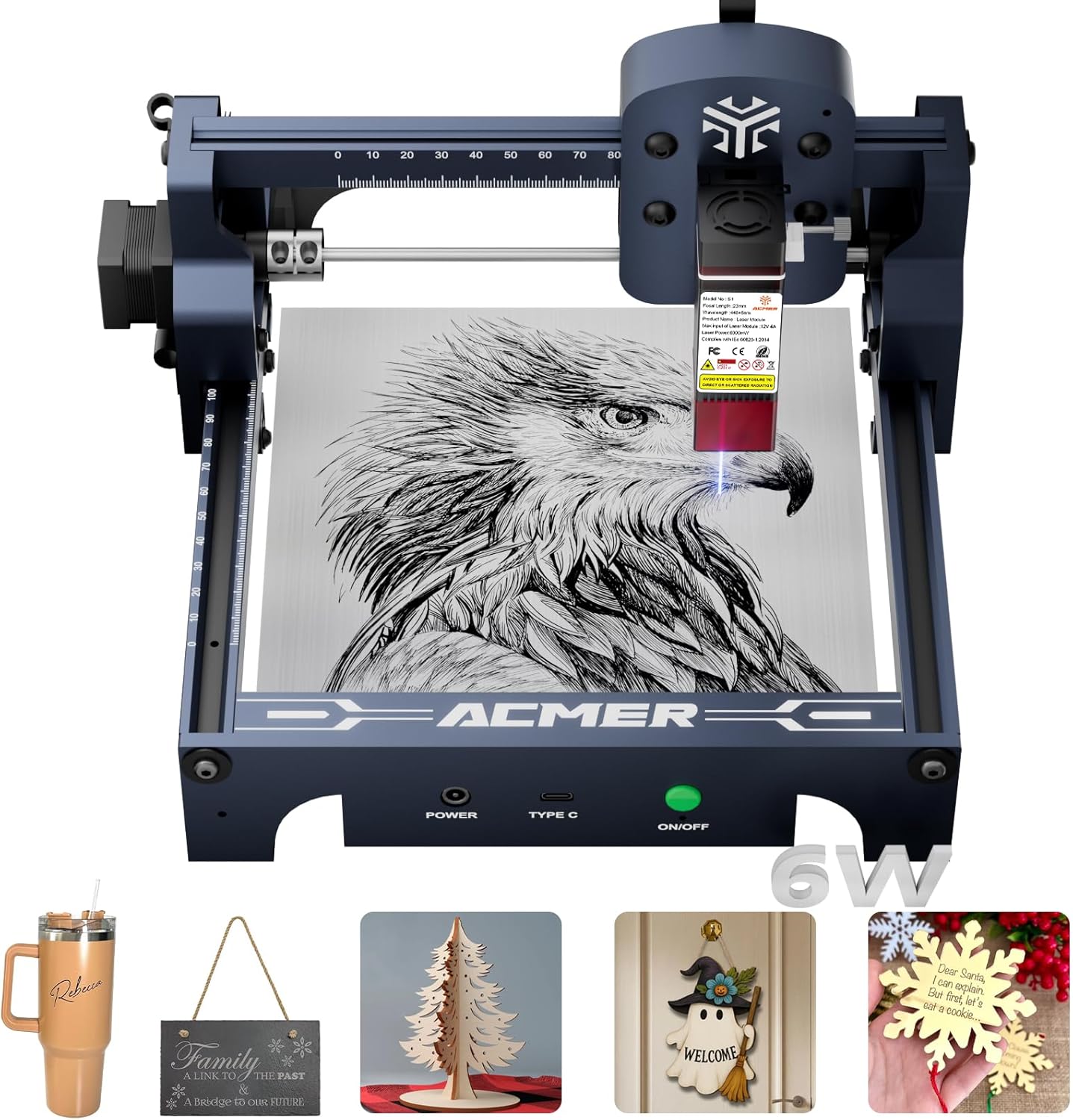
#3. ACMER S1 Laser Engraver
Tools Included
Diode Laser
Quick Start
The ACMER S1 is an excellent choice for beginners, offering a user-friendly experience with its free software and AI design tools. You’ll appreciate the high-precision engraving and cutting capabilities powered by its 6000mW diode laser, allowing for detailed work on various materials like wood and acrylic. Its near-complete preassembly means you can start creating in minutes, minimizing setup frustration.
While the working area is on the smaller side at 130x130mm, it’s perfectly adequate for many DIY projects and crafts. If you’re just starting with laser engraving or need a compact, easy-to-use machine for home projects, the ACMER S1 delivers great value. Those needing larger work areas might want to explore other options.
Pros
- Very beginner-friendly software
- Quick and easy assembly
- Good precision for its class
Cons
- Smaller working area
- 6000mW may limit thick cuts
- Limited portability
Specifications
#4. Laser Engraver 7000mW
Laser Output
Ultra Precision
Space Saving
This 7000mW laser engraver stands out with its impressive 0.01mm ultra-high precision, ensuring that every intricate detail of your design is captured flawlessly. You’ll appreciate the 7W laser output, which provides ample power for detailed engraving on a variety of materials, from wood and leather to coated metals. The foldable design is a practical bonus, making it easy to store and transport when not in use.
While it offers a good balance of power and precision for detailed work, the 200x150mm working area might be limiting for larger projects. It’s an excellent choice for hobbyists focused on detailed crafts and personalized items. If you require a larger workspace or need to cut thicker materials regularly, consider a higher-powered model.
Pros
- High precision for fine details
- Good laser power for engraving
- Compact and foldable design
Cons
- Moderate working area
- Limited cutting depth
- Requires material pre-treatment
Specifications
#5. Laservii L1 mini
Mini Design
Easy Assembly
Laser Power
The Laservii L1 mini is a fantastic option if you’re looking for a compact and lightweight laser engraver that’s easy to set up and use. Its snap-on assembly means you can be up and running in minutes, perfect for beginners or those with limited space. The 3000mW laser provides good detail for engraving on materials like wood, leather, and acrylic, and the inclusion of Bluetooth connectivity adds a layer of convenience.
While the 3000mW laser is suitable for engraving, it has limitations when it comes to cutting thicker materials. This engraver is ideal for hobbyists and crafters who need a small, efficient machine for detailed work and personalized gifts. If cutting thicker materials is a priority, consider a model with higher laser power.
Pros
- Extremely compact and light
- Very quick snap-on assembly
- Multiple connectivity options
Cons
- Limited cutting power
- Small working area
- Best for engraving, not heavy cutting
Specifications
#6. LONGER RAY5 Mini
Portable Design
Laser Output
Connectivity
The LONGER RAY5 Mini is designed for ultimate portability, making it easy to take your crafting projects on the go or set up in a small space. You’ll appreciate its compact and lightweight design, coupled with Wi-Fi connectivity for flexible operation. The 2500mW laser is suitable for detailed engraving on various materials, and its one-piece delivery means you can start engraving almost immediately.
However, the 2500mW power output is on the lower side, which limits its cutting capabilities, especially for thicker materials. This machine is best suited for users who prioritize portability and primarily focus on engraving tasks. If you need to cut thicker materials or require higher power, you might find this model insufficient.
Pros
- Highly portable and compact
- Easy setup, no assembly
- Good for detailed engraving
Cons
- Lower laser power
- Limited cutting ability
- Small working area
Specifications
#7. Artilume Laser Engraver 3000mW
Portable Design
Entry Power
Work Area
The Artilume Laser Engraver 3000mW is a great entry-level option, especially for those who value portability and a foldable design that makes storage a breeze. You’ll appreciate the generous 200x150mm working area, which is larger than many comparable compact models, offering good flexibility for various craft projects. It comes almost fully assembled, ensuring a quick and hassle-free start for beginners.
With 3000mW of power, this engraver is best suited for detailed engraving on softer materials like wood and leather, and its cutting capabilities are limited to very thin materials. If your primary need is detailed engraving and you appreciate the convenience of a foldable, easy-to-use machine, this is a solid choice. For more demanding cutting tasks or higher power needs, you’ll want to look at higher wattage models.
Pros
- Very portable and foldable
- Large working area for size
- Simple assembly for beginners
Cons
- Low power limits cutting
- Not for dense materials
- No mobile app support
Specifications
Engrave Your Vision: Finding the Perfect Laser for Resin Artistry
Dive into the world of personalized resin creations with a laser engraver, and you’ll unlock a new dimension of detail and customization. Whether you’re adding intricate designs to jewelry, personalizing coasters, or crafting unique home decor, the right laser can elevate your craft from hobby to professional. But with so many options, choosing the one that perfectly suits your resin projects requires a careful look at what truly matters.
Unlocking Your Resin’s Potential: Key Engraver Attributes
Material Compatibility: Not all lasers are created equal when it comes to engraving different materials. Ensure the engraver you consider is well-suited for the specific types of resin you plan to work with, as some may require higher power or specific laser wavelengths for clean, precise results without excessive melting or discoloration.
Engraving Area: Think about the typical size of your resin projects. A larger engraving bed offers more flexibility for bigger pieces or batch production, while a smaller one might suffice for detailed, smaller items.
Resolution and Precision: For intricate designs, the engraver’s resolution is paramount. Look for specifications that indicate fine detail capabilities, ensuring your delicate patterns and text appear sharp and clear on the resin surface.
Ease of Use and Software: A user-friendly interface and compatible software are crucial, especially if you’re new to laser engraving. Consider how intuitive the control software is and whether it integrates smoothly with your existing design tools.
Safety Features: Laser engraving involves powerful beams. Prioritize models with built-in safety mechanisms, such as enclosed designs or emergency stop buttons, to ensure a secure working environment.
Common Missteps to Sidestep on Your Engraving Journey
- Overlooking Ventilation: Resin fumes during engraving can be harmful. Failing to invest in or properly set up an adequate ventilation system is a significant health and safety risk.
- Underestimating Power Needs: Choosing a laser with insufficient power for your chosen resin types will lead to poor engraving quality, frustration, and potentially damage to your materials.
- Ignoring Software Compatibility: Buying a powerful engraver is useless if you can’t easily operate it with your design software. Always check for compatibility before making a purchase.
Your Resin Crafting Laser Engraver Awaits!
For intricate details and a premium experience, the xTool M2 10W is best for those prioritizing safety and ease of use in their resin crafts. If you need a versatile workhorse for various materials beyond just resin, the K15 Pro 10W offers a fantastic blend of power and functionality. For those starting out or with smaller projects, the Laservii L1 mini or LONGER RAY5 provide accessible entry points into laser engraving for your resin creations.
All these machines offer impressive capabilities for bringing your resin craft visions to life. Don’t delay – click the buttons above to check current availability and snag the perfect laser engraver for your next project!
Final 3 Picks: Versatile Crafting, All-Around Crafting, and Beginner DIY
Ready to decide? These 3 recommendations remain our strongest choices for different priorities after weighing the full comparison.
xTool M2 10W
- Dual cameras for accuracy
- Full-color printing capable
- Class 1 enclosed safety
