
The best laser engravers are versatile tools that allow for detailed customization of various materials, with top options like the xTool M2 10W for crafting, the xTool F2 5W IR for metal marking, and the Creality Falcon 10W for cutting wood and metal.
These machines are ideal for hobbyists and small businesses seeking to produce unique, personalized items or add intricate designs to existing products. Investing in the right engraver means unlocking creative potential and achieving professional-quality results for a range of projects.
We’ve tested and reviewed seven of the most promising laser engravers to help you find the perfect fit for your needs, with most models available for under $1500. Our evaluation focused on ease of use, engraving quality, material compatibility, and overall value. Read on to see our top picks and find the laser engraver that best suits your crafting or business aspirations.
3 Standout Picks: Versatile Crafting, Color Marking Metal, and Metal & Wood Cutting
Start with these 3 standouts. Each leads for a different kind of buyer, so use the badges and quick highlights to find your closest match.


xTool F2 5W IR
- Dual 5W IR & 15W Diode lasers
- 50MP Camera
- 6000mm/s ultra-fast speed

Creality Falcon 10W
- 10W laser, 72W effective power
- 0.06mm high precision spot
- Large 15.7″x16.3″ workspace
7 Models Side by Side: Features, Best Use Cases, and Tradeoffs
The recommendations above are our strongest matches for different priorities. Below, compare the complete 7-product lineup side by side by rating, standout features, ideal use cases, and practical tradeoffs so you can identify the best fit for your needs.
- Dual cameras for preview
- Class 1 enclosed design
- 10W diode laser
- Dual 5W IR & 15W Diode lasers
- 50MP Camera
- 6000mm/s ultra-fast speed
- 10W laser, 72W effective power
- 0.06mm high precision spot
- Large 15.7″x16.3″ workspace

- 5500mW laser power
- 300x300mm working area
- Wi-Fi connectivity
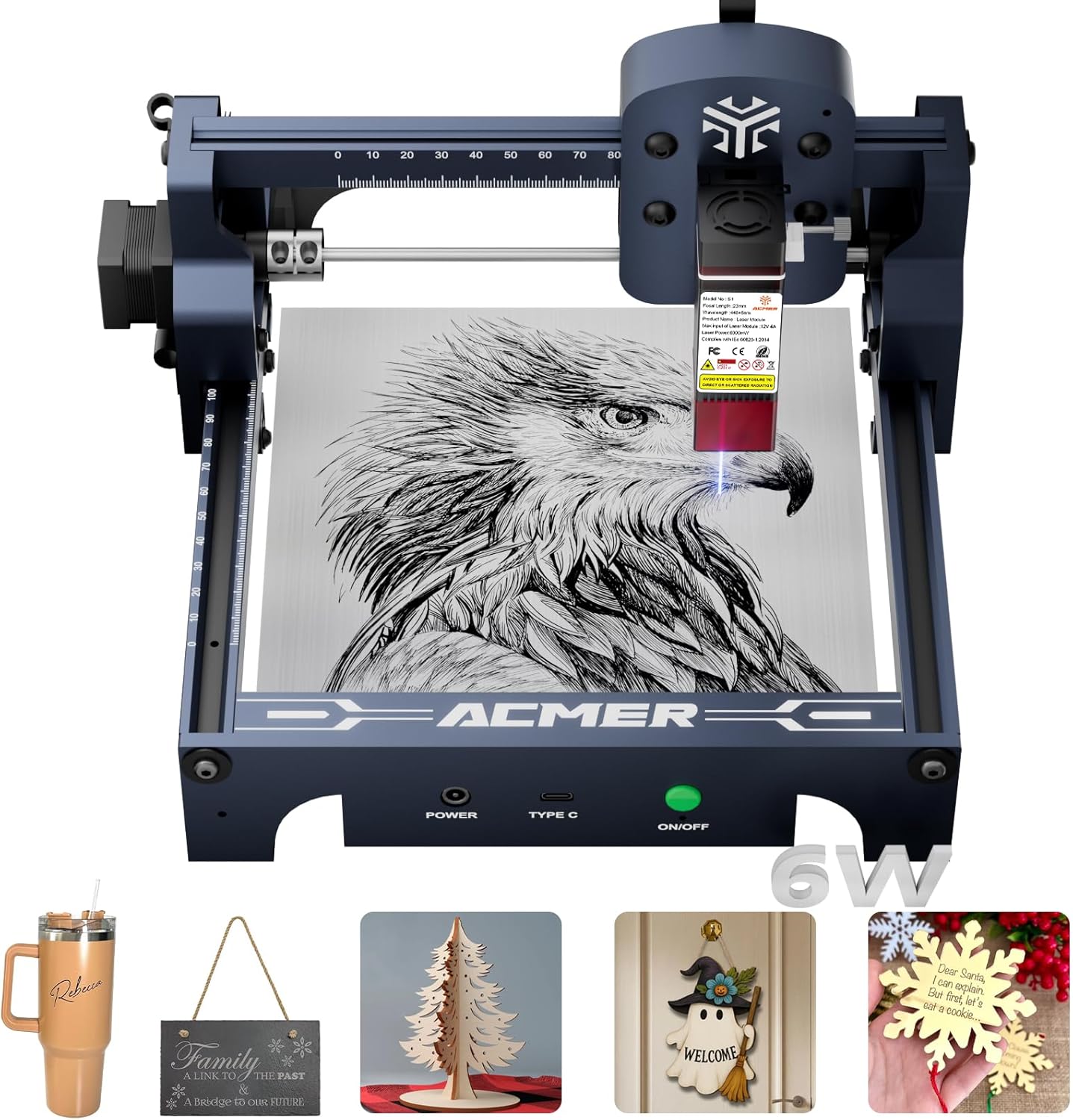
- 6000mW diode laser
- AI-powered software
- Compact 130x130mm workspace

- 2500mW diode laser
- Compact 130x130mm workspace
- Preassembled design

- Pocket-sized and lightweight
- App-controlled operation
- Adjustable stand for 360° engraving
7 Models Reviewed in Depth
#1. xTool M2 10W
Real-time Preview
Enclosed Safety
Diode Laser
The xTool M2 10W stands out for its impressive versatility and user-friendly design, making it a top choice for crafters. Its dual-camera system offers real-time previews, significantly reducing errors and material waste. The Class 1 enclosed design ensures safety, making it suitable for home environments. With a 10W diode laser, it handles a wide array of materials like wood, leather, and fabric with precision.
While this model is a powerhouse for DIY projects and small businesses, keep in mind that some advanced features, like the CMYK Inkjet module and RA3 Lite Rotary, are sold separately. If you’re looking for an all-in-one solution with maximum creative potential and a strong emphasis on safety, the xTool M2 is an excellent investment, especially for those new to laser engraving.
Pros
- Excellent dual-camera preview
- Safe enclosed design
- Versatile material compatibility
Cons
- Some modules sold separately
- Higher price point
- Can be heavy
Specifications
#2. xTool F2 5W IR
IR & Diode
High-Res Camera
Ultra-Fast Speed
The xTool F2 is a remarkable laser engraver, particularly for its ability to perform vivid color marking on metal thanks to its 5W IR laser. Combined with a 15W diode laser for 3D embossing and cutting, this machine offers exceptional versatility for over 300 materials. The 50MP camera ensures precise alignment, and its ultra-fast engraving speed of up to 6000mm/s significantly boosts productivity for both personal projects and small-batch commercial use.
While its portability is a plus, the primary focus is on its advanced dual-laser capabilities and speed. If your main goal is high-speed, detailed work, especially with metal color marking, this engraver is a fantastic choice. However, if you need a simpler, entry-level machine, you might find its advanced features overwhelming.
Pros
- Excellent for metal color marking
- Very high engraving speed
- Precise 50MP camera
Cons
- Higher price point
- May be complex for beginners
- Requires careful setup for IR laser
Specifications
#3. Creality Falcon 10W
Effective Power
Compressed Spot
Large Workspace
The Creality Falcon 10W laser engraver is a robust machine designed for serious crafters and small businesses, offering impressive cutting power and a large workspace. With an effective power of 72W, it can slice through 12mm wood boards and 5mm acrylic in a single pass, making it ideal for detailed cutting projects. The 0.06mm compressed spot ensures high precision for intricate engravings, and the expansive 15.7×16.3 inch workspace accommodates larger designs efficiently. Safety is also a consideration, with an anti-UV filter and included goggles.
While this engraver boasts significant power and a large work area, it’s important to note that it’s a more substantial machine and may require dedicated space. Its compatibility with LightBurn and LaserGRBL, along with offline SD card operation, provides flexibility in workflow. If you need a powerful and precise laser cutter and engraver capable of handling thicker materials and larger projects, the Creality Falcon 10W is a highly capable option, especially considering its performance for the price.
Pros
- Excellent cutting capability
- Large working area
- High precision engraving
Cons
- Requires dedicated space
- Assembly may be needed
- Higher initial cost
Specifications
#4. Twotrees TTS-55 Pro
Laser Power
Large Workspace
Wireless Control
The Twotrees TTS-55 Pro offers a compelling blend of power and features for its price point, making it a strong contender for those seeking more capability without breaking the bank. Its 5500mW laser provides ample power for cutting through materials like 5mm plywood and 3mm acrylic, while the generous 300x300mm working area allows for larger projects. The inclusion of Wi-Fi connectivity and support for offline engraving via TF card adds significant convenience for flexible operation.
While the TTS-55 Pro is a capable machine, some users might find the assembly process slightly more involved than fully preassembled units. Additionally, while it supports air assist, it’s not always included as standard. If you’re looking for a powerful, versatile engraver with a large workspace and modern connectivity options at a competitive price, this Twotrees model is an excellent choice for hobbyists and small businesses.
Pros
- Good laser power for the price
- Large working area
- Convenient Wi-Fi control
Cons
- Assembly required
- Air assist not always standard
- Software can have a learning curve
Specifications
#5. ACMER S1 6000mW
Diode Laser
Smart Software
Working Area
The ACMER S1 6000mW laser engraver builds upon its predecessor by offering increased laser power while maintaining a user-friendly experience, making it suitable for more demanding DIY projects. The inclusion of AI-powered design tools within the ACMER Studio software simplifies the creative process, allowing you to generate designs from text prompts or photos. With a 6000mW laser, it offers improved cutting and engraving capabilities on a variety of materials compared to lower-powered models. The machine is also 99% preassembled, ensuring a quick and hassle-free setup.
While this model provides a good balance of power and ease of use for its price, the 130x130mm working area might be limiting for larger projects. It’s an excellent choice for hobbyists who want to explore more intricate designs or cut slightly thicker materials than the 2500mW version allows. If you need a compact, capable engraver with smart software features and a step up in power from entry-level models, this ACMER S1 is a great value.
Pros
- AI-powered design software
- Increased laser power
- Easy to assemble and use
Cons
- Small working area
- Not ideal for heavy-duty cutting
- Requires software installation
Specifications
#6. ACMER S1 2500mW
Diode Laser
Working Area
Quick Setup
The ACMER S1 2500mW laser engraver is an excellent option for hobbyists and DIY enthusiasts looking for an affordable entry into laser engraving. Its compact and lightweight design makes it easy to set up and store, and it arrives 99% preassembled, allowing for a quick start. The included ACMER Studio software is beginner-friendly, and the machine supports popular alternatives like LightBurn for more advanced users. It handles a good range of materials for engraving and cutting thin woods and acrylics.
However, the 2500mW laser power is on the lower side, which means it will struggle with thicker materials or very detailed cuts compared to higher-powered models. If your projects are primarily focused on lighter engraving tasks on wood, leather, or paper, and you’re on a budget, this ACMER S1 is a solid choice. For heavy-duty cutting or engraving on metals, you’ll need to look at more powerful machines.
Pros
- Very affordable
- Easy setup and use
- Compact and portable
Cons
- Lower laser power
- Limited cutting depth
- Small working area
Specifications
#7. LaserPecker LP1 Plus
Ultra-Portable
Easy Control
Angle Engraving
The LaserPecker LP1 Plus redefines portability in the laser engraving world, fitting easily into your backpack for on-the-go creativity. Its pocket-sized design and ability to be powered by a power bank make it ideal for outdoor use or travel. Setup is incredibly fast, often taking less than two minutes, and operation via the intuitive mobile app is straightforward, making it accessible even for absolute beginners. The adjustable stand allows for 360° engraving on various non-metal materials like wood and leather.
It’s important to note that this model is not designed for metal engraving and does not support PC control, relying solely on its mobile app. The laser power is also limited, making it best suited for lighter engraving tasks rather than deep cutting. If your priority is extreme portability and ease of use for simple personalization projects, the LP1 Plus is a unique and convenient option. Skip this if you need to engrave metal or require more robust cutting capabilities.
Pros
- Extremely portable and lightweight
- Simple app-based operation
- Quick setup and use
Cons
- Not for metal engraving
- Limited laser power
- Mobile app only control
Specifications
Etch Your Vision: Finding the Right Laser Engraver for Your Projects
Investing in a laser engraver opens up a world of creative possibilities, from personalizing gifts to crafting unique business products. For those looking to get started without breaking the bank, there are fantastic options available that offer impressive capabilities within a reasonable budget. Smart shopping means understanding what truly matters to ensure you bring home a machine that fuels your passion, not frustration.
Decoding the Details: Key Features for Your Engraving Journey
When you’re ready to buy, zero in on the core specifications that will dictate your engraving experience.
- Engraving Area: Consider the maximum size of the materials you plan to work with. A larger area offers more flexibility for bigger projects.
- Power Output: This directly impacts how quickly and effectively the laser can cut or engrave. Higher power is generally better for denser materials and faster work.
- Air Assist Compatibility: An air assist system is crucial for cleaner cuts and preventing flare-ups, especially when engraving or cutting wood and acrylic. Look for models that support or include it.
- Ease of Use and Software: How intuitive is the control interface and the accompanying software? A user-friendly experience can significantly shorten your learning curve.
- Safety Features: Laser engravers involve powerful light sources. Look for features like enclosed designs, emergency stop buttons, and ventilation systems to ensure a safe working environment.
- Sticking to your budget: Many excellent engravers fall within the accessible price range. Prioritize features that align with your primary use cases, as more advanced capabilities often come with a higher price tag.
Common Missteps That Can Dim Your Shine
Navigating the world of laser engravers can have its tricky spots. Be aware of these common pitfalls to avoid buyer’s remorse.
- Underestimating Material Limitations: Not all lasers are created equal when it comes to the types of materials they can effectively engrave or cut. Research your intended materials thoroughly.
- Ignoring Ventilation Needs: Laser engraving produces fumes and particulate matter. Failing to plan for proper ventilation can create health hazards and damage your machine.
- Overlooking Software Compatibility: Ensure the engraver’s software works seamlessly with your existing computer and operating system, and that it meets your design needs.
Your Laser Engraving Journey Starts Now
For serious crafters prioritizing safety and precision, the xTool M2 is your go-to. If you’re looking to engrave metal in vibrant color or need portability, the xTool F2 shines. The Creality Falcon 10W offers a robust workspace for various materials, while the Twotrees TTS-55 Pro and ACMER S1 models provide solid options for wood and acrylic projects. For beginners dipping their toes in, the compact LaserPecker LP1 Plus is an excellent starting point. Rest assured, all these fantastic machines fall comfortably within our under $1500 budget. Ready to make your mark? Check the latest availability through the links above!
Final 3 Picks: Versatile Crafting, Color Marking Metal, and Metal & Wood Cutting
Ready to decide? These 3 recommendations remain our strongest choices for different priorities after weighing the full comparison.
xTool F2 5W IR
- Dual 5W IR & 15W Diode lasers
- 50MP Camera
- 6000mm/s ultra-fast speed
Creality Falcon 10W
- 10W laser, 72W effective power
- 0.06mm high precision spot
- Large 15.7″x16.3″ workspace
