

Your laser cuts aren’t straight because of common issues like an unstable laser head, a misaligned cutting bed, or worn-out mechanical components. These factors often cause the laser beam to wobble or drift during operation. It’s a common frustration for many makers and hobbyists! Getting perfectly straight lines is key for clean projects.
We’ve found that even small adjustments can make a big difference in your laser cutter’s accuracy. Addressing these potential problems will lead to smoother cuts and better overall performance. Think of it like tuning a musical instrument for the best sound; your laser needs precise alignment for crisp results.
- Laser head stability is vital for straight cuts.
- Ensure your cutting bed is perfectly level.
- Check for any wear or play in the machine’s moving parts.
- Proper maintenance prevents many cutting line issues.
Let’s walk through the most common reasons why your laser cuts might be wavy or crooked, and how you can fix them.
Troubleshooting Crooked Laser Cuts: What’s Going Wrong?
It’s incredibly frustrating when your laser cuts don’t come out as straight as you planned. You’ve set up your design perfectly, hit go, and then… wobbly lines. This isn’t a sign that you’re doing something wrong. Usually, it’s a mechanical or alignment issue with the laser cutter itself. We can fix this!
Many makers find that even slight imperfections in the machine’s setup can lead to noticeable errors in the cut lines. Let’s figure out what’s causing your laser to stray off course and how to get it back on track for clean, precise results.
Is Your Laser Head Wobbling? The Stability Factor
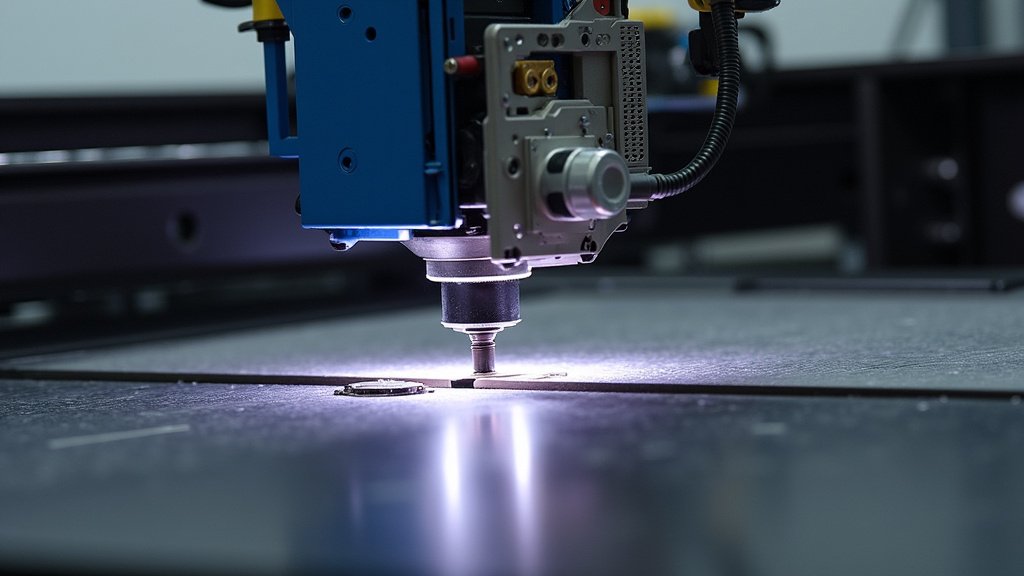
The laser head is the business end of your machine. If it’s not stable, your cuts won’t be either. Think of it like trying to draw a straight line with a shaky hand. The laser beam needs to move smoothly and predictably.
Checking the Gantry and Linear Rails
Your laser head moves along a system of rails and a gantry. If these parts are loose, dirty, or damaged, they can cause the head to wiggle. You’ll want to check for any **play or movement** that shouldn’t be there.
Inspect the linear rails for dust, debris, or any buildup. These can create friction and uneven movement. Cleaning them regularly with a lint-free cloth is a good practice. Some manufacturers recommend a light application of appropriate lubricant. Always consult your machine’s manual first!
The Importance of Belt Tension
Most laser cutters use belts to move the gantry. If these belts are too loose, they can skip teeth or stretch. This results in jerky movements and wavy lines. If they’re too tight, they can cause extra strain on the motors and rails, leading to premature wear and also affecting smooth motion.
We found that **proper belt tension** is key. You should be able to pluck a loose belt like a guitar string, producing a low hum. It shouldn’t be slack, but it also shouldn’t be super tight. Adjusting belt tension is often a simple process of tightening or loosening screws on the belt pulleys. Refer to your laser cutter’s documentation for the exact method.
Examining the Laser Head Mount
The laser head itself is mounted onto a carriage. Make sure this mount is **securely fastened**. If the laser module can shift or vibrate within its mount, this directly translates to a shaky laser beam. Gently try to wiggle the laser head. Does it move independently of the gantry? If so, tighten the screws holding it in place.
Is Your Cutting Bed Level and True?
The surface where your material sits is critical for straight cuts. If your cutting bed is not perfectly level, the distance between the laser nozzle and the material changes. This can affect the focus and the straightness of the cut.
The Impact of an Uneven Surface
Imagine cutting a piece of paper with scissors. If you place the paper on a bumpy table, your cuts will be uneven. The same principle applies to laser cutting. A **misaligned cutting bed** can cause the laser beam to enter or exit the material at an angle, leading to a non-straight edge.
If your machine has adjustable feet, use a spirit level to ensure the entire machine is sitting perfectly flat on your workbench. Also, check the cutting bed itself. If you have a honeycomb or slatted bed, make sure all the pieces are seated correctly and not warped. Sometimes, simply reseating these components can help.
Focus Point Consistency
Your laser cutter has a specific focal length. This is the optimal distance between the nozzle and the material for a clean cut. If the bed is uneven, the laser may be out of focus in certain areas. This variation in focus will cause the laser’s beam to spread differently, resulting in wider, less precise, or wavy cuts.
Many experts recommend setting your focus on the lowest point of your cutting area. Then, **ensure the bed is level** so that all areas are at the correct focal distance. This is a straightforward way to eliminate focus variations caused by an unlevel surface. Always double-check your focus settings, especially after moving or cleaning the machine.
Mechanical Wear and Tear: The Silent Culprits
Over time, the moving parts of any machine can wear down. Laser cutters are no exception. Worn components can introduce play, looseness, and inconsistency into the cutting process.
Checking for Play in the Wheels or Bearings
The gantry and laser head often move on wheels or bearings that run along guide rails. If these wheels or bearings are worn, they can develop flat spots or become loose. This results in **slight jolts or hesitations** as the head moves. You might feel this as a catch or resistance when manually moving the gantry.
Carefully inspect these wheels for any signs of damage or excessive wear. Check if they spin freely and smoothly. If you can detect any wobble or looseness in the wheel assembly, it might be time to replace them. Many manufacturers offer replacement parts for common wear items.
Are Your Motors Healthy?
Stepper motors drive the movement of your laser cutter. If a motor is failing or not calibrated correctly, it can lead to inconsistent steps. This means the machine might not move the exact distance you command. You might notice **hesitation or jerky movements** from one side more than the other.
While diagnosing motor issues can be more complex, a simple check is to observe the movement. Do both sides of the gantry move in perfect sync? Are there any odd noises coming from the motors? If you suspect motor issues, consulting your machine’s support or a technician might be necessary. Sometimes, recalibrating the motor steps per millimeter can help resolve minor discrepancies (refer to your manual!). If you suspect motor issues, recalibrating the motor steps per millimeter can help resolve minor discrepancies.
Environmental Factors and Cutting Technique
Sometimes, the issue isn’t entirely with the machine’s mechanics. External factors can play a role too. Understanding these can help you get those perfect cuts.
Vibrations from Your Workspace
Is your laser cutter sitting on a table that vibrates easily? Even slight vibrations from nearby machinery, foot traffic, or even an unbalanced washing machine can transfer to the laser cutter. This vibration can cause the **laser beam to shake** mid-cut. We found that placing the laser cutter on a heavy, stable surface can significantly reduce this issue.
Consider using anti-vibration pads or a solid, heavy workbench. This isolates the machine from external movements. If your workspace is prone to tremors, finding a more stable location or dampening the vibrations will be a priority. It’s like trying to pour a perfect drink on a shaky boat – not ideal!
Proper Material Securing
Loose material is a prime suspect for crooked cuts. If your material shifts even slightly during the cutting process, the laser will follow that movement. Always ensure your material is **firmly secured** to the cutting bed. Use clamps, magnets, or hold-down pins as needed.
For thin or flexible materials, a vacuum hold-down system can be a fantastic investment. It keeps the material perfectly flat and still. Even for thicker materials, a few well-placed clamps can make a world of difference. Think of it as giving your material a stable foundation to be cut upon.
Quick Checklist for Straight Laser Cuts
Ready to tackle those wavy lines? Run through this quick checklist:
- Check that the laser head is firmly seated and doesn’t wobble.
- Inspect the gantry rails and wheels for dirt, damage, or looseness.
- Verify your belt tension is properly adjusted – not too loose, not too tight.
- Ensure your cutting bed is perfectly level using a spirit level.
- Confirm your material is securely fastened and won’t shift during cutting.
- Listen for any unusual noises from the motors that might indicate an issue.
Conclusion
Getting straight laser cuts is all about attention to detail and regular maintenance. You’ve learned that a stable laser head, a perfectly level cutting bed, and well-maintained mechanical components are the pillars of precision. Addressing wobbles in your gantry, ensuring correct belt tension, and checking for wear on wheels can dramatically improve your results. Don’t forget environmental factors like workspace stability and how you secure your material.
Your next step is to grab your spirit level and run through the quick checklist we provided. Make these small adjustments, and you’ll be cutting straighter lines in no time, leading to cleaner, more professional projects. Happy cutting!
Frequently Asked Questions
What’s the most common reason for wavy laser cuts?
The most frequent culprit is often an unstable laser head. If the gantry, rails, or the laser head mount has any looseness or play, it will translate directly into shaky cuts. We found that a quick wiggle test of the head can reveal this issue.
How can I tell if my cutting bed is level?
The easiest way is to use a standard spirit level across the entire surface of your cutting bed. If your machine has adjustable feet, you can use them to make fine adjustments until the level shows flat in all directions. This ensures consistent focus.
My laser cuts are jagged. Could it be the belts?
Yes, belt tension is critical. If your belts are too loose, they can skip teeth, causing jerky movements and jagged lines. If they’re too tight, they can cause strain and inconsistent motion. Aim for a firm, low hum when plucked.
What if my material shifts during a cut?
Material shifting is a common cause of crooked cuts, especially with thin or flexible materials. Always ensure your material is securely fastened. Using clamps, magnets, or even a vacuum hold-down system will keep it perfectly still for the laser.
Are environmental vibrations a real problem for laser cutting?
Absolutely. Vibrations from your workspace can easily transfer to the laser cutter, causing the beam to shake mid-cut. Placing your machine on a heavy, stable surface and using anti-vibration pads can significantly reduce this interference.
