

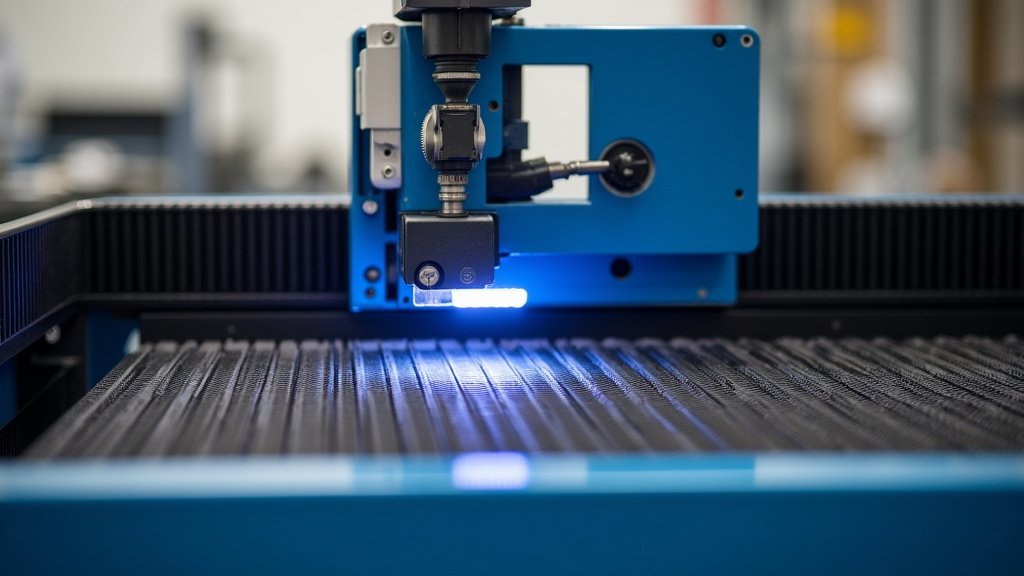
A laser bed is the flat surface where your materials sit during laser cutting or engraving. It’s essential because it supports your work and helps achieve clean, precise results. Without a properly functioning laser bed, your projects could be ruined by uneven cuts or scorch marks.
Think of the laser bed as the foundation for your creations. It’s designed to be level and stable, ensuring the laser beam hits your material at a consistent distance. Different types of laser beds exist, each suited for various materials and laser machine models, impacting the quality and accuracy of your finished pieces.
- A laser bed is the flat surface for laser cutting/engraving.
- It provides support and ensures precision.
- A level and stable bed is key for good results.
- Different beds suit different materials and machines.
Let’s dive into what makes a laser bed so important and what you need to know to get the best performance from yours.
Understanding Your Laser Bed: The Foundation of Great Cuts
Your laser bed might seem like a simple flat surface, but it’s actually one of the most critical components of your laser cutting or engraving setup. It’s where the magic happens, where your design transforms into reality. Getting this part right ensures precision and prevents frustrating mistakes.
What Exactly Is a Laser Bed?
Think of it as the stage for your laser’s performance. The laser bed is the support structure directly beneath your material. Its primary job is to hold your workpiece perfectly flat and stable while the laser beam does its work. This ensures the laser can focus correctly, leading to clean, consistent results every time.
The Role of Stability and Levelness
Why does this flat surface matter so much? Well, lasers are incredibly precise instruments. If your material isn’t perfectly level, the laser beam will hit it at different distances across the surface. This can lead to uneven cuts, scorch marks in the wrong places, or engraving that’s too deep in one spot and too light in another. A truly level and stable bed is your first step toward professional-looking projects.
Materials the Bed Encounters
You’ll place all sorts of materials on your laser bed. From delicate paper and cardstock to robust wood, acrylic, and even some metals. The bed needs to support these varied thicknesses and weights without sagging or shifting. It also needs to withstand the heat and particulate byproducts of the laser process.
Why the Laser Bed Is So Important for Quality
Many people focus on the laser itself or the material they’re using, but the bed plays an equally important role in the final outcome of your project. It’s the unsung hero that ensures your laser can perform at its best.
Achieving Consistent Focus
Lasers work by concentrating light energy onto a very small point. For this to be effective, the distance between the laser lens and the material must be consistent. A good laser bed guarantees this consistent distance, allowing the laser to maintain its precise focal point across the entire surface of your material. If the bed is uneven, your focus will be off, leading to poor cut quality. A good laser bed guarantees this consistent distance, allowing the laser to maintain its precise focal point across the entire surface of your material.
Preventing Material Damage
When you’re laser cutting, especially materials like wood or acrylic, you’ll generate smoke and debris. A well-designed laser bed often includes features to help manage this. For instance, some beds have slats or honeycomb structures that allow debris and smoke to fall away from the underside of your material. This prevents flashback (where burning material ignites from beneath) and reduces the likelihood of scorch marks on the bottom edge of your cuts. We found that materials processed on a clean, well-ventilated bed tend to have significantly fewer defects.
Supporting Delicate Work
For very thin or delicate materials, like paper or fabric, a rough or uneven bed can cause tears or distortions even before the laser starts. A smooth, flat surface ensures that these lighter materials are supported gently but firmly, allowing for clean, precise cuts without unwanted damage. Some specialized beds even use vacuum hold-down systems to keep these materials perfectly in place.
Types of Laser Beds and What They’re Good For
Not all laser beds are created equal. The type you have (or choose for a new machine) can significantly impact your workflow and the results you achieve. Understanding these differences helps you pick the best setup for your needs. Understanding these differences helps you pick the best setup for your needs, as not all laser beds are created equal.
Blade Beds (or Slat Beds)
These are probably the most common type you’ll see. They consist of a series of parallel metal blades or slats.
- Pros: Excellent for supporting heavier materials like wood, acrylic, and MDF. They allow smoke and debris to fall through, minimizing flashback and bottom scorching. They are generally durable and easy to clean.
- Cons: For very thin or flexible materials, like paper or fabric, these blades can leave unwanted impressions or indentations on the underside of your work. Small parts can also fall through the gaps.
Honeycomb Beds
As the name suggests, these beds have a hexagonal grid structure, resembling a honeycomb.
- Pros: Provide excellent support for a wide range of materials, including softer ones like fabric and paper, without leaving deep indentations. The honeycomb structure offers good airflow and can help reduce blowback. They also provide a large, relatively smooth surface area.
- Cons: Can be more challenging to clean than slat beds, as debris can get trapped in the numerous cells. Very small or intricate parts might still fall through if the gaps are large enough.
Pin Beds
These beds feature an array of small pins that can often be raised or lowered to different heights.
- Pros: Extremely versatile. You can adjust the pin height to support materials of varying thickness or to create a perfectly level surface even if the material isn’t perfectly flat. This is great for irregularly shaped objects. Some pin beds also incorporate vacuum hold-down.
- Cons: Can be more expensive than slat or honeycomb beds. Setting up the pins for a specific job can be time-consuming. Small parts can still be a problem if they fall between the pins.
Vacuum Beds
These beds use suction to hold your material firmly in place.
- Pros: Ideal for very thin, flexible, or irregularly shaped materials that might otherwise shift or warp. They provide a perfectly flat surface and excellent hold, preventing movement during cutting or engraving.
- Cons: Require a vacuum pump, which adds to the cost and complexity. They can be noisy. The seal needs to be good for effective operation.
Maintaining Your Laser Bed for Optimal Performance
Just like any part of your machine, your laser bed needs regular care to keep performing at its best. Neglecting it can lead to poor results and even damage to your laser cutter.
Regular Cleaning Is Key
After each working session, take a moment to clean your laser bed. Remove any loose debris, dust, or small scraps of material. For slat or honeycomb beds, this might involve brushing or vacuuming. For pin beds, ensure no material fragments are lodged between the pins. A clean bed prevents unintended burning or marks on your next project.
Checking for Damage and Wear
Periodically inspect your laser bed for any signs of damage. Are any slats bent or broken? Are there deep gouges or burn marks? Is the surface still perfectly flat? If you notice significant damage, it might be time to replace parts or the entire bed. We found that even minor warping on a slat bed can negatively affect cut accuracy.
Ensuring Proper Alignment
While the bed itself doesn’t typically require alignment in the same way the laser mirrors do, you must ensure it’s correctly seated and level within the machine. If your bed is removable, make sure it’s placed back correctly after cleaning or maintenance. A slightly misaligned bed can lead to subtle but noticeable errors in your work.
Quick Laser Bed Maintenance Checklist:
- Wipe down the surface to remove dust and debris.
- Brush or vacuum loose material from slats or honeycomb.
- Check for any bent, broken, or excessively burnt components.
- Ensure the bed is seated securely and level within the machine.
- Inspect for any warping that could affect material flatness.
- Address any sticky residue or build-up promptly.
Taking these simple steps will help ensure your laser bed continues to be a reliable foundation for all your creative projects. It’s a small investment of time that pays off in high-quality results and a longer lifespan for your equipment.
Conclusion
You’ve learned that your laser bed is much more than just a flat surface; it’s the foundation for precision. Its stability and levelness directly impact cut quality and prevent frustrating material damage. By understanding the different types of beds and committing to regular maintenance, you ensure your laser cutter performs at its best. Now, take a moment to inspect your current laser bed. Is it clean, level, and free of damage? Addressing these simple checks will help you achieve professional results on every project.
Frequently Asked Questions
Can I use any material on any laser bed type?
Not necessarily. While some beds like honeycomb and adjustable pins are quite versatile, others are better suited for specific materials. For example, blade beds can leave impressions on very soft materials, and vacuum beds are best for thin, flexible sheets.
How often should I clean my laser bed?
It’s best to clean your laser bed after each working session. This simple habit prevents debris from interfering with your next project or causing unintended burning. A quick wipe-down or brushing goes a long way.
What should I do if my laser bed is damaged?
If you notice bent slats, deep gouges, or excessive burning on your laser bed, it’s time to consider repairs or replacement. Continuing to use a damaged bed can lead to uneven cuts and further issues with your laser machine.
Will a wobbly laser bed really affect my cuts?
Yes, absolutely. Lasers require a stable and level surface to maintain consistent focus. If your bed is wobbly or uneven, the laser beam will hit your material at varying distances, resulting in inconsistent cut depths and poor quality.
Are honeycomb beds really easier to clean than slat beds?
Generally, slat beds are easier to clean because debris can simply fall through. Honeycomb beds, with their many cells, can trap debris, making them a bit more challenging to get perfectly clean. However, some users find the improved airflow and support from honeycomb beds worth the extra cleaning effort.
