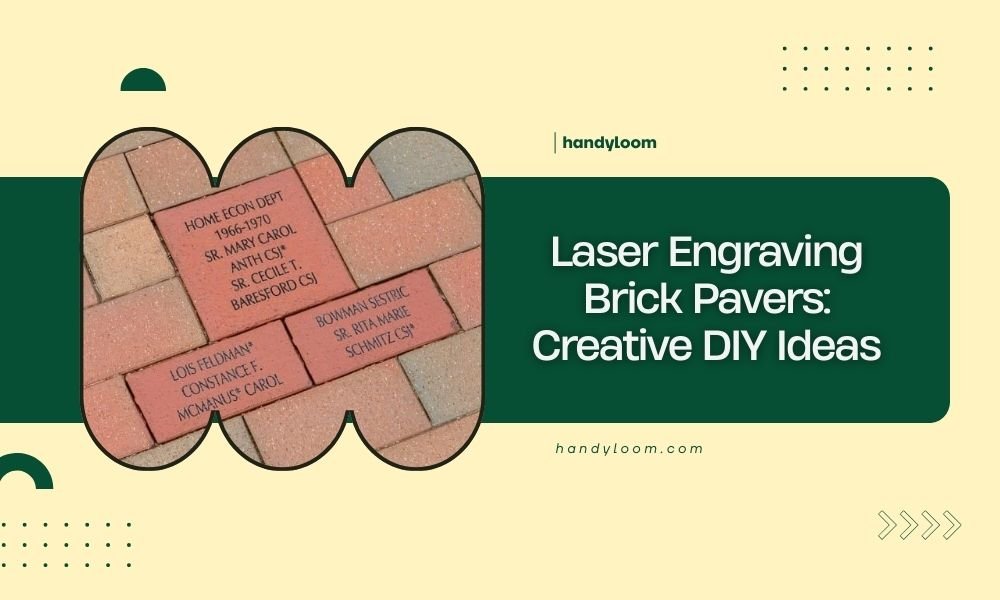
Laser engraving brick pavers transforms ordinary outdoor spaces into personalized works of art using precision laser technology to etch designs, text, or patterns directly onto brick surfaces.
You can create custom walkways, memorial stones, decorative accents, and functional markers by combining traditional brick pavers with modern laser engraving techniques.
What Makes Laser Engraving Perfect for Brick Pavers
Brick pavers offer an ideal surface for laser engraving projects. The material responds well to laser heat, creating clean, permanent marks that won’t fade over time.
Unlike painted or printed designs, laser-engraved patterns become part of the brick itself. Weather, foot traffic, and UV rays won’t damage your finished work.
Best Brick Types for Laser Engraving
Not all bricks work equally well with laser engraving. Clay-based pavers give the best results because they contain consistent minerals that react predictably to laser heat.
Avoid concrete pavers with heavy aggregate content. The mixed materials can cause uneven burning and poor image quality.
Recommended Brick Specifications
- Standard clay brick pavers (2.25″ x 4″ x 8″)
- Smooth or lightly textured surfaces
- Uniform color throughout
- Low moisture content
Essential Equipment and Setup
You’ll need specific laser equipment to achieve professional results on brick pavers. CO2 lasers work best for this application, providing enough power to create deep, visible engravings.
Laser Power Requirements
Research shows that 40-watt CO2 lasers provide sufficient power for most brick engraving projects. Higher wattage machines (60-100 watts) allow faster processing and deeper cuts.
Desktop laser engravers under 20 watts typically lack the power needed for quality brick work. You might get light surface marks, but they won’t be durable.
Safety Equipment Needed
- Safety glasses rated for your laser wavelength
- Dust mask or respirator
- Fire extinguisher nearby
- Proper ventilation system
Workspace Preparation
Set up your workspace in a well-ventilated area. Laser engraving brick creates dust and small particles that you don’t want to breathe.
Place your laser engraver on a stable, level surface. Vibration during the engraving process can ruin your design quality.
Creative Project Ideas for Every Skill Level
Starting with simple projects builds your confidence before tackling complex designs. Here are proven ideas that work well for beginners and experienced makers alike.
Beginner-Friendly Projects
House numbers make perfect first projects. They’re simple, practical, and give you instant satisfaction when completed.
Single-word engravings like “WELCOME” or family names also work well for beginners. The large text is forgiving if your settings aren’t perfect.
Simple Text Projects
- Address numbers for curb appeal
- Garden plant markers
- Pet memorial stones
- Date commemorations
Intermediate Design Ideas
Once you master basic text, try combining words with simple graphics. Borders, geometric patterns, and basic shapes add visual interest without overwhelming complexity.
Pattern and Border Designs
Repeating patterns work beautifully on brick pavers. Think Celtic knots, vine borders, or geometric tile patterns that complement your outdoor decor.
I found that symmetrical designs are more forgiving than complex illustrations when you’re still learning optimal power settings.
Advanced Creative Projects
Experienced users can create stunning photo engravings and detailed artwork. Portrait engravings of family members or beloved pets make meaningful memorial pieces.
Photo Engraving Techniques
Converting photos to laser-friendly formats requires image editing skills. High contrast black and white images work best on brick surfaces.
Avoid photos with fine details or subtle shading. The brick texture will interfere with delicate features, making them hard to recognize.
Technical Settings and Best Practices
Getting the right laser settings makes the difference between amateur and professional results. Each brick type may need slight adjustments, so test first.
Optimal Power and Speed Settings
Start with 70% power and 20% speed for standard clay bricks. These conservative settings prevent overburning while ensuring good depth.
Run test squares on scrap pieces before engraving your final project. Small adjustments in power can dramatically change the appearance.
| Brick Type | Power % | Speed % | Passes |
|---|---|---|---|
| Standard Clay | 70 | 20 | 1-2 |
| Hard Fired | 85 | 15 | 2-3 |
| Soft Clay | 60 | 25 | 1 |
Multi-Pass Techniques
Multiple light passes often produce better results than one heavy pass. This approach gives you more control over the final depth and appearance.
Between passes, brush away loose debris with a soft brush. Built-up dust can interfere with subsequent passes.
Design Software and File Preparation
Your design software choice affects the quality of your finished product. Most laser engravers work with common file formats like DXF, SVG, and bitmap images.
Vector vs. Raster Designs
Vector designs (lines and shapes) engrave as outlines or filled areas. Raster designs (photos and complex images) engrave as dot patterns.
For brick pavers, vector designs usually look cleaner and more professional. The brick texture can make detailed raster images appear muddy.
Image Resolution Guidelines
When working with raster images, use at least 300 DPI for good quality. Lower resolution images will look pixelated on the finished brick.
Keep in mind that very high resolution doesn’t always mean better results on textured surfaces like brick.
Installation and Finishing Tips
Your engraved pavers deserve proper installation to showcase your work. Standard paving techniques apply, with some special considerations for engraved surfaces.
Protecting Engraved Surfaces
Consider the orientation of your engraved design during installation. Text should be readable from the primary viewing angle.
If you’re creating a walkway with multiple engraved pavers, plan the layout before you start engraving. This prevents mistakes that are expensive to fix.
Weather Protection Options
Laser-engraved brick naturally resists weather, but you can apply clear sealers for extra protection. Test any sealer on a sample piece first to ensure it doesn’t change the appearance.
Troubleshooting Common Problems
Even experienced users encounter issues with brick engraving. Here are solutions to the most common problems you might face.
Uneven Burning Issues
If some areas burn deeper than others, check your brick surface for levelness. Slight height variations can cause focus problems.
Dirty or damaged laser lenses also cause uneven burning. Clean your optics regularly according to manufacturer instructions.
Poor Image Quality Solutions
Blurry or distorted images usually result from incorrect focus distance or excessive speed settings. Double-check your focus before starting each project.
Cost Considerations and Budgeting
Understanding the costs involved helps you plan projects within your budget. Factor in both equipment and material expenses.
Equipment Investment
Entry-level CO2 lasers suitable for brick work start around $3,000 for new machines. Used equipment can reduce initial costs but may require more maintenance.
Consider the long-term value when choosing equipment. A reliable machine will serve you for years of creative projects.
Per-Project Material Costs
Standard brick pavers cost $0.50 to $2.00 each, depending on size and quality. Specialty bricks or unusual sizes cost more but may be worth it for special projects.
Conclusion
Laser engraving brick pavers opens up endless possibilities for personalizing your outdoor spaces. Whether you’re marking house numbers, creating memorial stones, or designing decorative walkways, this technique combines durability with artistic expression.
Start with simple projects to learn your equipment and develop your skills. As you gain experience, you’ll discover new ways to transform ordinary brick pavers into extraordinary focal points for your home and garden.
The investment in equipment and materials pays off through years of creative satisfaction and the ability to create meaningful, permanent art that enhances your property value.
What type of laser works best for engraving brick pavers?
CO2 lasers with at least 40 watts of power work best for brick paver engraving. They provide sufficient heat to create permanent, deep engravings without cracking the material. Diode lasers typically lack the power needed for quality results on dense clay surfaces.
How long do laser-engraved designs last on outdoor brick pavers?
Properly laser-engraved brick pavers maintain their appearance for decades when installed correctly. The laser actually changes the brick’s surface structure, making the design permanent and resistant to weather, foot traffic, and UV fade.
Can you laser engrave any type of brick paver?
Standard clay brick pavers work best for laser engraving, while concrete pavers with heavy aggregate content produce poor results. Avoid glazed or sealed bricks, as surface treatments can interfere with laser penetration and create toxic fumes.
What safety precautions should you take when laser engraving bricks?
Always wear appropriate laser safety glasses, use proper ventilation to remove dust and particles, and keep a fire extinguisher nearby. Work in a well-ventilated area since brick engraving produces fine dust that shouldn’t be inhaled.
How much does it cost to start laser engraving brick pavers as a hobby?
Initial setup costs range from $3,000 to $6,000 for a suitable CO2 laser engraver, plus safety equipment and workspace setup. Individual brick pavers cost $0.50 to $2.00 each, making this an affordable ongoing hobby once you have the basic equipment.