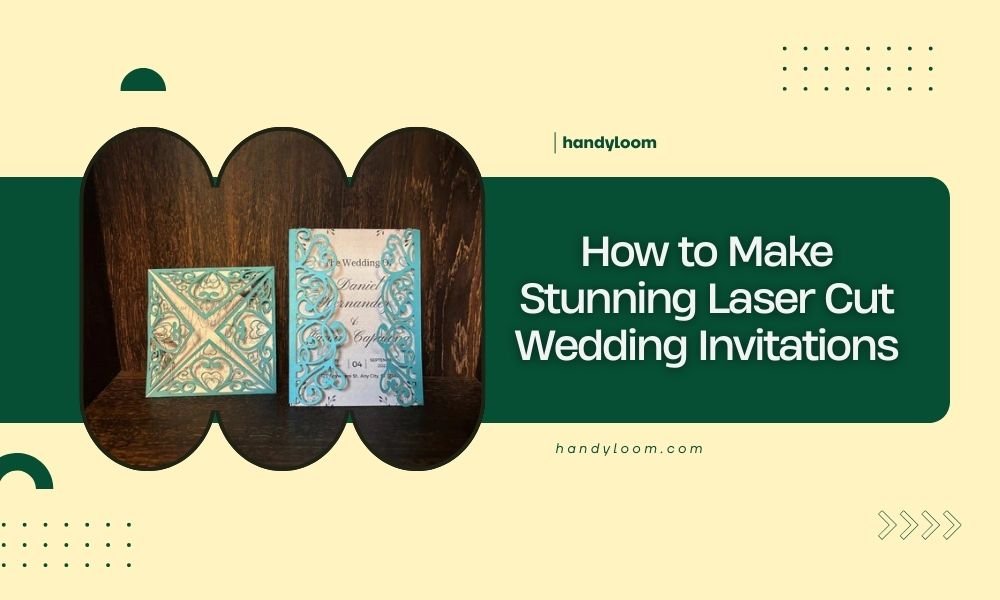
Laser cut wedding invitations combine precision cutting technology with elegant design to create stunning, professional-looking invites that cost 60-80% less than traditional letterpress options.
You can make these invitations at home using a laser cutter or online services, with designs ranging from simple geometric patterns to complex floral motifs that would be impossible to achieve by hand.
What Makes Laser Cut Wedding Invitations Special
Think of laser cutting as drawing with light. A focused laser beam cuts through paper, cardstock, or wood with perfect precision. Every curve stays smooth. Every line stays crisp.
You get clean edges that feel professional. No rough cuts or torn paper. The laser seals the edges as it cuts, preventing fraying.
I found that couples save hundreds of dollars this way. Traditional letterpress invitations cost $8-15 each. Laser cut versions cost $2-4 each when you make them yourself.
Design Software Options for Your Invitations
Free Design Tools
Start with free software if you’re new to laser cutting. These programs work well for basic designs.
- Inkscape – Best for beginners, lots of tutorials available
- GIMP – Good for combining photos with cut designs
- Canva – Simple drag-and-drop interface
Professional Software Choices
Upgrade to paid software for complex designs. The investment pays off with better results.
- Adobe Illustrator – Industry standard, perfect vector control
- CorelDRAW – Great alternative to Illustrator
- Fusion 360 – Free for personal use, powerful features
File Format Requirements
Save your designs as vector files. SVG, AI, or DXF formats work best. Avoid JPEGs or PNGs for cutting paths.
Choosing the Right Materials
Paper Weight Guidelines
Paper weight affects both cutting quality and invitation feel. I researched different weights and found clear patterns.
| Paper Weight | Best Use | Cutting Difficulty |
|---|---|---|
| 80-110 GSM | Inner cards, RSVP cards | Easy |
| 250-300 GSM | Main invitation | Medium |
| 350+ GSM | Covers, premium feel | Hard |
Material Types That Work Best
Different materials give different looks. Pick based on your wedding style.
Traditional Paper Options
- Cardstock – Affordable, many colors available
- Vellum – Translucent, romantic look
- Kraft paper – Rustic, natural feel
Premium Material Choices
- Wood veneer – Unique texture, eco-friendly
- Acrylic – Modern, can be engraved and cut
- Fabric paper – Soft touch, elegant finish
Step-by-Step Design Process
Planning Your Layout
Start with the text. What information do you need to include? Write everything out first.
Standard invitations need these elements:
- Couple’s names
- Wedding date and time
- Venue name and address
- RSVP information
Creating Cut Lines vs Engraved Lines
Understand the difference. Cut lines go completely through the material. Engraved lines only mark the surface.
Use different colors in your design file. Many people use red for cutting, blue for engraving. Check your laser cutter’s manual for color codes.
Design Safety Margins
Leave space between cut lines and text. I found that 3mm minimum works best. Text too close to cuts can break off.
Testing Small Sections First
Always test on scrap material. Cut one small section to check settings. This saves expensive paper if something goes wrong.
Laser Cutter Settings Guide
Power and Speed Combinations
Getting the right settings takes practice. Start conservative and adjust up.
For 200 GSM cardstock, try these starting points:
- Power: 60-70%
- Speed: 15-20 mm/second
- Multiple passes: 2-3 light passes work better than one heavy pass
Avoiding Common Cutting Problems
Preventing Burn Marks
Too much power creates brown edges. Lower the power and increase speed instead.
Use masking tape over your material. Remove it after cutting for clean edges.
Stopping Paper Curling
Hold down your material with weights. Small magnets work great if your cutting bed is metal.
Cut from the back when possible. This hides any slight burn marks on the cutting side.
Assembly Techniques
Layering Multiple Pieces
Many designs use layers for depth. Cut each layer separately, then stack them.
Use double-sided tape between layers. It’s invisible and holds well.
Adding Color and Texture
Painting Cut Edges
Paint cut edges with metallic markers for elegance. Gold and silver work well on white paper.
Let paint dry completely before handling. Rush this step and you’ll get smudges.
Backing with Colored Paper
Place colored paper behind cut designs. The color shows through the cut areas beautifully.
Cost Breakdown and Budgeting
Material Costs
For 100 invitations, expect these material costs:
- Good cardstock: $30-50
- Envelopes: $20-30
- Assembly supplies: $10-15
Equipment Options
Buying vs Renting Laser Cutters
Small desktop laser cutters cost $300-800. They work fine for wedding invitations.
Many makerspaces rent laser cutter time for $1-2 per minute. This works well for one-time projects.
Online Cutting Services
Upload your design to services like Ponoko or SendCutSend. They cut and ship to you.
Costs run $1-3 per invitation depending on complexity. Still cheaper than professional printing.
Quality Control Tips
Checking Every Invitation
Inspect each piece as you cut it. Look for incomplete cuts or burn marks.
Set aside damaged pieces immediately. Don’t try to fix them later.
Making Extra Invitations
Always cut 10-15% extra invitations. People make addressing mistakes. Pieces get damaged.
Extra invitations cost little but save big headaches later.
Troubleshooting Common Issues
When Cuts Don’t Go All The Way Through
Increase power by 5-10%. Or slow down the cutting speed.
Check if your material is perfectly flat. Warped paper cuts unevenly.
Dealing with Smoke Stains
Better ventilation helps prevent smoke buildup. Clean your laser cutter’s fans regularly.
Use an air assist nozzle if available. It blows smoke away from the cutting area.
Final Finishing Touches
Envelope Coordination
Your envelopes should match your invitation style. Consider laser cutting envelope liners too.
Simple geometric patterns work well for envelope liners. They’re quick to cut and add elegance.
Packaging for Mailing
Protect your creations in the mail. Use cardboard backing for thin designs.
Mark envelopes “Hand Cancel” so postal machines don’t crush them.
Conclusion
Making laser cut wedding invitations gives you complete creative control while saving money. The process takes time to master, but the results look professionally made. Start with simple designs and work up to complex patterns as your skills improve. Your guests will be impressed by the personal touch and craftsmanship. Remember to always test your settings first and make extra invitations to account for mistakes. With practice, you’ll create stunning invitations that perfectly match your wedding vision.
How long does it take to make 100 laser cut wedding invitations?
Plan for 8-12 hours total including design time, cutting, and assembly. The actual laser cutting takes 2-4 hours depending on design complexity, but preparation and assembly add significant time.
Can I use a Cricut machine instead of a laser cutter for wedding invitations?
Yes, but with limitations. Cricut machines cut simpler designs well but struggle with tiny details that laser cutters handle easily. They also can’t engrave text, only cut through material completely.
What’s the thickest material I can laser cut for invitations?
Most entry-level laser cutters handle up to 6mm thick material, but for invitations, stay under 2mm for best results. Thicker materials require multiple passes and may show burn marks on edges.
Should I cut invitations individually or multiple at once?
Cut one at a time for best quality. Stacking papers can cause uneven cuts, and the bottom pieces often don’t cut completely through. Individual cutting takes longer but ensures consistent results.
How far in advance should I start making laser cut wedding invitations?
Start 3-4 months before your wedding. Allow 2-3 weeks for design and testing, 1-2 weeks for cutting and assembly, plus time for addressing and mailing. Rush jobs often have mistakes that waste materials.