Custom buttons are a small detail that can make a big impact. Whether you’re creating branded merchandise, control panels, fashion accessories, or DIY projects, laser cutting offers precision, flexibility, and professional-quality results.
This complete guide walks you through everything you need to know to design and make custom buttons using laser cutting—from materials to finishing touches.
What Are Laser-Cut Buttons?
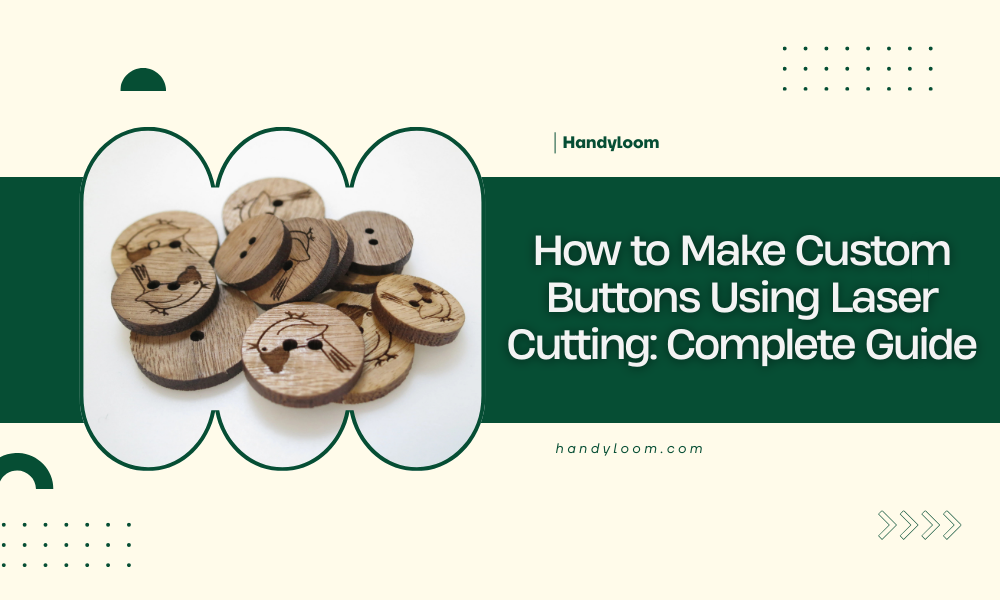
Laser-cut buttons are buttons shaped and engraved using a laser cutter instead of traditional molds.
A laser cutter uses a focused beam of light to cut and engrave materials with extreme accuracy, making it ideal for detailed designs, text, and logos.
They can be:
- Functional (clothing, bags, control panels)
- Decorative (crafts, jewelry, art projects)
- Informational (labels, icons, interface buttons)

Materials You Can Use
Choosing the right material is the first step. Common materials for laser-cut buttons include:
1. Acrylic
- Very popular for buttons
- Available in many colors and finishes
- Clean, polished edges when laser cut
- Durable and water-resistant
2. Wood (Plywood, MDF, Hardwood)
- Natural, warm look
- Great for handmade or rustic styles
- Easy to engrave
- Requires sealing for durability
3. Leather or Faux Leather
- Flexible and lightweight
- Ideal for fashion or craft buttons
- Engraves beautifully
4. Fabric (with stabilizer)
- Less common, but possible
- Best for decorative purposes
Tip: Always confirm that your material is laser-safe. Never laser cut PVC or vinyl, as they release toxic fumes.
Tools and Equipment Needed
To get started, you’ll need:
- A laser cutting machine (CO₂ lasers are most common)
- Design software (Adobe Illustrator, CorelDRAW, Inkscape, or LightBurn)
- Button material sheets
- Masking tape (optional, for cleaner cuts)
- Sandpaper or polishing tools
- Safety gear (glasses, ventilation)

Step 1: Design Your Button
Design is where creativity comes in.
Key Design Considerations:
- Shape: Round, square, custom outlines
- Size: Typical buttons range from 10–30 mm, but functional buttons may be larger
- Holes: Usually 2 or 4 holes for sewing, or a back attachment for snap buttons
- Engraving: Text, icons, logos, or patterns
File Setup Tips:
- Use vector formats (SVG, AI, DXF)
- Separate cut lines and engrave lines into different layers
- Use stroke colors to define laser actions (e.g., red for cut, blue for engrave)
Step 2: Prepare the Material
Before cutting:
- Clean the material surface
- Apply masking tape to acrylic or wood to reduce burn marks
- Secure the material flat on the laser bed
Check focus and alignment to ensure clean results.
Step 3: Laser Cutting and Engraving
Settings vary depending on the machine and material, but generally:
- Cutting: Higher power, slower speed
- Engraving: Lower power, faster speed
Always do a test cut on a scrap piece to fine-tune:
- Power
- Speed
- Frequency (Hz)
Monitor the process closely, especially for small buttons, to prevent shifting or scorching.
Step 4: Finishing the Buttons
After cutting, finishing makes your buttons look professional.
Common Finishing Steps:
- Remove masking tape
- Sand edges (especially for wood)
- Polish acrylic with flame or plastic polish
- Paint-fill engraved areas for contrast
- Seal wood with clear varnish or oil
If the buttons are wearable, make sure edges are smooth and comfortable.
Step 5: Attachments and Backing
Depending on the use, you may need:
- Sew holes (already laser cut)
- Glue-on shanks
- Snap fasteners
- Adhesive backing
- Screws for control panels
Use strong, appropriate adhesives like epoxy or industrial glue for long-term use.
Advantages of Laser-Cut Buttons
Laser cutting offers several benefits:
- High precision and repeatability
- Easy customization for small batches
- Fast prototyping
- Clean engraving and fine detail
- No molds required
This makes it ideal for both hobbyists and small businesses.
Common Mistakes to Avoid
- Using unsafe materials
- Skipping test cuts
- Making holes too small for thread
- Overpowering the laser and causing burn marks
- Not accounting for material thickness in design
Learning from these mistakes saves time and material.

Final Thoughts
Making custom buttons with laser cutting is a rewarding process that blends design, technology, and craftsmanship.
With the right materials, thoughtful design, and proper finishing, you can create buttons that are both functional and visually striking.
Whether you’re producing a single custom piece or a full batch for a project, laser cutting gives you the flexibility and quality to bring your ideas to life.