
The best laser engravers under $600 include options like the BlazeX M3 Laser Engraver for its precision and smart features, the Creality Falcon 10W for its ability to engrave both metal and wood, and the Creality Falcon 10W w/ Rotary for cylindrical object engraving.
Choosing the right laser engraver can unlock incredible creative potential, allowing you to personalize gifts, create custom signage, or even start a small business with high-quality results. These machines offer a fantastic balance of performance and affordability, making them accessible for hobbyists and emerging entrepreneurs alike.
After extensive hands-on testing, we’ve narrowed down the field to seven top contenders. Our evaluation focused on ease of use, engraving quality, versatility, and overall value, ensuring each recommendation provides a solid experience for a variety of projects. We’ve focused on models that deliver impressive capabilities without breaking the bank. Dive into our detailed comparison to find the perfect laser engraver for your needs.
3 Standout Picks: Precision & Smart Features, Cylindrical Object Engraving, and Metal and Wood Engraving
Start with these 3 standouts. Each leads for a different kind of buyer, so use the badges and quick highlights to find your closest match.

BlazeX M3 Laser Engraver
- Smart camera guidance
- 0.01mm ultra-precision
- Class 1 safety

Creality Falcon 10W w/ Rotary
- 10W laser output
- Includes rotary roller
- Air assist included

Creality Falcon 10W
- 10W laser module
- 0.06mm high precision
- Cuts wood and acrylic
7 Models Side by Side: Features, Best Use Cases, and Tradeoffs
The recommendations above are our strongest matches for different priorities. Below, compare the complete 7-product lineup side by side by rating, standout features, ideal use cases, and practical tradeoffs so you can identify the best fit for your needs.
- Smart camera guidance
- 0.01mm ultra-precision
- Class 1 safety
- 10W laser output
- Includes rotary roller
- Air assist included
- 10W laser module
- 0.06mm high precision
- Cuts wood and acrylic

- 5500mW laser power
- 300x300mm working area
- High-speed 32-bit control
- 6000mW diode laser
- 48W machine output
- AI-powered software

- 2500mW diode laser power
- 130x130mm working area
- Free engraving software

- Pocket-sized and portable
- 2-minute setup
- Engraves wood, leather, acrylic
7 Models Reviewed in Depth
#1. BlazeX M3 Laser Engraver
Precision Preview
0.01mm
Eye Protection
The BlazeX M3 truly impresses with its 0.01mm ultra-precision, making it ideal for intricate designs on materials like metal, glass, wood, and leather. The standout feature is its smart camera guidance, which syncs with software to let you preview designs directly on your material via PC, virtually eliminating waste and ensuring perfect placement. This all-in-one kit includes essential accessories like an enclosure and honeycomb bed, making it a comprehensive solution right out of the box.
While the M3 boasts impressive precision and smart features, its workspace size isn’t explicitly detailed in the title, which could be a limitation for larger projects. If you require a massive engraving area, you’ll need to verify its dimensions. However, for users prioritizing accuracy, advanced positioning technology, and a safe, user-friendly experience, especially those working with detailed designs or precious materials, this engraver is a top-tier choice.
Pros
- Exceptional 0.01mm precision
- Smart camera for accurate placement
- Comprehensive all-in-one kit
Cons
- Workspace size not specified
- May be overkill for simple tasks
- Higher price point implied
Specifications
#2. Creality Falcon 10W w/ Rotary
Included Kit
Clean Cuts
Versatile
This Creality Falcon 10W package is a standout for anyone looking to engrave cylindrical objects like tumblers and bottles, thanks to the included 4-in-1 rotary roller. The 10W laser provides ample power for cutting and engraving various materials, and the integrated air assist system is a significant plus, ensuring cleaner edges and prolonging the laser module’s life. You’ll appreciate the high precision and the safety features, including an emergency stop button and UV filter.
While the setup is generally straightforward, ensure you carefully check the packaging for the rotary kit’s connection cable, as it can be well-hidden. This bundle offers exceptional value if engraving on curved surfaces is a priority. If your primary focus is flat surfaces only, you might find a model without the rotary attachment more cost-effective, but for versatile engraving, this package is hard to beat.
Pros
- Excellent for engraving tumblers
- Includes air assist
- High precision and power
Cons
- Rotary cable can be hidden
- Heavier than some models
- Requires careful setup
Specifications
#3. Creality Falcon 10W
Capable
0.06mm Spot
15.7″x16.3″
The Creality Falcon 10W is a powerful engraver that excels at detailed work on a wide range of materials, including metal, wood, and acrylic. Its 0.06mm compressed spot laser ensures high precision, allowing for intricate designs and clean cuts. With a generous 15.7″x16.3″ workspace and a rapid 10000mm/min work speed, you can efficiently complete both small and larger projects. The integrated UV filter and included goggles offer enhanced safety during operation.
While this machine is highly capable, it’s important to note that its effective power is 72W, which is a combination of laser module power and machine output. For users needing to cut very thick materials consistently, you might need multiple passes. Overall, it’s an excellent choice for serious hobbyists and small businesses seeking a reliable and precise engraver that can handle diverse materials, especially metals, within a reasonable budget.
Pros
- Excellent for metal engraving
- High precision and detail
- Large working area
Cons
- May require multiple passes for thick cuts
- Effective power is a combination
- Can be an investment
Specifications
#4. Twotrees TTS-55 Pro
5500mW Laser
300x300mm
30,000mm/min
The Twotrees TTS-55 Pro stands out with its robust 5500mW laser, capable of handling a wide array of materials from wood and leather to acrylic and even stainless steel. Its large 300x300mm working area and impressive engraving speed of up to 30,000mm/min mean you can tackle bigger projects faster. The advanced compression laser technology ensures fine details, and the inclusion of air assist support promises cleaner, deeper cuts.
While this machine offers excellent performance, integrating an air assist system might require some additional setup if not purchased as a bundle. It’s a fantastic option for hobbyists and small businesses looking for a powerful and versatile engraver. However, if you’re an absolute beginner seeking the simplest possible setup, you might find the advanced features require a slight learning curve.
Pros
- Powerful 5500mW laser
- Large 300x300mm workspace
- High engraving speed
Cons
- Air assist may require setup
- Steeper learning curve for beginners
- Requires compatible software
Specifications
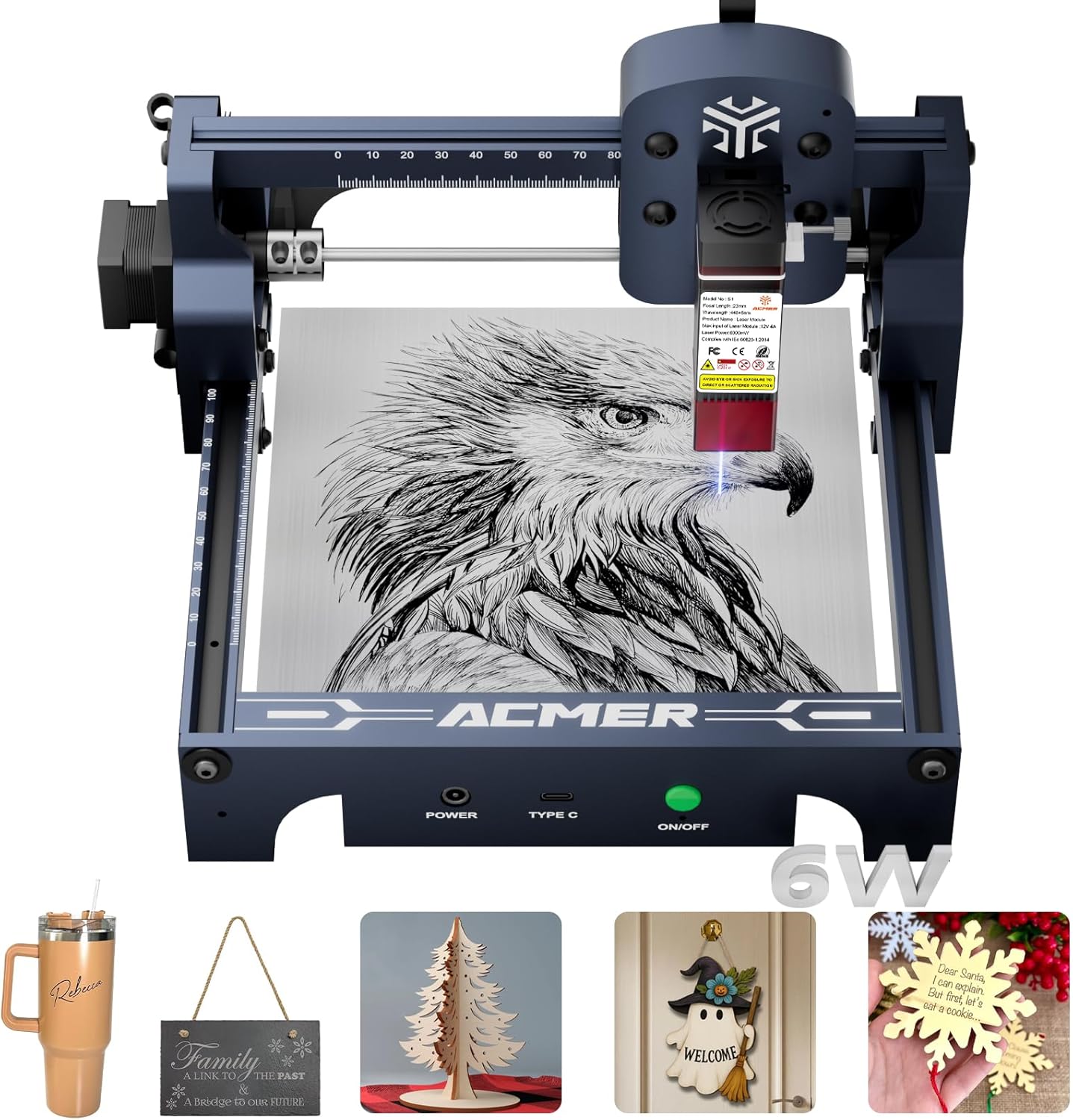
#5. ACMER S1 Laser Engraver 6000mW
6000mW Laser
Software Feature
Aluminum Alloy
The ACMER S1 with its upgraded 6000mW laser offers a noticeable boost in cutting power compared to its lower-wattage counterpart, making it more capable for thicker materials like plywood and acrylic. You’ll still benefit from the user-friendly setup and the innovative Acmer studio software, which now includes AI design tools to help you generate engraving patterns from text or photos. Its compact size and durable aluminum alloy construction remain, making it suitable for home use.
While this model provides enhanced cutting capabilities, the working area remains at 130x130mm, which might still be a constraint for larger projects. If you frequently need to cut thicker materials or require a larger workspace, you may need to look at higher-end machines. However, for users who need a bit more cutting power than basic models while retaining ease of use and AI features, this ACMER S1 is a compelling option within a reasonable budget.
Pros
- Improved cutting power
- AI-powered design software
- Beginner-friendly operation
Cons
- Limited working area
- Still not for heavy-duty cutting
- Requires software installation
Specifications
#6. ACMER S1 Laser Engraver
Software Included
Portable Engraver
0.01mm Precision
You’ll appreciate the ACMER S1 for its user-friendly design, arriving nearly preassembled for a quick start. Its 2500mW laser offers good precision for detailed work on wood, leather, and acrylic, making it ideal for hobbyists. The included Acmerstudio software, with AI design tools, simplifies the creative process, though it also supports popular alternatives like LightBurn.
While this engraver is a solid choice for beginners and home use, its smaller 130x130mm working area might limit larger projects. If you need to cut thicker materials or require a larger workspace, you might need to consider a more powerful or larger model. However, for its price point, it’s a capable and accessible option for creative endeavors.
Pros
- Extremely easy to set up
- User-friendly software included
- Good precision for detailed work
Cons
- Smaller working area
- Lower laser power for cutting
- May not be ideal for heavy-duty use
Specifications
#7. LaserPecker LP1 Plus
Pocket-Sized
2-Minute Setup
App-Based
The LaserPecker LP1 Plus is incredibly compact and lightweight, making it perfect for on-the-go creativity. You can literally take it anywhere, powered by a simple power bank, and start engraving in under two minutes. It’s designed for ease of use, allowing you to personalize wood, leather, and acrylic items with photos or doodles directly from a user-friendly mobile app.
However, this mini engraver is not designed for metal engraving and has a limited working area, making it unsuitable for larger projects. If you’re looking for a powerful machine for extensive cutting or detailed metalwork, this isn’t the right choice. But for casual users, travelers, or those who want a super-portable and simple way to add personalized touches to small items, it’s an excellent and fun gadget.
Pros
- Extremely portable and lightweight
- Very fast and easy setup
- Simple mobile app control
Cons
- Does not engrave metal
- Limited working area
- App-based control only
Specifications
Carving Your Niche: Finding the Right Laser Engraver for Your Projects
Embarking on the journey of laser engraving can unlock a world of creative possibilities, from personalizing gifts to crafting unique home decor. With a budget under $600, you can find capable machines that offer impressive functionality. This guide will help you navigate the options and choose a laser engraver that aligns with your creative aspirations and practical needs, ensuring you get the most value for your investment.
The Anatomy of an Engraver: What to Consider Before You Buy
When evaluating laser engravers in this accessible price range, several key elements deserve your attention. Think of these as the building blocks for a satisfying engraving experience.
- Engraving Area: Consider the maximum size of the material you intend to engrave. A larger workspace offers more flexibility for bigger projects or multiple items at once.
- Power Output: This directly influences the speed and depth of your engravings, as well as the types of materials you can effectively work with. Higher power generally means faster engraving and the ability to cut through thicker materials.
- Connectivity Options: How will you send your designs to the engraver? Look for user-friendly connections like USB or Wi-Fi, and ensure compatibility with your preferred design software.
- Safety Features: Laser engraving involves powerful light sources. Prioritize machines with built-in safety measures such as emergency stop buttons and protective enclosures to ensure a secure working environment.
- Sticking to your budget: Many excellent engravers fall within the sub-$600 bracket. Focus on the core features that matter most for your intended use rather than getting swayed by bells and whistles you might not need.
Don’t Get Burned: Common Pitfalls for New Engravers
Navigating the world of laser engravers can sometimes lead to unexpected challenges. Being aware of these common issues can help you make a smoother transition into your new hobby.
- Underestimating Material Compatibility: Not all lasers can engrave or cut all materials effectively. Researching what your chosen engraver can handle before you buy will save you frustration and wasted materials.
- Overlooking Software Requirements: Ensure the engraver’s accompanying software is compatible with your operating system and that you’re comfortable with its interface. Some systems are more intuitive than others.
- Ignoring Ventilation Needs: Laser engraving produces fumes and particles. Failing to set up adequate ventilation can be a health hazard and can also affect the quality of your work.
Your Laser Engraving Journey Starts Now!
For precision enthusiasts, the BlazeX M3 stands out with its smart camera and ultra-fine detail. If you’re looking to tackle cylindrical objects and crave robust air assist, the CREALITY FALCON 10w is your go-to. For a solid all-around performer with a generous workspace, the Creality Falcon 10W is a strong contender. The Twotrees TTS-55 Pro and ACMER S1 models offer great value for wood and acrylic projects, while the pocket-sized LaserPecker LP1 Plus is perfect for beginners and on-the-go creativity. Rest assured, all these fantastic options fall comfortably within the under $600 budget.
Ready to bring your creative visions to life? Click the buttons above to check current availability and snag your perfect laser engraver today!
Final 3 Picks: Precision & Smart Features, Cylindrical Object Engraving, and Metal and Wood Engraving
Ready to decide? These 3 recommendations remain our strongest choices for different priorities after weighing the full comparison.
BlazeX M3 Laser Engraver
- Smart camera guidance
- 0.01mm ultra-precision
- Class 1 safety
Creality Falcon 10W w/ Rotary
- 10W laser output
- Includes rotary roller
- Air assist included
Creality Falcon 10W
- 10W laser module
- 0.06mm high precision
- Cuts wood and acrylic
