

The best laser cutters for fabric are models like the OMTech Maker 60W CO2 for commercial and large projects, the xTool M2 10W Color Engraver for full-color crafting, and the xTool M2 20W Engraver for powerful cutting capabilities, offering precision and versatility for various textile applications.
Choosing the right laser cutter is crucial for achieving clean cuts, intricate designs, and efficient production on a wide range of fabrics, from delicate silks to robust denim. These machines provide the speed and accuracy needed for both hobbyists and professional garment makers. You can also explore how to create intricate laser cut fabric appliques for personalized designs.
We’ve narrowed down the field to seven top picks after hands-on comparison, evaluating each based on factors like material compatibility, ease of use, and overall performance. Our selections aim to cover diverse needs and budgets, ensuring you find the ideal tool for your fabric cutting projects. Let’s dive into the detailed comparisons.
3 Standout Picks: Commercial & Large Projects, Full-Color Crafting, and Powerful Cutting
Start with these 3 standouts. Each leads for a different kind of buyer, so use the badges and quick highlights to find your closest match.

OMTech Maker 60W CO2
- 60W CO2 laser
- 20×28 inch work area
- Autofocus & water chiller

xTool M2 10W Color Engraver
- 10W diode laser
- CMYK inkjet printer
- Built-in dual cameras

xTool M2 20W Engraver
- 20W diode laser
- Built-in dual cameras
- Class 1 enclosed design
7 Models Side by Side: Features, Best Use Cases, and Tradeoffs
The recommendations above are our strongest matches for different priorities. Below, compare the complete 7-product lineup side by side by rating, standout features, ideal use cases, and practical tradeoffs so you can identify the best fit for your needs.
- 60W CO2 laser
- 20×28 inch work area
- Autofocus & water chiller
- 10W diode laser
- CMYK inkjet printer
- Built-in dual cameras
- 20W diode laser
- Built-in dual cameras
- Class 1 enclosed design

- 10W diode laser
- Dual cameras
- Class 1 enclosed design

- 10W laser engraver
- Smart camera positioning
- 600mm/s engraving speed

- 12W diode laser
- 300x300mm work area
- Multi-device connectivity
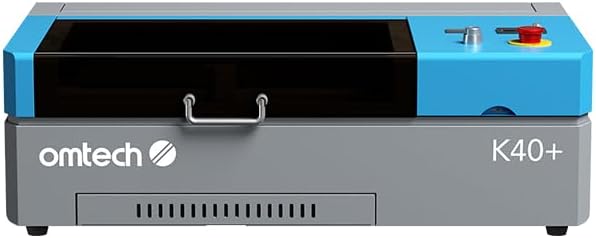
- 45W CO2 laser
- 12×8 inch work area
- Integrated air assist
7 Models Reviewed in Depth
#1. OMTech Maker 60W CO2
CO2 Power
Large Work Area
Precision Control
The OMTech Maker 60W CO2 Laser Engraver is a commercial-grade powerhouse, featuring a robust 60W CO2 laser and an expansive 20″x28″ work area for large-scale projects. You’ll appreciate the convenience of autofocus, which automatically sets the correct focal distance, and the included water chiller ensures consistent laser performance. Its four-way pass-through doors make accommodating oversized materials incredibly easy.
Given its substantial weight of 249 pounds, this machine is not designed for portability and requires a dedicated workspace. It’s an excellent investment for businesses and serious hobbyists who need high power and a large work envelope for continuous, demanding tasks, but ensure you have the space and setup for this industrial-grade equipment.
Pros
- Powerful 60W CO2 laser
- Large 20×28 inch work area
- Autofocus and water chiller
Cons
- Very heavy and not portable
- Requires significant space
- Higher initial investment
Specifications
#2. xTool M2 10W Color Engraver
CMYK Inkjet
Laser Power
Print-to-Cut
The xTool M2 10W Color Craft Laser Engraver stands out with its integrated CMYK Inkjet Printer, allowing you to achieve full-color printing directly onto materials like fabric, wood, and leather. Its dual-camera system ensures precise alignment and a seamless print-to-cut workflow, making complex projects much easier. You’ll appreciate the effortless software with customizable templates, perfect for quickly creating personalized gifts and home decor.
While offering exceptional versatility with both laser and inkjet capabilities, the machine’s weight at 43.3 pounds might make it less portable than some other options. This model is an excellent choice if you prioritize full-color printing alongside precise laser cutting and engraving, providing a comprehensive solution for advanced crafters and small businesses.
Pros
- Integrated full-color printing
- Precise dual-camera alignment
- Wide material compatibility
Cons
- Heavier than basic models
- IR laser sold separately
- Learning curve for new users
Specifications
#3. xTool M2 20W Engraver
Diode Laser
Cutting
Safe Design
The xTool M2 20W Laser Engraver provides enhanced cutting power for thicker materials, making it a strong contender for demanding projects on wood, acrylic, and fabric. Its built-in dual cameras offer precise workspace previews, ensuring accurate material placement and minimizing errors. The enclosed Class 1 design prioritizes safety, making it suitable for home use while delivering professional-grade results.
While the 20W laser is powerful, remember that the CMYK Inkjet module for full-color printing and the 3W IR laser for metal engraving are separate add-ons. This model is perfectly suited for users who need higher cutting capacity and precision for a wide range of materials, but you’ll need to budget for additional modules if you require extended functionality beyond laser cutting and engraving.
Pros
- High 20W cutting power
- Accurate dual-camera system
- Safe enclosed operation
Cons
- Inkjet module sold separately
- IR laser sold separately
- Can be bulky for small spaces
Specifications
#4. xTool M2 10W Engraver
Diode Laser
Enclosed Safety
Precision Alignment
The xTool M2 10W Laser Engraver offers ultimate versatility for crafters, allowing you to work with over 300 materials including fabric, wood, and leather. Its built-in dual cameras provide a real-time preview, ensuring precise placement and reducing material waste with its “Place & Go” experience. The beginner-friendly xTool Studio software, with its ready-to-use templates and AI image generator, makes creative projects accessible and efficient.
While highly capable for engraving and cutting, note that the CMYK Inkjet module for full-color printing is sold separately, which might be a consideration for some projects. This machine is ideal for home crafters and DIY makers looking for a safe and enclosed laser engraver to create personalized gifts and home decor, but you’ll need to purchase add-ons for extended functionality.
Pros
- Excellent for fabric, wood, leather
- Precise dual-camera positioning
- User-friendly software
Cons
- CMYK module sold separately
- Requires add-ons for full features
- Specific material limitations
Specifications
#5. CREALITY FALCON A1 10W
Auto Positioning
Engraving Speed
Enclosed Safety
The CREALITY FALCON A1 10W Laser Engraver offers an exceptionally user-friendly experience, ready to use straight out of the box with pre-set optimal parameters. Its smart camera positioning and graphic outline extraction features eliminate guesswork, allowing you to effortlessly place designs and convert patterns into engraving paths. With a rapid 600mm/s engraving speed, it significantly boosts efficiency for various projects.
While excellent for many materials, note that this 10W machine is strictly prohibited from engraving highly reflective materials and does not support cutting acrylic. It’s an ideal choice for beginners and those seeking automated precision for wood, fabric, and other compatible materials, but be aware of its specific material limitations before purchasing.
Pros
- Ready to use out of box
- Smart camera positioning
- Fast 600mm/s speed
Cons
- Cannot engrave reflective materials
- No acrylic cutting support
- Honeycomb panel not compatible
Specifications
#6. WIZMAKER Wand 12W Engraver
Diode Laser
Work Area
Engraving Speed
The WIZMAKER Wand 12W Laser Engraver is a versatile desktop tool ideal for serious DIY creators and small businesses, offering a generous 300x300mm work area. You’ll appreciate its high precision and fast engraving speeds of up to 10,000 mm/min, perfect for intricate designs on wood, leather, fabric, and more. Its flexible multi-device connectivity, supporting Windows, macOS, Android, and iOS, makes it easy to integrate into your existing setup.
As a Class 4 laser, it requires careful handling and external safety measures, despite its built-in tilt detection and flame monitoring. This engraver is an excellent choice if you need a compact yet powerful machine for a variety of projects, but be mindful of the open-frame design and ensure proper ventilation and eye protection during operation.
Pros
- Large 300x300mm work area
- High-speed engraving
- Flexible device connectivity
Cons
- Class 4 laser safety
- Open-frame design
- Limited material thickness cutting
Specifications
#7. OMTech K40+ 45W CO2
CO2 Laser
Air Assist
Compact Size
The OMTech K40+ 45W Desktop CO2 Laser Engraver & Cutter provides powerful 45W CO2 laser performance, capable of slicing through 10mm acrylic and 8mm wood with ease. You’ll benefit from its high-speed engraving up to 300 mm/s, making it suitable for complex designs and batch orders. The integrated air assist system helps keep your workspace clean and protects the lens, reducing carbonization and fire risk.
While offering strong cutting capabilities, its compact 12″x8″ work area might be limiting for larger projects, and as a Class 2 laser, proper safety precautions are essential. This machine is a solid choice for DIY makers and small businesses looking for an affordable entry into CO2 laser cutting, but be mindful of the smaller work envelope and ensure adequate ventilation.
Pros
- Strong 45W CO2 laser
- Good for thicker materials
- Integrated air assist
Cons
- Small 12×8 inch work area
- Heavy at 83.6 lbs
- Class 2 laser safety
Specifications

Unraveling the Best Laser Cutter for Your Fabric Creations
Investing in a laser cutter for fabric isn’t a decision to take lightly. This isn’t just another tool; it’s a gateway to precision, speed, and intricate designs that can transform your crafting, small business, or prototyping endeavors. Making an informed choice now will save you headaches and unlock creative possibilities later.
Decoding the Fabric-Cutting Powerhouse: Key Considerations
When you’re ready to bring a laser cutter into your workspace, these factors will guide you toward the perfect fit.
- Material Compatibility: Not all lasers are created equal for every fabric. Consider the types of textiles you’ll primarily be working with, from delicate silks to sturdy denim, and ensure the machine can handle them without scorching or fraying.
- Cutting Area Dimensions: Think about the size of your projects. A larger bed allows for bigger pieces of fabric and more efficient batch processing, while a compact machine might suit smaller, more intricate designs or limited spaces.
- Power Output: The laser’s wattage directly impacts its cutting speed and ability to handle thicker or denser materials. Higher power generally means faster cuts and more versatility across different fabric types.
- Software Integration: User-friendly software that seamlessly integrates with your design programs is crucial for a smooth workflow. Look for intuitive interfaces and broad file format support.
- Ventilation Requirements: Laser cutting produces fumes and particulate matter. Proper ventilation is non-negotiable for safety and maintaining air quality in your workspace.
Navigating the Weave: Traps to Avoid
Don’t let these common missteps snag your laser cutting journey.
- Underestimating ventilation needs: Failing to account for adequate fume extraction can lead to health hazards and an unpleasant working environment.
- Ignoring maintenance requirements: Laser cutters, like any precision equipment, need regular cleaning and upkeep. Neglecting this can impact performance and longevity.
- Overlooking the learning curve: While powerful, laser cutters require some time to master. Expect to dedicate effort to understanding the software and optimal settings for various fabrics.
Your Fabric-Cutting Future Starts Here!
For the serious crafter or small business, the OMTech Maker 60W is your power-packed partner. If versatility and color printing are key, the xTool M2 10W Color is an innovative marvel. For those seeking a robust, enclosed option with smart features, the CREALITY FALCON A1 10W is a fantastic choice. And for a reliable, entry-level CO2 machine, the OMTech K40+ 45W delivers solid performance.
No matter your fabric-cutting dreams, one of these machines is ready to help you achieve them. Don’t wait – hit those buttons above to check current availability and pricing!
Final 3 Picks: Commercial & Large Projects, Full-Color Crafting, and Powerful Cutting
Ready to decide? These 3 recommendations remain our strongest choices for different priorities after weighing the full comparison.
OMTech Maker 60W CO2
- 60W CO2 laser
- 20×28 inch work area
- Autofocus & water chiller
xTool M2 10W Color Engraver
- 10W diode laser
- CMYK inkjet printer
- Built-in dual cameras
xTool M2 20W Engraver
- 20W diode laser
- Built-in dual cameras
- Class 1 enclosed design
