
The best laser engravers for cutting boards are the Twotrees TTS-55 Pro Engraver for its versatile DIY project capabilities, the ACMER S1 Laser Engraver 3500mW for compact desktop crafts, and the ACMER S1 Laser Engraver 2500mW for entry-level detailed engraving. These devices offer the precision and power needed to transform ordinary cutting boards into personalized gifts or unique home decor. Choosing the right engraver ensures crisp designs and efficient project completion for both hobbyists and small business owners.
We’ve narrowed down the field to 7 top picks after extensive hands-on comparison and evaluation. Our assessment focused on crucial factors like engraving quality, ease of use, safety features, and material compatibility across various budget points. This guide will help you quickly find the ideal laser engraver to elevate your cutting board projects.
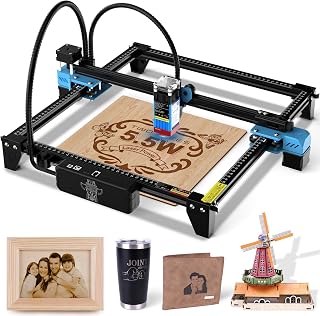
Twotrees TTS-55 Pro Engraver
- Large engraving area
- Fine laser spot
Show MoreShow Less
- Wide material compatibility
- 5500mW laser power
- 300x300mm work area

ACMER S1 Laser Engraver 3500mW
- Ultra-fine laser spot
- Compact desktop design
Show MoreShow Less
- Great for detailed crafts
- 3500mW laser power
- 0.04mm fine laser spot

ACMER S1 Laser Engraver 2500mW
- Compact and portable
- Good for detailed engraving
Show MoreShow Less
- Beginner-friendly
- 2500mW laser power
- 130x130mm work area

BlazeX M3 10W Laser Engraver
- Ultra-high precision
- Included safety enclosure
Show MoreShow Less
- Good material versatility
- 10W laser power
- 0.01mm ultra-precision

Ortur F20 Laser Engraver 10000mW
- High laser power
- Fast engraving speed
Show MoreShow Less
- Good accuracy
- 10000mW laser power
- 150x150mm work area

xTool S1 40W Laser Cutter
- Very high laser power
- Large work area
Show MoreShow Less
- Fast engraving speed
- 40W laser power
- 23.93″ x 15.16″ bed size

LONGER Ray5 20W Laser Engraver
- Powerful 20W laser
- Large work area
Show MoreShow Less
- Offline operation via touchscreen
- 20W laser power
- 400x356mm work area
Top 7 Best Laser Engraver For Cutting Boards
#1. Twotrees TTS-55 Pro Engraver
Work Area
Spot Precision
Engraving
The Twotrees TTS-55 Pro offers a robust 5500mW laser and a generous 300x300mm work area, making it highly capable for a variety of engraving and cutting tasks. You’ll appreciate the fine 0.08mm laser spot for detailed designs on wood, metal, and acrylic. This machine is well-suited for users looking to tackle diverse DIY projects with precision and power.
While it handles many materials, you might find the setup process requires some patience if you’re new to laser engravers. It’s a great choice for hobbyists and small business owners needing a versatile machine, but if your primary focus is on extremely delicate, high-speed production, you might consider models with even higher power or specialized features.
Pros
- Large engraving area
- Fine laser spot
- Wide material compatibility
Cons
- Setup can be involved
- Moderate laser power
- No enclosure mentioned
Specifications
#2. ACMER S1 Laser Engraver 3500mW
Detail Spot
Desktop Footprint
Precision
The ACMER S1 with its 3500mW laser is ideal for detailed craft projects, offering an exceptionally fine 0.04mm laser spot for intricate designs. Its compact desktop design makes it perfect for smaller workspaces, allowing you to create precise engravings on wood and acrylic without taking up much room. You’ll find it delivers excellent results for small-scale, detailed work.
While its precision is top-notch, the 130x130mm working area might feel limiting for larger cutting board designs. This engraver is a fantastic choice for hobbyists focused on small, highly detailed items, but if you frequently work on bigger pieces or require more cutting power, you might need to look at models with a larger bed and higher wattage.
Pros
- Ultra-fine laser spot
- Compact desktop design
- Great for detailed crafts
Cons
- Small work area
- Moderate cutting power
- Limited material range
Specifications
#3. ACMER S1 Laser Engraver 2500mW
Friendly
Convenience
Engravings
The ACMER S1 with its 2500mW laser is a solid entry-level option for small, detailed engraving projects on wood and acrylic. Its compact desktop design is a major plus for those with limited space, and you’ll find it generally easy to set up for your DIY crafts. It’s designed to deliver detailed results for personal projects and small-scale creations.
However, the 2500mW power means it’s primarily an engraver, and its cutting capabilities will be limited, especially on thicker materials. The 130x130mm work area is also quite small. This model is best for beginners and those focused on intricate engravings rather than heavy-duty cutting or large format projects.
Pros
- Compact and portable
- Good for detailed engraving
- Beginner-friendly
Cons
- Lower laser power
- Small work area
- Limited cutting ability
Specifications
#4. BlazeX M3 10W Laser Engraver
Engraving
Enclosure Included
Ready
The BlazeX M3 stands out with its 10W laser power and an incredible 0.01mm ultra-precision, allowing for exceptionally fine details on various materials. You’ll appreciate the included enclosure and honeycomb panel, which enhance safety and improve cutting results, making it very beginner-friendly. This Class 1 machine is designed for users who prioritize both precision and a safer operating environment.
While the enclosure is a great safety feature, it might limit the maximum size of items you can engrave compared to open-frame models. This engraver is an excellent choice for those new to laser engraving who want a powerful yet safe and precise machine, but if you need to engrave very large items, you might find the enclosed space restrictive.
Pros
- Ultra-high precision
- Included safety enclosure
- Good material versatility
Cons
- Enclosure limits size
- Learning curve for software
- Work area not specified
Specifications
#5. Ortur F20 Laser Engraver 10000mW
Power Output
Engraving Speed
Cutting
The Ortur F20 boasts a powerful 10000mW laser, making it highly capable for both engraving and cutting, especially on wood. You’ll benefit from its high accuracy and impressive 15000mm/min engraving speed, allowing you to complete projects quickly and precisely. This machine is designed for users who need significant power and speed for their creative endeavors on various materials.
As a Class 4 laser, you must exercise extreme caution and use appropriate eye protection during operation. While powerful, the 150x150mm work area is still relatively compact. This engraver is excellent for users seeking speed and power for smaller to medium-sized projects, but if you’re uncomfortable with Class 4 lasers or require a much larger work bed, you might consider other options.
Pros
- High laser power
- Fast engraving speed
- Good accuracy
Cons
- Class 4 laser safety
- Moderate work area
- Requires careful handling
Specifications
#6. xTool S1 40W Laser Cutter
Cutting Power
Project Bed
Bundle Included
The xTool S1 is a powerhouse with an impressive 40W laser, making it ideal for serious cutting and engraving tasks, including large projects and tumblers. You’ll benefit from its generous 23.93″ x 15.16″ bed size and blazing 600mm/s speed, significantly boosting your productivity. The included rotary bundle further expands its capabilities, allowing you to engrave cylindrical objects with ease.
Given its high power and advanced features, you should expect a higher investment compared to entry-level machines. This engraver is perfect for professionals or advanced hobbyists who need a robust, fast, and versatile machine for high-volume or large-format work, but it might be overkill if you only have occasional, small engraving needs.
Pros
- Very high laser power
- Large work area
- Fast engraving speed
Cons
- Higher cost investment
- Larger footprint
- Advanced features require learning
Specifications
#7. LONGER Ray5 20W Laser Engraver
Power Laser
Engraving Bed
Operation
The LONGER Ray5 offers a powerful 20W laser and a substantial 400x356mm work area, making it highly capable for larger cutting board projects and diverse materials. You’ll appreciate the convenience of its 3.5″ touch screen and offline use capability, allowing you to operate without a constant computer connection. This machine provides a great balance of power, speed, and user-friendly features for serious hobbyists and small businesses.
While its offline functionality is a huge plus, the initial software setup might require some learning. This engraver is an excellent choice if you need a powerful machine for larger projects and value the flexibility of offline operation, but if you prefer a fully integrated, cloud-based workflow, you might find its standalone nature less appealing.
Pros
- Powerful 20W laser
- Large work area
- Offline operation via touchscreen
Cons
- Initial software setup
- Larger footprint
- No enclosure mentioned
Specifications
Crafting Memories: Your Guide to the Perfect Cutting Board Laser Engraver
Choosing a laser engraver for cutting boards isn’t just about picking a tool; it’s about investing in a creative outlet that transforms ordinary wood into personalized keepsakes. With so many options available, a little foresight will ensure your projects are precise, beautiful, and a joy to create.
Unlocking Engraving Excellence: Key Considerations
When you’re ready to add that personal touch to cutting boards, focus on these critical aspects to find your ideal engraver:
- Power and Precision: The laser’s strength dictates how quickly and deeply it can engrave various wood types. Look for a balance that offers both efficiency and fine detail, allowing for intricate designs without scorching.
- Work Area Dimensions: Consider the size of the cutting boards you plan to engrave. A larger work area offers more versatility, accommodating bigger projects or multiple smaller ones simultaneously.
- Software Compatibility: User-friendly software is crucial. Ensure the engraver’s software integrates well with your computer and supports common design file formats, making your creative process smoother.
- Safety Features: Engraving involves powerful lasers. Prioritize models with robust safety enclosures, emergency stop buttons, and proper ventilation to protect yourself and your workspace.
- Material Versatility: While your primary focus is cutting boards, think about other materials you might want to engrave in the future. Some machines handle a wider range of materials better than others.
- Sticking to your budget: Many excellent engravers exist across various price points. Define your spending limit early and focus on models that deliver essential features without unnecessary extras.
Dodging Design Disasters: What Not to Overlook
Even experienced crafters can stumble. Keep these common missteps in mind to ensure your engraving journey is smooth:
- Ignoring Ventilation: Laser engraving produces smoke and fumes. Failing to set up proper ventilation can lead to unpleasant odors, health concerns, and residue buildup on your machine.
- Underestimating Learning Curve: While many engravers are user-friendly, mastering the software and understanding material settings takes time. Don’t expect perfect results on your first try; allow for practice.
- Neglecting Material Testing: Different woods react uniquely to laser power. Always perform small test engravings on scrap pieces of the same material to fine-tune settings before working on your final cutting board.
Your Cutting Board Engraving Champion Awaits!
For the ultimate beginner-friendly experience, the BlazeX M3 is your go-to, offering incredible precision and safety. If you’re tackling larger, more intricate designs, the xTool S1 with its expansive bed and rotary bundle is a game-changer. For those who prioritize a blend of power and portability, the LONGER Ray5 delivers fantastic results with offline capabilities.
No matter your skill level or project ambition, there’s a perfect cutting board engraver here to ignite your creative spark. Ready to get engraving? Check the links above for the latest availability and make your pick!
